> Feedback: If these docs are stale, missing, or confusing, post sanitized feedback to `https://tempo.xyz/developers/api/feedback` with `source: "mcp"`, a short `message`, and any relevant `toolName`, `relatedResource`, or `client`.
# Tempo Docs
Documentation for the Tempo network and protocol specifications
# Integrate Tempo
Use this section when you are connecting an existing app, wallet, contract, bridge, or infrastructure service to Tempo. These pages cover the practical edges of integration: chain configuration, RPC endpoints, faucet funding, wallet support, EVM compatibility, predeploys, contract verification, and ecosystem resources.
Tempo is EVM-compatible and targets the **Osaka** EVM hard fork. Most Ethereum tooling works as expected, with Tempo-specific differences documented where they matter.
## Connect and Fund
## App and Wallet Readiness
## Bridges and Ecosystem
# Getting Funds on Tempo
## Tempo Wallet
[Tempo Wallet](https://wallet.tempo.xyz) is Tempo's web-based passkey wallet. You can onramp with fiat or bridge from other chains using the flow below.
### With the CLI
Install the [Tempo CLI](/docs/cli/wallet) and log in to your wallet:
```bash
curl -fsSL https://tempo.xyz/install | bash
tempo wallet login
```
Then fund your wallet:
```bash
tempo wallet fund
```
### With an agent
Paste this into your agent to set up Tempo Wallet and add funds:
:::code-group
```bash [Claude Code]
claude -p "Read https://tempo.xyz/SKILL.md and fund my Tempo Wallet"
```
```bash [Amp]
amp --execute "Read https://tempo.xyz/SKILL.md and fund my Tempo Wallet"
```
```bash [Codex CLI]
codex exec "Read https://tempo.xyz/SKILL.md and fund my Tempo Wallet"
```
:::
## Bridge
Use one of these supported bridges to move assets to Tempo:
When you bridge USDC with LayerZero (Stargate), it appears on Tempo as USDC.e. Stargate does not charge its transfer fee on the direct route between Ethereum and Tempo, but other routes can vary, so check the quote before sending.
* **[LayerZero (Stargate)](/docs/guide/bridge-layerzero)**: Bridge USDC to and from Tempo via Stargate. See the [full bridging guide](/docs/guide/bridge-layerzero) for contract addresses, code examples, and EndpointDollar details.
* **[Squid](https://app.squidrouter.com/)**: Swap and bridge assets to Tempo in one flow.
* **[Relay](https://relay.link/)**: Bridge assets to Tempo with low fees.
* **[Across](https://app.across.to/)**: Bridge assets to Tempo quickly with competitive fees.
* **[Bungee](/docs/guide/bridge-bungee)**: Swap and bridge assets to and from Tempo using Bungee Deposit. See the [full Bungee guide](/docs/guide/bridge-bungee) for quote, transaction, and status examples.
## Testnet Funds
For development and testing, use the [Tempo Faucet](/docs/quickstart/faucet).
The faucet provides `pathUSD`, `alphaUSD`, `betaUSD`, and `thetaUSD` test stablecoins.
# Send a Payment
Send stablecoin payments between accounts on Tempo. Payments can include optional memos for reconciliation and tracking.
:::warning[Confirm delivery, not just transaction success]
On post-T6 networks, a blocked TIP-20 `transfer` / `transferFrom` still succeeds, but credits `ReceivePolicyGuard` at `0xB10C000000000000000000000000000000000000` instead of the intended receiver.
* Before marking a payment, withdrawal, or deposit delivered, confirm the `Transfer` recipient is the intended receiver or the master wallet for its virtual address.
* Index `ReceivePolicyGuard.TransferBlocked` so redirected funds can be surfaced and claimed later.
See [Configure Receive Policies](/docs/guide/payments/configure-receive-policies).
:::
## Send payment demo
By the end of this guide you will be able to send payments on Tempo with an optional memo.
## Send payment implementation steps
::::steps
### Set up Wagmi for Tempo payments
Ensure that you have set up your project with Wagmi, a Tempo chain config, and a wallet connector:
* [Connection details](/docs/quickstart/connection-details)
* [TypeScript SDK](/docs/sdk/typescript)
* [Wallet integration](/docs/quickstart/wallet-developers)
### Add testnet stablecoin funds¹
Before you can send a payment, you need to fund your account. In this guide you will be sending `AlphaUSD` (`0x20c000…0001`).
The built-in Tempo testnet faucet funds accounts with `AlphaUSD`.
:::code-group
```tsx twoslash [AddFunds.ts]
// @noErrors
import { Hooks } from 'wagmi/tempo'
import { useConnection } from 'wagmi'
function AddFunds() {
const { address } = useConnection()
const { mutate, isPending } = Hooks.faucet.useFundSync()
return (
)
}
```
```tsx twoslash [wagmi.config.ts] filename="wagmi.config.ts"
// @noErrors
// [!include ~/snippets/wagmi.config.ts:setup]
```
:::
:::warning
¹ It is important to note that the `addFunds` Hook only works on testnets as a convenience feature to get
started quickly. For production, you will need to onramp & fund your account manually.
:::
### Add TIP-20 transfer logic
Now that you have `AlphaUSD` you are ready to add logic to send a payment with an optional memo.
:::code-group
```tsx twoslash [SendPaymentWithMemo.tsx]
import { Hooks } from 'wagmi/tempo'
import { parseUnits, stringToHex, pad } from 'viem'
// @noErrors
function SendPaymentWithMemo() {
const sendPayment = Hooks.token.useTransferSync() // [!code hl]
return (
)
}
```
```tsx twoslash [wagmi.config.ts] filename="wagmi.config.ts"
// @noErrors
// [!include ~/snippets/wagmi.config.ts:setup]
```
:::
### Display the payment receipt
Now that you can send a payment, you can display the transaction receipt on success.
:::code-group
```tsx twoslash [SendPaymentWithMemo.tsx]
import { Hooks } from 'wagmi/tempo'
import { parseUnits, stringToHex, pad } from 'viem'
// @noErrors
function SendPaymentWithMemo() {
const sendPayment = Hooks.token.useTransferSync()
return (
<>
{/* ... your payment form ... */}
{sendPayment.data && ( // [!code ++]
{/* [!code ++] */}
View receipt {/* [!code ++] */}
{/* [!code ++] */}
)} {/* [!code ++] */}
>
)
}
```
```tsx twoslash [wagmi.config.ts] filename="wagmi.config.ts"
// @noErrors
// [!include ~/snippets/wagmi.config.ts:setup]
```
:::
### Next steps after sending a payment
Now that you have made a payment you can
* **[Accept a payment](/docs/guide/payments/accept-a-payment)** to receive payments in your application
* Learn about [Tempo Transactions](/docs/protocol/transactions) for batching, sponsorship, scheduling, and more
* Send a payment [with a specific fee token](/docs/guide/payments/pay-fees-in-any-stablecoin)
::::
## Stablecoin payment recipes
### Basic TIP-20 transfer
Send a payment using the standard `transfer` function:
:::code-group
```ts twoslash [example.ts]
// @noErrors
import { parseUnits } from 'viem'
import { client } from './viem.config'
const { receipt } = await client.token.transferSync({
amount: parseUnits('100', 6), // 100 tokens (6 decimals) // [!code hl]
to: '0x742d35Cc6634C0532925a3b844Bc9e7595f0bEbb', // [!code hl]
token: '0x20c0000000000000000000000000000000000001', // AlphaUSD // [!code hl]
})
```
```ts twoslash [viem.config.ts]
// [!include ~/snippets/viem.config.ts:setup]
```
:::
```tsx twoslash
// @noErrors
import { Hooks } from 'wagmi/tempo'
import { parseUnits } from 'viem'
function SendPayment() {
const { mutate, isPending } = Hooks.token.useTransferSync() // [!code hl]
return (
)
}
```
:::code-group
```rust [example.rs]
use alloy::{
primitives::{address, U256},
providers::ProviderBuilder,
};
use tempo_alloy::{TempoNetwork, contracts::precompiles::ITIP20};
mod provider;
#[tokio::main]
async fn main() -> Result<(), Box> {
let provider = provider::get_provider().await?;
let token = ITIP20::new( // [!code hl]
address!("0x20c0000000000000000000000000000000000001"), // AlphaUSD // [!code hl]
&provider, // [!code hl]
); // [!code hl]
let receipt = token // [!code hl]
.transfer( // [!code hl]
address!("0x742d35Cc6634C0532925a3b844Bc9e7595f0bEbb"), // [!code hl]
U256::from(100_000_000), // 100 tokens (6 decimals) // [!code hl]
) // [!code hl]
.send() // [!code hl]
.await? // [!code hl]
.get_receipt() // [!code hl]
.await?; // [!code hl]
println!("Transfer successful: {:?}", receipt.transaction_hash);
Ok(())
}
```
```rust [provider.rs]
// [!include ~/snippets/rust-signer-provider.rs:setup]
```
:::
:::code-group
```python [example.py]
from eth_abi import encode
from pytempo import Call, TempoTransaction
from provider import w3, account
TRANSFER_SELECTOR = bytes.fromhex("a9059cbb")
ALPHA_USD = "0x20c0000000000000000000000000000000000001"
data = TRANSFER_SELECTOR + encode( # [!code hl]
["address", "uint256"], # [!code hl]
["0x742d35Cc6634C0532925a3b844Bc9e7595f0bEbb", 100_000_000], # [!code hl]
) # [!code hl]
tx = TempoTransaction.create(
chain_id=w3.eth.chain_id,
gas_limit=100_000,
max_fee_per_gas=w3.eth.gas_price * 2,
max_priority_fee_per_gas=w3.eth.gas_price,
nonce=w3.eth.get_transaction_count(account.address),
calls=(
Call.create(to=ALPHA_USD, data="0x" + data.hex()), # [!code hl]
),
)
signed_tx = tx.sign(account.key.hex())
tx_hash = w3.eth.send_raw_transaction(signed_tx.encode())
```
```python [provider.py]
from web3 import Web3
from eth_account import Account
w3 = Web3(Web3.HTTPProvider("https://rpc.tempo.xyz"))
account = Account.from_key("0x...")
```
:::
:::code-group
```go [main.go]
package main
import (
"context"
"log"
"math/big"
"github.com/ethereum/go-ethereum/common"
"github.com/tempoxyz/tempo-go/pkg/signer"
"github.com/tempoxyz/tempo-go/pkg/transaction"
)
func buildTransferData(to common.Address, amount *big.Int) []byte {
data := make([]byte, 68) // 4 (selector) + 32 (address) + 32 (uint256)
data[0], data[1], data[2], data[3] = 0xa9, 0x05, 0x9c, 0xbb
copy(data[16:36], to.Bytes())
amount.FillBytes(data[36:68])
return data
}
func main() {
sgn, _ := signer.NewSigner("0x...")
c := newClient()
ctx := context.Background()
nonce, _ := c.GetTransactionCount(ctx, sgn.Address().Hex())
recipient := common.HexToAddress("0x742d35Cc6634C0532925a3b844Bc9e7595f0bEbb")
alphaUSD := common.HexToAddress("0x20c0000000000000000000000000000000000001")
tx := transaction.NewBuilder(big.NewInt(transaction.ChainIdMainnet)).
SetNonce(nonce).
SetGas(100_000).
SetMaxFeePerGas(big.NewInt(25_000_000_000)).
SetMaxPriorityFeePerGas(big.NewInt(1_000_000_000)).
AddCall( // [!code hl]
alphaUSD, // [!code hl]
big.NewInt(0), // [!code hl]
buildTransferData(recipient, big.NewInt(100_000_000)), // [!code hl]
). // [!code hl]
Build()
_ = transaction.SignTransaction(tx, sgn)
serialized, _ := transaction.Serialize(tx, nil)
txHash, _ := c.SendRawTransaction(ctx, serialized)
log.Printf("Transaction hash: %s", txHash)
}
```
```go [provider.go]
// [!include ~/snippets/go-provider.go:setup]
```
:::
```bash
$ cast erc20 transfer \
0x20c0000000000000000000000000000000000001 \
0x742d35Cc6634C0532925a3b844Bc9e7595f0bEbb \
100000000 \
--rpc-url $TEMPO_RPC_URL \
--private-key $PRIVATE_KEY # [!code hl]
```
```solidity
import {ITIP20} from "tempo-std/interfaces/ITIP20.sol";
contract PaymentSender {
ITIP20 public token;
function sendPayment(address recipient, uint256 amount) external {
token.transfer(recipient, amount); // [!code hl]
}
}
```
### Transfer with memo
Include a memo for payment reconciliation and tracking. The memo is a 32-byte value that can store payment references, invoice IDs, order numbers, or any other metadata.
:::code-group
```ts twoslash [example.ts]
// @noErrors
import { parseUnits, stringToHex, pad } from 'viem'
import { client } from './viem.config'
const invoiceId = pad(stringToHex('INV-12345'), { size: 32 }) // [!code hl]
const { receipt } = await client.token.transferSync({
amount: parseUnits('100', 6),
to: '0x742d35Cc6634C0532925a3b844Bc9e7595f0bEbb',
token: '0x20c0000000000000000000000000000000000001',
memo: invoiceId, // [!code hl]
})
```
```ts twoslash [viem.config.ts]
// [!include ~/snippets/viem.config.ts:setup]
```
:::
```tsx twoslash
// @noErrors
import { Hooks } from 'wagmi/tempo'
import { parseUnits, stringToHex, pad } from 'viem'
function SendPaymentWithMemo() {
const { mutate, isPending } = Hooks.token.useTransferSync()
return (
)
}
```
:::code-group
```rust [example.rs]
use alloy::{
primitives::{address, B256, U256},
providers::ProviderBuilder,
};
use tempo_alloy::{TempoNetwork, contracts::precompiles::ITIP20};
mod provider;
#[tokio::main]
async fn main() -> Result<(), Box> {
let provider = provider::get_provider().await?;
let token = ITIP20::new(
address!("0x20c0000000000000000000000000000000000001"),
&provider,
);
let receipt = token
.transferWithMemo( // [!code hl]
address!("0x742d35Cc6634C0532925a3b844Bc9e7595f0bEbb"),
U256::from(100_000_000),
B256::left_padding_from("INV-12345".as_bytes()), // [!code hl]
)
.send()
.await?
.get_receipt()
.await?;
println!("Transfer successful: {:?}", receipt.transaction_hash);
Ok(())
}
```
```rust [provider.rs]
// [!include ~/snippets/rust-signer-provider.rs:setup]
```
:::
:::code-group
```python [example.py]
from eth_abi import encode
from pytempo import Call, TempoTransaction
from provider import w3, account
TRANSFER_WITH_MEMO_SELECTOR = bytes.fromhex("76a8ee59")
ALPHA_USD = "0x20c0000000000000000000000000000000000001"
memo = b"INV-12345" + b"\x00" * 23 # right-pad to 32 bytes # [!code hl]
data = TRANSFER_WITH_MEMO_SELECTOR + encode( # [!code hl]
["address", "uint256", "bytes32"], # [!code hl]
["0x742d35Cc6634C0532925a3b844Bc9e7595f0bEbb", 100_000_000, memo], # [!code hl]
) # [!code hl]
tx = TempoTransaction.create(
chain_id=w3.eth.chain_id,
gas_limit=100_000,
max_fee_per_gas=w3.eth.gas_price * 2,
max_priority_fee_per_gas=w3.eth.gas_price,
nonce=w3.eth.get_transaction_count(account.address),
calls=(
Call.create(to=ALPHA_USD, data="0x" + data.hex()),
),
)
signed_tx = tx.sign(account.key.hex())
tx_hash = w3.eth.send_raw_transaction(signed_tx.encode())
```
```python [provider.py]
from web3 import Web3
from eth_account import Account
w3 = Web3(Web3.HTTPProvider("https://rpc.tempo.xyz"))
account = Account.from_key("0x...")
```
:::
:::code-group
```go [main.go]
package main
import (
"context"
"log"
"math/big"
"github.com/ethereum/go-ethereum/common"
"github.com/tempoxyz/tempo-go/pkg/signer"
"github.com/tempoxyz/tempo-go/pkg/transaction"
)
func buildTransferWithMemoData(to common.Address, amount *big.Int, memo [32]byte) []byte {
data := make([]byte, 100) // 4 + 32 + 32 + 32
data[0], data[1], data[2], data[3] = 0x76, 0xa8, 0xee, 0x59
copy(data[16:36], to.Bytes())
amount.FillBytes(data[36:68])
copy(data[68:100], memo[:])
return data
}
func main() {
sgn, _ := signer.NewSigner("0x...")
c := newClient()
ctx := context.Background()
nonce, _ := c.GetTransactionCount(ctx, sgn.Address().Hex())
recipient := common.HexToAddress("0x742d35Cc6634C0532925a3b844Bc9e7595f0bEbb")
alphaUSD := common.HexToAddress("0x20c0000000000000000000000000000000000001")
var memo [32]byte // [!code hl]
copy(memo[:], []byte("INV-12345")) // [!code hl]
tx := transaction.NewBuilder(big.NewInt(transaction.ChainIdMainnet)).
SetNonce(nonce).
SetGas(100_000).
SetMaxFeePerGas(big.NewInt(25_000_000_000)).
SetMaxPriorityFeePerGas(big.NewInt(1_000_000_000)).
AddCall( // [!code hl]
alphaUSD, // [!code hl]
big.NewInt(0), // [!code hl]
buildTransferWithMemoData(recipient, big.NewInt(100_000_000), memo), // [!code hl]
). // [!code hl]
Build()
_ = transaction.SignTransaction(tx, sgn)
serialized, _ := transaction.Serialize(tx, nil)
txHash, _ := c.SendRawTransaction(ctx, serialized)
log.Printf("Transaction hash: %s", txHash)
}
```
```go [provider.go]
// [!include ~/snippets/go-provider.go:setup]
```
:::
```bash
$ cast send \
0x20c0000000000000000000000000000000000001 \
"transferWithMemo(address,uint256,bytes32)" \
0x742d35Cc6634C0532925a3b844Bc9e7595f0bEbb \
100000000 \
$(cast --format-bytes32-string "INV-12345") \
--rpc-url $TEMPO_RPC_URL \
--private-key $PRIVATE_KEY # [!code hl]
```
```solidity
import {ITIP20} from "tempo-std/interfaces/ITIP20.sol";
contract PaymentSender {
ITIP20 public token;
function sendPaymentWithMemo(
address recipient,
uint256 amount,
bytes32 invoiceId
) external {
token.transferWithMemo(recipient, amount, invoiceId); // [!code hl]
}
}
```
### Batch payment transactions
Send multiple payments in a single transaction using batch transactions:
:::code-group
```ts twoslash [example.ts]
// @noErrors
import { encodeFunctionData, parseUnits } from 'viem'
import { Abis } from 'viem/tempo'
import { client } from './viem.config'
const tokenABI = Abis.tip20
const recipient1 = '0x742d35Cc6634C0532925a3b844Bc9e7595f0bEbb'
const recipient2 = '0x70997970C51812dc3A010C7d01b50e0d17dc79C8'
const calls = [ // [!code hl]
{ // [!code hl]
to: '0x20c0000000000000000000000000000000000001', // [!code hl]
data: encodeFunctionData({ // [!code hl]
abi: tokenABI, // [!code hl]
functionName: 'transfer', // [!code hl]
args: [recipient1, parseUnits('100', 6)], // [!code hl]
}), // [!code hl]
}, // [!code hl]
{ // [!code hl]
to: '0x20c0000000000000000000000000000000000001', // [!code hl]
data: encodeFunctionData({ // [!code hl]
abi: tokenABI, // [!code hl]
functionName: 'transfer', // [!code hl]
args: [recipient2, parseUnits('50', 6)], // [!code hl]
}), // [!code hl]
}, // [!code hl]
] // [!code hl]
const hash = await client.sendTransaction({ calls })
```
```ts twoslash [viem.config.ts]
// [!include ~/snippets/viem.config.ts:setup]
```
:::
```tsx twoslash
// @noErrors
import { useSendTransactionSync } from 'wagmi'
import { encodeFunctionData, parseUnits } from 'viem'
import { Abis } from 'viem/tempo'
function BatchPayment() {
const { sendTransactionSync, isPending } = useSendTransactionSync()
const tokenABI = Abis.tip20
const token = '0x20c0000000000000000000000000000000000001'
return (
)
}
```
:::code-group
```rust [example.rs]
use alloy::{
primitives::{address, Address, U256},
providers::{Provider, ProviderBuilder},
sol_types::SolCall,
};
use tempo_alloy::{
TempoNetwork, contracts::precompiles::ITIP20, primitives::transaction::Call,
rpc::TempoTransactionRequest,
};
mod provider;
#[tokio::main]
async fn main() -> Result<(), Box> {
let provider = provider::get_provider().await?;
let recipient1 = address!("0x742d35Cc6634C0532925a3b844Bc9e7595f0bEbb");
let recipient2 = address!("0x70997970C51812dc3A010C7d01b50e0d17dc79C8");
let token_address: Address = address!("0x20c0000000000000000000000000000000000001");
let calls = vec![ // [!code hl]
Call { // [!code hl]
to: token_address.into(), // [!code hl]
input: ITIP20::transferCall { // [!code hl]
to: recipient1, // [!code hl]
amount: U256::from(100_000_000), // [!code hl]
} // [!code hl]
.abi_encode() // [!code hl]
.into(), // [!code hl]
value: U256::ZERO, // [!code hl]
}, // [!code hl]
Call { // [!code hl]
to: token_address.into(), // [!code hl]
input: ITIP20::transferCall { // [!code hl]
to: recipient2, // [!code hl]
amount: U256::from(50_000_000), // [!code hl]
} // [!code hl]
.abi_encode() // [!code hl]
.into(), // [!code hl]
value: U256::ZERO, // [!code hl]
}, // [!code hl]
]; // [!code hl]
let pending = provider
.send_transaction(TempoTransactionRequest {
calls,
..Default::default()
})
.await?;
let tx_hash = pending.tx_hash();
println!("Batch transaction sent: {tx_hash:?}");
Ok(())
}
```
```rust [provider.rs]
// [!include ~/snippets/rust-signer-provider.rs:setup]
```
:::
:::code-group
```python [example.py]
from eth_abi import encode
from pytempo import Call, TempoTransaction
from provider import w3, account
TRANSFER_SELECTOR = bytes.fromhex("a9059cbb")
ALPHA_USD = "0x20c0000000000000000000000000000000000001"
def build_transfer(to: str, amount: int) -> str:
data = TRANSFER_SELECTOR + encode(
["address", "uint256"], [to, amount]
)
return "0x" + data.hex()
tx = TempoTransaction.create(
chain_id=w3.eth.chain_id,
gas_limit=200_000,
max_fee_per_gas=w3.eth.gas_price * 2,
max_priority_fee_per_gas=w3.eth.gas_price,
nonce=w3.eth.get_transaction_count(account.address),
calls=( # [!code hl]
Call.create( # [!code hl]
to=ALPHA_USD, # [!code hl]
data=build_transfer("0x742d35Cc6634C0532925a3b844Bc9e7595f0bEbb", 100_000_000), # [!code hl]
), # [!code hl]
Call.create( # [!code hl]
to=ALPHA_USD, # [!code hl]
data=build_transfer("0x70997970C51812dc3A010C7d01b50e0d17dc79C8", 50_000_000), # [!code hl]
), # [!code hl]
), # [!code hl]
)
signed_tx = tx.sign(account.key.hex())
tx_hash = w3.eth.send_raw_transaction(signed_tx.encode())
```
```python [provider.py]
from web3 import Web3
from eth_account import Account
w3 = Web3(Web3.HTTPProvider("https://rpc.tempo.xyz"))
account = Account.from_key("0x...")
```
:::
:::code-group
```go [main.go]
package main
import (
"context"
"log"
"math/big"
"github.com/ethereum/go-ethereum/common"
"github.com/tempoxyz/tempo-go/pkg/signer"
"github.com/tempoxyz/tempo-go/pkg/transaction"
)
func buildTransferData(to common.Address, amount *big.Int) []byte {
data := make([]byte, 68)
data[0], data[1], data[2], data[3] = 0xa9, 0x05, 0x9c, 0xbb
copy(data[16:36], to.Bytes())
amount.FillBytes(data[36:68])
return data
}
func main() {
sgn, _ := signer.NewSigner("0x...")
c := newClient()
ctx := context.Background()
nonce, _ := c.GetTransactionCount(ctx, sgn.Address().Hex())
recipient1 := common.HexToAddress("0x742d35Cc6634C0532925a3b844Bc9e7595f0bEbb")
recipient2 := common.HexToAddress("0x70997970C51812dc3A010C7d01b50e0d17dc79C8")
alphaUSD := common.HexToAddress("0x20c0000000000000000000000000000000000001")
tx := transaction.NewBuilder(big.NewInt(transaction.ChainIdMainnet)).
SetNonce(nonce).
SetGas(200_000).
SetMaxFeePerGas(big.NewInt(25_000_000_000)).
SetMaxPriorityFeePerGas(big.NewInt(1_000_000_000)).
AddCall(alphaUSD, big.NewInt(0), buildTransferData(recipient1, big.NewInt(100_000_000))). // [!code hl]
AddCall(alphaUSD, big.NewInt(0), buildTransferData(recipient2, big.NewInt(50_000_000))). // [!code hl]
Build()
_ = transaction.SignTransaction(tx, sgn)
serialized, _ := transaction.Serialize(tx, nil)
txHash, _ := c.SendRawTransaction(ctx, serialized)
log.Printf("Batch transaction sent: %s", txHash)
}
```
```go [provider.go]
// [!include ~/snippets/go-provider.go:setup]
```
:::
```bash
$ cast batch-send \
--rpc-url $TEMPO_RPC_URL \
--private-key $PRIVATE_KEY \
--call "0x20c0000000000000000000000000000000000001::transfer(address,uint256):0x742d35Cc6634C0532925a3b844Bc9e7595f0bEbb,100000000" \
--call "0x20c0000000000000000000000000000000000001::transfer(address,uint256):0x70997970C51812dc3A010C7d01b50e0d17dc79C8,50000000" # [!code hl]
```
```solidity
import {ITIP20} from "tempo-std/interfaces/ITIP20.sol";
contract BatchPaymentSender {
ITIP20 public token;
struct Payment {
address recipient;
uint256 amount;
}
function batchPay(Payment[] calldata payments) external {
for (uint256 i = 0; i < payments.length; i++) {
token.transfer(payments[i].recipient, payments[i].amount); // [!code hl]
}
}
}
```
### Index payment events
When you send a payment, the token contract emits events:
* **Transfer**: Standard ERC-20 transfer event
* **TransferWithMemo**: Additional event with memo (if using `transferWithMemo`)
You can filter these events to track payments in your off-chain systems.
## Stablecoin payment best practices
### Payment loading states
Users should see a loading state when the payment is being processed.
You can use the `isPending` property from the `useTransferSync` hook to show pending state to the user.
### Payment error handling
If an error unexpectedly occurs, you can display an error message to the user by using the `error` property from the `useTransferSync` hook.
```tsx
import { Hooks } from 'wagmi/tempo'
function SendPayment() {
const sendPayment = Hooks.token.useTransferSync()
return (
<>
{/* ... your paymentform ... */}
{sendPayment.error &&
Error: {sendPayment.error.message}
}
>
)
}
```
## Stablecoin payment learning resources
# Stablecoin Payments
Send and receive payments using stablecoins on Tempo. Start with core payment flows, then add reconciliation, receive controls, fee preferences, sponsorship, and higher-throughput transaction patterns.
Use [receive policies](/docs/guide/payments/configure-receive-policies) when an account needs to filter inbound TIP-20 transfers or mints by token and sender.
## Core Payment Flows
## Payment Controls
# Stablecoin Issuance
Create and manage your own stablecoin on Tempo. Launch the token first, then configure fees, roles, supply controls, and transfer policies.
## Launch a Stablecoin
## Operate a Stablecoin
# Exchange Stablecoins
Trade between stablecoins on Tempo's enshrined decentralized exchange (DEX). Start with quote-token behavior, then execute swaps, provide liquidity, or manage the fee-liquidity path for a stablecoin.
## Stablecoin Exchange Paths
# Make Agentic Payments
Make agentic payments using the [Machine Payments Protocol](https://mpp.dev) (MPP). MPP adds inline payments to any HTTP endpoint — agents, apps, or humans pay as part of their request, and the server verifies payment before returning the response.
## Try an agentic payment
See the full payment flow in action. The terminal creates an ephemeral wallet, funds it with testnet USDG, and makes a paid request to fetch a photo.
## MPP payment flow
A client requests a paid resource, the server responds with `402` and a `Challenge` describing the price. The client pays, retries with a `Credential` transaction, and the server returns the resource with a `Receipt`.
>Server: (1) GET /resource
Server-->>Client: (2) 402 Payment Required + Challenge
Note over Client: (3) Client fulfills payment
Client->>Server: (4) GET /resource + Credential
Note over Server: (5) Server verifies payment
Server-->>Client: (6) 200 OK + Receipt
`}
/>
1. **Request** — Any HTTP method (`GET`, `POST`, etc.)
2. **Challenge** — `402` with `WWW-Authenticate: Payment` header describing amount, currency, and recipient
3. **Pay** — Client signs a transaction or fulfills payment off-chain
4. **Retry** — Client re-sends with `Authorization: Payment` header containing the Credential
5. **Deliver** — Server verifies, returns `200` with `Payment-Receipt` header
## Why Tempo for agentic payments
Tempo's transaction model is designed for agentic payments using MPP:
* **~500ms finality** — Deterministic confirmation fast enough for synchronous request/response flows
* **Sub-cent fees** — Low enough for micropayments and per-request billing
* **Lower repeated channel lifecycle costs** — T7 adds payer-scoped storage credits for MPP payment channels. The credited reopen path, `open_new_channel_with_storage_credit`, is 60,225 gas in the channel-reserve gas snapshot.
* **Fee sponsorship** — Servers can cover gas on behalf of clients so they only need stablecoins
* **2D and expiring nonces** — Parallel nonce lanes prevent payment transactions from blocking other account activity
* **High throughput** — Supports the on-chain settlement volume that payment channels generate at scale
## MPP payment intents on Tempo
Two [intents](https://mpp.dev/protocol#payment-intents) are available on Tempo:
| | **Charge** | **Session** |
|---|---|---|
| **Pattern** | One-time payment per request | Continuous pay-as-you-go |
| **Latency** | ~500ms (on-chain confirmation) | Near-zero (off-chain vouchers) |
| **Best for** | Single API calls, content access, one-off purchases | LLM APIs, metered services, usage-based billing |
| **On-chain cost** | Per request | Amortized across many requests |
## Agentic payment use cases
* **Paid APIs** — Charge per request without API keys, billing accounts, or signup flows.
* **MCP tools** — Monetize tool calls served through the Model Context Protocol. Agents pay per call without OAuth or account setup.
* **Digital content** — Charge per access for articles, data feeds, or media without subscription paywalls.
## Get started with MPP on Tempo
## MPP SDKs and tools
| Tool | Package | Install |
|-----|---------|---------|
| CLI | [`tempo request`](/docs/cli/request) | `curl -fsSL https://tempo.xyz/install \| bash` |
| TypeScript | [`mppx`](https://github.com/wevm/mppx) | `npm install mppx viem` |
| Python | [`pympp`](https://github.com/tempoxyz/pympp) | `pip install pympp` |
| Rust | [`mpp-rs`](https://github.com/tempoxyz/mpp-rs) | `cargo add mpp` |
See the [full SDK documentation](https://mpp.dev/sdk) for API reference and advanced usage.
## Learn more about MPP
* [MPP documentation](https://mpp.dev) — Full protocol docs, SDK reference, and guides
* [IETF specs](https://paymentauth.org/) — Normative protocol specification
* [Protocol overview](https://mpp.dev/protocol) — Challenges, Credentials, Receipts, and transports
# Connect to Tempo Zones
:::info
Tempo Zones is still in early development and is available for testing purposes on Tempo Testnet only. While Tempo Zones are in this stage, expect breaking changes to the design and implementation. Do not use this in production. If you're interested in working with Tempo Labs as a design partner on the development of Tempo Zones, contact us at [tempo.xyz/contact](https://tempo.xyz/contact).
:::
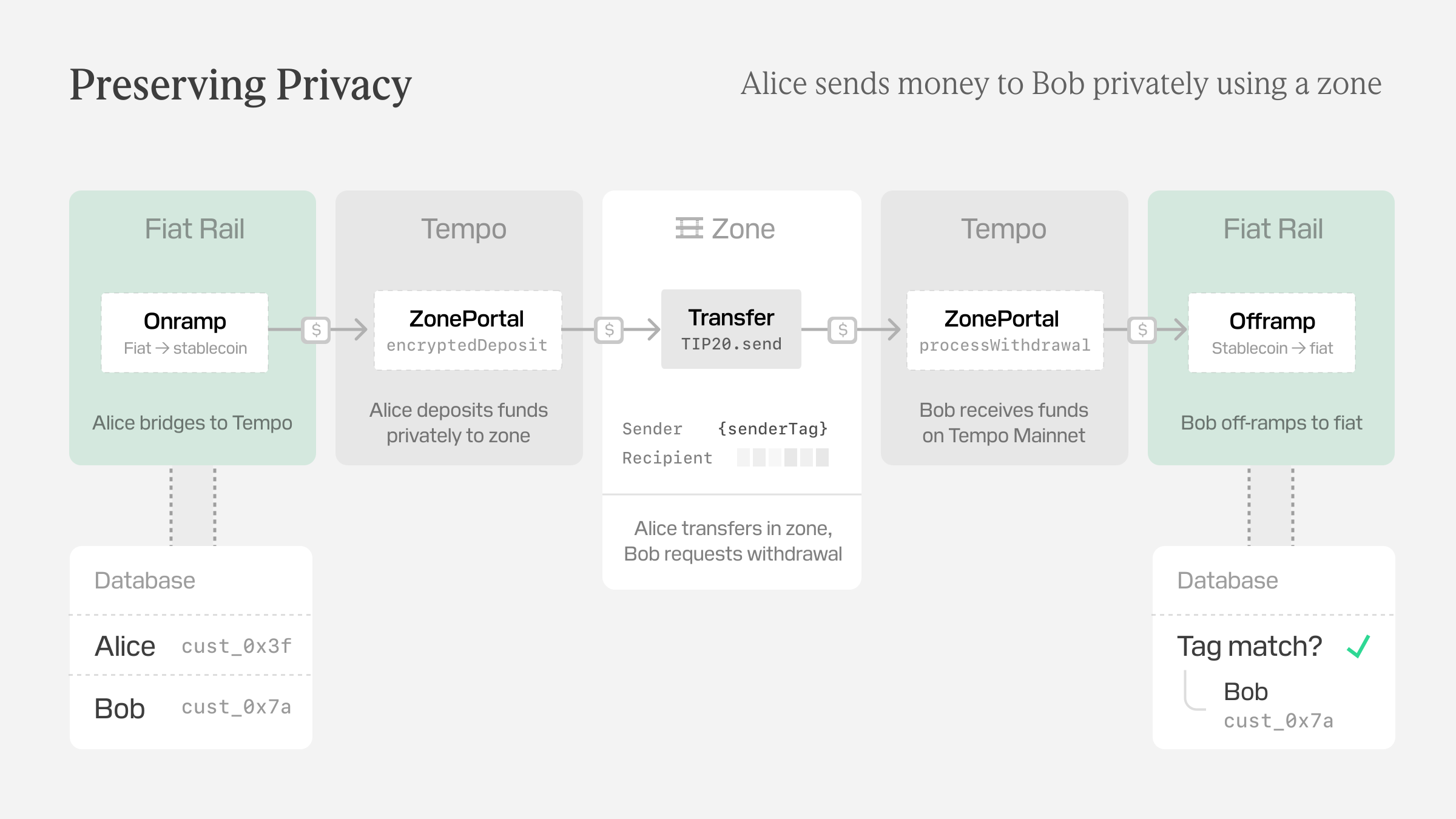
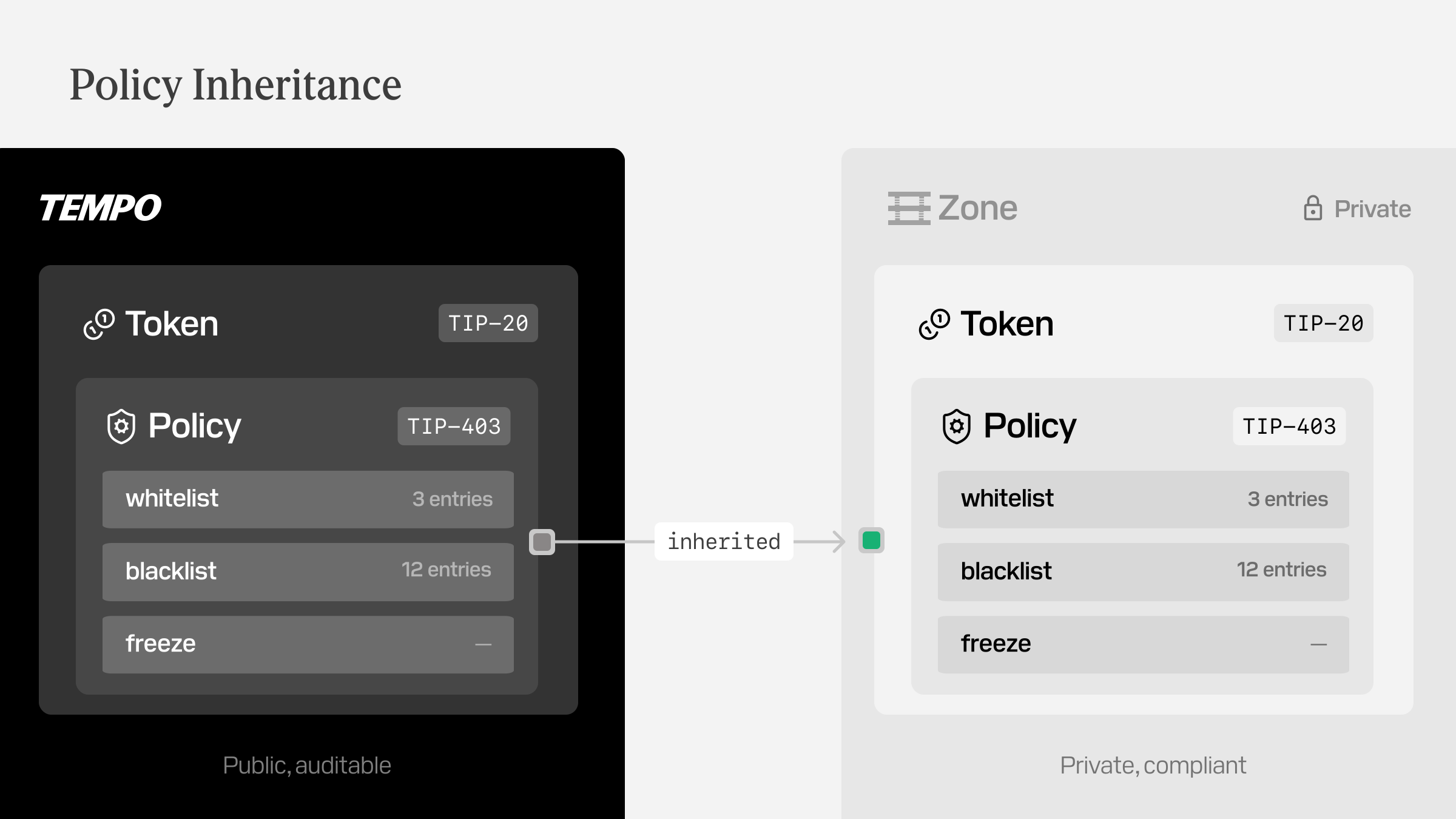
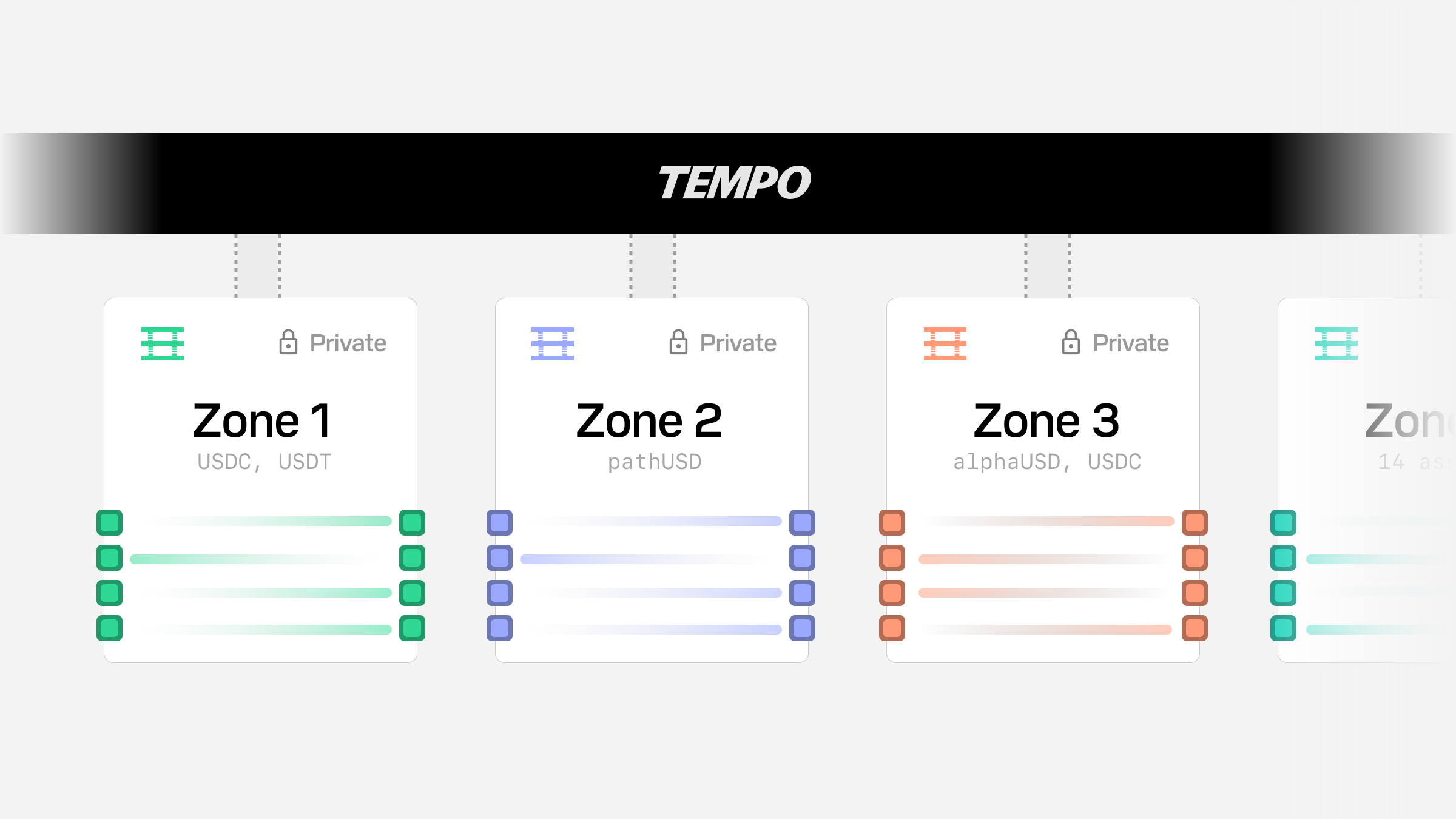
Tempo Zones let you keep balances and transfers inside a private execution environment while still using the public Tempo chain when funds enter or leave. The important thing to remember is that most zone flows settle in stages: a public or zone transaction lands first, then the private balance update appears shortly after.
## Before you start
* Use a Tempo passkey account in the demo so the page can authorize private zone reads.
* Keep some `pathUSD` on the public chain if you want to try deposits, source-zone top-ups, routed sends, swaps, or withdrawals.
* Expect deposits, routed sends, routed swaps, and withdrawals to complete asynchronously rather than in a single balance update.
These guides cover the current zone connection setup plus the baseline workflows used in the demos: deposits through `Actions.zone.depositSync(...)` and `Actions.zone.encryptedDepositSync(...)`, in-zone transfers, same-token routed sends through `Actions.zone.requestWithdrawalSync(...)`, routed swaps, direct withdrawals, and authenticated withdrawals through `Actions.zone.requestVerifiableWithdrawalSync(...)`.
The deposit guide's demo lets you switch between plaintext and encrypted deposits, and the withdrawal guide lets you switch between standard and authenticated withdrawals, while keeping the transaction flow on the upstream `viem` zone actions.
## Choose the right guide
* **Connect to a zone** if you want the Zone A and Zone B RPC URLs, chain IDs, and a minimal `viem` client setup.
* **Deposit to a zone** if you want to move `pathUSD` from your public balance into `Zone A`.
* **Send tokens within a zone** if you want to transfer `pathUSD` between private accounts without leaving `Zone A`.
* **Send tokens across zones** if you want to leave `Zone A` with `pathUSD` and arrive in `Zone B` with the same token.
* **Swap across zones** if you want to leave `Zone A` with `pathUSD` and arrive in `Zone B` with `betaUSD`.
* **Withdraw from a zone** if you want to move `pathUSD` back from `Zone A` to your public balance.
# Tools & SDKs
Use this section when you need the implementation surface for Tempo: libraries, command-line tools, managed services, wallet integration, RPC references, and query access to network data.
If you are integrating a product, start with the TypeScript SDKs and hosted services. If you are operating infrastructure or debugging low-level behavior, start with the CLI and RPC reference.
## Build with SDKs
## Operate and Inspect
# Tempo Protocol
Use this section when you need the technical reference for Tempo itself. These pages are written for implementers, auditors, wallet teams, infrastructure operators, and anyone building against protocol-level behavior rather than a single product workflow.
If you are building an app, start with the guides in **Build on Tempo** and come here when you need exact semantics, ABI details, or protocol rationale.
For private execution internals, start with Tempo Zones and the [zone accounts specification](/docs/protocol/zones/accounts), which defines private balance, allowance, and account-scoped access rules.
## Core Primitives
## Network Systems
## Specifications and Source
# Run a Tempo Node
Run Tempo infrastructure when you need direct network access, dedicated RPC capacity, validator operations, or lower-level visibility into network behavior.
Most teams should start with [running RPC and standby nodes](/docs/guide/node/rpc). Validator operation requires coordination with the Tempo team and includes a separate [validator failover](/docs/guide/node/validator-failover) path for backup infrastructure.
## RPC Node Path
## Validator Operations
## Releases
# Use Tempo with AI
Tempo publishes documentation, Markdown pages, MCP tools, and agent plugins so AI coding agents can work with Tempo using current project context instead of guesses.
Use this page when you want Claude, Codex, Cursor, Amp, or another MCP-compatible client to search Tempo docs, read source-linked references, and install reusable Tempo workflows.
## Connect to Tempo's MCP server
The Tempo MCP server gives agents programmatic access to Tempo documentation and related developer resources.
```bash
claude mcp add --transport http tempo https://mcp.tempo.xyz
```
```bash
codex mcp add tempo --url https://mcp.tempo.xyz
```
Install in Cursor
To open Cursor and automatically add the Tempo MCP server, click install. Alternatively, add the following to your `~/.cursor/mcp.json` file. To learn more, see the Cursor [documentation](https://docs.cursor.com/context/model-context-protocol).
## MCP tools
The MCP endpoint exposes these tools to connected agents:
| Tool | Purpose | Required arguments |
| --- | --- | --- |
| `search` | Search docs. | `query` |
| `find_pages` | Find matching page URLs from a source index. | `source`, `query` |
| `read_page` | Read one cleaned documentation page. | `source` plus `path` or `url` |
### MCP feedback
MCP clients can also post feedback directly to `https://tempo.xyz/developers/api/feedback`:
```json
{
"source": "mcp",
"sentiment": "negative",
"message": "The read_page result for /guide/payments is missing fee-token setup.",
"toolName": "read_page",
"relatedResource": "/guide/payments",
"client": "codex"
}
```
### Try the MCP server
## Install Tempo plugins
The Tempo plugin installs a complete agent integration: the Tempo MCP server, workflow skills for using Tempo APIs and docs, and editor metadata that helps agents discover the right Tempo tools without manual setup.
:::code-group
```bash [Codex]
codex plugin marketplace add tempoxyz/docs
codex plugin add tempo@docs
```
```bash [Claude]
claude plugin marketplace add tempoxyz/docs
claude plugin install tempo@claude
```
:::
## Tempo Docs
### Docs skill
Install the Tempo Docs skill to give AI coding agents access to Tempo documentation, source code via MCP, and examples:
```bash
npx skills add tempoxyz/docs
```
Once installed, the agent uses it automatically when relevant tasks are detected.
### Read docs as Markdown
Every page on this site is available as plain Markdown — append `.md` to any URL:
```
https://tempo.xyz/developers/docs/quickstart/integrate-tempo.md
```
For LLM consumption, two [`llms.txt`](https://llmstxt.org/) files are served at the root:
# Partners
Tempo works with partners across stablecoin issuance, wallets and custody, compliance tooling, fraud monitoring, interoperability protocols, analytics and monitoring, orchestration, ramps, and infrastructure.
The ecosystem is designed to support production payment workloads from day one, with issuers across regions, broad local currency support, and infrastructure partners for developers building on Tempo.
# Build on Tempo
Use this section when you are designing payment experiences or payment infrastructure on Tempo. The guides here focus on what your product needs to do: move stablecoins, issue assets, exchange liquidity, isolate activity in private zones, or let agents pay for services.
Start with **Make Payments** if you are not sure where to begin. It covers the core transfer flow and introduces the payment primitives used throughout the rest of the docs.
Use [Agentic Payments](/docs/guide/machine-payments) when agents, APIs, or services need to pay per request. Use [Private Zones](/docs/guide/private-zones) when your product needs isolated execution, private transfers, or zone bridging flows.
## Core Build Paths
## Production Essentials
# Accept a Payment
Accept stablecoin payments in your application. Learn how to receive payments, verify transactions, and reconcile payments using memos.
## Receive stablecoin payments
Payments are automatically credited to the recipient's address when a transfer is executed. You don't need to do anything special to "accept" a payment, it happens automatically onchain.
In this basic receiving demo you can see the balances update after you add funds to your account, using the `getBalance` and `watchEvent` calls documented below.
## Verify stablecoin payments
Check if a payment has been received by querying the token balance or listening for transfer events:
### Check receiver token balance
:::code-group
```ts [example.ts]
import { client } from './viem.config'
const balance = await client.token.getBalance({
account: '0x742d35Cc6634C0532925a3b844Bc9e7595f0bEbb',
token: '0x20c0000000000000000000000000000000000001', // AlphaUSD
})
console.log('Balance:', balance.formatted)
```
```ts [viem.config.ts]
// [!include ~/snippets/viem.config.ts:setup]
```
:::
:::code-group
```rust [example.rs]
use alloy::{primitives::address, providers::ProviderBuilder};
use tempo_alloy::{TempoNetwork, contracts::precompiles::ITIP20};
#[tokio::main]
async fn main() -> Result<(), Box> {
let provider = ProviderBuilder::new_with_network::()
.connect(&std::env::var("RPC_URL").expect("No RPC URL set"))
.await?;
let balance = ITIP20::new( // [!code focus]
address!("0x20c0000000000000000000000000000000000001"), // AlphaUSD // [!code focus]
&provider, // [!code focus]
) // [!code focus]
.balanceOf(address!("0x742d35Cc6634C0532925a3b844Bc9e7595f0bEbb")) // [!code focus]
.call() // [!code focus]
.await?; // [!code focus]
println!("Balance: {balance:?}"); // [!code focus]
Ok(())
}
```
```rust [provider.rs]
// [!include ~/snippets/rust-provider.rs:setup]
```
:::
:::code-group
```python [example.py]
from web3 import Web3
from eth_abi import encode
from provider import w3
token_address = "0x20c0000000000000000000000000000000000001" # AlphaUSD
account_address = "0x742d35Cc6634C0532925a3b844Bc9e7595f0bEbb"
# balanceOf(address) selector: 0x70a08231
calldata = "0x70a08231" + encode(["address"], [account_address]).hex() # [!code hl]
result = w3.eth.call({"to": token_address, "data": calldata}) # [!code hl]
balance = int.from_bytes(result, "big") # [!code hl]
print(f"Balance: {balance}")
```
```python [provider.py]
from web3 import Web3
w3 = Web3(Web3.HTTPProvider("https://rpc.tempo.xyz"))
```
:::
:::code-group
```go [main.go]
package main
import (
"context"
"fmt"
"log"
"math/big"
"strings"
)
func main() {
c := newClient()
ctx := context.Background()
token := "0x20c0000000000000000000000000000000000001"
account := "0x742d35Cc6634C0532925a3b844Bc9e7595f0bEbb"
// balanceOf(address) — ABI-encoded eth_call // [!code hl]
calldata := "0x70a08231" + fmt.Sprintf("%064s", strings.TrimPrefix(account, "0x")) // [!code hl]
resp, err := c.SendRequest(ctx, "eth_call", map[string]interface{}{ // [!code hl]
"to": token, // [!code hl]
"data": calldata, // [!code hl]
}, "latest") // [!code hl]
if err != nil {
log.Fatal(err)
}
balance := new(big.Int) // [!code hl]
balance.SetString(strings.TrimPrefix(resp.Result.(string), "0x"), 16) // [!code hl]
fmt.Printf("Balance: %s\n", balance)
}
```
```go [provider.go]
// [!include ~/snippets/go-provider.go:setup]
```
:::
```bash
$ cast call 0x20c0000000000000000000000000000000000001 \
"balanceOf(address)(uint256)" \
0x742d35Cc6634C0532925a3b844Bc9e7595f0bEbb \
--rpc-url $TEMPO_RPC_URL
```
### Listen for TIP-20 transfer events
:::code-group
```ts [example.ts]
import { client } from './viem.config'
// Watch for incoming transfers
const unwatch = client.watchEvent({
address: '0x20c0000000000000000000000000000000000001',
event: {
type: 'event',
name: 'Transfer',
inputs: [
{ name: 'from', type: 'address', indexed: true },
{ name: 'to', type: 'address', indexed: true },
{ name: 'value', type: 'uint256' },
],
},
onLogs: (logs) => { // [!code focus]
logs.forEach((log) => { // [!code focus]
console.log('Received payment:', { // [!code focus]
from: log.args.from, // [!code focus]
amount: log.args.value, // [!code focus]
}) // [!code focus]
}) // [!code focus]
}, // [!code focus]
})
```
```ts [viem.config.ts]
// [!include ~/snippets/viem.config.ts:setup]
```
:::
:::code-group
```rust [example.rs]
use alloy::{primitives::address, providers::ProviderBuilder};
use futures::StreamExt;
use tempo_alloy::{TempoNetwork, contracts::precompiles::ITIP20};
#[tokio::main]
async fn main() -> Result<(), Box> {
let provider = ProviderBuilder::new_with_network::()
.connect(&std::env::var("RPC_URL").expect("No RPC URL set"))
.await?;
// Watch for incoming transfers // [!code focus]
let mut transfers = ITIP20::new( // [!code focus]
address!("0x20c0000000000000000000000000000000000001"), // [!code focus]
&provider, // [!code focus]
) // [!code focus]
.Transfer_filter() // [!code focus]
.watch() // [!code focus]
.await? // [!code focus]
.into_stream(); // [!code focus]
while let Some(Ok((payment, _))) = transfers.next().await { // [!code focus]
println!("Received payment: {payment:?}") // [!code focus]
} // [!code focus]
Ok(())
}
```
```rust [provider.rs]
// [!include ~/snippets/rust-provider.rs:setup]
```
:::
:::code-group
```python [example.py]
import json
from web3 import Web3
from provider import w3
token_address = "0x20c0000000000000000000000000000000000001" # AlphaUSD
transfer_event_abi = { # [!code focus]
"anonymous": False, # [!code focus]
"name": "Transfer", # [!code focus]
"type": "event", # [!code focus]
"inputs": [ # [!code focus]
{"indexed": True, "name": "from", "type": "address"}, # [!code focus]
{"indexed": True, "name": "to", "type": "address"}, # [!code focus]
{"indexed": False, "name": "value", "type": "uint256"}, # [!code focus]
], # [!code focus]
} # [!code focus]
contract = w3.eth.contract( # [!code focus]
address=Web3.to_checksum_address(token_address), # [!code focus]
abi=[transfer_event_abi], # [!code focus]
) # [!code focus]
# Get historical Transfer events # [!code focus]
events = contract.events.Transfer().get_logs(from_block="latest") # [!code focus]
for event in events: # [!code focus]
print(f"Transfer: {event.args['from']} -> {event.args['to']}: {event.args['value']}") # [!code focus]
```
```python [provider.py]
from web3 import Web3
w3 = Web3(Web3.HTTPProvider("https://rpc.tempo.xyz"))
```
:::
:::code-group
```go [main.go]
package main
import (
"context"
"fmt"
"log"
"github.com/ethereum/go-ethereum/crypto"
)
func main() {
c := newClient()
ctx := context.Background()
token := "0x20c0000000000000000000000000000000000001"
// Transfer(address,address,uint256) event topic // [!code focus]
transferTopic := crypto.Keccak256Hash([]byte("Transfer(address,address,uint256)")) // [!code focus]
resp, err := c.SendRequest(ctx, "eth_getLogs", map[string]interface{}{ // [!code focus]
"fromBlock": "0x0", // [!code focus]
"toBlock": "latest", // [!code focus]
"address": token, // [!code focus]
"topics": []interface{}{transferTopic.Hex()}, // [!code focus]
}) // [!code focus]
if err != nil {
log.Fatal(err)
}
logs, _ := resp.Result.([]interface{}) // [!code focus]
for _, entry := range logs { // [!code focus]
l := entry.(map[string]interface{}) // [!code focus]
topics := l["topics"].([]interface{}) // [!code focus]
fmt.Printf("Transfer: %s -> %s (data: %s)\n", topics[1], topics[2], l["data"]) // [!code focus]
} // [!code focus]
}
```
```go [provider.go]
// [!include ~/snippets/go-provider.go:setup]
```
:::
```bash
$ cast logs \
--address 0x20c0000000000000000000000000000000000001 \
"Transfer(address indexed, address indexed, uint256)" \
--rpc-url $TEMPO_RPC_URL
```
## Payment Reconciliation with Memos
If payments include memos (invoice IDs, order numbers, etc.), you can reconcile them automatically:
:::code-group
```ts [example.ts]
import { client } from './viem.config'
// Watch for TransferWithMemo events
const unwatch = client.watchEvent({
address: '0x20c0000000000000000000000000000000000001',
event: {
type: 'event',
name: 'TransferWithMemo',
inputs: [
{ name: 'from', type: 'address', indexed: true },
{ name: 'to', type: 'address', indexed: true },
{ name: 'value', type: 'uint256' },
{ name: 'memo', type: 'bytes32', indexed: true },
],
},
onLogs: (logs) => { // [!code focus]
logs.forEach((log) => { // [!code focus]
const invoiceId = log.args.memo // [!code focus]
// Mark invoice as paid in your database // [!code focus]
markInvoiceAsPaid(invoiceId, log.args.value) // [!code focus]
}) // [!code focus]
}, // [!code focus]
})
```
```ts [viem.config.ts]
// [!include ~/snippets/viem.config.ts:setup]
```
:::
:::code-group
```rust [example.rs]
use alloy::{primitives::address, providers::ProviderBuilder};
use futures::StreamExt;
use tempo_alloy::{TempoNetwork, contracts::precompiles::ITIP20};
#[tokio::main]
async fn main() -> Result<(), Box> {
let provider = ProviderBuilder::new_with_network::()
.connect(&std::env::var("RPC_URL").expect("No RPC URL set"))
.await?;
let mut transfers = ITIP20::new( // [!code focus]
address!("0x20c0000000000000000000000000000000000001"), // [!code focus]
&provider, // [!code focus]
) // [!code focus]
.TransferWithMemo_filter() // [!code focus]
.watch() // [!code focus]
.await? // [!code focus]
.into_stream(); // [!code focus]
while let Some(Ok((transfer, _))) = transfers.next().await { // [!code focus]
let invoice_id = transfer.memo; // [!code focus]
println!("Transfer received with memo: {invoice_id:?}"); // [!code focus]
} // [!code focus]
Ok(())
}
```
```rust [provider.rs]
// [!include ~/snippets/rust-provider.rs:setup]
```
:::
:::code-group
```python [example.py]
from web3 import Web3
from provider import w3
token_address = "0x20c0000000000000000000000000000000000001" # AlphaUSD
transfer_memo_abi = { # [!code focus]
"anonymous": False, # [!code focus]
"name": "TransferWithMemo", # [!code focus]
"type": "event", # [!code focus]
"inputs": [ # [!code focus]
{"indexed": True, "name": "from", "type": "address"}, # [!code focus]
{"indexed": True, "name": "to", "type": "address"}, # [!code focus]
{"indexed": False, "name": "value", "type": "uint256"}, # [!code focus]
{"indexed": True, "name": "memo", "type": "bytes32"}, # [!code focus]
], # [!code focus]
} # [!code focus]
contract = w3.eth.contract( # [!code focus]
address=Web3.to_checksum_address(token_address), # [!code focus]
abi=[transfer_memo_abi], # [!code focus]
) # [!code focus]
events = contract.events.TransferWithMemo().get_logs(from_block="latest") # [!code focus]
for event in events: # [!code focus]
invoice_id = event.args["memo"] # [!code focus]
print(f"Transfer with memo {invoice_id.hex()}: {event.args['value']}") # [!code focus]
```
```python [provider.py]
from web3 import Web3
w3 = Web3(Web3.HTTPProvider("https://rpc.tempo.xyz"))
```
:::
:::code-group
```go [main.go]
package main
import (
"context"
"fmt"
"log"
"github.com/ethereum/go-ethereum/crypto"
)
func main() {
c := newClient()
ctx := context.Background()
token := "0x20c0000000000000000000000000000000000001"
// TransferWithMemo(address,address,uint256,bytes32) event topic // [!code focus]
memoTopic := crypto.Keccak256Hash( // [!code focus]
[]byte("TransferWithMemo(address,address,uint256,bytes32)"), // [!code focus]
) // [!code focus]
resp, err := c.SendRequest(ctx, "eth_getLogs", map[string]interface{}{ // [!code focus]
"fromBlock": "0x0", // [!code focus]
"toBlock": "latest", // [!code focus]
"address": token, // [!code focus]
"topics": []interface{}{memoTopic.Hex()}, // [!code focus]
}) // [!code focus]
if err != nil {
log.Fatal(err)
}
logs, _ := resp.Result.([]interface{}) // [!code focus]
for _, entry := range logs { // [!code focus]
l := entry.(map[string]interface{}) // [!code focus]
topics := l["topics"].([]interface{}) // [!code focus]
fmt.Printf("Transfer: %s -> %s (memo: %s, data: %s)\n", // [!code focus]
topics[1], topics[2], topics[3], l["data"]) // [!code focus]
} // [!code focus]
}
```
```go [provider.go]
// [!include ~/snippets/go-provider.go:setup]
```
:::
```bash
$ cast logs \
--address 0x20c0000000000000000000000000000000000001 \
"TransferWithMemo(address indexed, address indexed, uint256, bytes32 indexed)" \
--rpc-url $TEMPO_RPC_URL
```
## Smart Contract Integration
If you're building a smart contract that accepts payments:
```solidity
contract PaymentReceiver {
ITIP20 public token;
mapping(bytes32 => bool) public paidInvoices;
event PaymentReceived(
address indexed payer,
uint256 amount,
bytes32 indexed invoiceId
);
function receivePayment(
address payer,
uint256 amount,
bytes32 invoiceId
) external {
require(!paidInvoices[invoiceId], "Invoice already paid");
// Transfer tokens from payer to this contract
token.transferFrom(payer, address(this), amount);
paidInvoices[invoiceId] = true;
emit PaymentReceived(payer, amount, invoiceId);
}
}
```
## Payment Verification Best Practices
1. **Verify onchain**: Always verify payments onchain before marking orders as paid
2. **Use memos**: Request memos from payers to link payments to invoices or orders
3. **Check confirmations**: Wait for transaction finality (~1 second on Tempo) before processing
4. **Handle edge cases**: Account for partial payments, refunds, and failed transactions
## Cross-Stablecoin Payments
If you need to accept payments in a specific stablecoin but receive a different one, use the exchange to swap:
```ts
// User sends USDG, but you need USDT
// Swap USDG to USDT using the exchange
const { receipt } = await client.dex.sellSync({
tokenIn: usdgAddress,
tokenOut: usdtAddress,
amountIn: receivedAmount,
minAmountOut: receivedAmount * 99n / 100n, // 1% slippage
})
```
## Next steps for accepting payments
* **[Send a payment](/docs/guide/payments/send-a-payment)** to learn how to send payments
* Learn more about [Exchange](/docs/guide/stablecoin-dex) for cross-stablecoin payments
# Configure Receive Policies
Receive policies let a receiver define which [TIP-20](/docs/protocol/tip20/overview) tokens it accepts and which senders may send those tokens to it.
This page is intentionally about the builder flow rather than the full spec. It covers when to configure a policy, what happens when delivery is blocked, and what operators need to watch.
If a receive policy blocks an inbound transfer or mint, the TIP-20 call still succeeds. The funds are credited to `ReceivePolicyGuard` instead of the receiver, and `ReceivePolicyGuard` records a receipt that can be claimed later by the configured recovery authority.
The token's [TIP-403](/docs/protocol/tip403/spec) policy checks still run first and still revert on failure. Only a receive-policy failure redirects delivery to `ReceivePolicyGuard`.
For the full protocol flow, claim rules, burn rules, and event signatures, see the [Receive Policies protocol overview](/docs/protocol/tip403/receive-policies).
## When to configure a receive policy
Configure a receive policy when an address should reject some incoming TIP-20 tokens or some incoming senders.
For example, receive policies are useful when:
* a regulated entity that only wants to receive from addresses held by individuals it has KYC'ed
* an orchestrator or exchange that only wants specific tokens sent to its deposit addresses
## Understand receive policy behavior
If an address has no receive policy, all transfers and mints are allowed by the receive-policy layer.
| Result | Transaction result | Where the funds go |
|---|---|---|
| Token-level checks fail | The call reverts | Funds are not delivered |
| Receive policy allows | The call succeeds | Receiver is credited normally |
| Receive policy blocks | The call succeeds | `ReceivePolicyGuard` is credited and records a receipt |
The receive-policy check applies to `transfer`, `transferFrom`, `transferWithMemo`, `transferFromWithMemo`, `systemTransferFrom`, `mint`, and `mintWithMemo`.
It does not apply to `approve`, `permit`, or `burn`. It also does not affect fee deposits or refunds through `transfer_fee_pre_tx` or `transfer_fee_post_tx`, TIP-20 rewards, or internal balances.
For `transferFrom`, the spender's allowance is consumed even when the receiver's policy blocks delivery, because the funds still move out of the `from` account.
## Configure the policy
:::steps
### Create or choose a sender policy
A receive policy uses `senderPolicyId` to decide which senders are allowed. The sender policy can be:
* built-in policy `0`, which rejects all
* built-in policy `1`, which allows all
* an existing simple TIP-403 `WHITELIST` or `BLACKLIST` policy
* a newly created simple TIP-403 `WHITELIST` or `BLACKLIST` policy
`COMPOUND` policies are not valid for `senderPolicyId`.
### Create or choose a token filter
A receive policy uses `tokenFilterId` to decide which TIP-20 tokens are allowed. Token filters use existing TIP-403 policy data and membership sets, where members are interpreted as TIP-20 token addresses.
The token filter can use built-in policy `0`, built-in policy `1`, or a simple TIP-403 `WHITELIST` or `BLACKLIST` policy. `COMPOUND` policies are not valid for `tokenFilterId`.
Receive policies do not add a dedicated token-filter interface. Token filters are managed through the existing TIP-403 policy interface.
### Choose a recovery authority
The recovery authority controls who may claim receipts for future blocked transfers or mints:
| Recovery authority | Who can claim |
|---|---|
| `address(0)` | the originator of the transfer or mint |
| the receiver's address | the receiver |
| another nonzero address | that address |
Changing the recovery authority affects future receipts only. Existing receipts keep the recovery authority captured when they were created.
Nonzero recovery authorities cannot be `ReceivePolicyGuard`, [virtual addresses](/docs/protocol/tip20/virtual-addresses), or system precompile addresses that cannot initiate calls.
### Set the receive policy
Call `setReceivePolicy(senderPolicyId, tokenFilterId, recoveryAuthority)` from the address being configured.
If the receiver is using virtual addresses, configure the policy on the resolved master address. A virtual address must not call `setReceivePolicy(...)`.
:::
## Monitor blocked receipts
`ReceivePolicyGuard` lives at `0xB10C000000000000000000000000000000000000`.
When delivery is blocked, the token balance is credited to that address. `ReceivePolicyGuard` stores a keyed amount for the blocked receipt. The receipt includes the token, recovery authority, originator, recipient, timestamp, nonce, blocked reason, inbound kind, and memo.
`ReceivePolicyGuard` does not enumerate receipts onchain. Claimers need the receipt bytes, usually by indexing `TransferBlocked` events.
The regular TIP-20 events still happen:
* a blocked transfer emits the regular `Transfer` event with `ReceivePolicyGuard` as the recipient, then `TransferBlocked(...)`
* a blocked mint emits the regular `Transfer` and `Mint` events with `ReceivePolicyGuard` as the recipient, then `TransferBlocked(...)`
Index these events to track policy changes and receipt lifecycle:
| Event | Purpose |
|---|---|
| `ReceivePolicyUpdated` | A receive policy changed for an address |
| `TransferBlocked` | A transfer or mint was blocked and a receipt was created |
| `ReceiptClaimed` | A receipt was consumed and funds were released |
| `ReceiptBurned` | A receipt was consumed and funds were burned |
`TransferBlocked.receipt` is the ABI-encoded receipt witness. The spec requires that this receipt be directly usable as the `receipt` argument to `balanceOf`, `claim`, and `burnBlockedReceipt`.
## Claim blocked receipts
A claim is the normal recovery path for blocked transfers or mints. It consumes one full receipt and releases the full amount to one destination. Partial claims are not supported.
Only the authorized claimer may call `claim(...)`:
* if the receipt's `recoveryAuthority` is `address(0)`, only the receipt's `originator` may claim
* otherwise, only the receipt's nonzero `recoveryAuthority` may claim
Changing a receiver's recovery authority does not change who can claim older receipts.
Claim paths have additional policy checks. See the [protocol overview](/docs/protocol/tip403/receive-policies#claims) before implementing recovery flows.
## Burn blocked receipts
Burning is an issuer-only path for blocked receipts.
`burnBlockedReceipt(...)` consumes one full receipt and burns the stored amount from `ReceivePolicyGuard`.
The caller must hold `BURN_BLOCKED_ROLE` for the token. A receipt is burnable only when its policy subject is currently unauthorized as a sender under the token's TIP-403 policy.
Burn eligibility has additional policy checks. See the [protocol overview](/docs/protocol/tip403/receive-policies#burns) before implementing issuer burn flows.
## Virtual-address behavior
If `to` is a virtual address, it is resolved to its master address before checks run. Receive-policy checks use the master address.
If resolution fails, the operation reverts as before. If the transfer or mint is blocked, the receipt is recorded for the master address and preserves the original `to` for attribution.
## Learn more about receive policies
# Attach a Transfer Memo
Attach 32-byte references to [TIP-20](/docs/protocol/tip20/overview) transfers for payment reconciliation. Use memos to link onchain transactions to your internal records—customer IDs, invoice numbers, or any identifier that helps you match payments to your database.
## Transfer memo demo
## Transfer memo implementation steps
::::steps
### Set up your project for transfer memos
Ensure you have Wagmi configured with Tempo:
* [Connection details](/docs/quickstart/connection-details)
* [TypeScript SDK](/docs/sdk/typescript)
* [Wallet integration](/docs/quickstart/wallet-developers)
### Send a transfer with memo
Use `transferWithMemo` to attach a reference to your payment. The memo is a 32-byte value that gets emitted in the `TransferWithMemo` event.
:::code-group
```tsx twoslash [SendWithMemo.tsx]
// @noErrors
import { Hooks } from 'wagmi/tempo'
import { parseUnits, toHex } from 'viem'
import { useConnection } from 'wagmi'
export function SendWithMemo() {
const { address } = useConnection()
const transfer = Hooks.token.useTransferSync()
const handleSend = () => {
transfer.mutate({
token: '0x20c0000000000000000000000000000000000001',
to: '0x742d35Cc6634C0532925a3b844Bc9e7595f0bEbb',
amount: parseUnits('100', 6),
memo: toHex('INV-12345', { size: 32 }),
})
}
return (
)
}
```
```tsx twoslash [wagmi.config.ts] filename="wagmi.config.ts"
// @noErrors
// [!include ~/snippets/wagmi.config.ts:setup]
```
:::
### Watch for transfers with memos
Listen for `TransferWithMemo` events to reconcile incoming payments. The memo is indexed, so you can filter by specific values.
:::code-group
```tsx twoslash [WatchMemos.tsx]
// @noErrors
import { useWatchContractEvent } from 'wagmi'
import { fromHex } from 'viem'
import { Abis } from 'viem/tempo'
export function WatchMemos({ depositAddress }: { depositAddress: `0x${string}` }) {
useWatchContractEvent({
address: '0x20c0000000000000000000000000000000000001',
abi: Abis.TIP20,
eventName: 'TransferWithMemo',
onLogs: (logs) => {
for (const log of logs) {
if (log.args.to === depositAddress) {
const memo = fromHex(log.args.memo, 'string').replace(/\0/g, '')
console.log(`Received ${log.args.value} with memo: ${memo}`)
}
}
},
})
return
Watching for deposits...
}
```
```tsx twoslash [wagmi.config.ts] filename="wagmi.config.ts"
// @noErrors
// [!include ~/snippets/wagmi.config.ts:setup]
```
:::
::::
## Transfer memo recipes
### Exchange deposit reconciliation
As an exchange, use a single master hot wallet for all customer deposits. Customers include their customer ID as the memo, and you credit their account by parsing the event.
```ts
import { Actions } from 'viem/tempo'
import { parseUnits, stringToHex, pad } from 'viem'
// Customer deposits with their customer ID
await Actions.token.transferSync(walletClient, {
token: tokenAddress,
to: exchangeHotWallet,
amount: parseUnits('500', 6),
memo: pad(stringToHex('CUST-12345'), { size: 32 }),
})
```
### Payroll batch payments
Batch multiple payments in a single Tempo transaction with employee IDs in each memo for clear accounting records.
```ts
import { Abis } from 'viem/tempo'
import { encodeFunctionData, parseUnits, stringToHex, pad } from 'viem'
const calls = employees.map(emp => ({
to: tokenAddress,
data: encodeFunctionData({
abi: Abis.TIP20,
functionName: 'transferWithMemo',
args: [emp.wallet, parseUnits(emp.salary, 6), pad(stringToHex(emp.id), { size: 32 })]
})
}))
await walletClient.sendCalls({ calls })
```
### Refund address in memo
Include a refund address in the memo so the recipient knows where to send funds if a reversal is needed.
```ts
import { Actions } from 'viem/tempo'
import { parseUnits, stringToHex, pad } from 'viem'
const refundMemo = pad(stringToHex('REFUND 0x742d35Cc6634C0532925a3b8'), { size: 32 })
await Actions.token.transferSync(walletClient, {
token: tokenAddress,
to: merchantAddress,
amount: parseUnits('100', 6),
memo: refundMemo,
})
```
## Transfer memo best practices
### Use consistent memo formats
Establish a naming convention for your memos (e.g., `CUST-{id}`, `INV-{number}`, `REFUND-{id}`) to make parsing and filtering reliable across your system.
### Keep memos under 32 bytes
Memos are `bytes32` values. Use `toHex(string, { size: 32 })` to convert strings—if your string exceeds 32 bytes, it will be truncated. For longer references, store the full data offchain and use a hash or short ID as the memo.
### Index memos for efficient queries
The `TransferWithMemo` event has `memo` as an indexed parameter. Use `getLogs` with the `args` filter to query transactions by memo without scanning all events.
```ts
import { parseAbiItem, stringToHex, pad } from 'viem'
const logs = await client.getLogs({
address: tokenAddress,
event: parseAbiItem('event TransferWithMemo(address indexed from, address indexed to, uint256 value, bytes32 indexed memo)'),
args: { memo: pad(stringToHex('INV-12345'), { size: 32 }) },
})
```
## Transfer memo learning resources
# Use virtual addresses for deposits
Virtual addresses let you issue a distinct deposit address for each customer without creating a separate onchain TIP-20 balance for each one. The deposit is attributed to the virtual address, but the balance is credited directly to the registered master wallet.
This page is intentionally about the operator flow rather than the spec. In preview environments the demo may run against pre-release infrastructure, but the flow is the same one operators will use on public testnet.
## How virtual address deposits work
>TIP20: transfer(virtualAddress, amount)
TIP20->>Registry: resolve(masterId)
Registry-->>TIP20: master wallet
TIP20->>Master: credit balance
Note over TIP20: emits Transfer(sender → virtual, amount)
Note over TIP20: emits Transfer(virtual → master, amount)
`}
/>
The important behavior is:
* the sender pays the **virtual address**
* TIP-20 resolves that address to the registered **master wallet**
* the **master wallet** receives the balance
* the virtual address still appears in events, so you can attribute the deposit correctly
## Virtual address live demo
This walkthrough shows the full flow:
1. sign in with a passkey and get a Tempo address
2. register a master id for that address
3. send `pathUSD` from a second address to a virtual address derived from that master id
4. confirm that the balance lands in the registered wallet
Use a docs-managed master with a pre-mined valid salt so you can skip the wait and jump straight to the forwarding flow.
Use `VirtualMaster.mineSaltAsync` to register a master id for the passkey account you create in the demo.
:::info
Mining a virtual-address salt can take 30+ seconds depending on your browser, hardware, and available worker parallelism.
:::
## What to verify in virtual address deposits
When the demo succeeds, you should see all of the following:
* the passkey wallet is shown as the registered master wallet
* the virtual address is distinct from the master wallet
* the sender transfers `pathUSD` to the virtual address
* the master wallet balance increases
* the virtual address TIP-20 balance remains `0`
* the receipt shows the expected two-hop `Transfer` events
## Derive deposit addresses offchain
Once a master is registered, operators derive virtual addresses offchain from the `masterId` and their own customer tag.
:::code-group
```ts [virtualAddress.ts]
import { VirtualAddress } from 'ox/tempo'
const virtualAddress = VirtualAddress.from({
masterId,
userTag: '0x000000000001',
})
```
:::
In practice, the `userTag` is the operator's internal routing value for a customer, account, or payment reference.
## Operational notes
A few things matter in production:
* virtual forwarding applies only to **TIP-20** transfer and mint paths
* `balanceOf(virtualAddress)` stays `0`; use events and your own `userTag` mapping for attribution
* policy checks apply to the **resolved master wallet**, not the literal virtual address
* avoid using virtual addresses in reward protocols (lending pools, DEX rewards, etc) unless explicitly supported, as they can't track or hold funds
## Learn more about TIP-20 virtual addresses
# Pay Fees in Any Stablecoin
Configure users to pay transaction fees in any supported stablecoin. Tempo's flexible fee system allows users to pay fees with the same token they're using, eliminating the need to hold a separate gas token.
## Fee-token payment demo
By the end of this guide you will be able to pay fees in any stablecoin on Tempo.
## Quick fee-token snippet
Using a custom fee token is as simple as passing a `feeToken` attribute to mutable actions like `useTransferSync`, `useSendTransactionSync`, and more.
```tsx twoslash
// @noErrors
import { Hooks } from 'wagmi/tempo'
import { parseUnits } from 'viem'
const alphaUsd = '0x20c0000000000000000000000000000000000001'
const betaUsd = '0x20c0000000000000000000000000000000000002'
const sendPayment = Hooks.token.useTransferSync()
sendPayment.mutate({
amount: parseUnits('100', 6),
feeToken: betaUsd, // [!code ++]
to: '0x0000000000000000000000000000000000000000',
token: alphaUsd,
})
```
```tsx twoslash
// @noErrors
import { parseUnits } from 'viem'
import { client } from './viem.config'
const alphaUsd = '0x20c0000000000000000000000000000000000001'
const betaUsd = '0x20c0000000000000000000000000000000000002'
const receipt = await client.token.transferSync({
amount: parseUnits('100', 6),
feeToken: betaUsd, // [!code ++]
to: '0x0000000000000000000000000000000000000000',
token: alphaUsd,
})
```
:::code-group
```rust [example.rs]
use alloy::{
primitives::{address, U256},
providers::Provider,
sol_types::SolCall,
};
use tempo_alloy::{
contracts::precompiles::ITIP20, primitives::transaction::Call,
rpc::TempoTransactionRequest,
};
mod provider;
#[tokio::main]
async fn main() -> Result<(), Box> {
let provider = provider::get_provider().await?;
let alpha_usd = address!("0x20c0000000000000000000000000000000000001");
let beta_usd = address!("0x20c0000000000000000000000000000000000002");
let calls = vec![Call {
to: alpha_usd.into(),
input: ITIP20::transferCall {
to: address!("0x0000000000000000000000000000000000000000"),
amount: U256::from(100_000_000),
}
.abi_encode()
.into(),
value: U256::ZERO,
}];
let pending = provider
.send_transaction(TempoTransactionRequest {
calls,
fee_token: Some(beta_usd), // [!code ++]
..Default::default()
})
.await?;
Ok(())
}
```
```rust [provider.rs]
// [!include ~/snippets/rust-signer-provider.rs:setup]
```
:::
```python
from pytempo import TempoTransaction
from pytempo.contracts import TIP20, ALPHA_USD, BETA_USD
tx = TempoTransaction.create(
chain_id=w3.eth.chain_id,
gas_limit=100_000,
max_fee_per_gas=w3.eth.gas_price * 2,
max_priority_fee_per_gas=w3.eth.gas_price,
nonce=w3.eth.get_transaction_count(account.address),
fee_token=BETA_USD, # [!code ++]
calls=(
TIP20(ALPHA_USD).transfer(
to="0x0000000000000000000000000000000000000000",
amount=100_000_000,
),
),
)
```
```go
alphaUSD := common.HexToAddress("0x20c0000000000000000000000000000000000001")
betaUSD := common.HexToAddress("0x20c0000000000000000000000000000000000002")
tx := transaction.NewBuilder(big.NewInt(transaction.ChainIdModerato)).
SetNonce(nonce).
SetGas(100_000).
SetMaxFeePerGas(big.NewInt(25_000_000_000)).
SetMaxPriorityFeePerGas(big.NewInt(1_000_000_000)).
SetFeeToken(betaUSD). // [!code ++]
AddCall(alphaUSD, big.NewInt(0), buildTransferData(recipient, big.NewInt(100_000_000))).
Build()
```
```bash
$ cast send \
0x20c0000000000000000000000000000000000001 \
"transfer(address,uint256)" \
0x0000000000000000000000000000000000000000 \
100000000 \
--rpc-url $TEMPO_RPC_URL \
--private-key $PRIVATE_KEY \
--tempo.fee-token 0x20c0000000000000000000000000000000000002 # [!code ++]
```
:::info
The fee token for a given transaction cannot be set from Solidity — it is a transaction-level parameter handled by the signing SDK. However, you can configure a **default** fee token for an account using [`setUserToken`](#set-a-default-user-fee-token), which will apply to all future transactions unless explicitly overridden at submission.
:::
## Fee-token implementation steps
::::steps
### Set up Wagmi for fee tokens
Ensure that you have set up your project with Wagmi, a Tempo chain config, and a wallet connector:
* [Connection details](/docs/quickstart/connection-details)
* [TypeScript SDK](/docs/sdk/typescript)
* [Wallet integration](/docs/quickstart/wallet-developers)
### Add testnet fee-token funds¹
Before you can pay fees in a token of your choice, you need to fund your account. In this guide you will be sending `AlphaUSD` (`0x20c000…0001`) and paying fees in `BetaUSD` (`0x20c000…0002`).
The built-in Tempo testnet faucet includes `AlphaUSD` and `BetaUSD` when funding.
:::code-group
```tsx twoslash [AddFunds.ts]
// @noErrors
import { Hooks } from 'wagmi/tempo'
import { useConnection } from 'wagmi'
function AddFunds() {
const { address } = useConnection()
const { mutate, isPending } = Hooks.faucet.useFundSync()
return (
)
}
```
```tsx twoslash [wagmi.config.ts] filename="wagmi.config.ts"
// @noErrors
// [!include ~/snippets/wagmi.config.ts:setup]
```
:::
:::warning
¹ It is important to note that the `addFunds` Hook only works on testnets as a convenience feature to get
started quickly. For production, you will need to onramp & fund your account manually.
:::
### Add custom fee-token logic
Now that you have `AlphaUSD` to send and `BetaUSD` to pay fees with, you can add a form that allows users to select a fee token and send a payment.
After this step, your users can send payments with a specified fee token by clicking the "Send Payment" button!
:::code-group
```tsx twoslash [PayWithFeeToken.tsx]
import { Hooks } from 'wagmi/tempo'
import { parseUnits } from 'viem'
const alphaUsd = '0x20c0000000000000000000000000000000000001'
const betaUsd = '0x20c0000000000000000000000000000000000002'
const thetaUsd = '0x20c0000000000000000000000000000000000003'
const pathUsd = '0x20c0000000000000000000000000000000000000'
// @noErrors
function PayWithFeeToken() {
const sendPayment = Hooks.token.useTransferSync()
const metadata = Hooks.token.useGetMetadata({
token: alphaUsd,
})
return (
)
}
```
```tsx twoslash [wagmi.config.ts] filename="wagmi.config.ts"
// @noErrors
// [!include ~/snippets/wagmi.config.ts:setup]
```
:::
### Display the fee-token receipt
Now that users can send payments with a specified fee token, you can link to the transaction receipt.
:::code-group
```tsx twoslash [PayWithFeeToken.tsx]
import { Hooks } from 'wagmi/tempo'
import { parseUnits } from 'viem'
const alphaUsd = '0x20c0000000000000000000000000000000000001'
const betaUsd = '0x20c0000000000000000000000000000000000002'
const thetaUsd = '0x20c0000000000000000000000000000000000003'
const pathUsd = '0x20c0000000000000000000000000000000000000'
// @noErrors
function PayWithFeeToken() {
const sendPayment = Hooks.token.useTransferSync()
const metadata = Hooks.token.useGetMetadata({
token: alphaUsd,
})
return (
<>
{/* ... your payment form ... */}
{sendPayment.data && ( // [!code ++]
{/* [!code ++] */}
View receipt {/* [!code ++] */}
{/* [!code ++] */}
)} {/* [!code ++] */}
>
)
}
```
```tsx twoslash [wagmi.config.ts] filename="wagmi.config.ts"
// @noErrors
// [!include ~/snippets/wagmi.config.ts:setup]
```
:::
### Next fee-token steps
Now that you have made a payment using a desired fee token, you can:
* Follow a guide on how to [sponsor user fees](/docs/guide/payments/sponsor-user-fees) to enable gasless transactions
* Learn more about [transaction fees](/docs/protocol/fees)
::::
::::steps
### Set up a Viem client for fee tokens
First, we will set up a Viem client configured with Tempo.
```ts twoslash [viem.config.ts]
// [!include ~/snippets/viem.config.ts:setup]
```
:::info
For simplicity of the guide, this example uses a Private Key (Secp256k1) account instead of Passkeys (WebAuthn).
:::
### Add testnet fee-token funds¹
Before you can pay fees in a token of your choice, you need to fund your account. In this guide you will be sending `AlphaUSD` (`0x20c000…0001`) and paying fees in `BetaUSD` (`0x20c000…0002`).
The built-in Tempo testnet faucet includes `AlphaUSD` and `BetaUSD` when funding.
:::code-group
```tsx twoslash [example.ts]
// @noErrors
import { client } from './viem.config'
await client.faucet.fundSync({
account: client.account,
})
```
```tsx twoslash [viem.config.ts] filename="viem.config.ts"
// @noErrors
// [!include ~/snippets/viem.config.ts:setup]
```
:::
### Add custom fee-token logic
Now that you have `AlphaUSD` to send and `BetaUSD` to pay fees with, you can now add logic to send a payment with a specified fee token.
:::code-group
```tsx twoslash [example.ts]
// @noErrors
import { client } from './viem.config'
const receipt = await client.token.transferSync({
amount: parseUnits('100', 6),
feeToken: betaUsd, // [!code hl]
to: '0x0000000000000000000000000000000000000000',
token: alphaUsd,
})
```
```tsx twoslash [viem.config.ts] filename="viem.config.ts"
// @noErrors
// [!include ~/snippets/viem.config.ts:setup]
```
:::
::::
:::info
For Rust integration, refer to the [Quick Snippet](#quick-fee-token-snippet) above and the [Set user fee token](#set-a-default-user-fee-token) below.
:::
:::info
For Python integration, refer to the [Quick Snippet](#quick-fee-token-snippet) above and the [Set user fee token](#set-a-default-user-fee-token) below.
:::
:::info
For Go integration, refer to the [Quick Snippet](#quick-fee-token-snippet) above and the [Set user fee token](#set-a-default-user-fee-token) below.
:::
:::info
For Cast integration, refer to the [Quick Snippet](#quick-fee-token-snippet) above and the [Set user fee token](#set-a-default-user-fee-token) below.
:::
:::info
For Solidity integration, refer to the [Quick Snippet](#quick-fee-token-snippet) above and the [Set user fee token](#set-a-default-user-fee-token) below.
:::
## Set a default user fee token
You can also set a persistent default fee token for an account, so users don't need to specify `feeToken` on every transaction. Learn more about fee token preferences [here](/docs/protocol/fees/spec-fee#fee-token-preferences).
```tsx twoslash
// @noErrors
// [!include ~/snippets/unformatted/fee.setUserToken.ts:wagmi-hooks]
```
```ts twoslash
// @noErrors
// [!include ~/snippets/unformatted/fee.setUserToken.ts:viem]
```
:::code-group
```rust [example.rs]
use alloy::primitives::address;
use tempo_alloy::contracts::precompiles::IFeeManager;
mod provider;
#[tokio::main]
async fn main() -> Result<(), Box> {
let provider = provider::get_provider().await?;
let fee_manager = IFeeManager::new(
address!("0xFEEc000000000000000000000000000000000000"),
&provider,
);
let receipt = fee_manager
.setUserToken( // [!code hl]
address!("0x20c0000000000000000000000000000000000001"), // [!code hl]
) // [!code hl]
.send()
.await?
.get_receipt()
.await?;
println!("Transaction hash: {:?}", receipt.transaction_hash);
Ok(())
}
```
```rust [provider.rs]
// [!include ~/snippets/rust-signer-provider.rs:setup]
```
:::
:::code-group
```python [example.py]
from pytempo import TempoTransaction
from pytempo.contracts import FeeManager, ALPHA_USD
from provider import w3, account
tx = TempoTransaction.create(
chain_id=w3.eth.chain_id,
gas_limit=100_000,
max_fee_per_gas=w3.eth.gas_price * 2,
max_priority_fee_per_gas=w3.eth.gas_price,
nonce=w3.eth.get_transaction_count(account.address),
calls=(
FeeManager.set_user_token(ALPHA_USD), # [!code hl]
),
)
signed_tx = tx.sign(account.key.hex())
tx_hash = w3.eth.send_raw_transaction(signed_tx.encode())
```
```python [provider.py]
from web3 import Web3
from eth_account import Account
w3 = Web3(Web3.HTTPProvider("https://rpc.presto.tempo.xyz"))
account = Account.from_key("0x...")
```
:::
:::code-group
```go [main.go]
package main
import (
"context"
"log"
"math/big"
"github.com/ethereum/go-ethereum/common"
"github.com/tempoxyz/tempo-go/pkg/signer"
"github.com/tempoxyz/tempo-go/pkg/transaction"
)
func main() {
sgn, _ := signer.NewSigner("0x...")
c := newClient()
ctx := context.Background()
nonce, _ := c.GetTransactionCount(ctx, sgn.Address().Hex())
feeManager := common.HexToAddress("0xFEEc000000000000000000000000000000000000")
token := common.HexToAddress("0x20c0000000000000000000000000000000000001")
// setUserToken(address) selector: 0xe7897444
data := make([]byte, 36) // [!code hl]
data[0], data[1], data[2], data[3] = 0xe7, 0x89, 0x74, 0x44 // [!code hl]
copy(data[16:36], token.Bytes()) // [!code hl]
tx := transaction.NewBuilder(big.NewInt(transaction.ChainIdModerato)).
SetNonce(nonce).
SetGas(100_000).
SetMaxFeePerGas(big.NewInt(25_000_000_000)).
SetMaxPriorityFeePerGas(big.NewInt(1_000_000_000)).
AddCall(feeManager, big.NewInt(0), data).
Build()
_ = transaction.SignTransaction(tx, sgn)
serialized, _ := transaction.Serialize(tx, nil)
txHash, _ := c.SendRawTransaction(ctx, serialized)
log.Printf("Transaction hash: %s", txHash)
}
```
```go [provider.go]
// [!include ~/snippets/go-provider.go:setup]
```
:::
```bash
$ cast send \
0xFEEc000000000000000000000000000000000000 \
"setUserToken(address)" \
0x20c0000000000000000000000000000000000001 \
--rpc-url $TEMPO_RPC_URL \
--private-key $PRIVATE_KEY # [!code hl]
```
```solidity
import {StdPrecompiles} from "tempo-std/StdPrecompiles.sol";
StdPrecompiles.TIP_FEE_MANAGER.setUserToken(0x20c0000000000000000000000000000000000001); // [!code hl]
```
## Fee-token learning resources
# Sponsor User Fees
Enable gasless transactions by sponsoring transaction fees for your users. Tempo's native fee sponsorship allows applications to pay fees on behalf of users, improving UX and removing friction from payment flows.
:::tip[Hosted fee payer]
Use Tempo's [hosted fee payer endpoints](/docs/developer-tools/fee-payer) for testnet development or approved mainnet integrations. Run your own fee payer when you need custom sponsorship policy, accounting, or operational control.
:::
## Fee sponsorship demo
## Fee sponsorship implementation steps
::::steps
### Set up the fee payer service
:::tip
Tempo provides a public testnet fee payer service at `https://sponsor.moderato.tempo.xyz` that you can use for development and testing. See [Hosted Fee Payer](/docs/developer-tools/fee-payer) for endpoint details, or follow the instructions below to run your own.
:::
To sponsor transactions with your own infrastructure, run a JSON-RPC relay that validates incoming requests, fills Tempo Transactions, signs the fee payer payload, and broadcasts approved transactions. The fee payer account must be funded with the stablecoin it will use for fees.
Your relay should expose the same core JSON-RPC methods described in the [Hosted Fee Payer API reference](/docs/developer-tools/fee-payer#hosted-fee-payer-api-reference), then apply your own sponsorship policy before signing.
### Configure your client to use the fee payer service
:::tip
Tempo provides a public testnet fee payer service at `https://sponsor.moderato.tempo.xyz` that you can use for development and testing. See [Hosted Fee Payer](/docs/developer-tools/fee-payer) for endpoint details, or follow the instructions below to run your own.
:::
:::code-group
```ts twoslash [Tempo Wallet]
// @noErrors
import { tempo } from 'viem/chains'
import { createConfig, http } from 'wagmi'
import { tempoWallet } from 'wagmi/connectors'
export const config = createConfig({
connectors: [tempoWallet({
feePayer: 'https://sponsor.moderato.tempo.xyz', // [!code focus]
})],
chains: [tempo],
multiInjectedProviderDiscovery: false,
transports: {
[tempo.id]: http(),
},
})
```
```ts twoslash [WebAuthn]
// @noErrors
import { tempo } from 'viem/chains'
import { withRelay } from 'viem/tempo'
import { createConfig, http } from 'wagmi'
import { webAuthn } from 'wagmi/tempo'
export const config = createConfig({
connectors: [webAuthn({ authUrl: '/auth' })],
chains: [tempo],
multiInjectedProviderDiscovery: false,
transports: {
[tempo.id]: withRelay( // [!code focus]
http(), // [!code focus]
http('https://sponsor.moderato.tempo.xyz'), // [!code focus]
), // [!code focus]
},
})
```
:::
### Sponsor your user's transactions
Now transactions will be sponsored by your relay. For more details on how to send a transaction, see the [Send a payment](/docs/guide/payments/send-a-payment) guide.
:::info
You can also build your own fee paying service. See [Build your own fee payer service](#build-your-own-fee-payer-service) below.
:::
:::code-group
```tsx twoslash [SendSponsoredPayment.tsx] filename="SendSponsoredPayment.tsx"
import { Hooks } from 'wagmi/tempo'
import { parseUnits } from 'viem'
import { privateKeyToAccount } from 'viem/accounts'
const alphaUsd = '0x20c0000000000000000000000000000000000001'
// @noErrors
function SendSponsoredPayment() {
const sponsorAccount = privateKeyToAccount('0x...')
const sendPayment = Hooks.token.useTransferSync() // [!code hl]
const metadata = Hooks.token.useGetMetadata({
token: alphaUsd,
})
return (
)
}
```
```tsx twoslash [wagmi.config.ts] filename="wagmi.config.ts"
// @noErrors
// [!include ~/snippets/wagmi.config.ts:withFeePayer]
```
:::
### Next steps for fee sponsorship
Now that you've implemented fee sponsorship, you can:
* Learn more about the [Tempo Transaction](/docs/protocol/transactions/spec-tempo-transaction#fee-payer-signature-details) type and fee payer signature details
* Use Tempo Transactions to sponsor multiple calls in a single signed operation
* Learn how to [Pay Fees in Any Stablecoin](/docs/guide/payments/pay-fees-in-any-stablecoin)
::::
## Build your own fee payer service
Instead of using the hosted fee payer service, you can build your own.
The sender must indicate sponsorship **before signing**, because the transaction's signing hash differs based on whether it will be sponsored:
* **Sponsored transactions**: The `fee_token` field is omitted from the sender's signing payload, and a `0x00` marker is used. This allows the fee payer to choose the fee token.
* **Non-sponsored transactions**: The `fee_token` is included in the sender's signing payload.
The SDKs handle this automatically. Here's how each SDK manages the dual-signing flow:
In Viem, pass a local account to the `feePayer` parameter to handle both signatures in your Node.js backend.
```ts twoslash
// @noErrors
import { parseUnits } from 'viem'
import { privateKeyToAccount } from 'viem/accounts'
import { createClient } from 'viem/tempo'
const client = createClient({
testnet: true,
})
const senderAccount = privateKeyToAccount('0x...')
const feePayerAccount = privateKeyToAccount('0x...') // [!code hl]
// When feePayer is an Account object, Viem:
// 1. Has the sender sign the transaction (with feeToken skipped)
// 2. Recovers the sender address from their signature
// 3. Has the fee payer sign a separate hash (includes sender + feeToken)
// 4. Serializes the dual-signed transaction
const { receipt } = await client.token.transferSync({
account: senderAccount,
amount: parseUnits('10.5', 6),
to: '0x742d35Cc6634C0532925a3b844Bc9e7595f0bEbb',
token: '0x20c0000000000000000000000000000000000000',
feePayer: feePayerAccount, // [!code hl]
})
```
:::info
Alternatively, use the [`withRelay`](https://viem.sh/tempo/transports/withRelay) transport to delegate signing to a remote fee payer service. See the [Steps section above](#configure-your-client-to-use-the-fee-payer-service) for setup.
:::
:::code-group
```rust [example.rs]
use alloy::{
primitives::{address, U256},
providers::Provider,
signers::{SignerSync, local::PrivateKeySigner},
sol_types::SolCall,
};
use tempo_alloy::{
contracts::precompiles::ITIP20, primitives::transaction::Call,
rpc::TempoTransactionRequest,
};
mod provider;
#[tokio::main]
async fn main() -> Result<(), Box> {
let provider = provider::get_provider().await?;
let tx = TempoTransactionRequest {
calls: vec![Call {
to: address!("0x20c0000000000000000000000000000000000000").into(),
input: ITIP20::transferCall {
to: address!("0x742d35Cc6634C0532925a3b844Bc9e7595f0bEbb"),
amount: U256::from(10_500_000),
}
.abi_encode()
.into(),
value: U256::ZERO,
}],
..Default::default()
};
// Step 1: Build the transaction (sender signs, fee_token excluded from hash)
let mut tempo_tx = provider.fill(tx).await?.build_aa()?;
let sender_addr = provider.default_signer_address();
// Step 2: Compute the fee payer hash (includes sender address + fee_token)
let fee_payer_hash = tempo_tx.fee_payer_signature_hash(sender_addr); // [!code hl]
// Step 3: Fee payer counter-signs
let fee_payer: PrivateKeySigner = "0x...".parse()?; // [!code hl]
tempo_tx.fee_payer_signature = Some(fee_payer.sign_hash_sync(&fee_payer_hash)?); // [!code hl]
// Step 4: Broadcast
let pending = provider.send_transaction(tempo_tx).await?;
println!("Transaction hash: {:?}", pending.tx_hash());
Ok(())
}
```
```rust [provider.rs]
// [!include ~/snippets/rust-signer-provider.rs:setup]
```
:::
:::code-group
```python [example.py]
from pytempo import TempoTransaction
from pytempo.contracts import TIP20
from provider import w3, account
TOKEN = "0x20c0000000000000000000000000000000000000"
# Step 1: Sender creates and signs (fee_token excluded from signing hash)
tx = TempoTransaction.create(
chain_id=w3.eth.chain_id,
gas_limit=100_000,
max_fee_per_gas=w3.eth.gas_price * 2,
max_priority_fee_per_gas=w3.eth.gas_price,
nonce=w3.eth.get_transaction_count(account.address),
awaiting_fee_payer=True, # [!code hl]
calls=(
TIP20(TOKEN).transfer(
to="0x742d35Cc6634C0532925a3b844Bc9e7595f0bEbb",
amount=10_500_000,
),
),
)
signed_by_sender = tx.sign(account.key.hex())
# Step 2: Fee payer counter-signs (includes sender address + fee_token)
FEE_PAYER_KEY = "0x..."
fully_signed = signed_by_sender.sign(FEE_PAYER_KEY, for_fee_payer=True) # [!code hl]
# Step 3: Broadcast
tx_hash = w3.eth.send_raw_transaction(fully_signed.encode())
```
```python [provider.py]
from web3 import Web3
from eth_account import Account
w3 = Web3(Web3.HTTPProvider("https://rpc.presto.tempo.xyz"))
account = Account.from_key("0x...")
```
:::
:::code-group
```go [main.go]
package main
import (
"context"
"log"
"math/big"
"github.com/ethereum/go-ethereum/common"
"github.com/tempoxyz/tempo-go/pkg/signer"
"github.com/tempoxyz/tempo-go/pkg/transaction"
)
func main() {
senderSigner, _ := signer.NewSigner("0x...") // sender key
feePayerSigner, _ := signer.NewSigner("0x...") // fee payer key
c := newClient()
ctx := context.Background()
nonce, _ := c.GetTransactionCount(ctx, senderSigner.Address().Hex())
token := common.HexToAddress("0x20c0000000000000000000000000000000000000")
recipient := common.HexToAddress("0x742d35Cc6634C0532925a3b844Bc9e7595f0bEbb")
// Step 1: Sender creates tx and signs (fee_token excluded from hash)
tx := transaction.NewBuilder(big.NewInt(transaction.ChainIdModerato)).
SetNonce(nonce).
SetGas(100_000).
SetMaxFeePerGas(big.NewInt(25_000_000_000)).
SetMaxPriorityFeePerGas(big.NewInt(1_000_000_000)).
SetSponsored(true). // [!code hl]
AddCall(token, big.NewInt(0), buildTransferData(recipient, big.NewInt(10_500_000))).
Build()
_ = transaction.SignTransaction(tx, senderSigner)
// Step 2: Fee payer sets fee token and counter-signs
tx.FeeToken = common.HexToAddress("0x20c0000000000000000000000000000000000001") // [!code hl]
_ = transaction.AddFeePayerSignature(tx, feePayerSigner) // [!code hl]
// Step 3: Broadcast
serialized, _ := transaction.Serialize(tx, nil)
txHash, _ := c.SendRawTransaction(ctx, serialized)
log.Printf("Sponsored transaction hash: %s", txHash)
}
```
```go [provider.go]
// [!include ~/snippets/go-provider.go:setup]
```
:::
## Fee sponsorship best practices
1. **Set sponsorship limits**: Implement daily or per-user limits to control costs
2. **Monitor expenses**: Track sponsorship costs regularly to stay within budget
3. **Consider selective sponsorship**: Only sponsor fees for specific operations or user segments
4. **Educate users**: Clearly communicate when fees are being sponsored
### Fee sponsorship security considerations
* **Transaction-specific**: Fee payer signatures are tied to specific transactions
* **No delegation risk**: Fee payer can't execute arbitrary transactions
* **Balance checks**: Network verifies fee payer has sufficient balance
* **Signature validation**: Both signatures must be valid
## Fee sponsorship learning resources
# Send Parallel Transactions
Tempo enables concurrent transaction execution through its [expiring nonce](/docs/guide/tempo-transaction#expiring-nonces) system. Unlike traditional sequential nonces that require transactions to be processed one at a time, expiring nonces allow multiple transactions to be submitted simultaneously without nonce conflicts. Each transaction uses an independent nonce that automatically expires after a set time window, enabling true parallel execution.
## Parallel transaction demo
By the end of this guide you will understand how to send parallel payments using expiring nonces under-the-hood.
## Parallel transaction implementation steps
::::steps
### Set up Wagmi for parallel transactions
Ensure that you have set up your project with Wagmi, a Tempo chain config, and a wallet connector:
* [Connection details](/docs/quickstart/connection-details)
* [TypeScript SDK](/docs/sdk/typescript)
* [Wallet integration](/docs/quickstart/wallet-developers)
### Send concurrent transactions with nonce keys
To send multiple transactions in parallel, simply batch them together. [Expiring nonces](/docs/guide/tempo-transaction#expiring-nonces) are attached to each transaction automatically.
:::code-group
```ts twoslash [example.ts]
// @noErrors
import { Hooks } from 'wagmi/tempo'
import { parseUnits } from 'viem'
const alphaUsd = '0x20c0000000000000000000000000000000000001'
const { mutate: transfer } = Hooks.token.useTransferSync()
// Send both transfers in parallel. // [!code focus]
const [receipt1, receipt2] = await Promise.all([ // [!code focus]
transfer.mutate({ // [!code focus]
amount: parseUnits('100', 6), // [!code focus]
to: '0x70997970C51812dc3A010C7d01b50e0d17dc79C8', // [!code focus]
token: alphaUsd, // [!code focus]
}), // [!code focus]
transfer.mutate({ // [!code focus]
amount: parseUnits('50', 6), // [!code focus]
to: '0x3C44CdDdB6a900fa2b585dd299e03d12FA4293BC', // [!code focus]
token: alphaUsd, // [!code focus]
}), // [!code focus]
]) // [!code focus]
console.log('Transaction 1:', receipt1.transactionHash) // [!code focus]
console.log('Transaction 2:', receipt2.transactionHash) // [!code focus]
```
```tsx twoslash [wagmi.config.ts] filename="wagmi.config.ts"
// @noErrors
// [!include ~/snippets/wagmi.config.ts:setup]
```
:::
::::
## Parallel transaction learning resources
# Create a Stablecoin
Create your own stablecoin on Tempo using [TIP-20 Tokens](/docs/protocol/tip20/overview).
TIP-20 tokens are designed specifically for payments with built-in compliance features, role-based permissions,
and integration with Tempo's payment infrastructure.
## Stablecoin creation demo
By the end of this guide, you will be able to create a stablecoin on Tempo.
## Stablecoin creation steps
::::steps
### Set up Wagmi for stablecoin creation
Ensure that you have set up your project with Wagmi, a Tempo chain config, and a wallet connector:
* [Connection details](/docs/quickstart/connection-details)
* [TypeScript SDK](/docs/sdk/typescript)
* [Wallet integration](/docs/quickstart/wallet-developers)
### Add testnet funds for deployment¹
Before we send off a transaction to deploy our stablecoin to the Tempo testnet, we need to make sure our account is funded with a stablecoin to cover the transaction fee.
As we have configured our project to use `AlphaUSD` (`0x20c000…0001`)
as the [default fee token](/docs/quickstart/integrate-tempo#default-fee-token), we will need to add some `AlphaUSD` to our account.
Luckily, the built-in Tempo testnet faucet supports funding accounts with `AlphaUSD`.
:::code-group
```tsx twoslash [AddFunds.ts]
// @noErrors
import { Hooks } from 'wagmi/tempo'
import { useConnection } from 'wagmi'
export function AddFunds() {
const { address } = useConnection()
const addFunds = Hooks.faucet.useFund()
return (
)
}
```
```tsx twoslash [config.ts] filename="config.ts"
// @noErrors
import { createConfig, http } from 'wagmi'
import { tempo } from 'viem/chains'
import { tempoWallet } from 'wagmi/connectors'
export const config = createConfig({
chains: [tempo],
connectors: [tempoWallet()],
transports: {
[tempo.id]: http(),
},
})
```
:::
:::warning
¹ It is important to note that the `addFunds` Hook only works on testnets as a convenience feature to get
started quickly. For production, you will need to onramp & fund your account manually.
:::
### Add stablecoin form fields
Now that we have some funds to cover the transaction fee in our account, we can create a stablecoin.
Let's create a new component and add some input fields for the **name** and **symbol** of our stablecoin, as shown in the demo.
:::code-group
```tsx twoslash [CreateStablecoin.tsx]
// @noErrors
export function CreateStablecoin() {
return (
)
}
```
```tsx twoslash [config.ts] filename="config.ts"
// @noErrors
import { createConfig, http } from 'wagmi'
import { tempo } from 'viem/chains'
import { tempoWallet } from 'wagmi/connectors'
export const config = createConfig({
chains: [tempo],
connectors: [tempoWallet()],
transports: {
[tempo.id]: http(),
},
})
```
:::
### Add stablecoin deployment logic
Now that we have some input fields, we need to add some logic to handle the submission of the form to create the stablecoin.
After this step, your users will be able to create a stablecoin by clicking the "Create" button!
Tokens can also carry an optional on-chain [`logoURI`](/docs/protocol/tip20/spec#logo-uri) that wallets and explorers read directly from the token contract. It's set on the token contract and is independent of this creation flow; for the recommended format, use a square, rasterized PNG or WebP (max 256 bytes; `https`, `http`, `ipfs`, or `data` scheme).
:::warning
The `currency` field is **immutable** after token creation and affects fee payment eligibility, DEX routing, and quote token pairing. See [Currency Declaration](/docs/protocol/tip20/overview#currency-declaration) for guidelines on choosing the right value. **Only `USD` stablecoins can be used to pay transaction fees on Tempo.**
:::
:::code-group
```tsx twoslash [CreateStablecoin.tsx]
import { Hooks } from 'wagmi/tempo' // [!code ++]
// @noErrors
export function CreateStablecoin() {
const create = Hooks.token.useCreateSync() // [!code ++]
return (
)
}
```
```tsx twoslash [config.ts] filename="config.ts"
// @noErrors
import { createConfig, http } from 'wagmi'
import { tempo } from 'viem/chains'
import { tempoWallet } from 'wagmi/connectors'
export const config = createConfig({
chains: [tempo],
connectors: [tempoWallet()],
transports: {
[tempo.id]: http(),
},
})
```
:::
### Add stablecoin creation success state
Now that users can submit the form and create a stablecoin, let's add a basic success state to display
the name of the stablecoin and a link to the transaction receipt.
:::code-group
```tsx twoslash [CreateStablecoin.tsx]
import { Hooks } from 'wagmi/tempo'
// @noErrors
export function CreateStablecoin() {
const create = Hooks.token.useCreateSync()
return (
)
}
```
```tsx twoslash [config.ts] filename="config.ts"
// @noErrors
import { createConfig, http } from 'wagmi'
import { tempo } from 'viem/chains'
import { tempoWallet } from 'wagmi/connectors'
export const config = createConfig({
chains: [tempo],
connectors: [tempoWallet()],
transports: {
[tempo.id]: http(),
},
})
```
:::
### Next steps after creating a stablecoin
Now that you have created your first stablecoin, you can now:
* [Add your token to the Token List](/docs/quickstart/tokenlist#adding-a-new-token) so it appears in wallets, explorers, and other apps on Tempo
* learn the [Best Practices](#stablecoin-creation-best-practices) below
* follow a guide on how to [mint](/docs/guide/issuance/mint-stablecoins) and [more](/docs/guide/issuance/manage-stablecoin) with your stablecoin.
::::
## Stablecoin creation best practices
### Stablecoin creation loading state
When the user is creating a stablecoin, we should show loading state to indicate that the process is happening.
We can use the `isPending` property from the `useCreateSync` hook to show pending state to the user on our "Create" button.
```tsx
```
### Stablecoin creation error handling
If an error unexpectedly occurs, we should display an error message to the user.
We can use the `error` property from the `useCreateSync` hook to show error state to the user.
```tsx twoslash
// @noErrors
export function CreateStablecoin() {
// ...
if (create.error) // [!code ++]
return
Error: {create.error.message}
{/* [!code ++] */}
// ...
}
```
## Stablecoin creation learning resources
# Mint Stablecoins
Create new tokens by minting them to a specified address. Minting increases the total supply of your stablecoin.
## Stablecoin minting steps
::::steps
### Create the stablecoin to mint
Before you can mint tokens, you need to create a stablecoin. Follow the [Create a Stablecoin](/docs/guide/issuance/create-a-stablecoin) guide to deploy your token.
Once you've created your token, you can proceed to grant the issuer role and mint tokens.
### Grant the stablecoin issuer role
Assign the issuer role to the address that will mint tokens. Minting requires the **`ISSUER_ROLE`**.
:::code-group
```tsx twoslash [GrantIssuerRole.tsx]
import React from 'react'
import { Hooks } from 'wagmi/tempo'
import { useQueryClient } from '@tanstack/react-query'
// @noErrors
export function GrantIssuerRole() {
const queryClient = useQueryClient()
const tokenAddress = '0x...' // Your token address
const issuerAddress = '0x...' // Address to grant the issuer role
const grant = Hooks.token.useGrantRolesSync({ // [!code hl]
mutation: { // [!code hl]
onSettled() { // [!code hl]
queryClient.refetchQueries({ queryKey: ['hasRole'] }) // [!code hl]
}, // [!code hl]
}, // [!code hl]
}) // [!code hl]
const handleGrantIssuer = async () => { // [!code hl]
await grant.mutate({ // [!code hl]
token: tokenAddress, // [!code hl]
roles: ['issuer'], // [!code hl]
to: issuerAddress, // [!code hl]
feeToken: '0x20c0000000000000000000000000000000000001', // [!code hl]
}) // [!code hl]
} // [!code hl]
return (
{/* [!code hl] */}
)
}
```
```tsx twoslash [config.ts] filename="config.ts"
// @noErrors
import { createConfig, http } from 'wagmi'
import { tempo } from 'viem/chains'
import { tempoWallet } from 'wagmi/connectors'
export const config = createConfig({
chains: [tempo],
connectors: [tempoWallet()],
transports: {
[tempo.id]: http(),
},
})
```
:::
### Mint stablecoins to a recipient
Now that the issuer role is granted, you can mint tokens to any address.
:::code-group
```tsx twoslash [MintToken.tsx]
import React from 'react'
import { Hooks } from 'wagmi/tempo'
import { useConnection } from 'wagmi'
import { parseUnits, pad, stringToHex } from 'viem'
import { useQueryClient } from '@tanstack/react-query'
// @noErrors
export function MintToken() {
const { address } = useConnection()
const queryClient = useQueryClient()
const tokenAddress = '0x...' // Your token address
const [recipient, setRecipient] = React.useState('')
const [memo, setMemo] = React.useState('')
const { data: metadata } = Hooks.token.useGetMetadata({ // [!code hl]
token: tokenAddress, // [!code hl]
}) // [!code hl]
const mint = Hooks.token.useMintSync({ // [!code hl]
mutation: { // [!code hl]
onSettled() { // [!code hl]
queryClient.refetchQueries({ queryKey: ['getBalance'] }) // [!code hl]
}, // [!code hl]
}, // [!code hl]
}) // [!code hl]
const handleMint = () => { // [!code hl]
if (!tokenAddress || !recipient || !metadata) return // [!code hl]
mint.mutate({ // [!code hl]
amount: parseUnits('100', metadata.decimals), // [!code hl]
to: recipient as `0x${string}`, // [!code hl]
token: tokenAddress, // [!code hl]
memo: memo ? pad(stringToHex(memo), { size: 32 }) : undefined, // [!code hl]
feeToken: '0x20c0000000000000000000000000000000000001', // [!code hl]
}) // [!code hl]
} // [!code hl]
return (
<>
{/* [!code hl] */}
>
)
}
```
```tsx twoslash [config.ts] filename="config.ts"
// @noErrors
import { createConfig, http } from 'wagmi'
import { tempo } from 'viem/chains'
import { tempoWallet } from 'wagmi/connectors'
export const config = createConfig({
chains: [tempo],
connectors: [tempoWallet()],
transports: {
[tempo.id]: http(),
},
})
```
```solidity [Solidity]
ITIP20 token = ITIP20(0x20c0000000000000000000000000000000000001); // AlphaUSD
address yourToken = 0x20c0000000000000000000000000000000000004; // Your issued stablecoin
address recipient = 0xbeefcafe54750903ac1c8909323af7beb21ea2cb;
// Send payment using your token for fees
IFeeManager feeManager = IFeeManager(TIP_FEE_MANAGER_ADDRESS);
feeManager.setTransactionFeeToken(yourToken);
token.transfer(recipient, 100_000_000);
```
```rust [Rust]
use alloy::{
primitives::{address, U256},
providers::ProviderBuilder,
};
use tempo_alloy::{
TempoNetwork,
contracts::precompiles::{ITIPFeeAMM, TIP_FEE_MANAGER_ADDRESS},
};
#[tokio::main]
async fn main() -> Result<(), Box> {
let provider = ProviderBuilder::new_with_network::()
.connect(&std::env::var("RPC_URL").expect("No RPC URL set"))
.await?;
// Your issued token
let your_token = address!("0x20c0000000000000000000000000000000000004"); // [!code focus]
// AlphaUSD
let validator_token = address!("0x20c0000000000000000000000000000000000001"); // [!code focus]
let fee_amm = ITIPFeeAMM::new( // [!code focus]
TIP_FEE_MANAGER_ADDRESS, // [!code focus]
&provider, // [!code focus]
); // [!code focus]
let recipient = address!("0xdeadbeefdeadbeefdeadbeefdeadbeefdeadbeef"); // [!code focus]
// Add 100 AlphaUSD of liquidity to the fee pool
fee_amm // [!code focus]
.mint( // [!code focus]
your_token, // [!code focus]
validator_token, // [!code focus]
U256::from(100_000_000), // [!code focus]
recipient, // [!code focus]
) // [!code focus]
.send() // [!code focus]
.await? // [!code focus]
.get_receipt() // [!code focus]
.await?; // [!code focus]
println!("Fee liquidity added successfully"); // [!code focus]
Ok(())
}
```
:::
Users can set your stablecoin as their default fee token at the account level, or specify it for individual transactions. Learn more about [how users pay fees in different stablecoins](/docs/guide/payments/pay-fees-in-any-stablecoin).
::::
## How stablecoin fee payments work
When users pay transaction fees with your stablecoin, Tempo's fee system automatically handles the conversion if validators prefer a different token. The [Fee AMM](/docs/protocol/fees/spec-fee-amm) ensures seamless fee payments across all supported stablecoins.
Users can select your stablecoin as their fee token through:
* **Account-level preference**: Set as default for all transactions
* **Transaction-level preference**: Specify for individual transactions
* **Automatic selection**: When directly interacting with your token contract
Learn more about [how users pay fees in different stablecoins](/docs/guide/payments/pay-fees-in-any-stablecoin) and the complete [fee token preference hierarchy](/docs/protocol/fees/spec-fee#fee-token-preferences).
## Benefits of stablecoin fee tokens
* **User convenience**: Users can pay fees with the same token they're using
* **Liquidity**: Encourages users to hold your stablecoin
* **Flexibility**: Works seamlessly with Tempo's fee system
## Stablecoin fee-token best practices
### Monitor pool liquidity
Regularly check your token's fee pool reserves to ensure users can consistently pay fees with your stablecoin. Low liquidity can prevent transactions from being processed.
### Maintain adequate reserves
Keep sufficient validator token reserves in your fee pool to handle expected transaction volume. Consider your user base size and typical transaction frequency when determining reserve levels.
As fees accrue in your token, the pool will run low on validator tokens and need to be rebalanced. Use [`rebalanceSwap`](/docs/guide/stablecoin-dex/managing-fee-liquidity#rebalance-liquidity) to replenish validator token reserves when they become depleted.
### Test before launch
Before promoting fee payments with your token, thoroughly test the flow on testnet:
1. Add liquidity to the fee pool
2. Verify users can set your token as their fee preference
3. Execute test transactions with various gas costs
4. Monitor that fee conversions work correctly
## Next steps for stablecoin fee tokens
# Manage Your Stablecoin
Configure your stablecoin's permissions, supply limits, and compliance policies after deployment. This guide covers granting roles to manage token operations, setting supply caps, configuring transfer policies, and controlling token transfers through pause/unpause functionality.
TIP-20 tokens use a role-based access control system that allows you to delegate different administrative functions to different addresses. For detailed information about the role system, see the [TIP-20 specification](/docs/protocol/tip20/spec#role-based-access-control).
## Stablecoin management steps
In this guide, we'll walk through how to assign and check the **`issuer`** role, but the process is identical for other roles like `pause`, `unpause`, `burnBlocked`, and `defaultAdmin`.
::::steps
### Set up stablecoin management
Before you can manage roles on your stablecoin, you need to create one. Follow the [Create a Stablecoin](/docs/guide/issuance/create-a-stablecoin) guide to deploy your token.
Once you've created your token, you can proceed to grant roles to specific addresses.
### Grant stablecoin roles to an address
Assign roles to specific addresses to delegate token management capabilities.
:::code-group
```tsx twoslash [GrantRoles.tsx]
import React from 'react'
import { Hooks } from 'wagmi/tempo'
import { useQueryClient } from '@tanstack/react-query'
// @noErrors
export function GrantRoles() {
const queryClient = useQueryClient()
const tokenAddress = '0x...' // Your token address
const treasuryAddress = '0x...' // Address to grant the issuer role
const grant = Hooks.token.useGrantRolesSync({}) // [!code hl]
const handleGrantIssuer = async () => { // [!code hl]
await grant.mutate({ // [!code hl]
token: tokenAddress, // [!code hl]
roles: ['issuer'], // [!code hl]
to: treasuryAddress, // [!code hl]
}) // [!code hl]
} // [!code hl]
return (
{/* [!code hl] */}
)
}
```
```tsx twoslash [config.ts] filename="config.ts"
// @noErrors
import { createConfig, http } from 'wagmi'
import { tempo } from 'viem/chains'
import { tempoWallet } from 'wagmi/connectors'
export const config = createConfig({
chains: [tempo],
connectors: [tempoWallet()],
transports: {
[tempo.id]: http(),
},
})
```
:::
### Check stablecoin roles for an address
Use `hasRole` to verify whether an address has been granted a specific role.
:::code-group
```tsx twoslash [GrantRoles.tsx]
import React from 'react'
import { Hooks } from 'wagmi/tempo'
import { useQueryClient } from '@tanstack/react-query'
// @noErrors
export function GrantRoles() {
const queryClient = useQueryClient()
const tokenAddress = '0x...' // Your token address
const treasuryAddress = '0x...' // Address to grant the issuer role
// Grant the issuer role
const grant = Hooks.token.useGrantRolesSync({
mutation: { // [!code ++]
onSettled() { // [!code ++]
queryClient.refetchQueries({ queryKey: ['hasRole'] }) // [!code ++]
}, // [!code ++]
}, // [!code ++]
})
const handleGrantIssuer = async () => {
await grant.mutate({
token: tokenAddress,
roles: ['issuer'],
to: treasuryAddress,
})
}
const { data: hasIssuerRole } = Hooks.token.useHasRole({ // [!code ++]
account: treasuryAddress, // [!code ++]
token: tokenAddress, // [!code ++]
role: 'issuer', // [!code ++]
}) // [!code ++]
return (
{hasIssuerRole !== undefined && ( // [!code ++]
{/* [!code ++] */}
Treasury {hasIssuerRole ? 'has' : 'does not have'} the issuer role // [!code ++]
{/* [!code ++] */}
)} // [!code ++]
)
}
```
```tsx twoslash [config.ts] filename="config.ts"
// @noErrors
import { createConfig, http } from 'wagmi'
import { tempo } from 'viem/chains'
import { tempoWallet } from 'wagmi/connectors'
export const config = createConfig({
chains: [tempo],
connectors: [tempoWallet()],
transports: {
[tempo.id]: http(),
},
})
```
:::
### Revoke the stablecoin issuer role
Revoke roles from addresses when you need to remove their permissions.
:::code-group
```tsx twoslash [RevokeRoles.tsx]
import React from 'react'
import { Hooks } from 'wagmi/tempo'
import { useQueryClient } from '@tanstack/react-query'
// @noErrors
export function RevokeRoles() {
const queryClient = useQueryClient()
const tokenAddress = '0x...' // Your token address
const treasuryAddress = '0x...' // Address to grant/revoke the issuer role
// Grant the issuer role
const grant = Hooks.token.useGrantRolesSync({
mutation: {
onSettled() {
queryClient.refetchQueries({ queryKey: ['hasRole'] })
},
},
})
const handleGrantIssuer = async () => {
await grant.mutate({
token: tokenAddress,
roles: ['issuer'],
to: treasuryAddress,
})
}
// Check if the treasury has the issuer role
const { data: hasIssuerRole } = Hooks.token.useHasRole({
account: treasuryAddress,
token: tokenAddress,
role: 'issuer',
})
// Revoke the issuer role // [!code ++]
const revoke = Hooks.token.useRevokeRolesSync({ // [!code ++]
mutation: { // [!code ++]
onSettled() { // [!code ++]
queryClient.refetchQueries({ queryKey: ['hasRole'] }) // [!code ++]
}, // [!code ++]
}, // [!code ++]
}) // [!code ++]
const handleRevokeIssuer = async () => { // [!code ++]
await revoke.mutate({ // [!code ++]
token: tokenAddress, // [!code ++]
roles: ['issuer'], // [!code ++]
from: treasuryAddress, // [!code ++]
}) // [!code ++]
} // [!code ++]
return (
)
}
```
```ts twoslash [wagmi.config.ts]
// @noErrors
import { tempo } from 'viem/chains'
import { createConfig, http } from 'wagmi'
import { tempoWallet } from 'wagmi/connectors'
export const config = createConfig({
connectors: [tempoWallet()],
chains: [tempo],
multiInjectedProviderDiscovery: false,
transports: {
[tempo.id]: http(),
},
})
```
:::
## Fee liquidity best practices
### Monitor pool reserves
Regularly check pool reserves to ensure sufficient liquidity for fee conversions. Low reserves can prevent transactions from being processed.
Add liquidity when:
* Transaction rates increase for a given `userToken`
* Reserve levels drop below expected daily volume
* Multiple validators begin preferring the same token
### Maintain adequate reserves
As an issuer, keep sufficient validator token reserves to handle expected transaction volume. Consider your anticipated fee conversion volume when determining reserve levels.
For new token pairs, provide the entire initial amount in the validator token. The pool naturally accumulates user tokens as fees are paid.
### Deploy liquidity strategically
Focus liquidity on pools with:
* High transaction volume and frequent fee conversions
* New stablecoins that need initial bootstrapping
* Validator tokens preferred by multiple validators
## Fee liquidity learning resources
# Executing Swaps
Execute swaps between stablecoins on the exchange. Swaps execute immediately against existing orders in the orderbook, providing instant liquidity for cross-stablecoin payments.
By the end of this guide you will be able to execute swaps, get price quotes, and manage slippage protection.
## Swap implementation steps
::::steps
### Set up your swap client
Ensure that you have set up your client by following the [guide](/docs/sdk/typescript).
### Get a price quote
Before executing a swap, get a quote to see the expected price.
:::code-group
```tsx twoslash [Buy.tsx]
// @noErrors
import { Hooks } from 'wagmi/tempo'
import { formatUnits, parseUnits } from 'viem'
const alphaUsd = '0x20c0000000000000000000000000000000000001'
const betaUsd = '0x20c0000000000000000000000000000000000002'
function Buy() {
const amount = parseUnits('10', 6)
// How much AlphaUSD do I need to spend to receive 10 BetaUSD? // [!code hl]
const { data: quote } = Hooks.dex.useBuyQuote({ // [!code hl]
tokenIn: alphaUsd, // [!code hl]
tokenOut: betaUsd, // [!code hl]
amountOut: amount, // [!code hl]
}) // [!code hl]
return
Quote: {formatUnits(quote, 6)}
}
```
```tsx twoslash [Sell.tsx]
// @noErrors
import { Hooks } from 'wagmi/tempo'
import { formatUnits, parseUnits } from 'viem'
const alphaUsd = '0x20c0000000000000000000000000000000000001'
const betaUsd = '0x20c0000000000000000000000000000000000002'
function Sell() {
const amount = parseUnits('10', 6)
// How much BetaUSD will I receive for 10 AlphaUSD? // [!code hl]
const { data: quote } = Hooks.dex.useSellQuote({ // [!code hl]
tokenIn: alphaUsd, // [!code hl]
tokenOut: betaUsd, // [!code hl]
amountIn: amount, // [!code hl]
}) // [!code hl]
return
Quote: {formatUnits(quote, 6)}
}
```
:::
### Calculate slippage tolerance
Set appropriate slippage based on your quote to protect against unfavorable price movements.
:::code-group
```tsx twoslash [Buy.tsx]
// @noErrors
import { Hooks } from 'wagmi/tempo'
import { formatUnits, parseUnits } from 'viem'
const alphaUsd = '0x20c0000000000000000000000000000000000001'
const betaUsd = '0x20c0000000000000000000000000000000000002'
function Buy() {
const amount = parseUnits('10', 6)
// How much AlphaUSD do I need to spend to receive 10 BetaUSD?
const { data: quote } = Hooks.dex.useBuyQuote({
tokenIn: alphaUsd,
tokenOut: betaUsd,
amountOut: amount,
})
// [!code ++] Calculate 0.5% slippage tolerance
const slippageTolerance = 0.005 // [!code ++]
const maxAmountIn = quote // [!code ++]
? quote * BigInt(Math.floor((1 + slippageTolerance) * 1000)) / 1000n // [!code ++]
: 0n // [!code ++]
return (
Quote: {formatUnits(quote, 6)}
Max input (0.5% slippage): {formatUnits(maxAmountIn, 6)}
Min output (0.5% slippage): {formatUnits(minAmountOut, 6)}
)
}
```
:::
::::
## Stablecoin swap recipes
### Handling insufficient liquidity
Quote requests will fail with an `InsufficientLiquidity` error if there isn't enough liquidity in the orderbook to satisfy the requested amount.
Handle this error when fetching quotes:
```tsx
import { Hooks } from 'wagmi/tempo'
import { parseUnits } from 'viem'
const alphaUsd = '0x20c0000000000000000000000000000000000001'
const betaUsd = '0x20c0000000000000000000000000000000000002'
function Swap() {
const amount = parseUnits('10', 6)
const { data: quote, error } = Hooks.dex.useSellQuote({
tokenIn: alphaUsd,
tokenOut: betaUsd,
amountIn: amount,
})
if (error) {
if (error.message.includes('InsufficientLiquidity')) {
return
Not enough liquidity available. Try a smaller amount.
}
return
Error: {error.message}
}
if (!quote) {
return
Loading quote...
}
return
Quote: {quote.toString()}
}
```
## Stablecoin swap best practices
### Always get quotes before swapping
Query the expected price before executing a swap to ensure you're getting a fair rate and to set appropriate slippage protection.
### Set appropriate slippage protection
Use `minAmountOut` or `maxAmountIn` to protect against unfavorable price movements between quoting and execution.
## Stablecoin swap learning resources
# Providing Liquidity
Add liquidity for a token pair by placing orders on the Stablecoin DEX. You can provide liquidity on the `buy` or `sell` side of the orderbook, with `limit` or `flip` orders. To learn more about order types see the [documentation on order types](/docs/protocol/exchange/providing-liquidity#order-types).
In this guide you will learn how to place buy and sell orders to provide liquidity on the Stablecoin DEX orderbook. Active makers may pay less gas when they cancel eligible orders or have eligible orders filled, then later place new eligible orders. See the [T7 network upgrade](/docs/protocol/upgrades/t7#user-attributed-dex-savings) for the feature details.
## Liquidity provider demo
## Liquidity provider steps
::::steps
### Set up your liquidity client
Ensure that you have set up your client by following the [guide](/docs/sdk/typescript).
### Approve stablecoin spend
To place an order, you need to approve the Stablecoin DEX contract to spend the order's "spend" token.
:::info
The code samples in this guide will place orders on the `AlphaUSD` / `pathUSD` pair.
The "spend" token is the token that will be spent to place the order.
* buying `AlphaUSD` spends `pathUSD`
* selling `AlphaUSD` spends `AlphaUSD`
:::
:::code-group
```tsx twoslash [ApproveSpend.tsx]
// @noErrors
import { parseUnits } from 'viem'
import { Addresses } from 'viem/tempo'
import { Hooks } from 'wagmi/tempo'
const pathUsd = '0x20c0000000000000000000000000000000000000'
const alphaUsd = '0x20c0000000000000000000000000000000000001'
function ApproveSpend(props: { orderType: 'buy' | 'sell' }) {
const { orderType } = props
// buying AlphaUSD requires we spend pathUSD // [!code hl]
const spendToken = orderType === 'buy' ? pathUsd : alphaUsd // [!code hl]
// [!code hl]
const { mutate: approve } = Hooks.token.useApproveSync() // [!code hl]
return (
)
}
```
```ts [wagmi.config.ts]
// [!include ~/snippets/wagmi.config.ts:setup]
```
:::
### Place a liquidity order
Once the spend is approved, you can place an order by calling the `place` action on the Stablecoin DEX.
:::info
In the code sample below, we use the `useSendCallsSync` hook to batch the approve and place order calls in a single transaction for efficiency.
:::
:::code-group
```tsx twoslash [PlaceOrder.tsx]
// @noErrors
import { Actions, Addresses } from 'viem/tempo'
import { parseUnits } from 'viem'
import { useSendCallsSync } from 'wagmi' // [!code hl]
const pathUsd = '0x20c0000000000000000000000000000000000000'
const alphaUsd = '0x20c0000000000000000000000000000000000001'
function PlaceOrder(props: { orderType: 'buy' | 'sell' }) {
const { orderType } = props
// buying AlphaUSD requires we spend pathUSD
const spendToken = orderType === 'buy' ? pathUsd : alphaUsd
const sendCalls = useSendCallsSync() // [!code hl]
return (
)
}
```
```ts [wagmi.config.ts]
// [!include ~/snippets/wagmi.config.ts:setup]
```
:::
### View liquidity order details
After placing an order, you can query its details to see the current state, including the amount filled and remaining using [`Hooks.dex.useOrder`](https://wagmi.sh/tempo/hooks/dex.useOrder).
:::code-group
```tsx twoslash [QueryOrder.tsx]
// @noErrors
import { Hooks } from 'wagmi/tempo'
const orderId = 123n
const { data: order, refetch } = Hooks.dex.useOrder({
orderId,
})
console.log('Type:', order?.isBid ? 'Buy' : 'Sell')
console.log('Amount:', order?.amount.toString())
console.log('Remaining:', order?.remaining.toString())
console.log('Tick:', order?.tick)
console.log('Is flip order:', order?.isFlip)
```
```ts [wagmi.config.ts]
// [!include ~/snippets/wagmi.config.ts:setup]
```
:::
For more details on querying orders, see the [`Hooks.dex.useOrder`](https://wagmi.sh/tempo/hooks/dex.useOrder) documentation.
::::
## Liquidity provider recipes
### Cancel a liquidity order
Cancel an order using its order ID.
When you cancel an order, any remaining funds are credited to your exchange balance (not directly to your wallet). To move funds back to your wallet, you can [withdraw them to your wallet](/docs/protocol/exchange/exchange-balance#withdrawing-funds).
:::code-group
```tsx twoslash [ManageOrder.tsx]
// @noErrors
import { Actions, Addresses } from 'viem/tempo'
import { Hooks } from 'wagmi/tempo'
import { parseUnits } from 'viem'
import { useSendCallsSync } from 'wagmi'
const pathUsd = '0x20c0000000000000000000000000000000000000'
const alphaUsd = '0x20c0000000000000000000000000000000000001'
function ManageOrder() {
const sendCalls = useSendCallsSync()
const cancelOrder = Hooks.dex.useCancelSync() // [!code hl]
const placeOrder = () => {
const calls = [
Actions.token.approve.call({
spender: Addresses.stablecoinDex,
amount: parseUnits('100', 6),
token: pathUsd,
}),
Actions.dex.place.call({
token: alphaUsd,
amount: parseUnits('100', 6),
type: 'buy',
tick: 0,
}),
]
sendCalls.sendCallsSync({ calls })
}
return (
<>
>
)
}
```
```ts [wagmi.config.ts]
// [!include ~/snippets/wagmi.config.ts:setup]
```
:::
### Determine the quote token
Each token has a designated quote token that it trades against on the DEX. For most stablecoins, this will be `pathUSD`.
Use the `token.useGetMetadata` hook to retrieve a token's quote token.
:::code-group
```ts twoslash [example.ts]
// @errors: 2322
import { config } from './wagmi.config'
declare module 'wagmi' {
interface Register {
config: typeof config
}
}
// ---cut---
import { Hooks } from 'wagmi/tempo'
const { data: metadata } = Hooks.token.useGetMetadata({ // [!code focus]
token: '0x20c0000000000000000000000000000000000001', // AlphaUSD // [!code focus]
}) // [!code focus]
console.log('Token:', metadata?.symbol)
// @log: Token: AlphaUSD
console.log('Quote Token:', metadata?.quoteToken) // returns `pathUSD` address
// @log: Quote Token: 0x20c0000000000000000000000000000000000000
```
```ts [wagmi.config.ts] filename="wagmi.config.ts"
// @noErrors
// [!include ~/snippets/wagmi.config.ts:setup]
```
:::
### Place a flip order
Flip orders automatically switch between buy and sell sides when filled, providing continuous liquidity. Use viem's [`dex.placeFlip`](https://viem.sh/tempo/actions/dex.placeFlip) to create a flip order call.
A flip order can re-list on the opposite side at the same tick (`flipTick == tick`), which is useful for pegged or near-1:1 pairs. When it fills, the order keeps the same `orderId` and emits an `OrderFlipped` event instead of a new `OrderPlaced`, so a single flip strategy stays trackable under one ID across its full lifecycle. Indexers, SDKs, and contract code that follow flip orders should treat `OrderFlipped` as the latest active state — see the [flip-order indexing notes](/docs/protocol/exchange/providing-liquidity#flip-order-indexing).
:::code-group
```tsx twoslash [PlaceFlipOrder.tsx]
// @noErrors
import { Actions, Addresses } from 'viem/tempo'
import { parseUnits } from 'viem'
import { useSendCallsSync } from 'wagmi'
const pathUsd = '0x20c0000000000000000000000000000000000000'
const alphaUsd = '0x20c0000000000000000000000000000000000001'
function PlaceFlipOrder(props: { orderType: 'buy' | 'sell' }) {
const { orderType } = props
// buying AlphaUSD requires we spend pathUSD
const spendToken = orderType === 'buy' ? pathUsd : alphaUsd
const sendCalls = useSendCallsSync()
return (
)
}
```
```ts [wagmi.config.ts]
// [!include ~/snippets/wagmi.config.ts:setup]
```
:::
### Place order at specific price
Ticks represent prices relative to the quote token (usually pathUSD). The formula is:
```
tick = (price - 1) * 100_000
```
For example, price $1.0000 → tick = 0, price $0.9990 → tick = -10, and price $1.0010 → tick = 10.
Use the `Tick` utility to convert between prices and ticks:
```tsx
import { Actions, Tick } from 'viem/tempo' // [!code hl]
import { parseUnits } from 'viem'
const alphaUsd = '0x20c0000000000000000000000000000000000001'
// buy order at $0.9990 (tick: -10) // [!code hl]
const buyCall = Actions.dex.place.call({ // [!code hl]
token: alphaUsd, // [!code hl]
amount: parseUnits('100', 6), // [!code hl]
type: 'buy', // [!code hl]
tick: Tick.fromPrice('0.9990'), // -10 // [!code hl]
}) // [!code hl]
// sell order at $1.0010 (tick: 10) // [!code hl]
const sellCall = Actions.dex.place.call({ // [!code hl]
token: alphaUsd, // [!code hl]
amount: parseUnits('100', 6), // [!code hl]
type: 'sell', // [!code hl]
tick: Tick.fromPrice('1.0010'), // 10 // [!code hl]
}) // [!code hl]
```
For more details including tick precision, limits, and calculation examples, see [Understanding Ticks](/docs/protocol/exchange/providing-liquidity#understanding-ticks).
## Liquidity provider best practices
### Batch liquidity calls
You can batch the calls to approve spend and place the order in a single transaction for efficiency. See the [Tempo Transactions guide](/docs/guide/tempo-transaction) for more details.
## Liquidity learning resources
# Connect to a Zone
:::info
Tempo Zones is still in early development and is available for testing purposes on Tempo Testnet only. While Tempo Zones are in this stage, expect breaking changes to the design and implementation. Do not use this in production. If you're interested in working with Tempo Labs as a design partner on the development of Tempo Zones, contact us at [tempo.xyz/contact](https://tempo.xyz/contact).
:::
Use this page when you need the RPC endpoint and chain metadata for `Zone A` or `Zone B`.
Account-scoped zone RPC methods require an `X-Authorization-Token` header signed by the Tempo account you are using. The interactive guides handle that for you automatically. If you are building your own integration, see the [Zone RPC specification](/docs/protocol/zones/rpc) for the token format and the list of scoped methods.
## Create a Viem client
Use `zoneModerato(...)` from `viem/tempo/zones` so the client has the correct chain metadata for the zone you want to reach.
```ts
import { createClient } from 'viem/tempo'
import { http, zoneModerato } from 'viem/tempo/zones'
const rpcUrl = 'https://rpc-zone-a.testnet.tempo.xyz'
const zoneClient = createClient({
chain: zoneModerato(6),
transport: http(rpcUrl),
})
const blockNumber = await zoneClient.getBlockNumber()
console.log(blockNumber)
```
## Direct Connection Details
### Zone A
| **Property** | **Value** |
|-------------------|-------|
| **Network Name** | Zone A |
| **Zone ID** | `6` |
| **Chain ID** | `4217000006` |
| **HTTP URL** | `https://rpc-zone-a.testnet.tempo.xyz` |
| **Portal Address** | `0x7069DeC4E64Fd07334A0933eDe836C17259c9B23` |
| **Outbox Address** | `0x1c00000000000000000000000000000000000002` |
### Zone B
| **Property** | **Value** |
|-------------------|-------|
| **Network Name** | Zone B |
| **Zone ID** | `7` |
| **Chain ID** | `4217000007` |
| **HTTP URL** | `https://rpc-zone-b.testnet.tempo.xyz` |
| **Portal Address** | `0x3F5296303400B56271b476F5A0B9cBF74350D6Ac` |
| **Outbox Address** | `0x1c00000000000000000000000000000000000002` |
Zones do not expose a public block explorer for private activity. Use authenticated RPC reads instead.
export const depositZoneBalances = [{ label: 'Zone A', token: Demo.pathUsd, zone: 6 }]
# Deposit to a Zone
:::info
Tempo Zones is still in early development and is available for testing purposes on Tempo Testnet only. While Tempo Zones are in this stage, expect breaking changes to the design and implementation. Do not use this in production. If you're interested in working with Tempo Labs as a design partner on the development of Tempo Zones, contact us at [tempo.xyz/contact](https://tempo.xyz/contact).
:::
Use this guide when you want to move `pathUSD` from your public Tempo balance into `Zone A`. You will submit a public-chain deposit first, then wait for `Zone A` to credit the net amount after fees.
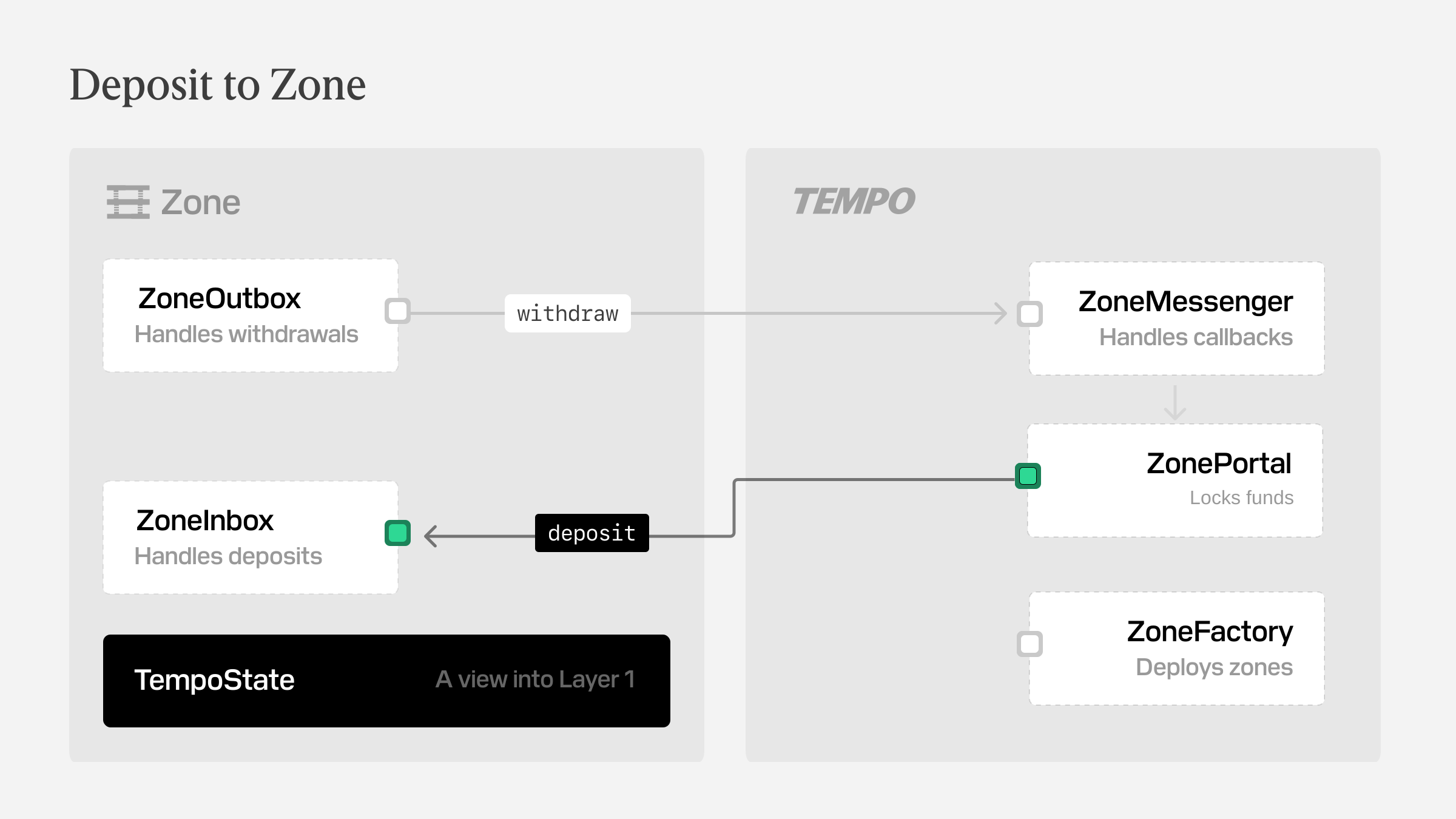
The deposit is accepted through `ZonePortal` on the public chain. You need private zone authorization to read the resulting zone balance, because those reads are only exposed to the authenticated account.
## Depositing pathUSD to Zone A
By the end of this guide you will have deposited `pathUSD` into `Zone A` and confirmed the balance update.
## Code examples
These snippets assume you already have a signed-in `rootClient` on the public chain and the usual token and zone constants in scope.
Use the plaintext flow when revealing the recipient and memo is acceptable. Use the encrypted flow when only the zone sequencer should be able to read those fields.
```ts
import { parseUnits } from 'viem'
import { Actions } from 'viem/tempo'
const depositAmount = parseUnits('100', 6)
const { receipt } = await Actions.zone.depositSync(rootClient, {
account: rootClient.account,
amount: depositAmount,
token: pathUsd,
zoneId: ZONE_A.id,
})
console.log(receipt.blockNumber)
```
```ts
import { parseUnits } from 'viem'
import { Actions } from 'viem/tempo'
const depositAmount = parseUnits('100', 6)
const { receipt } = await Actions.zone.encryptedDepositSync(rootClient, { // [!code focus]
account: rootClient.account,
amount: depositAmount,
token: pathUsd,
zoneId: ZONE_A.id,
})
console.log(receipt.blockNumber)
```
## What Happens During a Deposit
A zone deposit settles in two phases.
First, you submit a public Tempo transaction depositing to the `ZonePortal`. The Zone Portal contract locks the token, deducts the deposit fee in the same token, and records the net deposit in its deposit queue. Later, the zone sequencer processes that queue and credits the recipient inside the zone.
That means your public transaction receipt and your zone balance do not update at the same time. The Tempo transaction confirms that the deposit request was accepted. The zone balance changes only after the zone has processed that deposit, and it reflects the post-fee amount rather than the full amount you passed into `deposit(...)`.
:::warning
If you need a specific net amount inside the zone, account for the portal deposit fee first. The amount minted on the zone is `amount - depositFee`.
:::
export const inZoneBalances = [{ label: 'Zone A', token: Demo.pathUsd, zone: 6 }]
# Send tokens within a zone
:::info
Tempo Zones is still in early development and is available for testing purposes on Tempo Testnet only. While Tempo Zones are in this stage, expect breaking changes to the design and implementation. Do not use this in production. If you're interested in working with Tempo Labs as a design partner on the development of Tempo Zones, contact us at [tempo.xyz/contact](https://tempo.xyz/contact).
:::
Use this guide when you want to send `pathUSD` from one private `Zone A` balance to another without moving funds back through the public chain.
Zone tokens use the `TIP20` token interface, so once you authorize private reads for the session, an in-zone transfer looks much like a normal token transfer.
## Sending pathUSD within Zone A
By the end of this guide you will have sent `25 pathUSD` inside `Zone A` and confirmed the updated balance.
## Code example
This snippet assumes you already have a signed-in `rootClient` on the public chain and a derived `zoneAClient`.
It shows the core zone transfer path; use the demo above when you want to watch the updated zone balance.
```ts
import { parseUnits, type Address } from 'viem'
import { Actions } from 'viem/tempo'
const transferAmount = parseUnits('25', 6)
const demoRecipient = '0xbeefcafe54750903ac1c8909323af7beb21ea2cb' as Address
await zoneAClient.zone.signAuthorizationToken()
const { receipt } = await Actions.token.transferSync(zoneAClient, {
account: rootClient.account,
amount: transferAmount,
feeToken: pathUsd,
to: demoRecipient,
token: pathUsd,
})
```
export const crossZoneBalances = [
{ label: 'Zone A', token: Demo.pathUsd, zone: 6 },
{ label: 'Zone B', token: Demo.pathUsd, zone: 7 },
]
# Send tokens across zones
:::info
Tempo Zones is still in early development and is available for testing purposes on Tempo Testnet only. While Tempo Zones are in this stage, expect breaking changes to the design and implementation. Do not use this in production. If you're interested in working with Tempo Labs as a design partner on the development of Tempo Zones, contact us at [tempo.xyz/contact](https://tempo.xyz/contact).
:::
Use this guide when you want to move `pathUSD` from `Zone A` into `Zone B` without changing the token. The route still touches the public chain, so the confirmation happens in stages rather than as a single balance update.
The flow uses `swapAndDepositRouter` on the public chain in same-token mode: withdraw from `Zone A`, skip the swap because the asset stays as `pathUSD`, then deposit that `pathUSD` into `Zone B`.
## Sending pathUSD from Zone A into Zone B
By the end of this guide you will have sent **25 pathUSD** from **Zone A** into **Zone B** and confirmed the routed deposit.
## Code example
This snippet assumes you already have a signed-in `rootClient` on the public chain plus `zoneAClient`, and the shared token, router, and portal constants used throughout the zone guides.
It shows the core routed send submission path; use the demo above when you want to watch the routed deposit settle into Zone B.
```ts
import { encodeAbiParameters, parseUnits } from 'viem'
import { Actions } from 'viem/tempo'
const transferAmount = parseUnits('25', 6)
await zoneAClient.zone.signAuthorizationToken()
const callbackData = encodeAbiParameters(
[
{ type: 'bool' },
{ type: 'address' },
{ type: 'bytes32' },
{ type: 'uint128' },
],
[false, pathUsd, ZONE_B.portalAddress, rootClient.account.address, zeroBytes32, 0n],
)
const { receipt } = await Actions.zone.requestWithdrawalSync(zoneAClient, {
account: rootClient.account,
amount: transferAmount,
data: callbackData,
feeToken: pathUsd,
gas: routerCallbackGasLimit,
timeout: zoneRpcSyncTimeout,
to: swapAndDepositRouter,
token: pathUsd,
})
console.log(receipt.blockNumber)
```
## What this routed send does
The cross-zone transfer path looks like this: the token leaves `Zone A`, briefly lands on the public chain, and is deposited back into `Zone B` as the same asset.
1. Withdraws `pathUSD` from `Zone A` through `ZoneOutbox`.
2. Routes that withdrawal to `swapAndDepositRouter` on Tempo.
3. Skips the DEX swap because the input and output token are both `pathUSD`.
4. Deposits the routed `pathUSD` into `Zone B` through `ZonePortal`.
The target deposit still pays the normal portal deposit fee, so the amount that arrives in `Zone B` is the routed `pathUSD` minus that fee.
:::warning
If the routed withdrawal fails on Tempo—for example because the callback reverts or the target deposit cannot be completed—the amount is bounced back to the withdrawal's `fallbackRecipient` inside `Zone A`. The fee is still paid to the sequencer.
:::
export const swapZoneBalances = [
{ label: 'Zone A', token: Demo.pathUsd, zone: 6 },
{ label: 'Zone B', token: Demo.betaUsd, zone: 7 },
]
# Swap across zones
:::info
Tempo Zones is still in early development and is available for testing purposes on Tempo Testnet only. While Tempo Zones are in this stage, expect breaking changes to the design and implementation. Do not use this in production. If you're interested in working with Tempo Labs as a design partner on the development of Tempo Zones, contact us at [tempo.xyz/contact](https://tempo.xyz/contact).
:::
Use this guide when you want to leave `Zone A` with `pathUSD` and arrive in `Zone B` with `betaUSD` in one routed flow. The trade briefly touches the public chain, so the confirmation happens in stages rather than as a single balance update.
The route uses `swapAndDepositRouter` on the public chain: withdraw from `Zone A`, swap on the Stablecoin DEX, then deposit the output token into `Zone B`.
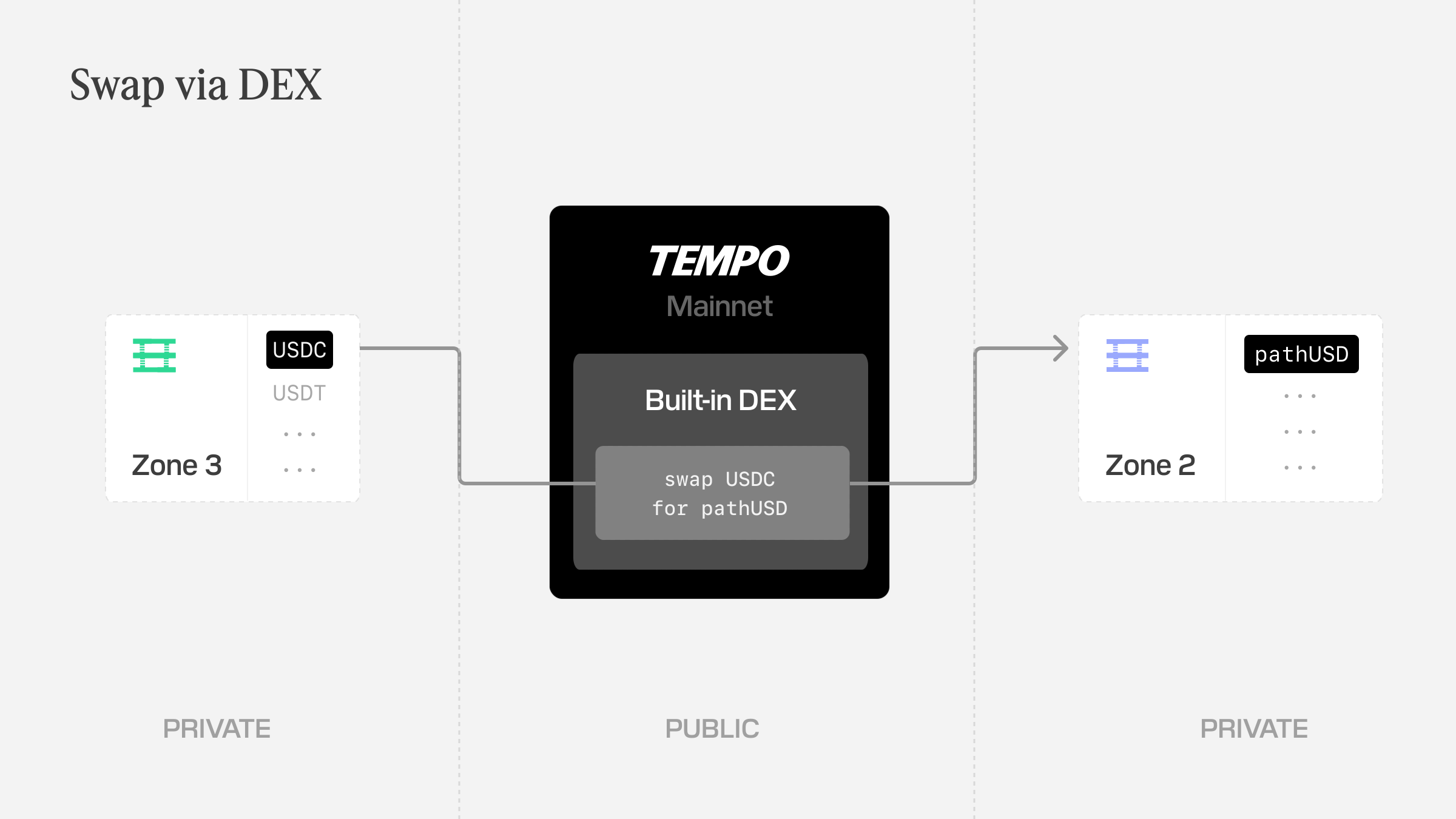
## Swapping pathUSD from Zone A into betaUSD on Zone B
By the end of this guide you will have swapped **25 pathUSD** from **Zone A** into **betaUSD** on **Zone B** and confirmed the routed deposit.
## What this swap does
1. Withdraws `pathUSD` from `Zone A`.
2. Routes it through the public chain and swaps it on the Stablecoin DEX.
3. Deposits the output token into `Zone B` through `ZonePortal`.
4. Lets you authorize private reads in `Zone B` so you can confirm the final `betaUSD` balance.
## Code example
This snippet assumes you already have a signed-in `rootClient` on the public chain plus `zoneAClient`, and the shared token, router, and portal constants used throughout the zone guides.
It shows the core routed swap submission path; use the demo above when you want to watch the output deposit settle into Zone B.
```ts
import { encodeAbiParameters, parseUnits } from 'viem'
import { Actions } from 'viem/tempo'
const swapAmount = parseUnits('25', 6)
await zoneAClient.zone.signAuthorizationToken()
const routedWithdrawalFee = await zoneAClient.zone.getWithdrawalFee({ gas: routerCallbackGasLimit })
const quotedBetaOut = await rootClient.dex.getSellQuote({
amountIn: swapAmount,
tokenIn: pathUsd,
tokenOut: betaUsd,
})
const minimumBetaOut = quotedBetaOut - quotedBetaOut / 100n
const callbackData = encodeAbiParameters(
[
{ type: 'bool' },
{ type: 'address' },
{ type: 'bytes32' },
{ type: 'uint128' },
],
[false, betaUsd, ZONE_B.portalAddress, rootClient.account.address, zeroBytes32, minimumBetaOut],
)
const { receipt } = await Actions.zone.requestWithdrawalSync(zoneAClient, {
account: rootClient.account,
amount: swapAmount,
data: callbackData,
feeToken: pathUsd,
gas: routerCallbackGasLimit,
timeout: zoneRpcSyncTimeout,
to: swapAndDepositRouter,
token: pathUsd,
})
console.log(receipt.blockNumber)
```
## How Routed Zone Swaps Settle
This guide's swap flow is asynchronous because the trade temporarily leaves the zone.
The source token is withdrawn through `ZoneOutbox`, transferred to `SwapAndDepositRouter` on Tempo, optionally swapped on the Stablecoin DEX, and then deposited back through a `ZonePortal` as the output token. That routed deposit pays the normal portal deposit fee, so the amount that arrives on the zone is the post-fee output.
:::warning
If the routed withdrawal fails on Tempo - for example because the swap fails, the transfer fails, the router callback reverts, or the target deposit cannot be completed—the amount is bounced back to the withdrawal's `fallbackRecipient` inside the source zone. The fee is still paid to the sequencer, so a failed routed swap still results in fees for the sender.
:::
export const withdrawalZoneBalances = [{ label: 'Zone A', token: Demo.pathUsd, zone: 6 }]
# Withdraw from a Zone
:::info
Tempo Zones is still in early development and is available for testing purposes on Tempo Testnet only. While Tempo Zones are in this stage, expect breaking changes to the design and implementation. Do not use this in production. If you're interested in working with Tempo Labs as a design partner on the development of Tempo Zones, contact us at [tempo.xyz/contact](https://tempo.xyz/contact).
:::
Use this guide when you want to move `pathUSD` out of `Zone A` and back to your public Tempo balance.
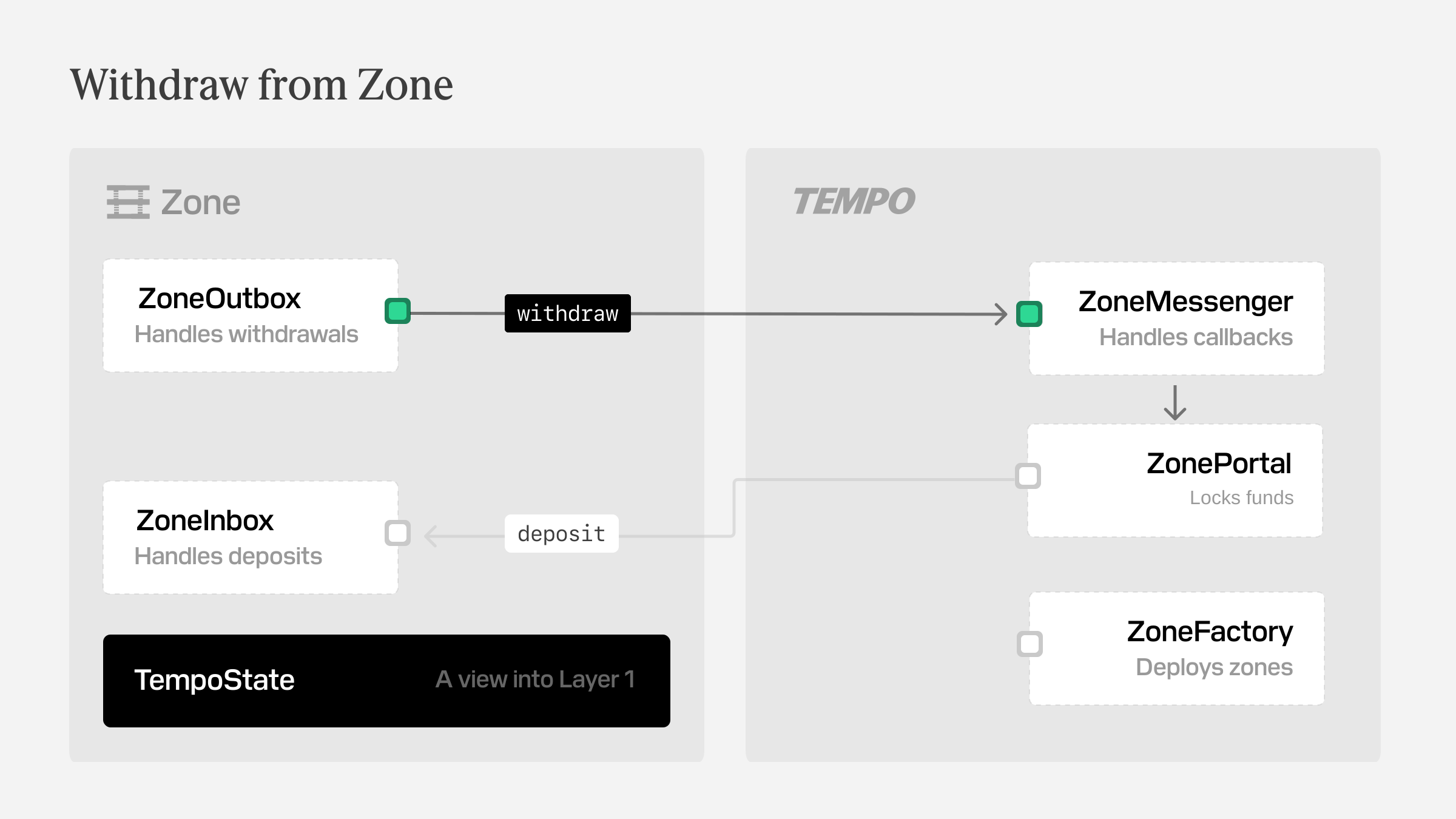
Direct withdrawals exit through `ZoneOutbox` on the zone chain. You submit the withdrawal request in the zone first, then wait for the public balance to increase after the batch settles.
## Withdrawing pathUSD from Zone A
By the end of this guide you will have withdrawn `pathUSD` from `Zone A` and confirmed the balance update on the public chain.
## Code examples
These snippets assume you already have a signed-in `rootClient` on the public chain, a derived `zoneAClient`, and the usual token constants in scope.
Use the plaintext flow when normal withdrawal visibility is fine. Use the authenticated flow when the sender details should only be revealed to the holder of a `revealTo` public key.
```ts
import { parseUnits } from 'viem'
import { Actions } from 'viem/tempo'
const withdrawalAmount = parseUnits('100', 6)
await zoneAClient.zone.signAuthorizationToken()
const { receipt } = await Actions.zone.requestWithdrawalSync(zoneAClient, {
account: rootClient.account,
feeToken: pathUsd,
amount: withdrawalAmount,
token: pathUsd,
to: rootClient.account.address,
})
console.log(receipt.blockNumber)
```
```ts
import { parseUnits } from 'viem'
import { Actions } from 'viem/tempo'
const withdrawalAmount = parseUnits('100', 6)
const revealTo = '0x031dc147467e8f106eb22850fef549dc74b8f6634aeac554ebdd4ab896b67cdf68' // [!code focus]
await zoneAClient.zone.signAuthorizationToken()
const { receipt } = await Actions.zone.requestVerifiableWithdrawalSync(zoneAClient, { // [!code focus]
account: rootClient.account,
feeToken: pathUsd,
amount: withdrawalAmount,
revealTo, // [!code focus]
token: pathUsd,
to: rootClient.account.address,
})
console.log(receipt.blockNumber)
```
## What a Direct Withdrawal Does
A direct withdrawal is the simplest way to exit a zone. You ask `ZoneOutbox` on the zone to burn the zone balance, include the request in the next withdrawal batch, and settle the amount back to a public Tempo address.
Like deposits, withdrawals settle in phases. The request is accepted on the zone first, and the public balance changes later when the sequencer submits and processes the corresponding batch on Tempo.
If Tempo-side processing fails, the withdrawal does not stay stuck in limbo. The protocol re-deposits the withdrawal amount back into the zone to the request's `fallbackRecipient`. The fee is still consumed.
:::warning
Even with `gasLimit: 0n`, a direct withdrawal can still fail on Tempo—for example because of token transfer or policy checks. In that case, the amount bounces back to `fallbackRecipient` on the zone instead of increasing the public balance.
:::
# Client quickstart
Polyfill `fetch` to handle `402` responses. Your existing code works unchanged — payments happen in the background.
::::steps
### Install MPP client dependencies
:::code-group
```bash [npm]
npm install mppx viem
```
```bash [pnpm]
pnpm add mppx viem
```
```bash [bun]
bun add mppx viem
```
:::
### Define the MPP payer account
```ts
import { privateKeyToAccount } from 'viem/accounts'
const account = privateKeyToAccount('0xabc…123')
```
:::tip
With Tempo, you can also use passkey or WebCrypto signing.
:::
### Create the MPP payment handler
Call `Mppx.create` at startup. This polyfills `fetch` to automatically handle `402` payment challenges.
```ts
import { privateKeyToAccount } from 'viem/accounts'
import { Mppx, tempo } from 'mppx/client'
const account = privateKeyToAccount('0xabc…123')
Mppx.create({
methods: [tempo({ account })],
})
```
:::tip
If you want to avoid polyfilling, use the bound `fetch` instead.
```ts
const mppx = Mppx.create({
polyfill: false,
methods: [tempo({ account })]
})
const response = await mppx.fetch('https://api.example.com/resource')
```
:::
### Request MPP-protected resources
Use `fetch`. Payment happens when a server returns `402`.
```ts
const response = await fetch('https://api.example.com/resource')
```
::::
## Advanced MPP client patterns
### Use MPP with Wagmi
You can inject a [Wagmi](https://wagmi.sh) connector into Mppx by passing the `getConnectorClient` function.
:::code-group
```ts [example.ts]
import { Mppx, tempo } from 'mppx/client'
import { getConnectorClient } from 'wagmi/actions'
import { config } from './config'
Mppx.create({
methods: [tempo({
getClient: (parameters) => getConnectorClient(config, parameters),
})],
})
```
```ts [config.ts]
import { createConfig, http } from 'wagmi'
import { tempoModerato } from 'viem/chains'
import { tempoWallet } from 'wagmi/connectors'
export const config = createConfig({
connectors: [tempoWallet()],
chains: [tempoModerato],
transports: {
[tempoModerato.id]: http(),
},
})
```
:::
### Use per-request payer accounts
Pass accounts on individual requests instead of at setup:
```ts
import { privateKeyToAccount } from 'viem/accounts'
import { Mppx, tempo } from 'mppx/client'
const mppx = Mppx.create({
polyfill: false,
methods: [tempo()]
})
const response = await mppx.fetch('https://api.example.com/resource', {
context: {
account: privateKeyToAccount('0xabc…123'),
}
})
```
### Handle MPP payments manually
Use `Mppx.create` for full control over the payment flow:
* Present payment UI before paying
* Implement custom retry logic
* Handle credentials manually
```ts
import { Mppx, tempo } from 'mppx/client'
import { privateKeyToAccount } from 'viem/accounts'
const mppx = Mppx.create({
polyfill: false,
methods: [tempo()],
})
const response = await fetch('https://api.example.com/resource')
if (response.status === 402) {
const credential = await mppx.createCredential(response, {
account: privateKeyToAccount('0x...'),
})
const paidResponse = await fetch('https://api.example.com/resource', {
headers: { Authorization: credential },
})
}
```
### Read MPP payment receipts
On success, the server returns a `Payment-Receipt` header:
```ts
import { Receipt } from 'mppx'
const response = await fetch('https://api.example.com/resource')
const receipt = Receipt.fromResponse(response)
console.log(receipt.status)
// success
console.log(receipt.reference)
// 0xtx789abc...
```
## Next steps for MPP clients
# Agent quickstart
The `tempo` CLI handles `402 Payment Required` responses the same way the client SDK does — but from a terminal, script, or AI agent, with zero integration code.
::::steps
### Install the Tempo CLI
```bash
curl -fsSL https://tempo.xyz/install | bash
```
### Log in to Tempo Wallet
```bash
tempo wallet login
tempo wallet whoami
```
`login` opens a browser flow that creates or connects a Tempo wallet. `whoami` confirms readiness and prints your address and balances.
:::tip
If your balance is zero, run `tempo wallet fund` before making requests.
:::
### Discover MPP services
```bash
tempo wallet services --search ai
tempo wallet services
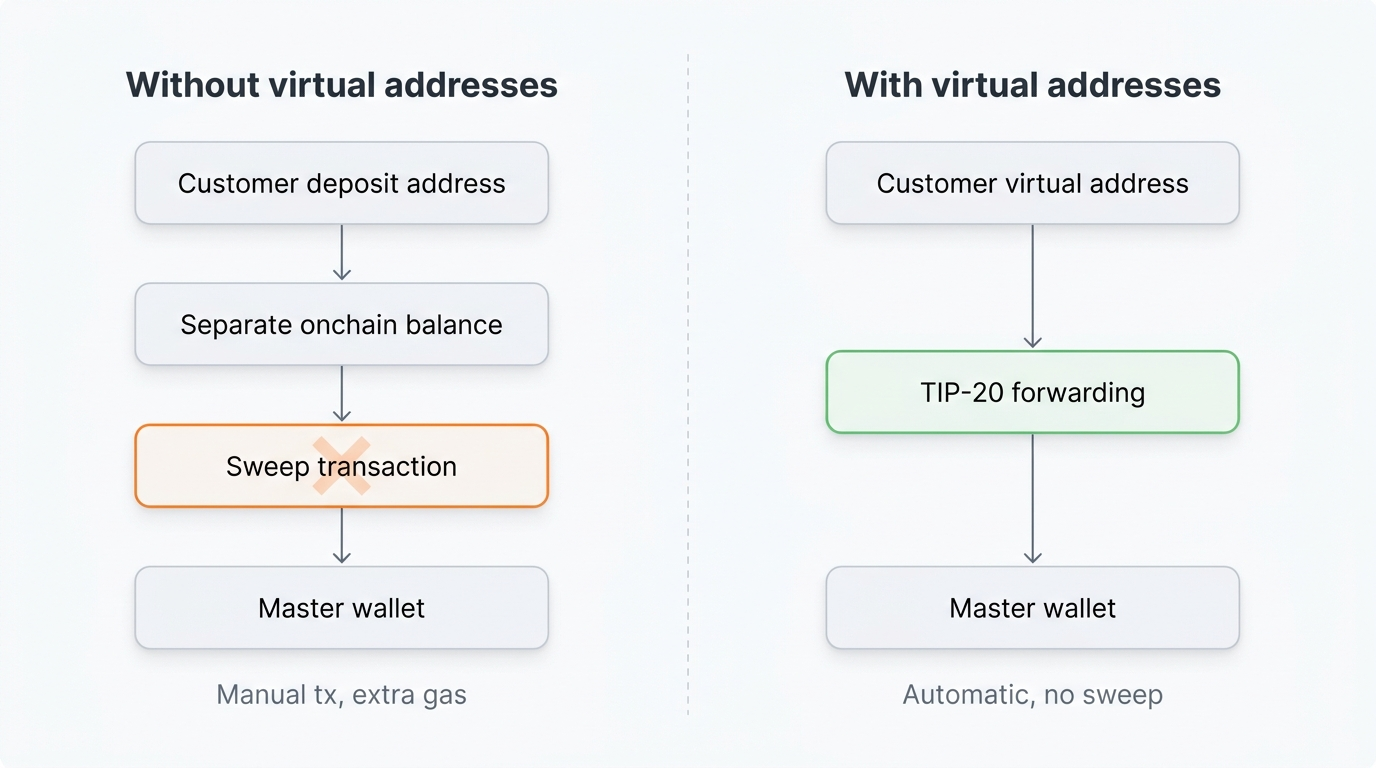
```
The service directory shows endpoint URLs, HTTP methods, pricing, and request schemas — everything you need to construct a valid request.
For MCP-capable agents, see [Discover MPP services](/docs/guide/machine-payments/discover-services) to connect the read-only services MCP server at `https://mpp.dev/mcp/services`.
### Preview the MPP request cost
```bash
tempo request --dry-run -X POST \
--json '{"prompt":"a sunset over the ocean"}' \
https://fal.mpp.tempo.xyz/fal-ai/flux/dev
```
`--dry-run` validates the request and shows the payment cost without spending.
### Make an MPP paid request
```bash
tempo request -X POST \
--json '{"prompt":"a sunset over the ocean"}' \
https://fal.mpp.tempo.xyz/fal-ai/flux/dev
```
`tempo request` sends the request, intercepts the `402` challenge, signs and submits the payment, and retries with the credential — all in one command.
::::
## Set up an AI agent
Paste this into your agent to install Tempo's wallet and request skills:
:::code-group
```txt [Claude Code]
Read https://tempo.xyz/SKILL.md and set up tempo
```
```txt [Amp]
Read https://tempo.xyz/SKILL.md and set up tempo
```
```txt [Codex]
Read https://tempo.xyz/SKILL.md and set up tempo
```
:::
Once installed, the agent can discover services, preview costs, and make paid requests within scoped spending limits.
## Next steps for agentic payments
# Discover MPP services
MPP service discovery helps agents find paid APIs before they make a request. Use it to rank services for a task, compare payment offers, inspect endpoint metadata, and build the next HTTP request.
Discovery is advisory. The runtime `402 Payment Required` challenge from the target service is always the authoritative source of current payment terms.
## Discovery surfaces
| Surface | URL | Use it for |
| --- | --- | --- |
| Web directory | [`https://mpp.dev/services`](https://mpp.dev/services) | Browse live services, categories, providers, endpoints, and examples. |
| Public catalog API | [`https://mpp.dev/api/services`](https://mpp.dev/api/services) | Fetch the JSON catalog directly from scripts, CLIs, or custom agents. |
| Services MCP | [`https://mpp.dev/mcp/services`](https://mpp.dev/mcp/services) | Let an MCP-capable agent rank services, inspect offers, get usage recipes, and fetch advisory OpenAPI summaries. |
| Protocol reference | [`https://mpp.dev/advanced/discovery`](https://mpp.dev/advanced/discovery) | Learn how service providers publish discovery metadata. |
Use this page as the agent-facing setup and recipe guide. Use `mpp.dev` for the live catalog, protocol reference, and service-provider discovery docs.
The services MCP server is read-only. It does not register services, execute payments, sign transactions, or proxy paid API calls.
## Connect over MCP
Use the Streamable HTTP endpoint:
```text
https://mpp.dev/mcp/services
```
:::code-group
```bash [Claude Code]
claude mcp add --transport http mpp-services https://mpp.dev/mcp/services
```
```bash [Codex]
codex mcp add mpp-services --url https://mpp.dev/mcp/services
```
```bash [Amp]
amp mcp add --transport http mpp-services https://mpp.dev/mcp/services
```
```json [Cursor]
{
"mcpServers": {
"mpp-services": {
"url": "https://mpp.dev/mcp/services"
}
}
}
```
```json [Manual]
{
"mcpServers": {
"mpp-services": {
"url": "https://mpp.dev/mcp/services"
}
}
}
```
:::
For AWS AgentCore, Bedrock agents, or another managed agent runtime, configure a remote MCP server with Streamable HTTP transport, no authentication, and the endpoint above.
## Smoke test with Inspector
Use the MCP Inspector when you want to verify the server from the same environment as your agent:
```bash
npx -y @modelcontextprotocol/inspector \
--cli \
--transport http \
--server-url https://mpp.dev/mcp/services
```
You can also smoke test with plain JSON-RPC:
```bash
curl https://mpp.dev/mcp/services \
-H 'content-type: application/json' \
-H 'accept: application/json, text/event-stream' \
--data '{
"jsonrpc": "2.0",
"id": 1,
"method": "initialize",
"params": {
"protocolVersion": "2025-06-18",
"capabilities": {},
"clientInfo": { "name": "my-agent", "version": "1.0.0" }
}
}'
```
Expected result: `serverInfo.name` is `mpp-services-mcp`, `instructions` mention that discovery is advisory, and `tools/list` includes `recommend_services`, `get_usage_recipe`, `search_offers`, and `get_catalog_status`.
## Recommended agent workflow
::::steps
### Rank services for the task
Start with `recommend_services` when the agent has a task but not a provider.
```json
{
"name": "recommend_services",
"arguments": {
"task": "send a transactional email from an agent",
"constraints": {
"category": "ai",
"method": "tempo",
"limit": 5
}
}
}
```
The response includes ranked services, matched task terms, reasons, top payment offers, and suggested next MCP calls.
### Get a usage recipe
After choosing a service, call `get_usage_recipe` to get payable endpoint candidates, target URLs, and the HTTP steps the agent should follow.
```json
{
"name": "get_usage_recipe",
"arguments": {
"service": "agentmail"
}
}
```
Use `route` when the agent already knows the endpoint:
```json
{
"name": "get_usage_recipe",
"arguments": {
"service": "agentmail",
"route": "POST /v0/inboxes"
}
}
```
### Inspect payment offers
Use `search_offers` or `get_offers` when the agent needs endpoint-level payment terms.
```json
{
"name": "search_offers",
"arguments": {
"query": "web search",
"category": "search",
"method": "tempo",
"dynamic": false,
"limit": 10
}
}
```
### Inspect the API shape
Fetch an advisory OpenAPI summary or registry-derived endpoint view before constructing the request body.
```json
{
"name": "get_openapi",
"arguments": {
"service": "agentmail"
}
}
```
### Make the paid request
Call the target service directly with an MPP-capable client such as [`tempo request`](/docs/cli/request). The service returns a `402` challenge if payment is required, and the client pays and retries.
```bash
tempo request -X POST \
--json '{"prompt":"a sunset over the ocean"}' \
https://fal.mpp.tempo.xyz/fal-ai/flux/dev
```
:::warning
The MCP server only helps with discovery and planning. The target service's runtime `402` challenge controls the final amount, currency, recipient, method, and credential flow.
:::
::::
## MPP service discovery example recipes
| Agent task | Start with | Then call |
| --- | --- | --- |
| Send email or create an agent inbox | `recommend_services` with `task: "send email from an agent"` | `get_usage_recipe` for the selected service, then `get_openapi` |
| Find an LLM or image model endpoint | `recommend_services` with `category: "ai"` | `search_offers` to compare fixed vs dynamic pricing |
| Search the web or crawl pages | `recommend_services` with `category: "search"` | `get_usage_recipe` for the chosen search provider |
| Map a `402` recipient back to services | `get_services_by_recipient` | `get_offers` and `get_service` for the matching provider |
| Build custom catalog analytics | `get_facets` and `get_catalog_status` | Fetch [`https://mpp.dev/api/services`](https://mpp.dev/api/services) directly |
## Agent prompts for MPP discovery
Give your agent a task and tell it to use the services MCP server first:
```txt
Use the mpp-services MCP server to find a paid API for sending email from an agent.
Rank options with recommend_services, inspect the best service with get_usage_recipe,
then tell me the target endpoint and what the runtime 402 challenge will confirm.
Do not execute payment.
```
```txt
Use the mpp-services MCP server to find AI model APIs that support Tempo payments.
Compare endpoint offers, prefer active services with OpenAPI metadata, and summarize
which route I should call with tempo request. Discovery is advisory.
```
```txt
Use the mpp-services MCP server to find web search or crawl APIs. Show the top three
services, why each matched, whether pricing is fixed or dynamic, and the next MCP
tool call you would make before constructing the HTTP request.
```
## MCP tools for MPP service discovery
| Tool | Purpose |
| --- | --- |
| `list_services` | List catalog services with id, name, URL, categories, integration, status, and description. |
| `search_services` | Search services by text query and exact filters. |
| `search_offers` | Search endpoint-level payment offers by task, method, currency, amount, recipient, and category. |
| `recommend_services` | Rank paid API services for a natural-language agent task with optional exact constraints. |
| `get_usage_recipe` | Turn a selected service into endpoint candidates, follow-up MCP calls, and target HTTP/`402` steps. |
| `get_facets` | Discover valid filter values and counts before narrowing a search. |
| `get_services_by_recipient` | Identify services that publish offers for a payment recipient. |
| `get_catalog_status` | Inspect catalog version, source URL, cache age, refresh time, and service count. |
| `get_service` | Fetch the full service record by id or name. |
| `get_offers` | Fetch payment offers for one service, optionally filtered by route. |
| `get_openapi` | Fetch a live OpenAPI summary when available, otherwise return the registry endpoint view. |
## Choosing a discovery surface
Use the web directory when a human is exploring the catalog. Use the public API when you are building your own service browser, CLI, or analytics job. Use the MCP server when an agent needs tool-callable discovery inside its planning loop.
For execution, call services directly with [`tempo request`](/docs/cli/request), the [MPP client quickstart](/docs/guide/machine-payments/client), or another MPP-capable client. Discovery narrows the choice; the service's runtime `402` challenge confirms the exact payment terms.
## Next steps for MPP service discovery
# Server quickstart
Plug MPP into any server framework to accept payments for protected resources. Use `mppx` middleware for your framework, or call `mppx/server` directly with the Fetch API.
## MPP server framework middleware
Use the framework-specific middleware from `mppx` to integrate payment into your server. Each middleware handles the `402` challenge/credential flow and attaches receipts automatically.
:::code-group
```ts [Next.js]
import { Mppx, tempo } from 'mppx/nextjs'
const mppx = Mppx.create({
methods: [tempo({
currency: '0x20c0000000000000000000000000000000000000',
recipient: '0xa726a1CD723409074DF9108A2187cfA19899aCF8',
})],
})
export const GET =
mppx.charge({ amount: '0.1' })
(() => Response.json({ data: '...' }))
```
```ts [Hono]
import { Hono } from 'hono'
import { Mppx, tempo } from 'mppx/hono'
const app = new Hono()
const mppx = Mppx.create({
methods: [tempo({
currency: '0x20c0000000000000000000000000000000000000',
recipient: '0xa726a1CD723409074DF9108A2187cfA19899aCF8',
})],
})
app.get(
'/resource',
mppx.charge({ amount: '0.1' }),
(c) => c.json({ data: '...' }),
)
```
```ts [Express]
import express from 'express'
import { Mppx, tempo } from 'mppx/express'
const app = express()
const mppx = Mppx.create({
methods: [tempo({
currency: '0x20c0000000000000000000000000000000000000',
recipient: '0xa726a1CD723409074DF9108A2187cfA19899aCF8',
})],
})
app.get(
'/resource',
mppx.charge({ amount: '0.1' }),
(req, res) => res.json({ data: '...' }))
```
:::
:::tip
You can override `currency` and `recipient` per call if different routes need different payment configurations.
```ts
mppx.charge({
amount: '0.1',
currency: '0x…',
recipient: '0x…',
})
```
:::
## Manual MPP server mode
If you prefer full control over the payment flow, use `mppx/server` directly with the Fetch API.
```ts
import { Mppx, tempo } from 'mppx/server'
const mppx = Mppx.create({
methods: [tempo({
currency: '0x20c0000000000000000000000000000000000000',
recipient: '0xa726a1CD723409074DF9108A2187cfA19899aCF8',
})],
})
export async function handler(request: Request) {
const response = await mppx.charge({ amount: '0.1' })(request)
// Payment required: send 402 response with challenge
if (response.status === 402) return response.challenge
// Payment verified: attach receipt and return resource
return response.withReceipt(Response.json({ data: '...' }))
}
```
:::info[Currency and recipient values]
`currency` is the TIP-20 token contract address — [`0x20c0…`](https://explore.tempo.xyz/address/0x20c0000000000000000000000000000000000000?live=false) is PathUSD on Tempo. `recipient` is the address that receives payment. See the [Tempo payment method](https://mpp.dev/payment-methods/tempo) for supported tokens.
:::
## MPP payment realm
The `realm` identifies your server in payment challenges and on-chain attribution. By default, mppx auto-detects it from environment variables (`HOSTNAME`, `VERCEL_URL`, etc.), but this can produce incorrect values in containerized environments where `HOSTNAME` is set to an internal identifier (e.g. a Kubernetes pod name).
Set `realm` explicitly to your public domain:
```ts
const mppx = Mppx.create({
realm: 'api.example.com', // [!code hl]
methods: [tempo({
currency: '0x20c0000000000000000000000000000000000000',
recipient: '0xa726a1CD723409074DF9108A2187cfA19899aCF8',
})],
})
```
You can also set the `MPP_REALM` environment variable instead of passing it in code.
## MPP push and pull modes
Tempo charges support two transaction submission modes, determined by the client:
* **`pull` mode (default)**: the client signs the transaction and sends the serialized transaction to the server. The server broadcasts it and verifies on-chain. This enables the server to sponsor gas fees via a `feePayer`.
* **`push` mode**: the client builds, signs, and broadcasts the transaction itself (for example, via a browser wallet). It sends the transaction hash to the server, which verifies the payment by fetching the receipt.
Your server handles both modes automatically — no configuration required. The server inspects the credential payload type (`transaction` for pull, `hash` for push) and verifies accordingly.
### MPP fee sponsorship
To sponsor gas fees for pull-mode clients, pass a `feePayer` account to `tempo()`:
```ts
import { Mppx, tempo } from 'mppx/server'
import { privateKeyToAccount } from 'viem/accounts'
const mppx = Mppx.create({
methods: [tempo({
currency: '0x20c0000000000000000000000000000000000000',
feePayer: privateKeyToAccount('0x…'),
recipient: '0xa726a1CD723409074DF9108A2187cfA19899aCF8',
})],
})
```
When a pull-mode client submits a signed transaction, the server co-signs with the fee payer account before broadcasting. Push-mode clients pay their own gas, so `feePayer` is ignored for those requests.
## Test your MPP server
After your server is running, test it with the `mppx` CLI:
```bash
# Create an account funded with testnet tokens
$ npx mppx account create
# Make a paid request
$ npx mppx /resource
```
:::tip
Use `npx mppx --inspect` to debug your server's Challenge response without making any payments.
:::
## Next steps for MPP servers
# Accept one-time payments
Build a payment-gated API that charges $0.01 per request using `mppx`. The server returns a random photo from [Picsum](https://picsum.photos) behind a paywall.
## One-time payment server setup
::::steps
### Install one-time payment dependencies
:::code-group
```bash [npm]
npm install mppx viem
```
```bash [pnpm]
pnpm add mppx viem
```
```bash [bun]
bun add mppx viem
```
:::
### Set up an `Mppx` charge instance
Set up an `Mppx` instance with the `tempo` method.
* `recipient` is the address where you receive payments.
* `currency` is the token address for payments (in this case, `pathUSD`).
```ts
import { Mppx, tempo } from 'mppx/server'
const mppx = Mppx.create({
methods: [tempo({
currency: '0x20c0000000000000000000000000000000000000',
recipient: '0xa726a1CD723409074DF9108A2187cfA19899aCF8',
})],
})
```
### Add a one-time payment route
Add payment verification using `mppx.charge` as route middleware. The handler only runs after payment is verified.
:::code-group
```ts [Next.js]
import { Mppx, tempo } from 'mppx/nextjs'
const mppx = Mppx.create({
methods: [tempo({
currency: '0x20c0000000000000000000000000000000000000',
recipient: '0xa726a1CD723409074DF9108A2187cfA19899aCF8',
})],
})
export const GET =
mppx.charge({ amount: '0.01', description: 'Random stock photo' })
(async () => {
const res = await fetch('https://picsum.photos/1024/1024')
return Response.json({ url: res.url })
})
```
```ts [Hono]
import { Hono } from 'hono'
import { Mppx, tempo } from 'mppx/hono'
const app = new Hono()
const mppx = Mppx.create({
methods: [tempo({
currency: '0x20c0000000000000000000000000000000000000',
recipient: '0xa726a1CD723409074DF9108A2187cfA19899aCF8',
})],
})
app.get(
'/api/photo',
mppx.charge({ amount: '0.01', description: 'Random stock photo' }),
async (c) => {
const res = await fetch('https://picsum.photos/1024/1024')
return c.json({ url: res.url })
},
)
```
```ts [Express]
import express from 'express'
import { Mppx, tempo } from 'mppx/express'
const app = express()
const mppx = Mppx.create({
methods: [tempo({
currency: '0x20c0000000000000000000000000000000000000',
recipient: '0xa726a1CD723409074DF9108A2187cfA19899aCF8',
})],
})
app.get(
'/api/photo',
mppx.charge({ amount: '0.01', description: 'Random stock photo' }),
async (req, res) => {
const response = await fetch('https://picsum.photos/1024/1024')
res.json({ url: response.url })
},
)
```
```ts [Fetch API]
import { Mppx, tempo } from 'mppx/server'
const mppx = Mppx.create({
methods: [tempo({
currency: '0x20c0000000000000000000000000000000000000',
recipient: '0xa726a1CD723409074DF9108A2187cfA19899aCF8',
})],
})
Bun.serve({
async fetch(request) {
const result = await mppx.charge({
amount: '0.01',
description: 'Random stock photo',
})(request)
if (result.status === 402) return result.challenge
const res = await fetch('https://picsum.photos/1024/1024')
return result.withReceipt(Response.json({ url: res.url }))
},
})
```
:::
### Test the one-time payment endpoint
```bash
# Create account funded with testnet tokens
$ npx mppx account create
# Make a paid request
$ npx mppx http://localhost:3000/api/photo
```
::::
## Next steps for one-time payments
# Accept pay-as-you-go payments
Use pay-as-you-go sessions when a customer should pay a small amount each time they use an API or service, without sending an on-chain transaction for every request.
This guide uses a simple photo API as the example: the client opens one `mppx` session, then pays $0.01 each time it asks for a photo. `mppx` is the library that manages the MPP session; [Picsum](https://picsum.photos) only supplies sample images for the demo.
:::info
Unlike [one-time payments](/docs/guide/machine-payments/one-time-payments), a session opens a payment channel once. Each later request is paid with a signed voucher that the server verifies off-chain.
:::
## How pay-as-you-go sessions work
>Tempo: (1) Deposit tokens
Tempo-->>Client: Channel created
Client->>Server: (2) Open credential
Note over Server: Verify on-chain deposit
Server-->>Client: 200 OK (session established)
loop Per request
Client->>Server: (3) Request + voucher
Note over Server: ecrecover only
Server-->>Client: 200 OK + Receipt
end
Note over Server: (4) Periodic settlement
Server->>Tempo: settle(channelId, voucher)
Client->>Server: (5) Close
Server->>Tempo: close(channelId, voucher)
Tempo-->>Client: Refund remaining deposit
`}
/>
1. **Open** — Client deposits funds into an on-chain reserve contract, creating a payment channel
2. **Session** — Client signs EIP-712 vouchers with increasing cumulative amounts as service is consumed
3. **Top up** — If the channel runs low, the client deposits additional tokens without closing the channel
4. **Close** — Either party closes the channel, settling the final balance on-chain and refunding unused deposit
:::info[T7 payment-channel savings]
The [T7 network upgrade](/docs/protocol/upgrades/t7) can make repeated sessions cheaper for the same payer. When a payer closes or withdraws a finished channel, Tempo records a channel storage credit for that payer. If the same payer opens another channel later, Tempo can use that payer's credit. Other payers cannot use it.
:::
The channel-reserve gas snapshot for the credited reopen path is:
| Channel reserve snapshot | T7 gas |
|--------------------------|-------:|
| `open_new_channel_with_storage_credit` | 60,225 |
This is a call-level gas number and excludes separate approval gas. It matters most for session services where the same payer opens, closes or withdraws, and later opens channels again.
## Pay-as-you-go server setup
::::steps
### Install pay-as-you-go dependencies
:::code-group
```bash [npm]
npm install mppx viem
```
```bash [pnpm]
pnpm add mppx viem
```
```bash [bun]
bun add mppx viem
```
:::
### Set up an `Mppx` session instance
Set up an `Mppx` instance with the `tempo` method.
* `recipient` is the address where you receive payments.
* `currency` is the token address for payments (in this case, `pathUSD`).
```ts
import { Mppx, tempo } from 'mppx/server'
const mppx = Mppx.create({
methods: [tempo({
currency: '0x20c0000000000000000000000000000000000000',
recipient: '0xa726a1CD723409074DF9108A2187cfA19899aCF8',
})],
})
```
### Add a pay-as-you-go route
Add payment verification using `mppx.session` as route middleware. The handler only runs after payment is verified.
:::code-group
```ts [Next.js]
import { Mppx, tempo } from 'mppx/nextjs'
const mppx = Mppx.create({
methods: [tempo({
currency: '0x20c0000000000000000000000000000000000000',
recipient: '0xa726a1CD723409074DF9108A2187cfA19899aCF8',
})],
})
export const GET =
mppx.session({ amount: '0.01', unitType: 'photo' })
(async () => {
const res = await fetch('https://picsum.photos/200/200')
return Response.json({ url: res.url })
})
```
```ts [Hono]
import { Hono } from 'hono'
import { Mppx, tempo } from 'mppx/hono'
const app = new Hono()
const mppx = Mppx.create({
methods: [tempo({
currency: '0x20c0000000000000000000000000000000000000',
recipient: '0xa726a1CD723409074DF9108A2187cfA19899aCF8',
})],
})
app.get(
'/api/sessions/photo',
mppx.session({ amount: '0.01', unitType: 'photo' }),
async (c) => {
const res = await fetch('https://picsum.photos/200/200')
return c.json({ url: res.url })
},
)
```
```ts [Express]
import express from 'express'
import { Mppx, tempo } from 'mppx/express'
const app = express()
const mppx = Mppx.create({
methods: [tempo({
currency: '0x20c0000000000000000000000000000000000000',
recipient: '0xa726a1CD723409074DF9108A2187cfA19899aCF8',
})],
})
app.get(
'/api/sessions/photo',
mppx.session({ amount: '0.01', unitType: 'photo' }),
async (req, res) => {
const response = await fetch('https://picsum.photos/200/200')
res.json({ url: response.url })
},
)
```
```ts [Fetch API]
import { Mppx, tempo } from 'mppx/server'
const mppx = Mppx.create({
methods: [tempo({
currency: '0x20c0000000000000000000000000000000000000',
recipient: '0xa726a1CD723409074DF9108A2187cfA19899aCF8',
})],
})
Bun.serve({
async fetch(request) {
const result = await mppx.session({
amount: '0.01',
unitType: 'photo',
})(request)
if (result.status === 402) return result.challenge
const res = await fetch('https://picsum.photos/200/200')
return result.withReceipt(Response.json({ url: res.url }))
},
})
```
:::
### Test the pay-as-you-go endpoint
```bash
# Create account funded with testnet tokens
$ npx mppx account create
# Make a paid request
$ npx mppx http://localhost:3000/api/sessions/photo
```
::::
## Pay-as-you-go client setup
When using sessions from a client, set `maxDeposit` to enable automatic channel management. This is the maximum amount of tokens the client locks into the payment channel's reserve contract. Any unspent deposit is refunded when the channel closes.
```ts
import { Mppx, tempo } from 'mppx/client'
import { privateKeyToAccount } from 'viem/accounts'
const mppx = Mppx.create({
methods: [tempo({
account: privateKeyToAccount('0x...'),
maxDeposit: '1', // Lock up to 1 pathUSD per channel
})],
})
// Each fetch automatically manages the session lifecycle:
// 1st request: opens channel on-chain, sends initial voucher
// 2nd+ requests: sends off-chain vouchers (no on-chain tx)
const res = await fetch('http://localhost:3000/api/sessions/photo')
```
* **`maxDeposit: '1'`** — Locks up to 1 pathUSD into the payment channel. At $0.01/photo, this covers up to 100 requests before the channel runs out.
* The client handles the full session lifecycle automatically: channel open, voucher signing, and retry after `402` responses.
* If the server sets `suggestedDeposit`, the client uses `min(suggestedDeposit, maxDeposit)`.
## Next steps for pay-as-you-go payments
# Accept streamed payments
Build a payment-gated API that streams content word-by-word and charges $0.001 per word using `mppx` sessions with Server-Sent Events (SSE).
:::info
Streamed payments extend [pay-as-you-go sessions](/docs/guide/machine-payments/pay-as-you-go) with SSE. The server charges per token as content streams — if the channel balance runs out mid-stream, the client automatically sends a new voucher and the stream resumes.
:::
## How streamed payment sessions work
>Tempo: (1) Deposit tokens
Tempo-->>Client: Channel created
Client->>Server: (2) Open credential
Note over Server: Verify on-chain deposit
Server-->>Client: 200 OK (SSE stream begins)
loop Per token streamed
Server-->>Client: (3) SSE data event + charge
Note over Server: ecrecover only
end
alt Channel balance low
Server-->>Client: (4) payment-need-voucher event
Client->>Server: New voucher
Note over Server: Resume streaming
end
Note over Server: (5) Periodic settlement
Server->>Tempo: settle(channelId, voucher)
Client->>Server: (6) Close
Server->>Tempo: close(channelId, voucher)
Tempo-->>Client: Refund remaining deposit
`}
/>
1. **Open** — Client deposits funds into an on-chain reserve contract, creating a payment channel
2. **Stream** — Server streams SSE events, calling `stream.charge()` per token to increment the voucher amount
3. **Top up** — If the channel runs low mid-stream, the server emits a `payment-need-voucher` event and the client automatically signs a new voucher
4. **Close** — Either party closes the channel, settling the final balance on-chain and refunding unused deposit
## Streamed payment server setup
::::steps
### Install streamed payment dependencies
:::code-group
```bash [npm]
npm install mppx viem
```
```bash [pnpm]
pnpm add mppx viem
```
```bash [bun]
bun add mppx viem
```
:::
### Set up an `Mppx` streaming instance
Set up an `Mppx` instance with `sse: true` to enable SSE support on the session method.
```ts
import { Mppx, tempo } from 'mppx/server'
const mppx = Mppx.create({
methods: [tempo({
currency: '0x20c0000000000000000000000000000000000000',
recipient: '0xa726a1CD723409074DF9108A2187cfA19899aCF8',
sse: true,
})],
})
```
### Add a streamed payment route
The handler returns an async generator — each yielded value becomes one SSE event and is charged one tick ($0.001). If the channel balance runs out mid-stream, the server emits `event: payment-need-voucher` and pauses until the client sends a new voucher.
:::code-group
```ts [Next.js]
import { Mppx, tempo } from 'mppx/nextjs'
const mppx = Mppx.create({
methods: [tempo({
currency: '0x20c0000000000000000000000000000000000000',
recipient: '0xa726a1CD723409074DF9108A2187cfA19899aCF8',
sse: true,
})],
})
const poem = {
title: 'The Road Not Taken',
author: 'Robert Frost',
lines: [
'Two roads diverged in a yellow wood,',
'And sorry I could not travel both',
'And be one traveler, long I stood',
'And looked down one as far as I could',
'To where it bent in the undergrowth;',
],
}
export const GET =
mppx.session({ amount: '0.001', unitType: 'word' })
(async () => {
const words = poem.lines.flatMap((line) => [...line.split(' '), '\\n'])
return async function* (stream) {
yield JSON.stringify({ title: poem.title, author: poem.author })
for (const word of words) {
await stream.charge()
yield word
}
}
})
```
```ts [Hono]
import { Hono } from 'hono'
import { Mppx, tempo } from 'mppx/hono'
const app = new Hono()
const mppx = Mppx.create({
methods: [tempo({
currency: '0x20c0000000000000000000000000000000000000',
recipient: '0xa726a1CD723409074DF9108A2187cfA19899aCF8',
sse: true,
})],
})
const poem = {
title: 'The Road Not Taken',
author: 'Robert Frost',
lines: [
'Two roads diverged in a yellow wood,',
'And sorry I could not travel both',
'And be one traveler, long I stood',
'And looked down one as far as I could',
'To where it bent in the undergrowth;',
],
}
app.get(
'/api/sessions/poem',
mppx.session({ amount: '0.001', unitType: 'word' }),
async (c) => {
const words = poem.lines.flatMap((line) => [...line.split(' '), '\\n'])
return async function* (stream) {
yield JSON.stringify({ title: poem.title, author: poem.author })
for (const word of words) {
await stream.charge()
yield word
}
}
},
)
```
```ts [Express]
import express from 'express'
import { Mppx, tempo } from 'mppx/express'
const app = express()
const mppx = Mppx.create({
methods: [tempo({
currency: '0x20c0000000000000000000000000000000000000',
recipient: '0xa726a1CD723409074DF9108A2187cfA19899aCF8',
sse: true,
})],
})
const poem = {
title: 'The Road Not Taken',
author: 'Robert Frost',
lines: [
'Two roads diverged in a yellow wood,',
'And sorry I could not travel both',
'And be one traveler, long I stood',
'And looked down one as far as I could',
'To where it bent in the undergrowth;',
],
}
app.get(
'/api/sessions/poem',
mppx.session({ amount: '0.001', unitType: 'word' }),
async (req, res) => {
const words = poem.lines.flatMap((line) => [...line.split(' '), '\\n'])
return async function* (stream) {
yield JSON.stringify({ title: poem.title, author: poem.author })
for (const word of words) {
await stream.charge()
yield word
}
}
},
)
```
```ts [Fetch API]
import { Mppx, tempo } from 'mppx/server'
const mppx = Mppx.create({
methods: [tempo({
currency: '0x20c0000000000000000000000000000000000000',
recipient: '0xa726a1CD723409074DF9108A2187cfA19899aCF8',
sse: true,
})],
})
const poem = {
title: 'The Road Not Taken',
author: 'Robert Frost',
lines: [
'Two roads diverged in a yellow wood,',
'And sorry I could not travel both',
'And be one traveler, long I stood',
'And looked down one as far as I could',
'To where it bent in the undergrowth;',
],
}
Bun.serve({
async fetch(request) {
const result = await mppx.session({
amount: '0.001',
unitType: 'word',
})(request)
if (result.status === 402) return result.challenge
const words = poem.lines.flatMap((line) => [...line.split(' '), '\\n'])
return result.withReceipt(async function* (stream) {
yield JSON.stringify({ title: poem.title, author: poem.author })
for (const word of words) {
await stream.charge()
yield word
}
})
},
})
```
:::
### Test the streamed payment endpoint
```bash
# Create account funded with testnet tokens
$ npx mppx account create
# Stream a paid poem
$ npx mppx http://localhost:3000/api/sessions/poem
```
::::
## Streamed payment client setup
Use `tempo.session()` from `mppx/client` to create a session manager. The `.sse()` method connects to the SSE endpoint and handles voucher renewal automatically — if the server requests a new voucher mid-stream, the client signs and sends one without interrupting the stream.
```ts
import { tempo } from 'mppx/client'
import { privateKeyToAccount } from 'viem/accounts'
const session = tempo.session({
account: privateKeyToAccount('0x...'),
maxDeposit: '1', // Lock up to 1 pathUSD per channel
})
// .sse() returns an async iterable of SSE data payloads
const stream = await session.sse('http://localhost:3000/api/sessions/poem')
for await (const word of stream) {
process.stdout.write(word + ' ')
}
```
* **`tempo.session()`** — Creates a session manager that handles the full channel lifecycle: open, voucher signing, and close.
* **`.sse()`** — Connects to an SSE endpoint. Automatically sends new vouchers when the server emits `payment-need-voucher` events.
* **`maxDeposit: '1'`** — Locks up to 1 pathUSD. At $0.001/word, this covers ~1,000 words before the channel needs a top-up.
## Next steps for streamed payments
# Monetize your API with agentic payments
Accept stablecoin payments for any HTTP endpoint. No signup flows, no billing accounts, no API key management. Your users — agents, apps, or humans — pay per request with stablecoins on Tempo, and you get paid instantly.
## The API monetization problem
Monetizing an API today means building a billing system: user registration, API key provisioning, usage metering, invoicing, and payment collection. For most developers, the billing infrastructure is harder to build than the API itself. Stripe and similar tools help, but still require account creation and credit card onboarding from every customer.
## How MPP adds agentic API payments
With MPP, you add a few lines of code to your HTTP endpoint and it becomes payment-gated. The server returns a `402` Challenge with the price, the client pays with a stablecoin transfer, and the server delivers the response with a `Receipt`. Settlement happens in ~500ms on Tempo.
**Two billing models** are available out of the box:
* **Tempo Charge** — One-time payment per request. Best for single API calls, content access, or discrete operations.
* **Tempo Session** — Continuous pay-as-you-go via payment channels. Best for LLM APIs, metered services, or streamed responses.
## Add API payments in 5 minutes
::::steps
### Install the MPP SDK
:::code-group
```bash [npm]
npm install mppx viem
```
```bash [pnpm]
pnpm add mppx viem
```
```bash [bun]
bun add mppx viem
```
:::
### Add MPP payment gating
```ts
import { Mppx, tempo } from 'mppx/server'
const mppx = Mppx.create({
methods: [tempo({
currency: '0x20c0000000000000000000000000000000000000',
recipient: '0xYOUR_ADDRESS_HERE',
})],
})
export async function handler(request: Request) {
const result = await mppx.charge({
amount: '0.01',
description: 'API call',
})(request)
if (result.status === 402) return result.challenge
// Your API logic here
return result.withReceipt(Response.json({ data: '...' }))
}
```
### Test the paid API
```bash
npx mppx account create
npx mppx http://localhost:3000/api/endpoint
```
::::
## Why Tempo for API monetization
* **~500ms settlement** — Fast enough for synchronous request/response flows
* **Sub-cent fees** — Charge $0.001 per request and still be profitable
* **No customer onboarding** — Clients pay with a wallet, no signup required
* **Fee sponsorship** — Cover gas fees for your customers so they only need stablecoins
* **Any stablecoin** — Accept pathUSD, USDC.e, or any TIP-20 token
## Next steps for API monetization
# Pay for AI models per request
Give your agents access to any LLM — OpenAI, Anthropic, Gemini, DeepSeek, Mistral, and more — without managing API keys, billing accounts, or usage limits. MPP lets agents pay per token with stablecoins on Tempo, and the model provider gets paid instantly.
## The AI model payment problem
Every LLM provider requires a separate API key, billing account, and credit card on file. For a single developer this is manageable. For a fleet of autonomous agents, it's a bottleneck: each agent needs its own credentials, each provider has different billing cycles, and rate limits are tied to account tiers rather than willingness to pay.
## How MPP enables paid AI model access
With MPP, your agent holds a stablecoin balance on Tempo and pays per request. No signup, no API keys, no invoices. The agent discovers the model's price via the `402` Challenge, pays with a stablecoin transfer or session voucher, and gets the response — all in a single HTTP round-trip.
**Tempo Sessions** are ideal for LLM access. The agent opens a payment channel once, then signs off-chain vouchers for each chunk of tokens received. The model provider verifies vouchers in microseconds — no blockchain calls during inference — and settles in batch later. This makes per-token billing practical without adding latency.
## AI model services you can pay for
| Provider | Models | Service URL |
|---|---|---|
| OpenAI | GPT-4o, o3, DALL·E, Whisper | `openai.mpp.tempo.xyz` |
| Anthropic | Claude Sonnet, Opus, Haiku | `anthropic.mpp.tempo.xyz` |
| Google Gemini | Gemini, Veo video, image gen | `gemini.mpp.tempo.xyz` |
| [DeepSeek](https://deepseek.mpp.paywithlocus.com) | DeepSeek-V3, R1 reasoning | `deepseek.mpp.paywithlocus.com` |
| [Mistral](https://mistral.mpp.paywithlocus.com) | Large, Codestral, Pixtral | `mistral.mpp.paywithlocus.com` |
| OpenRouter | 100+ models, unified API | `openrouter.mpp.tempo.xyz` |
| Grok | xAI chat, search, code exec | `grok.mpp.tempo.xyz` |
| [Perplexity](https://perplexity.mpp.paywithlocus.com) | Sonar search + grounding | `perplexity.mpp.paywithlocus.com` |
## Try paid AI model access with Tempo
```bash
# Install Tempo CLI + wallet
curl -L https://tempo.xyz/install | bash && tempo add request && tempo wallet login
# Call OpenAI with pay-per-request — no API key needed
tempo request openai.mpp.tempo.xyz/v1/chat/completions \
-d '{"model": "gpt-4o", "messages": [{"role": "user", "content": "Hello"}]}'
```
## Prompt your agent to buy AI model access
```
Use openai.mpp.tempo.xyz to call GPT-4o via Tempo.
Pay per request with stablecoins — no API key needed.
```
## Next steps for AI model payments
# Pay for web search and research
Give your agents access to web search, content extraction, and multi-hop research — pay per query with stablecoins on Tempo. No API keys, no monthly plans, no usage caps.
## The web search payment problem
Agents that research, summarize, or fact-check need reliable web search. But search APIs require developer accounts, billing setups, and API keys for every provider. Rate limits are tied to pricing tiers, and switching between providers means managing multiple integrations.
## How MPP enables paid web research
With MPP, your agent pays per search query or page extraction in a single HTTP request. The agent discovers the price via the `402` Challenge, pays with a stablecoin transfer, and gets results — no signup required. Switch between search providers by changing the URL.
**Tempo Charge** works well here: each search query is an independent request with a known price. The agent signs a TIP-20 transfer, the provider verifies it in ~500ms, and returns the results.
## Web research services you can pay for
| Provider | Capabilities | Service URL |
|---|---|---|
| [Parallel](https://parallelmpp.dev) | Web search, page extraction, multi-hop research | `parallelmpp.dev` |
| Exa | AI-powered search, content retrieval, answers | `exa.mpp.tempo.xyz` |
| [Brave](https://brave.mpp.paywithlocus.com) | Web, news, images, videos, AI answers | `brave.mpp.paywithlocus.com` |
| Firecrawl | Web scraping, crawling, structured extraction | `firecrawl.mpp.tempo.xyz` |
| [Diffbot](https://diffbot.mpp.paywithlocus.com) | Article, product, and discussion extraction | `diffbot.mpp.paywithlocus.com` |
| Oxylabs | Web scraping with geo-targeting and JS rendering | `oxylabs.mpp.tempo.xyz` |
## Try Parallel with Tempo payments
```bash
# Install Tempo CLI + wallet
curl -L https://tempo.xyz/install | bash && tempo add request && tempo wallet login
# Search the web via Parallel
tempo request parallelmpp.dev/search \
-d '{"query": "machine payments protocol"}'
```
## Prompt your agent to buy web research
```
Use parallelmpp.dev to search the web via Tempo.
Pay per query with stablecoins — no API key needed.
```
## Next steps for web research payments
# Pay for image, video, and audio generation
Let your agents generate images, videos, audio, and speech — pay per generation with stablecoins on Tempo. Access 600+ models through fal.ai, or use OpenAI, Gemini, and Deepgram directly.
## The media generation payment problem
Media generation APIs require separate accounts and API keys per provider. Costs vary wildly by model and resolution, making budgeting unpredictable. Agents that need to generate a product image, a voiceover, and a video clip in a single workflow must juggle three sets of credentials and billing systems.
## How MPP enables paid media generation
With MPP, your agent pays per generation using stablecoins on Tempo. The price is declared upfront in the `402` Challenge — the agent knows exactly what it will pay before generating anything. One wallet, one balance, any provider.
**Tempo Charge** is ideal for media generation: each request is a discrete unit with a known cost. The agent signs a TIP-20 transfer, the provider verifies it in ~500ms, and returns the generated media.
## Media generation services you can pay for
| Provider | Capabilities | Service URL |
|---|---|---|
| fal.ai | 600+ models: Flux, SD, Recraft, Grok | `fal.mpp.tempo.xyz` |
| OpenAI | DALL·E image generation, Whisper audio | `openai.mpp.tempo.xyz` |
| Google Gemini | Veo video, Nano Banana image gen | `gemini.mpp.tempo.xyz` |
| [Deepgram](https://deepgram.mpp.paywithlocus.com) | Nova-3 transcription, Aura-2 TTS | `deepgram.mpp.paywithlocus.com` |
| [Mathpix](https://mathpix.mpp.paywithlocus.com) | OCR for math, science docs, LaTeX | `mathpix.mpp.paywithlocus.com` |
## Try fal.ai with Tempo payments
```bash
# Install Tempo CLI + wallet
curl -L https://tempo.xyz/install | bash && tempo add request && tempo wallet login
# Generate an image via fal.ai
tempo request fal.mpp.tempo.xyz/fal-ai/flux/dev \
-d '{"prompt": "a futuristic city skyline at sunset"}'
```
## Prompt your agent to buy media generation
```
Use fal.mpp.tempo.xyz to generate images via Tempo.
Pay per image with stablecoins — no API key needed.
```
## Next steps for media generation payments
# Pay for browser automation and web scraping
Let your agents run headless browser sessions, solve CAPTCHAs, and scrape web pages with geo-targeting — pay per task with stablecoins on Tempo. No API keys, no browser infrastructure to manage.
## The browser automation payment problem
Browser automation at scale requires managing headless browser infrastructure, proxy networks, and CAPTCHA-solving services — each with separate accounts, API keys, and billing. Agents that need to interact with the web face a fragmented stack of tools, each requiring its own integration.
## How MPP enables paid browser automation
With MPP, your agent pays per browser session, per page scrape, or per CAPTCHA solve using stablecoins on Tempo. The agent sends a request, the service returns its price via a `402` Challenge, the agent pays, and the work is done. No infrastructure setup, no API key management.
## Browser automation services you can pay for
| Provider | Capabilities | Service URL |
|---|---|---|
| [Browserbase](https://mpp.browserbase.com) | Headless browser sessions, web search, page fetching | `mpp.browserbase.com` |
| 2Captcha | reCAPTCHA, Turnstile, hCaptcha, image captchas | `twocaptcha.mpp.tempo.xyz` |
| Oxylabs | Web scraping with geo-targeting and JS rendering | `oxylabs.mpp.tempo.xyz` |
| Firecrawl | Web crawling and structured data extraction | `firecrawl.mpp.tempo.xyz` |
| [Diffbot](https://diffbot.mpp.paywithlocus.com) | Article, product, and discussion extraction | `diffbot.mpp.paywithlocus.com` |
## Try Oxylabs with Tempo payments
```bash
# Install Tempo CLI + wallet
curl -L https://tempo.xyz/install | bash && tempo add request && tempo wallet login
# Scrape a page via Oxylabs
tempo request oxylabs.mpp.tempo.xyz/v1/queries \
-d '{"source": "universal", "url": "https://example.com"}'
```
## Prompt your agent to buy browser automation
```
Use mpp.browserbase.com to run headless browser sessions via Tempo.
Pay per session with stablecoins — no account needed.
```
## Next steps for browser automation payments
# Pay for compute and code execution
Let your agents run code in sandboxed environments, deploy containers, and access GPU compute — pay per use with stablecoins on Tempo. No cloud accounts, no billing dashboards, no credit cards.
## The compute payment problem
Cloud compute requires account creation, billing setup, and credential management before running a single line of code. For agents that need to execute code snippets, deploy temporary services, or run GPU workloads, the overhead of provisioning cloud accounts is disproportionate to the task. Sandbox environments like CodeSandbox or Replit target human developers, not programmatic access.
## How MPP enables paid code execution
With MPP, your agent pays per execution or per compute-minute with stablecoins on Tempo. Submit code, pay, get results — all in one HTTP request. No accounts, no API keys, no cloud provider onboarding.
**Tempo Charge** works well for discrete tasks like running a code snippet. For longer-running workloads or metered compute, **Tempo Sessions** let the agent pay incrementally as resources are consumed.
## Compute services you can pay for
| Provider | Capabilities | Service URL |
|---|---|---|
| Modal | Serverless GPU compute, AI/ML workloads | `modal.mpp.tempo.xyz` |
| [Judge0](https://judge0.mpp.paywithlocus.com) | Code execution in 60+ languages, sandboxed | `judge0.mpp.paywithlocus.com` |
| [Build With Locus](https://mpp.buildwithlocus.com) | Containers, Postgres, Redis, custom domains | `mpp.buildwithlocus.com` |
## Try Judge0 with Tempo payments
```bash
# Install Tempo CLI + wallet
curl -L https://tempo.xyz/install | bash && tempo add request && tempo wallet login
# Execute Python code via Judge0
tempo request judge0.mpp.paywithlocus.com/submissions \
-d '{"source_code": "print(42)", "language_id": 71}'
```
## Prompt your agent to buy code execution
```
Use judge0.mpp.paywithlocus.com to run Python code via Tempo.
Pay per execution with stablecoins — no account needed.
```
## Next steps for compute payments
# Pay for object storage and Git repos
Let your agents store files, upload objects, and create Git repositories — pay per operation with stablecoins on Tempo. No AWS accounts, no access keys, no billing dashboards.
## The storage payment problem
Cloud storage requires account creation, IAM configuration, and billing setup before an agent can store a single byte. Even "simple" object storage like S3 requires access keys, bucket policies, and region selection. For agents that need temporary or task-specific storage, the overhead of cloud account provisioning is disproportionate to the need.
## How MPP enables paid object storage
With MPP, your agent pays per upload or per repo creation using stablecoins. The storage service publishes its pricing via the `402` Challenge, the agent pays, and the operation completes. No cloud credentials, no IAM roles.
## Storage services you can pay for
| Provider | Capabilities | Service URL |
|---|---|---|
| Object Storage | S3/R2-compatible storage, dynamic per-size pricing | `storage.mpp.tempo.xyz` |
| Code Storage | Paid Git repo creation, authenticated clone URLs | `codestorage.mpp.tempo.xyz` |
## Try object storage with Tempo payments
```bash
# Install Tempo CLI + wallet
curl -L https://tempo.xyz/install | bash && tempo add request && tempo wallet login
# Upload a file to object storage
tempo request storage.mpp.tempo.xyz/upload \
-F "file=@document.pdf"
```
## Prompt your agent to buy storage
```
Use storage.mpp.tempo.xyz to upload files via Tempo.
Pay per upload with stablecoins — no cloud account needed.
```
## Next steps for storage payments
# Pay for blockchain data and analytics
Access on-chain data — token prices, wallet analytics, DEX trades, stablecoin flows, and smart contract events — from any MPP-enabled blockchain data provider. Pay per query with stablecoins on Tempo.
## The blockchain data payment problem
Blockchain data APIs gate access behind API keys, developer accounts, and monthly subscription tiers. Agents that need to query multiple providers — one for wallet balances, another for DEX analytics, a third for historical prices — must manage separate credentials and billing for each. Free tiers run out fast, and upgrading means committing to monthly plans before knowing actual usage.
## How MPP enables paid blockchain data
With MPP, your agent pays per query. No accounts, no API keys, no tier commitments. The agent calls any blockchain data provider, pays with a stablecoin transfer on Tempo, and gets the data back in the same response.
**Tempo Charge** is a natural fit for data queries: each request has a known cost, settlement takes ~500ms, and the agent only pays for queries it actually makes.
## Blockchain data services you can pay for
| Provider | Data | Service URL |
|---|---|---|
| [Alchemy](https://mpp.alchemy.com) | Core RPC, prices, portfolios, NFTs across 100+ chains | `mpp.alchemy.com` |
| [Allium](https://agents.allium.so) | Token prices, wallet balances, transactions, PnL, SQL | `agents.allium.so` |
| [Nansen](https://api.nansen.ai) | Smart money, wallet profiling, DEX trades, flow analysis | `api.nansen.ai` |
| [Dune](https://api.dune.com) | Raw transactions, decoded events, stablecoin flows, DeFi | `api.dune.com` |
| [Codex](https://graph.codex.io) | Token data, prediction markets, charts, wallet analytics | `graph.codex.io` |
## Try Alchemy with Tempo payments
```bash
# Install Tempo CLI + wallet
curl -L https://tempo.xyz/install | bash && tempo add request && tempo wallet login
# Query blockchain data via Alchemy
tempo request mpp.alchemy.com/v2 \
-d '{"jsonrpc":"2.0","method":"eth_blockNumber","params":[],"id":1}'
```
## Prompt your agent to buy blockchain data
```
Use agents.allium.so to query token prices and wallet balances via Tempo.
Pay per query with stablecoins — no API key needed.
```
## Next steps for blockchain data payments
# Pay for financial and market data
Access real-time stock prices, forex rates, crypto market data, SEC filings, and economic indicators — pay per request with stablecoins on Tempo. No API keys, no subscriptions, no billing accounts.
## The financial data payment problem
Financial data is fragmented across dozens of providers, each with its own API key, pricing tier, and billing cycle. Agents that need multi-source data — stock prices from one provider, SEC filings from another, crypto data from a third — face credential sprawl and unpredictable monthly bills. Free tiers are limited, and most providers require credit cards before returning a single data point.
## How MPP enables paid financial data
With MPP, your agent pays per data request using stablecoins on Tempo. No signup, no API keys. Point your agent at any MPP-enabled financial data provider, and it handles the rest: price discovery via the `402` Challenge, payment via a TIP-20 transfer, and data delivery in the same response.
## Financial data services you can pay for
| Provider | Data | Service URL |
|---|---|---|
| [Alpha Vantage](https://alphavantage.mpp.paywithlocus.com) | Stocks, forex, crypto, commodities, technicals | `alphavantage.mpp.paywithlocus.com` |
| [CoinGecko](https://coingecko.mpp.paywithlocus.com) | Crypto prices, market cap, exchanges, trending | `coingecko.mpp.paywithlocus.com` |
| [EDGAR (SEC)](https://edgar.mpp.paywithlocus.com) | Company filings, XBRL financials, full-text search | `edgar.mpp.paywithlocus.com` |
| [EDGAR Full-Text](https://edgar-search.mpp.paywithlocus.com) | 10-K, 10-Q, 8-K, proxy statement search | `edgar-search.mpp.paywithlocus.com` |
| [Exchange Rates](https://abstract-exchange-rates.mpp.paywithlocus.com) | Live and historical FX rates for 150+ currencies | `abstract-exchange-rates.mpp.paywithlocus.com` |
## Try Alpha Vantage with Tempo payments
```bash
# Install Tempo CLI + wallet
curl -L https://tempo.xyz/install | bash && tempo add request && tempo wallet login
# Get stock data via Alpha Vantage
tempo request alphavantage.mpp.paywithlocus.com/query \
-d '{"function": "TIME_SERIES_DAILY", "symbol": "AAPL"}'
```
## Prompt your agent to buy financial data
```
Use edgar.mpp.paywithlocus.com to search SEC filings via Tempo.
Pay per query with stablecoins — no API key needed.
```
## Next steps for financial data payments
# Pay for data enrichment and lead generation
Let your agents enrich contacts, find emails, profile companies, and search LinkedIn — pay per lookup with stablecoins on Tempo. No API keys, no monthly minimums, no seat-based pricing.
## The data enrichment payment problem
Sales and marketing data APIs charge monthly subscriptions with per-seat pricing, even when usage is sporadic. An agent that enriches 50 leads one week and zero the next still pays the same monthly fee. Each provider requires its own account, API key, and billing setup.
## How MPP enables paid data enrichment
With MPP, your agent pays per enrichment request. Look up a company, enrich a contact, verify an email — each operation is a single paid HTTP request. No contracts, no minimums, no wasted spend during quiet periods.
## Data enrichment services you can pay for
| Provider | Capabilities | Service URL |
|---|---|---|
| [Apollo](https://apollo.mpp.paywithlocus.com) | 275M+ contacts, company enrichment, lead search | `apollo.mpp.paywithlocus.com` |
| [Hunter](https://hunter.mpp.paywithlocus.com) | Email finding, verification, company enrichment | `hunter.mpp.paywithlocus.com` |
| [Clado](https://clado.mpp.paywithlocus.com) | People search, LinkedIn enrichment, deep research | `clado.mpp.paywithlocus.com` |
| [Company Enrichment](https://abstract-company-enrichment.mpp.paywithlocus.com) | Company data from domain name | `abstract-company-enrichment.mpp.paywithlocus.com` |
| [Email Reputation](https://abstract-email-reputation.mpp.paywithlocus.com) | Email reputation and risk scoring | `abstract-email-reputation.mpp.paywithlocus.com` |
| [BuiltWith](https://builtwith.mpp.paywithlocus.com) | Technology profiling for 100M+ websites | `builtwith.mpp.paywithlocus.com` |
## Try Apollo with Tempo payments
```bash
# Install Tempo CLI + wallet
curl -L https://tempo.xyz/install | bash && tempo add request && tempo wallet login
# Enrich a company via Apollo
tempo request apollo.mpp.paywithlocus.com/v1/organizations/enrich \
-d '{"domain": "tempo.xyz"}'
```
## Prompt your agent to buy lead enrichment
```
Use apollo.mpp.paywithlocus.com to enrich company data via Tempo.
Pay per lookup with stablecoins — no API key needed.
```
## Next steps for data enrichment payments
# Pay for translation and language services
Let your agents translate text across 30+ languages, transcribe audio, generate speech, and analyze sentiment — pay per request with stablecoins on Tempo.
## The translation payment problem
Language APIs require separate developer accounts for each provider, with usage tied to monthly subscription tiers. An agent that needs to translate a document, transcribe a call, and generate a voiceover must manage three sets of credentials and billing cycles. Most providers don't offer true pay-per-use pricing.
## How MPP enables paid translation services
With MPP, your agent pays per translation, per transcription, or per TTS request using stablecoins. One Tempo wallet works across all language service providers. The agent pays only for what it uses — no monthly commitments, no unused credits.
## Translation services you can pay for
| Provider | Capabilities | Service URL |
|---|---|---|
| [DeepL](https://deepl.mpp.paywithlocus.com) | 30+ languages, professional quality translation | `deepl.mpp.paywithlocus.com` |
| [Deepgram](https://deepgram.mpp.paywithlocus.com) | Nova-3 transcription, Aura-2 TTS, sentiment | `deepgram.mpp.paywithlocus.com` |
| OpenAI | Whisper transcription, TTS | `openai.mpp.tempo.xyz` |
## Try DeepL with Tempo payments
```bash
# Install Tempo CLI + wallet
curl -L https://tempo.xyz/install | bash && tempo add request && tempo wallet login
# Translate text via DeepL
tempo request deepl.mpp.paywithlocus.com/v2/translate \
-d '{"text": ["Hello, world!"], "target_lang": "DE"}'
```
## Prompt your agent to buy translation
```
Use deepl.mpp.paywithlocus.com to translate text via Tempo.
Pay per request with stablecoins — no API key needed.
```
## Next steps for translation payments
# Pay for maps, geocoding, and location data
Let your agents geocode addresses, get directions, check weather, and track flights — pay per request with stablecoins on Tempo. No Google Cloud accounts, no Mapbox tokens, no API keys.
## The location data payment problem
Location APIs require cloud platform accounts with billing verification before returning data. Google Maps requires a Google Cloud project with a credit card. Mapbox requires a developer account with access tokens. Weather and flight APIs have their own signup flows. For agents that need location data as part of a larger workflow, this credential overhead is a barrier.
## How MPP enables paid location data
With MPP, your agent pays per geocode, per route, or per weather query using stablecoins. No cloud accounts, no access tokens. The agent makes a request, the service returns its price, the agent pays, and the data arrives.
## Location data services you can pay for
| Provider | Capabilities | Service URL |
|---|---|---|
| Google Maps | Geocoding, directions, places, routes, weather | `googlemaps.mpp.tempo.xyz` |
| [Mapbox](https://mapbox.mpp.paywithlocus.com) | Geocoding, directions, isochrones, static maps | `mapbox.mpp.paywithlocus.com` |
| [OpenWeather](https://openweather.mpp.paywithlocus.com) | Current weather, forecasts, air quality, alerts | `openweather.mpp.paywithlocus.com` |
| [StableTravel](https://stabletravel.dev) | Flights, hotels, activities, transfers, tracking | `stabletravel.dev` |
| FlightAPI | Flight prices, tracking, airport schedules | `flightapi.mpp.tempo.xyz` |
| [IPinfo](https://ipinfo.mpp.paywithlocus.com) | IP geolocation, ASN, privacy detection | `ipinfo.mpp.paywithlocus.com` |
## Try Google Maps with Tempo payments
```bash
# Install Tempo CLI + wallet
curl -L https://tempo.xyz/install | bash && tempo add request && tempo wallet login
# Geocode an address via Google Maps
tempo request googlemaps.mpp.tempo.xyz/maps/api/geocode/json \
-d '{"address": "1600 Amphitheatre Parkway, Mountain View, CA"}'
```
## Prompt your agent to buy location data
```
Use googlemaps.mpp.tempo.xyz to geocode addresses via Tempo.
Pay per request with stablecoins — no API key needed.
```
## Next steps for location data payments
# Pay for agent-to-agent services
Let your agents hire other agents — for coding, design, writing, research, and email — pay per task with stablecoins on Tempo. No platform accounts, no human intermediaries.
## The agent-to-agent payment problem
Agent-to-agent commerce barely exists today. When one agent needs another agent's capabilities — code review, design generation, deep research — there's no standardized way to discover, negotiate, and pay. Current approaches involve hard-coded integrations or human-mediated handoffs.
## How MPP coordinates agent-to-agent services
MPP provides the payment layer for agent-to-agent commerce. Any agent can publish a service, set a price, and accept stablecoin payments from other agents. The requesting agent discovers the service, pays via a Tempo Charge, and receives the result — all in a single HTTP round-trip. No accounts, no API keys, no human involvement.
## Agent-to-agent services you can pay for
| Provider | Capabilities | Service URL |
|---|---|---|
| [Auto.exchange](https://api.auto.exchange) | Discover and hire agents for coding, design, writing | `api.auto.exchange` |
| [AgentMail](https://mpp.api.agentmail.to) | Email inboxes for AI agents | `mpp.api.agentmail.to` |
## Try agent-to-agent hiring with Tempo
```bash
# Install Tempo CLI + wallet
curl -L https://tempo.xyz/install | bash && tempo add request && tempo wallet login
# Hire an agent via Auto.exchange
tempo request api.auto.exchange/v1/tasks \
-d '{"task": "Review this Python function for bugs", "code": "def add(a, b): return a - b"}'
```
## Prompt your agent to hire another agent
```
Use api.auto.exchange to hire another agent via Tempo.
Pay per task with stablecoins — no account needed.
```
## Next steps for agent-to-agent payments
# Connect to the Network
You can connect with Tempo like you would with any other EVM chain.
## Connect using a Browser Wallet
Click on your browser wallet below to automatically connect it to the Tempo network.
:::warning
Note that on some wallets, you might see an unusually high "balance". This is because, historically, blockchain wallets have always assumed that a blockchain has a "native gas token". On Tempo, there is no native gas token, and so the value shown is a placeholder. See [EVM Differences](/docs/quickstart/evm-compatibility#handling-eth-balance-checks) for more information on this quirk.
:::
## Connect via CLI
To connect via CLI, we recommend using [`cast`](https://getfoundry.sh/cast/overview/), which is a command-line tool for interacting with Ethereum networks. To install cast, you can read more in the [Foundry SDK docs](/docs/sdk/foundry#get-started-with-foundry).
```bash /dev/null/monitor.sh#L1-11
# Check block height (should be steadily increasing)
cast block-number --rpc-url https://rpc.tempo.xyz
```
## Direct Connection Details
### Mainnet
| **Property** | **Value** |
|-------------------|-------|
| **Network Name** | Tempo Mainnet |
| **Currency** | `USD` |
| **Chain ID** | `4217` |
| **HTTP URL** | `https://rpc.tempo.xyz` |
| **WebSocket URL** | `wss://rpc.tempo.xyz` |
| **Block Explorer** | [`https://explore.tempo.xyz`](https://explore.tempo.xyz) |
### Tempo Testnet
| **Property** | **Value** |
|-------------------|-------|
| **Network Name** | Tempo Testnet (Moderato) |
| **Currency** | `USD` |
| **Chain ID** | `42431` |
| **HTTP URL** | `https://rpc.moderato.tempo.xyz` |
| **WebSocket URL** | `wss://rpc.moderato.tempo.xyz` |
| **Block Explorer** | [`https://explore.testnet.tempo.xyz`](https://explore.testnet.tempo.xyz) |
# Use Tempo Transactions
Tempo Transactions are a new [EIP-2718](https://github.com/ethereum/EIPs/blob/master/EIPS/eip-2718.md) transaction type, exclusively available on Tempo.
:::note[SDKs Support]
Transaction [SDKs](#integration-guides) are available for TypeScript, Rust, Go, Python, and Foundry.
:::
If you're integrating with Tempo, we **strongly recommend** using Tempo Transactions, and not regular Ethereum transactions. Learn more about the benefits below, or follow the guide on issuance [here](/docs/guide/issuance).
## Integration Guides
Integrating Tempo Transactions is easy and can be done quickly by a developer in multiple languages. See below for quick links to some of our guides.
|Language|Source|Integration Time|
|--------|--------|--------|
| **TypeScript** | [tempoxyz/tempo-ts](/docs/sdk/typescript) | \< 1 hour |
| **Rust** | [tempo-alloy](/docs/sdk/rust) | \< 1 hour |
| **Golang** | [tempo-go](https://github.com/tempoxyz/tempo-go) | \< 1 hour |
| **Python** | [pytempo](https://github.com/tempoxyz/pytempo) | \< 1 hour |
| **Other Languages** | Reach out to us! The specification is [here](/docs/protocol/transactions/spec-tempo-transaction) and easy to build against. | 1-3 days |
If you are an EVM smart contract developer, see the [Foundry guide for Tempo](/docs/sdk/foundry).
## Properties
### Configurable Fee Tokens
A fee token is a permissionless [TIP-20 token](/docs/protocol/tip20/overview) that can be used to pay fees on Tempo.
When a TIP-20 token is passed as the `fee_token` parameter in a transaction,
Tempo's [Fee AMM](/docs/protocol/fees/spec-fee-amm) automatically facilitates conversion between the
user's preferred fee token and the validator's preferred token.
:::code-group
```tsx twoslash [example.ts]
// @noErrors
import { client } from './viem.config'
const alphaUsd = '0x20c0000000000000000000000000000000000001'
const receipt = await client.sendTransactionSync({
data: '0xdeadbeef',
feeToken: alphaUsd, // [!code hl]
to: '0xcafebabecafebabecafebabecafebabecafebabe',
})
```
```tsx twoslash [viem.config.ts]
// [!include ~/snippets/viem.config.ts:setup]
```
:::
:::code-group
```tsx twoslash [example.ts]
// @noErrors
import { useSendTransactionSync } from 'wagmi'
const { sendTransactionSync } = useSendTransactionSync()
const alphaUsd = '0x20c0000000000000000000000000000000000001'
sendTransactionSync({
data: '0xdeadbeef',
feeToken: alphaUsd, // [!code hl]
to: '0xcafebabecafebabecafebabecafebabecafebabe',
})
```
```tsx twoslash [wagmi.config.ts]
// @noErrors
// [!include ~/snippets/wagmi.config.ts:setup]
```
:::
:::code-group
```rust [example.rs]
use alloy::primitives::{address, bytes};
use alloy::providers::Provider;
use tempo_alloy::rpc::TempoTransactionRequest;
mod provider;
#[tokio::main]
async fn main() -> Result<(), Box> {
let provider = provider::get_provider().await?;
let alpha_usd = address!("0x20c0000000000000000000000000000000000001");
let pending = provider
.send_transaction(
TempoTransactionRequest::default()
.with_fee_token(alpha_usd) // [!code hl]
.with_to(address!("0xcafebabecafebabecafebabecafebabecafebabe"))
.with_input(bytes!("deadbeef")),
)
.await?;
Ok(())
}
```
```rust [provider.rs]
// [!include ~/snippets/rust-signer-provider.rs:setup]
```
:::
:::code-group
```python [example.py]
from pytempo import Call, TempoTransaction
from provider import w3, account
alpha_usd = "0x20c0000000000000000000000000000000000001"
tx = TempoTransaction.create(
chain_id=w3.eth.chain_id,
gas_limit=300_000,
max_fee_per_gas=w3.eth.gas_price * 2,
max_priority_fee_per_gas=w3.eth.gas_price,
nonce=w3.eth.get_transaction_count(account.address),
fee_token=alpha_usd, # [!code hl]
calls=(
Call.create(
to="0xcafebabecafebabecafebabecafebabecafebabe",
data="0xdeadbeef",
),
),
)
signed_tx = tx.sign(account.key.hex())
tx_hash = w3.eth.send_raw_transaction(signed_tx.encode())
```
```python [provider.py]
from web3 import Web3
from eth_account import Account
w3 = Web3(Web3.HTTPProvider("https://rpc.tempo.xyz"))
account = Account.from_key("0x...")
```
:::
:::code-group
```go [main.go]
package main
import (
"context"
"log"
"math/big"
"github.com/ethereum/go-ethereum/common"
"github.com/tempoxyz/tempo-go/pkg/signer"
"github.com/tempoxyz/tempo-go/pkg/transaction"
)
func main() {
sgn, _ := signer.NewSigner("0x...")
c := newClient()
ctx := context.Background()
nonce, _ := c.GetTransactionCount(ctx, sgn.Address().Hex())
tx := transaction.NewBuilder(big.NewInt(transaction.ChainIdMainnet)).
SetNonce(nonce).
SetGas(300_000).
SetMaxFeePerGas(big.NewInt(25_000_000_000)).
SetMaxPriorityFeePerGas(big.NewInt(1_000_000_000)).
SetFeeToken(transaction.AlphaUSDAddress). // [!code hl]
AddCall(
common.HexToAddress("0xcafebabecafebabecafebabecafebabecafebabe"),
big.NewInt(0),
common.Hex2Bytes("deadbeef"),
).
Build()
_ = transaction.SignTransaction(tx, sgn)
serialized, _ := transaction.Serialize(tx, nil)
txHash, _ := c.SendRawTransaction(ctx, serialized)
log.Printf("Transaction hash: %s", txHash)
}
```
```go [provider.go]
// [!include ~/snippets/go-provider.go:setup]
```
:::
```bash
$ cast send 0xcafebabecafebabecafebabecafebabecafebabe \
--data 0xdeadbeef \
--rpc-url $TEMPO_RPC_URL \
--private-key $PRIVATE_KEY \
--tempo.fee-token 0x20c0000000000000000000000000000000000001 # [!code hl]
```
```tsx
rlp([
chain_id,
max_priority_fee_per_gas,
max_fee_per_gas,
gas,
calls,
access_list,
nonce_key,
nonce,
valid_before,
valid_after,
fee_token, // [!code focus]
fee_payer_signature,
aa_authorization_list,
key_authorization,
signature,
])
```
:::info
See a full guide on [paying fees in any stablecoin](/docs/guide/payments/pay-fees-in-any-stablecoin).
:::
### Fee Sponsorship
Fee sponsorship enables a third party (the fee payer) to pay transaction fees on behalf of the transaction sender.
The process uses dual signature domains: the sender signs their transaction, and then the fee payer signs
over the transaction with a special "fee payer envelope" to commit to paying fees for that specific sender.
:::code-group
```tsx twoslash [example.ts]
// @noErrors
import { client } from './viem.config'
const feePayer = privateKeyToAccount('0x...')
const receipt = await client.sendTransactionSync({
data: '0xdeadbeef',
feePayer, // [!code hl]
to: '0xcafebabecafebabecafebabecafebabecafebabe',
})
```
```tsx twoslash [viem.config.ts]
// [!include ~/snippets/viem.config.ts:setup]
```
:::
:::code-group
```tsx twoslash [example.ts]
// @noErrors
import { useSendTransactionSync } from 'wagmi'
export const feePayer = privateKeyToAccount('0x...')
const { sendTransactionSync } = useSendTransactionSync()
sendTransactionSync({
data: '0xdeadbeef',
feePayer, // [!code hl]
to: '0xcafebabecafebabecafebabecafebabecafebabe',
})
```
```tsx twoslash [wagmi.config.ts]
// @noErrors
// [!include ~/snippets/wagmi.config.ts:setup]
```
:::
:::code-group
```rust [example.rs]
use alloy::primitives::{U256, address, bytes};
use alloy::providers::Provider;
use alloy::signers::{SignerSync, local::PrivateKeySigner};
use tempo_alloy::primitives::transaction::tempo_transaction::Call;
use tempo_alloy::rpc::TempoTransactionRequest;
mod provider;
#[tokio::main]
async fn main() -> Result<(), Box> {
let provider = provider::get_provider().await?;
let tx = TempoTransactionRequest {
calls: vec![Call {
to: address!("0xcafebabecafebabecafebabecafebabecafebabe").into(),
value: U256::ZERO,
input: bytes!("deadbeef"),
}],
..Default::default()
};
// Step 1: Build the transaction
let mut tempo_tx = provider.fill(tx).await?.build_aa()?;
let sender_addr = provider.default_signer_address();
let fee_payer_hash = tempo_tx.fee_payer_signature_hash(sender_addr);
// Step 2: Fee payer counter-signs the transaction // [!code hl]
let fee_payer: PrivateKeySigner = "0x...".parse()?; // [!code hl]
tempo_tx.fee_payer_signature = Some(fee_payer.sign_hash_sync(&fee_payer_hash)?); // [!code hl]
// Step 3: Broadcast
let pending = provider.send_transaction(tempo_tx).await?;
Ok(())
}
```
```rust [provider.rs]
// [!include ~/snippets/rust-signer-provider.rs:setup]
```
:::
:::code-group
```python [example.py]
from pytempo import Call, TempoTransaction
from provider import w3, account
fee_payer_key = "0x..."
# Sender signs with awaiting_fee_payer flag
tx = TempoTransaction.create(
chain_id=w3.eth.chain_id,
gas_limit=300_000,
max_fee_per_gas=w3.eth.gas_price * 2,
max_priority_fee_per_gas=w3.eth.gas_price,
nonce=w3.eth.get_transaction_count(account.address),
awaiting_fee_payer=True, # [!code hl]
calls=(
Call.create(
to="0xcafebabecafebabecafebabecafebabecafebabe",
data="0xdeadbeef",
),
),
)
sender_signed = tx.sign(account.key.hex())
# Fee payer co-signs the transaction // [!code hl]
fully_signed = sender_signed.sign(fee_payer_key, for_fee_payer=True) # [!code hl]
tx_hash = w3.eth.send_raw_transaction(fully_signed.encode())
```
```python [provider.py]
from web3 import Web3
from eth_account import Account
w3 = Web3(Web3.HTTPProvider("https://rpc.tempo.xyz"))
account = Account.from_key("0x...")
```
:::
:::code-group
```go [main.go]
package main
import (
"context"
"log"
"math/big"
"github.com/ethereum/go-ethereum/common"
"github.com/tempoxyz/tempo-go/pkg/signer"
"github.com/tempoxyz/tempo-go/pkg/transaction"
)
func main() {
senderSgn, _ := signer.NewSigner("0x...")
sponsorSgn, _ := signer.NewSigner("0x...")
c := newClient()
ctx := context.Background()
nonce, _ := c.GetTransactionCount(ctx, senderSgn.Address().Hex())
// Sender builds and signs a sponsored transaction
tx := transaction.NewBuilder(big.NewInt(transaction.ChainIdMainnet)).
SetNonce(nonce).
SetGas(300_000).
SetMaxFeePerGas(big.NewInt(25_000_000_000)).
SetMaxPriorityFeePerGas(big.NewInt(1_000_000_000)).
SetSponsored(true). // [!code hl]
AddCall(
common.HexToAddress("0xcafebabecafebabecafebabecafebabecafebabe"),
big.NewInt(0),
common.Hex2Bytes("deadbeef"),
).
Build()
_ = transaction.SignTransaction(tx, senderSgn)
// Fee payer co-signs the transaction // [!code hl]
tx.FeeToken = transaction.AlphaUSDAddress // [!code hl]
tx.AwaitingFeePayer = false // [!code hl]
_ = transaction.AddFeePayerSignature(tx, sponsorSgn) // [!code hl]
serialized, _ := transaction.Serialize(tx, nil)
txHash, _ := c.SendRawTransaction(ctx, serialized)
log.Printf("Transaction hash: %s", txHash)
}
```
```go [provider.go]
// [!include ~/snippets/go-provider.go:setup]
```
:::
```bash
# 1. Get the fee payer signature hash
$ FEE_PAYER_HASH=$(cast mktx 0xcafebabecafebabecafebabecafebabecafebabe \
--data 0xdeadbeef \
--rpc-url $TEMPO_RPC_URL \
--private-key $SENDER_KEY \
--tempo.print-sponsor-hash) # [!code hl]
# 2. Sponsor signs the hash
$ SPONSOR_SIG=$(cast wallet sign \
--private-key $SPONSOR_KEY \
"$FEE_PAYER_HASH" \
--no-hash) # [!code hl]
# 3. Send with sponsor signature
$ cast send 0xcafebabecafebabecafebabecafebabecafebabe \
--data 0xdeadbeef \
--rpc-url $TEMPO_RPC_URL \
--private-key $SENDER_KEY \
--tempo.sponsor-signature "$SPONSOR_SIG" # [!code hl]
```
```tsx
// 1. User signs over `user_envelope` // [!code focus]
user_envelope = 0x77 ∥ rlp([
chain_id,
max_priority_fee_per_gas,
max_fee_per_gas,
gas,
calls,
access_list,
nonce_key,
nonce,
valid_before,
valid_after,
fee_token,
0x00, // indicate intention for a fee payer // [!code focus]
aa_authorization_list,
key_authorization
])
// 2. Fee payer signs over `fee_payer_envelope` // [!code focus]
fee_payer_envelope = 0x76 ∥ rlp([
chain_id,
max_priority_fee_per_gas,
max_fee_per_gas,
gas,
calls,
access_list,
nonce_key,
nonce,
valid_before,
valid_after,
fee_token,
sender_address, // scope to sender // [!code focus]
aa_authorization_list,
key_authorization
])
// 3. Construct + send off `final_envelope` to the network // [!code focus]
final_envelope = 0x77 ∥ rlp([
chain_id,
max_priority_fee_per_gas,
max_fee_per_gas,
gas,
calls,
access_list,
nonce_key,
nonce,
valid_before,
valid_after,
fee_token,
fee_payer_signature, // signature over `fee_payer_envelope` // [!code focus]
aa_authorization_list,
key_authorization,
signature, // signature over `user_envelope` // [!code focus]
])
```
:::tip
It is also possible to use a remote [Fee Payer Relay](/docs/guide/payments/sponsor-user-fees#fee-payer-relay) instead of a local account.
:::
:::tip
Tempo provides a public testnet fee payer service at `https://sponsor.moderato.tempo.xyz` that you can use for development and testing. See [Hosted Fee Payer](/docs/developer-tools/fee-payer) for endpoint details, or follow the instructions below to run your own.
:::
:::info
See a full guide on [sponsoring fees](/docs/guide/payments/sponsor-user-fees).
:::
### Batch Calls
Batch calls enable multiple operations to be executed atomically within a single transaction.
Instead of sending separate transactions for each operation, you can bundle multiple calls together using the `calls`
parameter.
:::code-group
```tsx twoslash [example.ts]
// @noErrors
import { client } from './viem.config'
const receipt = await client.sendTransactionSync({
calls: [ // [!code hl]
{ // [!code hl]
to: '0xcafebabecafebabecafebabecafebabecafebabe', // [!code hl]
data: '0xdeadbeef0000000000000000000000000000000001', // [!code hl]
}, // [!code hl]
{ // [!code hl]
to: '0xdeadbeefdeadbeefdeadbeefdeadbeefdeadbeef', // [!code hl]
data: '0xcafebabe0000000000000000000000000000000001', // [!code hl]
}, // [!code hl]
{ // [!code hl]
to: '0xcafebabecafebabecafebabecafebabecafebabe', // [!code hl]
data: '0xdeadbeef0000000000000000000000000000000001', // [!code hl]
}, // [!code hl]
] // [!code hl]
})
```
```tsx twoslash [viem.config.ts]
// [!include ~/snippets/viem.config.ts:setup]
```
:::
:::code-group
```tsx twoslash [example.ts]
// @noErrors
import { useSendTransactionSync } from 'wagmi'
const { sendTransactionSync } = useSendTransactionSync()
sendTransactionSync({
calls: [ // [!code hl]
{ // [!code hl]
to: '0xcafebabecafebabecafebabecafebabecafebabe', // [!code hl]
data: '0xdeadbeef0000000000000000000000000000000001', // [!code hl]
}, // [!code hl]
{ // [!code hl]
to: '0xdeadbeefdeadbeefdeadbeefdeadbeefdeadbeef', // [!code hl]
data: '0xcafebabe0000000000000000000000000000000001', // [!code hl]
}, // [!code hl]
{ // [!code hl]
to: '0xcafebabecafebabecafebabecafebabecafebabe', // [!code hl]
data: '0xdeadbeef0000000000000000000000000000000001', // [!code hl]
}, // [!code hl]
] // [!code hl]
})
```
```tsx twoslash [wagmi.config.ts]
// @noErrors
// [!include ~/snippets/wagmi.config.ts:setup]
```
:::
:::code-group
```rust [example.rs]
use alloy::primitives::{U256, address, bytes};
use alloy::providers::Provider;
use tempo_alloy::primitives::transaction::Call;
use tempo_alloy::rpc::TempoTransactionRequest;
mod provider;
#[tokio::main]
async fn main() -> Result<(), Box> {
let provider = provider::get_provider().await?;
let pending = provider
.send_transaction(TempoTransactionRequest {
calls: vec![ // [!code hl]
Call { // [!code hl]
to: address!("0xcafebabecafebabecafebabecafebabecafebabe").into(), // [!code hl]
value: U256::ZERO, // [!code hl]
input: bytes!("deadbeef0000000000000000000000000000000001"), // [!code hl]
}, // [!code hl]
Call { // [!code hl]
to: address!("0xdeadbeefdeadbeefdeadbeefdeadbeefdeadbeef").into(), // [!code hl]
value: U256::ZERO, // [!code hl]
input: bytes!("cafebabe0000000000000000000000000000000001"), // [!code hl]
}, // [!code hl]
Call { // [!code hl]
to: address!("0xcafebabecafebabecafebabecafebabecafebabe").into(), // [!code hl]
value: U256::ZERO, // [!code hl]
input: bytes!("deadbeef0000000000000000000000000000000001"), // [!code hl]
}, // [!code hl]
], // [!code hl]
..Default::default()
})
.await?;
Ok(())
}
```
```rust [provider.rs]
// [!include ~/snippets/rust-signer-provider.rs:setup]
```
:::
:::code-group
```python [example.py]
from pytempo import Call, TempoTransaction
from provider import w3, account
tx = TempoTransaction.create(
chain_id=w3.eth.chain_id,
gas_limit=600_000,
max_fee_per_gas=w3.eth.gas_price * 2,
max_priority_fee_per_gas=w3.eth.gas_price,
nonce=w3.eth.get_transaction_count(account.address),
calls=( # [!code hl]
Call.create( # [!code hl]
to="0xcafebabecafebabecafebabecafebabecafebabe", # [!code hl]
data="0xdeadbeef0000000000000000000000000000000001", # [!code hl]
), # [!code hl]
Call.create( # [!code hl]
to="0xdeadbeefdeadbeefdeadbeefdeadbeefdeadbeef", # [!code hl]
data="0xcafebabe0000000000000000000000000000000001", # [!code hl]
), # [!code hl]
Call.create( # [!code hl]
to="0xcafebabecafebabecafebabecafebabecafebabe", # [!code hl]
data="0xdeadbeef0000000000000000000000000000000001", # [!code hl]
), # [!code hl]
), # [!code hl]
)
signed_tx = tx.sign(account.key.hex())
tx_hash = w3.eth.send_raw_transaction(signed_tx.encode())
```
```python [provider.py]
from web3 import Web3
from eth_account import Account
w3 = Web3(Web3.HTTPProvider("https://rpc.tempo.xyz"))
account = Account.from_key("0x...")
```
:::
:::code-group
```go [main.go]
package main
import (
"context"
"log"
"math/big"
"github.com/ethereum/go-ethereum/common"
"github.com/tempoxyz/tempo-go/pkg/signer"
"github.com/tempoxyz/tempo-go/pkg/transaction"
)
func main() {
sgn, _ := signer.NewSigner("0x...")
c := newClient()
ctx := context.Background()
nonce, _ := c.GetTransactionCount(ctx, sgn.Address().Hex())
tx := transaction.NewBuilder(big.NewInt(transaction.ChainIdMainnet)).
SetNonce(nonce).
SetGas(600_000).
SetMaxFeePerGas(big.NewInt(25_000_000_000)).
SetMaxPriorityFeePerGas(big.NewInt(1_000_000_000)).
AddCall( // [!code hl]
common.HexToAddress("0xcafebabecafebabecafebabecafebabecafebabe"), // [!code hl]
big.NewInt(0), // [!code hl]
common.Hex2Bytes("deadbeef0000000000000000000000000000000001"), // [!code hl]
). // [!code hl]
AddCall( // [!code hl]
common.HexToAddress("0xdeadbeefdeadbeefdeadbeefdeadbeefdeadbeef"), // [!code hl]
big.NewInt(0), // [!code hl]
common.Hex2Bytes("cafebabe0000000000000000000000000000000001"), // [!code hl]
). // [!code hl]
AddCall( // [!code hl]
common.HexToAddress("0xcafebabecafebabecafebabecafebabecafebabe"), // [!code hl]
big.NewInt(0), // [!code hl]
common.Hex2Bytes("deadbeef0000000000000000000000000000000001"), // [!code hl]
). // [!code hl]
Build()
_ = transaction.SignTransaction(tx, sgn)
serialized, _ := transaction.Serialize(tx, nil)
txHash, _ := c.SendRawTransaction(ctx, serialized)
log.Printf("Transaction hash: %s", txHash)
}
```
```go [provider.go]
// [!include ~/snippets/go-provider.go:setup]
```
:::
```bash
$ cast batch-send \
--rpc-url $TEMPO_RPC_URL \
--private-key $PRIVATE_KEY \
--call "0xcafebabecafebabecafebabecafebabecafebabe::increment()" \
--call "0xdeadbeefdeadbeefdeadbeefdeadbeefdeadbeef::setNumber(uint256):500" \
--call "0xcafebabecafebabecafebabecafebabecafebabe::increment()"
```
```tsx
rlp([
chain_id,
max_priority_fee_per_gas,
max_fee_per_gas,
gas,
calls, // [!code focus]
access_list,
nonce_key,
nonce,
valid_before,
valid_after,
fee_token,
fee_payer_signature,
aa_authorization_list,
key_authorization,
signature,
])
```
### Access Keys
Access keys enable you to delegate signing authority from a primary account to a secondary key,
such as device-bound non-extractable [WebCrypto key](https://developer.mozilla.org/en-US/docs/Web/API/CryptoKeyPair). The primary account signs a key authorization that grants the access key permission
to sign transactions on its behalf.
This authorization is then attached to the next transaction (that can be signed by either the primary or the access key), then all
transactions thereafter can be signed by the access key.
:::code-group
```tsx twoslash [example.ts]
// @noErrors
import { parseUnits } from 'viem'
import { Account, P256 } from 'viem/tempo'
import { client } from './viem.config'
const account = Account.fromSecp256k1('0x...')
const alphaUsd = '0x20c0000000000000000000000000000000000001'
const treasury = '0xcafebabecafebabecafebabecafebabecafebabe'
const accessKey = Account.fromP256(P256.randomPrivateKey(), {
access: account,
})
const keyAuthorization = await account.signKeyAuthorization(accessKey, {
chainId: BigInt(client.chain.id),
expiry: Math.floor(Date.now() / 1000) + 3600,
limits: [
{
token: alphaUsd,
limit: parseUnits('1000', 6),
period: 60 * 60 * 24 * 30,
},
],
scopes: [
{
address: alphaUsd,
selector: 'transfer(address,uint256)',
recipients: [treasury],
},
],
})
// `keyAuthorization` provisions the access key and uses it in this same transaction.
const receipt = await client.sendTransactionSync({
account: accessKey, // [!code hl]
data: '0xa9059cbb000000000000000000000000cafebabecafebabecafebabecafebabecafebabe00000000000000000000000000000000000000000000000000000000000f4240',
keyAuthorization, // [!code hl]
to: alphaUsd,
})
```
```tsx twoslash [viem.config.ts]
// [!include ~/snippets/viem.config.ts:setup]
```
:::
```tsx twoslash [example.tsx]
// @noErrors
import { parseUnits } from 'viem'
import { Account, Expiry, P256, Period, tempoActions } from 'viem/tempo'
import { useConnectorClient } from 'wagmi'
export function useAuthorizeAccessKey() {
const { data: connectorClient } = useConnectorClient()
async function authorize() {
if (!connectorClient) return
const client = connectorClient.extend(tempoActions())
const alphaUsd = '0x20c0000000000000000000000000000000000001'
const accessKey = Account.fromP256(P256.randomPrivateKey(), {
access: connectorClient.account,
})
const { receipt } = await client.accessKey.authorizeSync({
accessKey, // [!code hl]
expiry: Expiry.hours(1),
limits: [
{
token: alphaUsd,
limit: parseUnits('1000', 6),
period: Period.months(1),
},
],
scopes: [
{
address: alphaUsd,
selector: 'transfer(address,uint256)',
},
],
})
return receipt.transactionHash
}
return { authorize }
}
```
:::code-group
```rust [example.rs]
use std::str::FromStr;
use alloy::primitives::{U256, address, bytes};
use alloy::providers::Provider;
use alloy::signers::{SignerSync, local::PrivateKeySigner};
use tempo_alloy::primitives::transaction::key_authorization::{
CallScope, KeyAuthorization, SelectorRule, TokenLimit,
};
use tempo_alloy::primitives::transaction::tt_signature::{
KeychainSignature, PrimitiveSignature, SignatureType, TempoSignature,
};
use tempo_alloy::rpc::TempoTransactionRequest;
mod provider;
#[tokio::main]
async fn main() -> Result<(), Box> {
let provider = provider::get_provider().await?;
let root: PrivateKeySigner = std::env::var("PRIVATE_KEY")?.parse()?;
let access_key = PrivateKeySigner::random();
let alpha_usd = address!("0x20c0000000000000000000000000000000000001");
let treasury = address!("0xcafebabecafebabecafebabecafebabecafebabe");
let authorization = KeyAuthorization::unrestricted( // [!code hl]
4217, // [!code hl]
SignatureType::Secp256k1, // [!code hl]
access_key.address(), // [!code hl]
) // [!code hl]
.with_expiry(1_893_456_000) // [!code hl]
.with_limits(vec![TokenLimit { // [!code hl]
token: alpha_usd, // [!code hl]
limit: U256::from(1_000_000u64), // [!code hl]
period: 86_400, // [!code hl]
}]) // [!code hl]
.with_allowed_calls(vec![CallScope { // [!code hl]
target: alpha_usd, // [!code hl]
selector_rules: vec![SelectorRule { // [!code hl]
selector: [0xa9, 0x05, 0x9c, 0xbb], // transfer(address,uint256) // [!code hl]
recipients: vec![treasury], // [!code hl]
}], // [!code hl]
}]); // [!code hl]
let sig = root.sign_hash_sync(&authorization.signature_hash())?; // [!code hl]
let key_authorization = // [!code hl]
authorization.into_signed(PrimitiveSignature::Secp256k1(sig)); // [!code hl]
provider
.send_transaction(
TempoTransactionRequest {
key_authorization: Some(key_authorization), // [!code hl]
..Default::default()
}
.with_to(alpha_usd)
.with_input(bytes!("a9059cbb000000000000000000000000cafebabecafebabecafebabecafebabecafebabe00000000000000000000000000000000000000000000000000000000000f4240")),
)
.await?
.get_receipt()
.await?;
let tx = TempoTransactionRequest::default()
.with_to(alpha_usd)
.with_input(bytes!("a9059cbb000000000000000000000000cafebabecafebabecafebabecafebabecafebabe00000000000000000000000000000000000000000000000000000000000f4240"));
let filled = provider.fill(tx).await?;
let tempo_tx = filled.build_aa()?;
// Keychain signatures are domain-separated by the root account address.
let inner_hash = // [!code hl]
KeychainSignature::signing_hash(tempo_tx.signature_hash(), root.address()); // [!code hl]
let inner_sig = access_key.sign_hash_sync(&inner_hash)?; // [!code hl]
let signature = TempoSignature::Keychain(KeychainSignature::new( // [!code hl]
root.address(), // [!code hl]
PrimitiveSignature::Secp256k1(inner_sig), // [!code hl]
)); // [!code hl]
let envelope = tempo_tx.into_signed(signature); // [!code hl]
let pending = provider // [!code hl]
.send_raw_transaction(envelope.encoded_2718().as_ref()) // [!code hl]
.await?; // [!code hl]
Ok(())
}
```
```rust [provider.rs]
// [!include ~/snippets/rust-signer-provider.rs:setup]
```
:::
:::code-group
```python [example.py]
import time
from eth_account import Account as EthAccount
from pytempo import (
Call, CallScope, KeyRestrictions, SignatureType, TempoTransaction,
TokenLimit,
)
from pytempo.contracts import AccountKeychain
from provider import w3, account
access_key = EthAccount.create()
alpha_usd = "0x20c0000000000000000000000000000000000001"
treasury = "0xcafebabecafebabecafebabecafebabecafebabe"
auth_nonce = w3.eth.get_transaction_count(account.address)
authorize_call = AccountKeychain.authorize_key( # [!code hl]
key_id=access_key.address, # [!code hl]
signature_type=SignatureType.SECP256K1, # [!code hl]
restrictions=KeyRestrictions( # [!code hl]
expiry=int(time.time()) + 3600, # [!code hl]
limits=[TokenLimit(token=alpha_usd, limit=1_000_000, period=86_400)], # [!code hl]
allowed_calls=[CallScope.transfer(target=alpha_usd, recipients=[treasury])], # [!code hl]
), # [!code hl]
) # [!code hl]
# Root key authorizes first, then the access key signs later transactions.
auth_tx = TempoTransaction.create(
chain_id=w3.eth.chain_id,
gas_limit=300_000,
max_fee_per_gas=w3.eth.gas_price * 2,
max_priority_fee_per_gas=w3.eth.gas_price,
nonce=auth_nonce,
calls=(authorize_call,),
)
signed_auth_tx = auth_tx.sign(account.key.hex())
w3.eth.send_raw_transaction(signed_auth_tx.encode())
tx = TempoTransaction.create(
chain_id=w3.eth.chain_id,
gas_limit=300_000,
max_fee_per_gas=w3.eth.gas_price * 2,
max_priority_fee_per_gas=w3.eth.gas_price,
nonce=auth_nonce + 1,
calls=(
Call.create(
to=alpha_usd,
data="0xa9059cbb000000000000000000000000cafebabecafebabecafebabecafebabecafebabe00000000000000000000000000000000000000000000000000000000000f4240",
),
),
)
signed_tx = tx.sign_access_key( # [!code hl]
access_key_private_key=access_key.key.hex(), # [!code hl]
root_account=account.address, # [!code hl]
) # [!code hl]
tx_hash = w3.eth.send_raw_transaction(signed_tx.encode())
```
```python [provider.py]
from web3 import Web3
from eth_account import Account
w3 = Web3(Web3.HTTPProvider("https://rpc.tempo.xyz"))
account = Account.from_key("0x...")
```
:::
:::code-group
```go [main.go]
package main
import (
"context"
"log"
"math/big"
"time"
"github.com/ethereum/go-ethereum/common"
"github.com/tempoxyz/tempo-go/pkg/keychain"
"github.com/tempoxyz/tempo-go/pkg/signer"
"github.com/tempoxyz/tempo-go/pkg/transaction"
)
func main() {
rootSgn, _ := signer.NewSigner("0x...")
accessKey, _ := signer.NewSigner("0x...")
c := newClient()
ctx := context.Background()
chainID := big.NewInt(transaction.ChainIdMainnet)
gasPrice := big.NewInt(25_000_000_000)
alphaUSD := common.HexToAddress("0x20c0000000000000000000000000000000000001")
treasury := common.HexToAddress("0xcafebabecafebabecafebabecafebabecafebabe")
// Authorize the access key with T3 restrictions. // [!code hl]
restrictions := keychain.NewKeyRestrictions(uint64(time.Now().Add(1 * time.Hour).Unix())). // [!code hl]
WithLimits([]keychain.TokenLimit{{ // [!code hl]
Token: alphaUSD, // [!code hl]
Amount: big.NewInt(1_000_000), // [!code hl]
Period: 86_400, // [!code hl]
}}). // [!code hl]
WithAllowedCalls([]keychain.CallScope{ // [!code hl]
keychain.NewCallScopeBuilder(alphaUSD).Transfer([]common.Address{treasury}).Build(), // [!code hl]
}) // [!code hl]
authorizeCall, _ := keychain.AuthorizeKey( // [!code hl]
accessKey.Address(), // [!code hl]
keychain.SignatureTypeSecp256k1, // [!code hl]
restrictions, // [!code hl]
) // [!code hl]
// Go shows the explicit two-step flow: root key authorizes first, then the access key signs later transactions.
nonce, _ := c.GetTransactionCount(ctx, rootSgn.Address().Hex())
authTx := transaction.NewBuilder(chainID).
SetNonce(nonce).
SetGas(300_000).
SetMaxFeePerGas(gasPrice).
SetMaxPriorityFeePerGas(gasPrice).
AddCall(authorizeCall.To, big.NewInt(0), authorizeCall.Data).
Build()
_ = transaction.SignTransaction(authTx, rootSgn)
serializedAuth, _ := transaction.Serialize(authTx, nil)
authHash, _ := c.SendRawTransaction(ctx, serializedAuth)
log.Printf("Authorized access key: %s", authHash)
// Sign a transaction with the access key. // [!code hl]
tx := transaction.NewBuilder(chainID). // [!code hl]
SetNonce(nonce + 1). // [!code hl]
SetGas(300_000). // [!code hl]
SetMaxFeePerGas(gasPrice). // [!code hl]
SetMaxPriorityFeePerGas(gasPrice). // [!code hl]
AddCall( // [!code hl]
alphaUSD, // [!code hl]
big.NewInt(0), // [!code hl]
common.Hex2Bytes("a9059cbb000000000000000000000000cafebabecafebabecafebabecafebabecafebabe00000000000000000000000000000000000000000000000000000000000f4240"), // [!code hl]
). // [!code hl]
Build() // [!code hl]
_ = keychain.SignWithAccessKey(tx, accessKey, rootSgn.Address()) // [!code hl]
serialized, _ := transaction.Serialize(tx, nil)
txHash, _ := c.SendRawTransaction(ctx, serialized)
log.Printf("Transaction hash: %s", txHash)
}
```
```go [provider.go]
// [!include ~/snippets/go-provider.go:setup]
```
:::
```bash
# 1. Authorize the access key with a recurring limit and transfer scope
$ cast keychain authorize $ACCESS_KEY_ADDR secp256k1 $(($(date +%s) + 3600)) \
--limit 0x20c0000000000000000000000000000000000001:1000000:86400 \
--scope 0x20c0000000000000000000000000000000000001:transfer@0xcafebabecafebabecafebabecafebabecafebabe \
--rpc-url $TEMPO_RPC_URL \
--private-key $ROOT_PRIVATE_KEY # [!code hl]
# 2. Send using the access key
$ cast send 0x20c0000000000000000000000000000000000001 \
--data 0xa9059cbb000000000000000000000000cafebabecafebabecafebabecafebabecafebabe00000000000000000000000000000000000000000000000000000000000f4240 \
--rpc-url $TEMPO_RPC_URL \
--tempo.root-account $ROOT_ADDRESS \
--tempo.access-key $ACCESS_KEY_PRIVATE_KEY # [!code hl]
```
```tsx
rlp([
chain_id,
max_priority_fee_per_gas,
max_fee_per_gas,
gas,
calls,
access_list,
nonce_key,
nonce,
valid_before,
valid_after,
fee_token,
fee_payer_signature,
aa_authorization_list,
key_authorization, // rlp([chain_id, key_type, key_id, expiry?, limits?, allowed_calls?, signature]) // [!code focus]
signature,
])
```
:::info
Learn more about [Access Keys](/docs/protocol/transactions/spec-tempo-transaction#access-keys).
:::
### Concurrent Transactions
Concurrent transactions enable higher throughput by allowing multiple transactions from the same account to be sent
in parallel without waiting for sequential nonce confirmation.
By utilizing nonce keys, you can submit multiple transactions simultaneously that don't conflict with each other,
enabling parallel execution and significantly improved transaction throughput for high-activity accounts.
Concurrent transactions can be achieved with nonce keys via:
* [Expiring Nonces](#expiring-nonces)
* [2D Nonces](#2d-nonces)
In **Viem** and **Wagmi**, expiring nonces are handled automatically.
:::code-group
```tsx twoslash [example.ts]
// @noErrors
import { client } from './viem.config'
const [receipt1, receipt2, receipt3] = await Promise.all([
client.sendTransactionSync({
data: '0xdeadbeef0000000000000000000000000000000001',
to: '0xcafebabecafebabecafebabecafebabecafebabe',
}),
client.sendTransactionSync({
data: '0xcafebabe0000000000000000000000000000000001',
to: '0xdeadbeefdeadbeefdeadbeefdeadbeefdeadbeef',
}),
client.sendTransactionSync({
data: '0xdeadbeef0000000000000000000000000000000001',
to: '0xcafebabecafebabecafebabecafebabecafebabe',
}),
])
```
```tsx twoslash [viem.config.ts]
// [!include ~/snippets/viem.config.ts:setup]
```
:::
:::code-group
```tsx twoslash [example.ts]
// @noErrors
import { useSendTransaction } from 'wagmi'
const { sendTransaction } = useSendTransaction()
sendTransaction({
data: '0xdeadbeef0000000000000000000000000000000001',
to: '0xcafebabecafebabecafebabecafebabecafebabe',
})
sendTransaction({
data: '0xdeadbeef0000000000000000000000000000000001',
to: '0xcafebabecafebabecafebabecafebabecafebabe',
})
sendTransaction({
data: '0xdeadbeef0000000000000000000000000000000001',
to: '0xcafebabecafebabecafebabecafebabecafebabe',
})
```
```tsx twoslash [wagmi.config.ts]
// @noErrors
// [!include ~/snippets/wagmi.config.ts:setup]
```
:::
:::code-group
```rust [example.rs]
use alloy::primitives::{U256, address, bytes};
use alloy::providers::Provider;
use tempo_alloy::rpc::TempoTransactionRequest;
mod provider;
#[tokio::main]
async fn main() -> Result<(), Box> {
let provider = provider::get_provider().await?;
// Send three transactions concurrently using different nonce keys
let (r1, r2, r3) = tokio::try_join!(
provider.send_transaction(
TempoTransactionRequest::default()
.with_nonce_key(U256::from(1)) // [!code hl]
.with_to(address!("0xcafebabecafebabecafebabecafebabecafebabe"))
.with_input(bytes!("deadbeef0000000000000000000000000000000001")),
),
provider.send_transaction(
TempoTransactionRequest::default()
.with_nonce_key(U256::from(2)) // [!code hl]
.with_to(address!("0xdeadbeefdeadbeefdeadbeefdeadbeefdeadbeef"))
.with_input(bytes!("cafebabe0000000000000000000000000000000001")),
),
provider.send_transaction(
TempoTransactionRequest::default()
.with_nonce_key(U256::from(3)) // [!code hl]
.with_to(address!("0xcafebabecafebabecafebabecafebabecafebabe"))
.with_input(bytes!("deadbeef0000000000000000000000000000000001")),
),
)?;
Ok(())
}
```
```rust [provider.rs]
// [!include ~/snippets/rust-signer-provider.rs:setup]
```
:::
:::code-group
```python [example.py]
from pytempo import Call, TempoTransaction
from provider import w3, account
# Send three transactions concurrently using different nonce keys
for nonce_key, to, data in [
(1, "0xcafebabecafebabecafebabecafebabecafebabe", "0xdeadbeef0000000000000000000000000000000001"),
(2, "0xdeadbeefdeadbeefdeadbeefdeadbeefdeadbeef", "0xcafebabe0000000000000000000000000000000001"),
(3, "0xcafebabecafebabecafebabecafebabecafebabe", "0xdeadbeef0000000000000000000000000000000001"),
]:
tx = TempoTransaction.create(
chain_id=w3.eth.chain_id,
gas_limit=300_000,
max_fee_per_gas=w3.eth.gas_price * 2,
max_priority_fee_per_gas=w3.eth.gas_price,
nonce=0,
nonce_key=nonce_key, # [!code hl]
calls=(Call.create(to=to, data=data),),
)
signed_tx = tx.sign(account.key.hex())
w3.eth.send_raw_transaction(signed_tx.encode())
```
```python [provider.py]
from web3 import Web3
from eth_account import Account
w3 = Web3(Web3.HTTPProvider("https://rpc.tempo.xyz"))
account = Account.from_key("0x...")
```
:::
:::code-group
```go [main.go]
package main
import (
"context"
"log"
"math/big"
"sync"
"github.com/ethereum/go-ethereum/common"
"github.com/tempoxyz/tempo-go/pkg/signer"
"github.com/tempoxyz/tempo-go/pkg/transaction"
)
func main() {
sgn, _ := signer.NewSigner("0x...")
c := newClient()
ctx := context.Background()
// Send three transactions concurrently using different nonce keys
type txParams struct {
nonceKey int64
to string
data string
}
params := []txParams{
{1, "0xcafebabecafebabecafebabecafebabecafebabe", "deadbeef0000000000000000000000000000000001"},
{2, "0xdeadbeefdeadbeefdeadbeefdeadbeefdeadbeef", "cafebabe0000000000000000000000000000000001"},
{3, "0xcafebabecafebabecafebabecafebabecafebabe", "deadbeef0000000000000000000000000000000001"},
}
var wg sync.WaitGroup
for _, p := range params {
wg.Add(1)
go func(p txParams) {
defer wg.Done()
tx := transaction.NewBuilder(big.NewInt(transaction.ChainIdMainnet)).
SetNonce(0).
SetNonceKey(big.NewInt(p.nonceKey)). // [!code hl]
SetGas(300_000).
SetMaxFeePerGas(big.NewInt(25_000_000_000)).
SetMaxPriorityFeePerGas(big.NewInt(1_000_000_000)).
AddCall(
common.HexToAddress(p.to),
big.NewInt(0),
common.Hex2Bytes(p.data),
).
Build()
_ = transaction.SignTransaction(tx, sgn)
serialized, _ := transaction.Serialize(tx, nil)
txHash, _ := c.SendRawTransaction(ctx, serialized)
log.Printf("Nonce key %d tx: %s", p.nonceKey, txHash)
}(p)
}
wg.Wait()
}
```
```go [provider.go]
// [!include ~/snippets/go-provider.go:setup]
```
:::
```bash
# Send three transactions concurrently using different nonce keys
$ cast send 0xcafebabecafebabecafebabecafebabecafebabe \
--data 0xdeadbeef0000000000000000000000000000000001 \
--rpc-url $TEMPO_RPC_URL \
--private-key $PRIVATE_KEY \
--async --nonce 0 --tempo.nonce-key 1 # [!code hl]
$ cast send 0xdeadbeefdeadbeefdeadbeefdeadbeefdeadbeef \
--data 0xcafebabe0000000000000000000000000000000001 \
--rpc-url $TEMPO_RPC_URL \
--private-key $PRIVATE_KEY \
--async --nonce 0 --tempo.nonce-key 2 # [!code hl]
$ cast send 0xcafebabecafebabecafebabecafebabecafebabe \
--data 0xdeadbeef0000000000000000000000000000000001 \
--rpc-url $TEMPO_RPC_URL \
--private-key $PRIVATE_KEY \
--async --nonce 0 --tempo.nonce-key 3 # [!code hl]
```
```tsx
rlp([
chain_id,
max_priority_fee_per_gas,
max_fee_per_gas,
gas,
calls,
access_list,
nonce_key, // [!code focus]
nonce,
valid_before, // [!code focus]
valid_after,
fee_token,
fee_payer_signature,
aa_authorization_list,
key_authorization,
signature,
])
```
### Expiring Nonces
The [expiring nonces specification](https://github.com/tempoxyz/tempo/blob/main/tips/tip-1009.md) defines transactions that automatically expire if they are not executed within a specified time window.
**Benefits:**
* No nonce tracking required
* Automatic replay protection via circular buffer
* No permanent state bloat from unused nonce keys
Expiring nonces can be used by setting `nonceKey` to `maxUint256` and `validBefore` to a time in the future (within 30 seconds).
:::code-group
```tsx twoslash [example.ts]
// @noErrors
import { maxUint256 } from 'viem'
import { client } from './viem.config'
const receipt = await client.sendTransactionSync({
data: '0xdeadbeef0000000000000000000000000000000001',
nonceKey: maxUint256, // [!code focus]
to: '0xcafebabecafebabecafebabecafebabecafebabe',
validBefore: Math.floor(Date.now() / 1000) + 20, // [!code focus]
})
```
```tsx twoslash [viem.config.ts] filename="viem.config.ts"
// [!include ~/snippets/viem.config.ts:setup]
```
:::
:::code-group
```tsx twoslash [example.ts]
// @noErrors
import { maxUint256 } from 'viem'
import { useSendTransaction } from 'wagmi'
const { sendTransaction } = useSendTransaction()
sendTransaction({
data: '0xdeadbeef0000000000000000000000000000000001',
nonceKey: maxUint256, // [!code focus]
to: '0xcafebabecafebabecafebabecafebabecafebabe',
validBefore: Math.floor(Date.now() / 1000) + 20, // [!code focus]
})
```
```tsx twoslash [wagmi.config.ts]
// @noErrors
// [!include ~/snippets/wagmi.config.ts:setup]
```
:::
:::code-group
```rust [example.rs]
use std::time::{SystemTime, UNIX_EPOCH};
use alloy::primitives::{U256, address, bytes};
use alloy::providers::Provider;
use tempo_alloy::rpc::TempoTransactionRequest;
mod provider;
#[tokio::main]
async fn main() -> Result<(), Box> {
let provider = provider::get_provider().await?;
let valid_before = SystemTime::now().duration_since(UNIX_EPOCH)?.as_secs() + 30;
let pending = provider
.send_transaction(
TempoTransactionRequest::default()
.with_nonce_key(U256::MAX) // [!code focus]
.with_valid_before(valid_before) // [!code focus]
.with_to(address!("0xcafebabecafebabecafebabecafebabecafebabe"))
.with_input(bytes!("deadbeef0000000000000000000000000000000001")),
)
.await?;
Ok(())
}
```
```rust [provider.rs]
// [!include ~/snippets/rust-signer-provider.rs:setup]
```
:::
:::code-group
```python [example.py]
import time
from pytempo import Call, TempoTransaction
from provider import w3, account
# maxUint256: signals an expiring nonce
MAX_UINT256 = 2**256 - 1
valid_before = int(time.time()) + 20
tx = TempoTransaction.create(
chain_id=w3.eth.chain_id,
gas_limit=300_000,
max_fee_per_gas=w3.eth.gas_price * 2,
max_priority_fee_per_gas=w3.eth.gas_price,
nonce_key=MAX_UINT256, # [!code focus]
valid_before=valid_before, # [!code focus]
calls=(
Call.create(
to="0xcafebabecafebabecafebabecafebabecafebabe",
data="0xdeadbeef0000000000000000000000000000000001",
),
),
)
signed_tx = tx.sign(account.key.hex())
tx_hash = w3.eth.send_raw_transaction(signed_tx.encode())
```
```python [provider.py]
from web3 import Web3
from eth_account import Account
w3 = Web3(Web3.HTTPProvider("https://rpc.tempo.xyz"))
account = Account.from_key("0x...")
```
:::
:::code-group
```go [main.go]
package main
import (
"context"
"log"
"math/big"
"time"
"github.com/ethereum/go-ethereum/common"
"github.com/tempoxyz/tempo-go/pkg/signer"
"github.com/tempoxyz/tempo-go/pkg/transaction"
)
func main() {
sgn, _ := signer.NewSigner("0x...")
c := newClient()
ctx := context.Background()
// maxUint256: signals an expiring nonce
maxUint256, _ := new(big.Int).SetString("ffffffffffffffffffffffffffffffffffffffffffffffffffffffffffffffff", 16)
validBefore := uint64(time.Now().Unix()) + 20
tx := transaction.NewBuilder(big.NewInt(transaction.ChainIdMainnet)).
SetGas(300_000).
SetMaxFeePerGas(big.NewInt(25_000_000_000)).
SetMaxPriorityFeePerGas(big.NewInt(1_000_000_000)).
SetNonceKey(maxUint256). // [!code focus]
SetValidBefore(validBefore). // [!code focus]
AddCall(
common.HexToAddress("0xcafebabecafebabecafebabecafebabecafebabe"),
big.NewInt(0),
common.Hex2Bytes("deadbeef0000000000000000000000000000000001"),
).
Build()
_ = transaction.SignTransaction(tx, sgn)
serialized, _ := transaction.Serialize(tx, nil)
txHash, _ := c.SendRawTransaction(ctx, serialized)
log.Printf("Transaction hash: %s", txHash)
}
```
```go [provider.go]
// [!include ~/snippets/go-provider.go:setup]
```
:::
```bash
$ VALID_BEFORE=$(($(date +%s) + 20))
$ cast send 0xcafebabecafebabecafebabecafebabecafebabe \
--data 0xdeadbeef0000000000000000000000000000000001 \
--rpc-url $TEMPO_RPC_URL \
--private-key $PRIVATE_KEY \
--tempo.expiring-nonce --tempo.valid-before $VALID_BEFORE # [!code hl]
```
```tsx
rlp([
chain_id,
max_priority_fee_per_gas,
max_fee_per_gas,
gas,
calls,
access_list,
nonce_key, // set to `maxUint256` // [!code focus]
nonce,
valid_before, // set to `now + <30 seconds` // [!code focus]
valid_after,
fee_token,
fee_payer_signature,
aa_authorization_list,
key_authorization,
signature,
])
```
### 2D Nonces
For cases requiring ordered sequences within a key, Tempo's **2D nonce system** enables parallel transaction execution:
* **Protocol nonce (key 0)**: The default sequential nonce. Transactions must be processed in order.
* **User nonces (keys 1+)**: Independent nonce sequences that allow concurrent transaction submission.
:::code-group
```tsx twoslash [example.ts]
// @noErrors
import { client } from './viem.config'
const [receipt1, receipt2, receipt3] = await Promise.all([
client.sendTransactionSync({
data: '0xdeadbeef0000000000000000000000000000000001',
nonceKey: 1n, // [!code focus]
to: '0xcafebabecafebabecafebabecafebabecafebabe',
}),
client.sendTransactionSync({
data: '0xcafebabe0000000000000000000000000000000001',
nonceKey: 2n, // [!code focus]
to: '0xdeadbeefdeadbeefdeadbeefdeadbeefdeadbeef',
}),
client.sendTransactionSync({
data: '0xdeadbeef0000000000000000000000000000000001',
nonceKey: 3n, // [!code focus]
to: '0xcafebabecafebabecafebabecafebabecafebabe',
}),
])
```
```tsx twoslash [viem.config.ts]
// [!include ~/snippets/viem.config.ts:setup]
```
:::
:::code-group
```tsx twoslash [example.ts]
// @noErrors
import { useSendTransaction } from 'wagmi'
const { sendTransaction } = useSendTransaction()
sendTransaction({
data: '0xdeadbeef0000000000000000000000000000000001',
nonceKey: 1n, // [!code focus]
to: '0xcafebabecafebabecafebabecafebabecafebabe',
})
sendTransaction({
data: '0xdeadbeef0000000000000000000000000000000001',
nonceKey: 2n, // [!code focus]
to: '0xcafebabecafebabecafebabecafebabecafebabe',
})
sendTransaction({
data: '0xdeadbeef0000000000000000000000000000000001',
nonceKey: 3n, // [!code focus]
to: '0xcafebabecafebabecafebabecafebabecafebabe',
})
```
```tsx twoslash [wagmi.config.ts]
// @noErrors
// [!include ~/snippets/wagmi.config.ts:setup]
```
:::
:::code-group
```rust [example.rs]
use alloy::primitives::{U256, address, bytes};
use alloy::providers::Provider;
use tempo_alloy::rpc::TempoTransactionRequest;
mod provider;
#[tokio::main]
async fn main() -> Result<(), Box> {
let provider = provider::get_provider().await?;
let (r1, r2, r3) = tokio::try_join!(
provider.send_transaction(
TempoTransactionRequest::default()
.with_nonce_key(U256::from(1)) // [!code focus]
.with_to(address!("0xcafebabecafebabecafebabecafebabecafebabe"))
.with_input(bytes!("deadbeef0000000000000000000000000000000001")),
),
provider.send_transaction(
TempoTransactionRequest::default()
.with_nonce_key(U256::from(2)) // [!code focus]
.with_to(address!("0xdeadbeefdeadbeefdeadbeefdeadbeefdeadbeef"))
.with_input(bytes!("cafebabe0000000000000000000000000000000001")),
),
provider.send_transaction(
TempoTransactionRequest::default()
.with_nonce_key(U256::from(3)) // [!code focus]
.with_to(address!("0xcafebabecafebabecafebabecafebabecafebabe"))
.with_input(bytes!("deadbeef0000000000000000000000000000000001")),
),
)?;
Ok(())
}
```
```rust [provider.rs]
// [!include ~/snippets/rust-signer-provider.rs:setup]
```
:::
:::code-group
```python [example.py]
from pytempo import Call, TempoTransaction
from provider import w3, account
for nonce_key, to, data in [
(1, "0xcafebabecafebabecafebabecafebabecafebabe", "0xdeadbeef0000000000000000000000000000000001"),
(2, "0xdeadbeefdeadbeefdeadbeefdeadbeefdeadbeef", "0xcafebabe0000000000000000000000000000000001"),
(3, "0xcafebabecafebabecafebabecafebabecafebabe", "0xdeadbeef0000000000000000000000000000000001"),
]:
tx = TempoTransaction.create(
chain_id=w3.eth.chain_id,
gas_limit=300_000,
max_fee_per_gas=w3.eth.gas_price * 2,
max_priority_fee_per_gas=w3.eth.gas_price,
nonce=0,
nonce_key=nonce_key, # [!code focus]
calls=(Call.create(to=to, data=data),),
)
signed_tx = tx.sign(account.key.hex())
w3.eth.send_raw_transaction(signed_tx.encode())
```
```python [provider.py]
from web3 import Web3
from eth_account import Account
w3 = Web3(Web3.HTTPProvider("https://rpc.tempo.xyz"))
account = Account.from_key("0x...")
```
:::
:::code-group
```go [main.go]
package main
import (
"context"
"log"
"math/big"
"sync"
"github.com/ethereum/go-ethereum/common"
"github.com/tempoxyz/tempo-go/pkg/signer"
"github.com/tempoxyz/tempo-go/pkg/transaction"
)
func main() {
sgn, _ := signer.NewSigner("0x...")
c := newClient()
ctx := context.Background()
type txParams struct {
nonceKey int64
to string
data string
}
params := []txParams{
{1, "0xcafebabecafebabecafebabecafebabecafebabe", "deadbeef0000000000000000000000000000000001"},
{2, "0xdeadbeefdeadbeefdeadbeefdeadbeefdeadbeef", "cafebabe0000000000000000000000000000000001"},
{3, "0xcafebabecafebabecafebabecafebabecafebabe", "deadbeef0000000000000000000000000000000001"},
}
var wg sync.WaitGroup
for _, p := range params {
wg.Add(1)
go func(p txParams) {
defer wg.Done()
tx := transaction.NewBuilder(big.NewInt(transaction.ChainIdMainnet)).
SetNonce(0).
SetNonceKey(big.NewInt(p.nonceKey)). // [!code focus]
SetGas(300_000).
SetMaxFeePerGas(big.NewInt(25_000_000_000)).
SetMaxPriorityFeePerGas(big.NewInt(1_000_000_000)).
AddCall(
common.HexToAddress(p.to),
big.NewInt(0),
common.Hex2Bytes(p.data),
).
Build()
_ = transaction.SignTransaction(tx, sgn)
serialized, _ := transaction.Serialize(tx, nil)
txHash, _ := c.SendRawTransaction(ctx, serialized)
log.Printf("Nonce key %d tx: %s", p.nonceKey, txHash)
}(p)
}
wg.Wait()
}
```
```go [provider.go]
// [!include ~/snippets/go-provider.go:setup]
```
:::
```bash
$ cast send 0xcafebabecafebabecafebabecafebabecafebabe \
--data 0xdeadbeef0000000000000000000000000000000001 \
--rpc-url $TEMPO_RPC_URL \
--private-key $PRIVATE_KEY \
--nonce 0 --tempo.nonce-key 1 # [!code hl]
$ cast send 0xdeadbeefdeadbeefdeadbeefdeadbeefdeadbeef \
--data 0xcafebabe0000000000000000000000000000000001 \
--rpc-url $TEMPO_RPC_URL \
--private-key $PRIVATE_KEY \
--nonce 0 --tempo.nonce-key 2 # [!code hl]
$ cast send 0xcafebabecafebabecafebabecafebabecafebabe \
--data 0xdeadbeef0000000000000000000000000000000001 \
--rpc-url $TEMPO_RPC_URL \
--private-key $PRIVATE_KEY \
--nonce 0 --tempo.nonce-key 3 # [!code hl]
```
```tsx
rlp([
chain_id,
max_priority_fee_per_gas,
max_fee_per_gas,
gas,
calls,
access_list,
nonce_key, // [!code focus]
nonce,
valid_before,
valid_after,
fee_token,
fee_payer_signature,
aa_authorization_list,
key_authorization,
signature,
])
```
:::warning
**Reuse nonce keys instead of generating random ones.** Creating a new nonce key incurs a state creation cost that increases with the number of active keys (see [State creation costs](https://github.com/tempoxyz/tempo/blob/main/tips/tip-1000.md)). For most applications, using a small set of sequential nonce keys (e.g., `1n`, `2n`, `3n`) is sufficient and much more cost-effective than generating random nonce keys for each transaction.
:::
### Scheduled Transactions
Scheduled transactions allow you to sign a transaction in advance and specify a time window for when it can be
executed onchain. By setting `validAfter` and `validBefore` timestamps, you define the earliest and latest times
the transaction can be included in a block.
:::code-group
```tsx twoslash [example.ts]
// @noErrors
import { client } from './viem.config'
const signature = await client.signTransaction({
data: '0xdeadbeef0000000000000000000000000000000001',
to: '0xcafebabecafebabecafebabecafebabecafebabe',
validAfter: Math.floor(Number(new Date('2026-01-01')) / 1000), // [!code hl]
validBefore: Math.floor(Number(new Date('2026-01-02')) / 1000), // [!code hl]
})
```
```tsx twoslash [viem.config.ts]
// [!include ~/snippets/viem.config.ts:setup]
```
:::
:::code-group
```tsx twoslash [example.ts]
// @noErrors
import { signTransaction } from 'wagmi/actions'
import { config } from './wagmi.config'
const signature = await signTransaction(config, {
data: '0xdeadbeef0000000000000000000000000000000001',
to: '0xcafebabecafebabecafebabecafebabecafebabe',
validAfter: Math.floor(Number(new Date('2026-01-01')) / 1000), // [!code hl]
validBefore: Math.floor(Number(new Date('2026-01-02')) / 1000), // [!code hl]
})
```
```tsx twoslash [wagmi.config.ts]
// @noErrors
// [!include ~/snippets/wagmi.config.ts:setup]
```
:::
:::code-group
```rust [example.rs]
use alloy::primitives::{address, bytes};
use alloy::providers::Provider;
use tempo_alloy::rpc::TempoTransactionRequest;
mod provider;
#[tokio::main]
async fn main() -> Result<(), Box> {
let provider = provider::get_provider().await?;
// 2026-01-01 00:00:00 UTC
let valid_after = 1_767_225_600;
// 2026-01-02 00:00:00 UTC
let valid_before = 1_767_312_000;
let pending = provider
.send_transaction(
TempoTransactionRequest::default()
.with_valid_after(valid_after) // [!code hl]
.with_valid_before(valid_before) // [!code hl]
.with_to(address!("0xcafebabecafebabecafebabecafebabecafebabe"))
.with_input(bytes!("deadbeef0000000000000000000000000000000001")),
)
.await?;
Ok(())
}
```
```rust [provider.rs]
// [!include ~/snippets/rust-signer-provider.rs:setup]
```
:::
:::code-group
```python [example.py]
from datetime import datetime, timezone
from pytempo import Call, TempoTransaction
from provider import w3, account
# 2026-01-01 00:00:00 UTC
valid_after = int(datetime(2026, 1, 1, tzinfo=timezone.utc).timestamp())
# 2026-01-02 00:00:00 UTC
valid_before = int(datetime(2026, 1, 2, tzinfo=timezone.utc).timestamp())
tx = TempoTransaction.create(
chain_id=w3.eth.chain_id,
gas_limit=300_000,
max_fee_per_gas=w3.eth.gas_price * 2,
max_priority_fee_per_gas=w3.eth.gas_price,
nonce=w3.eth.get_transaction_count(account.address),
valid_after=valid_after, # [!code hl]
valid_before=valid_before, # [!code hl]
calls=(
Call.create(
to="0xcafebabecafebabecafebabecafebabecafebabe",
data="0xdeadbeef0000000000000000000000000000000001",
),
),
)
# Sign now, submit to the network for later execution
signed_tx = tx.sign(account.key.hex())
tx_hash = w3.eth.send_raw_transaction(signed_tx.encode())
```
```python [provider.py]
from web3 import Web3
from eth_account import Account
w3 = Web3(Web3.HTTPProvider("https://rpc.tempo.xyz"))
account = Account.from_key("0x...")
```
:::
:::code-group
```go [main.go]
package main
import (
"context"
"log"
"math/big"
"time"
"github.com/ethereum/go-ethereum/common"
"github.com/tempoxyz/tempo-go/pkg/signer"
"github.com/tempoxyz/tempo-go/pkg/transaction"
)
func main() {
sgn, _ := signer.NewSigner("0x...")
c := newClient()
ctx := context.Background()
nonce, _ := c.GetTransactionCount(ctx, sgn.Address().Hex())
// 2026-01-01 00:00:00 UTC
validAfter := uint64(time.Date(2026, 1, 1, 0, 0, 0, 0, time.UTC).Unix())
// 2026-01-02 00:00:00 UTC
validBefore := uint64(time.Date(2026, 1, 2, 0, 0, 0, 0, time.UTC).Unix())
tx := transaction.NewBuilder(big.NewInt(transaction.ChainIdMainnet)).
SetNonce(nonce).
SetGas(300_000).
SetMaxFeePerGas(big.NewInt(25_000_000_000)).
SetMaxPriorityFeePerGas(big.NewInt(1_000_000_000)).
SetValidAfter(validAfter). // [!code hl]
SetValidBefore(validBefore). // [!code hl]
AddCall(
common.HexToAddress("0xcafebabecafebabecafebabecafebabecafebabe"),
big.NewInt(0),
common.Hex2Bytes("deadbeef0000000000000000000000000000000001"),
).
Build()
// Sign now, submit to the network for later execution
_ = transaction.SignTransaction(tx, sgn)
serialized, _ := transaction.Serialize(tx, nil)
txHash, _ := c.SendRawTransaction(ctx, serialized)
log.Printf("Transaction hash: %s", txHash)
}
```
```go [provider.go]
// [!include ~/snippets/go-provider.go:setup]
```
:::
```bash
$ VALID_AFTER=$(date -d '2026-01-01' +%s)
$ VALID_BEFORE=$(date -d '2026-01-02' +%s)
$ cast mktx 0xcafebabecafebabecafebabecafebabecafebabe \
--data 0xdeadbeef0000000000000000000000000000000001 \
--rpc-url $TEMPO_RPC_URL \
--private-key $PRIVATE_KEY \
--tempo.valid-after $VALID_AFTER \
--tempo.valid-before $VALID_BEFORE # [!code hl]
```
```tsx
rlp([
chain_id,
max_priority_fee_per_gas,
max_fee_per_gas,
gas,
calls,
access_list,
nonce_key,
nonce,
valid_before, // [!code focus]
valid_after, // [!code focus]
fee_token,
fee_payer_signature,
aa_authorization_list,
key_authorization,
signature,
])
```
# Faucet
Get test stablecoins on Tempo testnet.
Send test stablecoins to any address.
Connect your wallet to receive test stablecoins directly.
Request tokens programmatically via the faucet API.
```bash
curl -X POST https://tempo.xyz/developers/api/faucet \
-H "Content-Type: application/json" \
-d '{"address": ""}'
```
Replace `` with a lowercase wallet address.
Request tokens using the `tempo_fundAddress` RPC method.
```bash
cast rpc tempo_fundAddress \
--rpc-url https://rpc.moderato.tempo.xyz
```
Replace `` with your wallet address.
The faucet funds the following assets.
| Asset | Address |Amount|
|-------|---------|----:|
| [pathUSD](https://explore.tempo.xyz/address/0x20c0000000000000000000000000000000000000) | `0x20c0000000000000000000000000000000000000` | `1M` |
| [AlphaUSD](https://explore.tempo.xyz/address/0x20c0000000000000000000000000000000000001) | `0x20c0000000000000000000000000000000000001` | `1M` |
| [BetaUSD](https://explore.tempo.xyz/address/0x20c0000000000000000000000000000000000002) | `0x20c0000000000000000000000000000000000002` | `1M` |
| [ThetaUSD](https://explore.tempo.xyz/address/0x20c0000000000000000000000000000000000003) | `0x20c0000000000000000000000000000000000003` | `1M` |
# EVM Differences
Tempo is fully compatible with the Ethereum Virtual Machine (EVM), targeting the **Osaka** EVM hard fork. Developers can deploy and interact with smart contracts using the same tools, languages, and frameworks they use on Ethereum, such as Solidity, Foundry, and Hardhat. All Ethereum JSON-RPC methods work out of the box.
While the execution environment mirrors Ethereum's, Tempo introduces some differences optimized for payments, described below.
## Wallet Differences
By default, all existing functionality will work for EVM-compatible wallets, with only a few quirks. For developers of wallets, we strongly encourage you to implement support for Tempo Transactions over regular EVM transactions. See the [transaction differences](#transaction-differences) for more.
:::tip
If you are building a wallet, read our [guide for wallet developers](/docs/quickstart/wallet-developers).
:::
### Handling ETH (native token) Balance Checks
Remember that on Tempo, there is no native gas token.
Many wallets and applications check a user's "native account balance" before letting them complete some action. In this scenario, you might see an error message like "Insufficient balance".
This stems from the return value of the `eth_getBalance` RPC method. When a wallet calls this method, it expects a hex string representing the "native token balance", hard-coded to be represented as an 18-decimal place number.
On Tempo, the `eth_getBalance` method returns a hex string representing an extremely large number. Specifically it returns: `0x9612084f0316e0ebd5182f398e5195a51b5ca47667d4c9b26c9b26c9b26c9b2` which is represented in decimals as 4.242424242424242e+75.
Our recommendation to wallets and to applications using this method is to remove this balance check, and to not represent any "native balance" in your user's UI. This will allow users to complete actions without being blocked by balance checks.
We endorse [this proposed ERC](https://github.com/ethereum/ERCs/pull/1220) to standardize this behavior.
### Specifying a Native Token Currency Symbol
Sometimes wallets will need to specify the currency symbol for the native token. On Tempo, there is no native token, but fees are denominated in USD. So, we recommend using the currency symbol "USD".
## Transaction Differences
### Dealing with the fee token selection
Tempo does not have a native gas token. Instead, fees are denominated in USD and fees can be paid in an stablecoin. For Tempo Transactions, the `fee_token` field can be set to any TIP-20 token, and fees are paid in that token.
If your transactions are not using Tempo Transactions, there is a cascading fee token selection algorithm that determines the default fee token based on the user's preferences and the contract being called.
This preference system is specified [here](/docs/protocol/fees/spec-fee#fee-token-preferences) in detail.
#### Consideration 1: Setting a user default fee token
As specified in the preference system above, the simplest way to specify the fee token for a user is to set the user default fee token. Read about how to do that [here](/docs/protocol/fees/spec-fee#account-level) on behalf of an account.
#### Consideration 2: Paying fees in the TIP-20 contract being interacted with
If the user is calling a method on a TIP-20 token (e.g., `transfer`), the default fee token is that token itself. For example, if the user is calling the `transfer` method on a TIP-20 token with a symbol of "USDG", the default fee token would be "USDG".
Importantly, note that the `amount` field in this case is sent in full. So, if the user is calling the `transfer` method on a TIP-20 token with a symbol of "USDG" with the `amount` field set to 1000, the full amount of the token will be transferred **and** the sender's balance will be reduced by the amount spent in fees. So, the recipient will receive 1000 USDG.
#### Consideration 3: The fallback in the case of a non-TIP-20 contract
If the user is calling a contract that is not a TIP-20 token, the EVM transaction will default to the pathUSD token. Thus, in order to send transactions to non-TIP-20 contracts, the wallet must hold some balance of pathUSD.
On the Tempo Testnet, pathUSD is available from the [faucet](/docs/quickstart/faucet).
If a wallet wants to submit a non-TIP20 transaction without having to submit the above transaction, we recommend investing in using [Tempo Transactions](/docs/quickstart/integrate-tempo#tempo-transactions) instead.
## VM Layer Differences
At the VM layer, all opcodes are supported out of the box. Due to the lack of a native token, native token balance is always returning zero balances.
### State Creation Costs
Tempo's [state creation costs](https://github.com/tempoxyz/tempo/blob/main/tips/tip-1000.md) are higher to prevent state growth attacks:
| Operation | Tempo | Ethereum |
|-----------|-------|----------|
| New storage slot (SSTORE 0→non-zero) | 250,000 gas | 20,000 gas |
| Account creation | 250,000 gas | 0 gas |
| Contract creation per byte | 1,000 gas | 200 gas |
| Transaction gas cap | 30M gas | 30M gas |
This means transfers to new addresses cost ~300k gas, and contract deployments cost 5-10x more than on Ethereum. Update your `gas_limit` estimates accordingly.
### Balance Opcodes and RPC Methods
| Feature | Behavior on Tempo | Alternatives |
|---------|-------------------|--------------|
| **`BALANCE` and `SELFBALANCE`** | Will always return 0 | Use TIP-20 `balanceOf` instead |
| **`CALLVALUE`** | Will always return 0 | There is no alternative |
:::info
We are exploring transaction level introspection for Tempo Transactions, with an ability to declare things like `tx.fee_token` and `tx.fee_payer` in Solidity.
:::
## Consensus & Finality
Tempo uses **Simplex BFT consensus** with a permissioned validator set at launch, providing deterministic finality, unlike Ethereum's finality gadget which takes approximately 12 minutes.
Block times are targeted at ~0.5 seconds compared to Ethereum's ~12 second slots.
# Predeployed Contracts
## System Contracts
Core protocol contracts that power Tempo's features.
| Contract | Address | Description |
|----------|---------|-------------|
| [**TIP-20 Factory**](/docs/protocol/tip20/overview) | [`0x20fc000000000000000000000000000000000000`](https://explore.tempo.xyz/address/0x20fc000000000000000000000000000000000000) | Create new TIP-20 tokens |
| [**Fee Manager**](/docs/protocol/fees/spec-fee-amm#2-feemanager-contract) | [`0xfeec000000000000000000000000000000000000`](https://explore.tempo.xyz/address/0xfeec000000000000000000000000000000000000) | Handle fee payments and conversions |
| [**Stablecoin DEX**](/docs/protocol/exchange) | [`0xdec0000000000000000000000000000000000000`](https://explore.tempo.xyz/address/0xdec0000000000000000000000000000000000000) | Enshrined DEX for stablecoin swaps |
| [**TIP-403 Registry**](/docs/protocol/tip403/spec) | [`0x403c000000000000000000000000000000000000`](https://explore.tempo.xyz/address/0x403c000000000000000000000000000000000000) | Transfer policy registry |
| [**ReceivePolicyGuard**](/docs/protocol/upgrades/t6#account-level-receive-policies) | [`0xB10C000000000000000000000000000000000000`](https://explore.tempo.xyz/address/0xB10C000000000000000000000000000000000000) | Holds TIP-20 transfers and mints blocked by account-level receive policies |
| [**Signature Verifier**](https://github.com/tempoxyz/tempo/blob/main/tips/tip-1020.md) | [`0x5165300000000000000000000000000000000000`](https://explore.tempo.xyz/address/0x5165300000000000000000000000000000000000) | Verify secp256k1, P256, and WebAuthn signatures onchain |
| [**Address Registry**](https://github.com/tempoxyz/tempo/blob/main/tips/tip-1022.md) | [`0xFDC0000000000000000000000000000000000000`](https://explore.tempo.xyz/address/0xFDC0000000000000000000000000000000000000) | Resolve virtual TIP-20 deposit addresses to registered master wallets |
| [**pathUSD**](/docs/protocol/exchange/quote-tokens#pathusd) | [`0x20c0000000000000000000000000000000000000`](https://explore.tempo.xyz/address/0x20c0000000000000000000000000000000000000) | First stablecoin deployed |
## Standard Utilities
Popular Ethereum contracts deployed for convenience.
| Contract | Address | Description |
|----------|---------|-------------|
| [**Multicall3**](https://www.multicall3.com/) | [`0xcA11bde05977b3631167028862bE2a173976CA11`](https://explore.tempo.xyz/address/0xcA11bde05977b3631167028862bE2a173976CA11) | Batch multiple calls in one transaction |
| [**CreateX**](https://github.com/pcaversaccio/createx) | [`0xba5Ed099633D3B313e4D5F7bdc1305d3c28ba5Ed`](https://explore.tempo.xyz/address/0xba5Ed099633D3B313e4D5F7bdc1305d3c28ba5Ed) | Deterministic contract deployment |
| [**Permit2**](https://docs.uniswap.org/contracts/permit2/overview) | [`0x000000000022d473030f116ddee9f6b43ac78ba3`](https://explore.tempo.xyz/address/0x000000000022d473030f116ddee9f6b43ac78ba3) | Token approvals and transfers |
| [**Arachnid Create2 Factory**](https://github.com/Arachnid/deterministic-deployment-proxy) | [`0x4e59b44847b379578588920cA78FbF26c0B4956C`](https://explore.tempo.xyz/address/0x4e59b44847b379578588920cA78FbF26c0B4956C) | CREATE2 deployment proxy |
| [**Safe Deployer**](https://github.com/safe-fndn/safe-singleton-factory) | [`0x914d7Fec6aaC8cd542e72Bca78B30650d45643d7`](https://explore.tempo.xyz/address/0x914d7Fec6aaC8cd542e72Bca78B30650d45643d7) | Safe deployer contract |
| **8004 Identity Registry** | [`0x8004A169FB4a3325136EB29fA0ceB6D2e539a432`](https://explore.tempo.xyz/address/0x8004A169FB4a3325136EB29fA0ceB6D2e539a432) | Identity registry |
| **8004 Reputation Registry** | [`0x8004BAa17C55a88189AE136b182e5fdA19dE9b63`](https://explore.tempo.xyz/address/0x8004BAa17C55a88189AE136b182e5fdA19dE9b63) | Reputation registry |
## Contract ABIs
ABIs for these contracts are available in the SDK:
```typescript
import { Abis } from 'viem/tempo'
const tip20Abi = Abis.tip20
const tip20FactoryAbi = Abis.tip20Factory
const stablecoinDexAbi = Abis.stablecoinDex
const feeManagerAbi = Abis.feeManager
const feeAmmAbi = Abis.feeAmm
// ...
```
import { TokenListDemo } from '../../../components/TokenList.tsx'
# Tempo Token List Registry
A [Uniswap Token Lists](https://tokenlists.org)-compatible API for token metadata and icons on Tempo.
As an example, here's Tempo's tokenlist, fetched from [tokenlist.tempo.xyz/list/4217](https://tokenlist.tempo.xyz/list/4217):
## Token list API endpoints
| Endpoint | Description |
|----------|-------------|
[`/list/{chain_id}`](https://tokenlist.tempo.xyz/list/4217) | Token list for a chain |
[`/asset/{chain_id}/{id}`](https://tokenlist.tempo.xyz/asset/4217/pathUSD) | Get a single token by symbol or address
[`/icon/{chain_id}`](https://tokenlist.tempo.xyz/icon/4217) | Chain icon (SVG) |
[`/icon/{chain_id}/{address}`](https://tokenlist.tempo.xyz/icon/4217/0x20c0000000000000000000000000000000000000) | Token icon (SVG) |
| Chain | `chain_id` |
|-------|------------|
| Mainnet | `4217` |
| Testnet (Moderato) | `42431` |
## Adding a New Token
1. **Fork** [tempoxyz/tempo-apps](https://github.com/tempoxyz/tempo-apps)
2. **Add token** to `data//tokenlist.json` in `apps/tokenlist`:
```json
{
"name": "piUSD",
"symbol": "PiUSD",
"decimals": 6,
"chainId": 4217,
"address": "0x...",
"extensions": {
"chain": "tempo",
"coingeckoId": "pi-usd"
}
}
```
3. **Add icon** to `data//icons/.svg` (lowercase address) in `apps/tokenlist`
Separately, TIP-20 tokens can also carry an optional on-chain [`logoURI`](/docs/protocol/tip20/spec#logo-uri) that wallets and explorers read directly from the token contract. The Logo URI specification recommends a square, rasterized PNG or WebP (max 256 bytes; `https`, `http`, `ipfs`, or `data` scheme) because clients fetch the icon from an untrusted source. Setting it is optional and independent of this PR — registering here still adds richer metadata (`coingeckoId`, `bridgeInfo`, display `label`) and a fallback icon for clients that don't read on-chain `logoURI`.
4. **Submit PR** with as much information as you think is helpful for review.
### Token Extensions
Tokens support optional `extensions` for richer metadata:
| Field | Description |
|-------|-------------|
| `chain` | Always `"tempo"` by convention |
| `coingeckoId` | [CoinGecko](https://www.coingecko.com) identifier for price mapping |
| `label` | Display label override (used by the Explorer) |
| `bridgeInfo` | Origin chain and contract info for bridged tokens |
For **bridged tokens**, include `bridgeInfo` so aggregators like DeFi Llama can automatically map to the canonical asset:
```json
{
"extensions": {
"chain": "tempo",
"coingeckoId": "usd-coin",
"bridgeInfo": {
"sourceChainId": 1,
"sourceAddress": "0xa0b86991c6218b36c1d19d4a2e9eb0ce3606eb48"
}
}
}
```
For **native tokens** (e.g., PathUSD), omit `bridgeInfo`:
```json
{
"extensions": {
"chain": "tempo",
"coingeckoId": "pathusd"
}
}
```
### Icon Requirements
* Format: SVG
* Address filename must be lowercase (e.g., `0xabcd...1234.svg`)
* Recommended: square aspect ratio, minimal whitespace
A token that gets added to the tokenlist will automatically reflect in the Explorer in the next deployment.
[Full OpenAPI Spec →](https://tokenlist.tempo.xyz/docs)
# Wallet Developer Guide
Tempo is EVM-compatible, so standard transactions work out of the box. However, Tempo has [no native gas token](/docs/quickstart/evm-compatibility#handling-eth-native-token-balance-checks), which means wallet behaviors like balance display and gas quoting need adjustment.
To deliver the best experience for your users, integrate [Tempo Transactions](/docs/guide/tempo-transaction) — a protocol-native [EIP-2718](https://github.com/ethereum/EIPs/blob/master/EIPS/eip-2718.md) transaction type (type byte `0x76`) that provides fee token selection, fee sponsorship, call batching, concurrent nonces, passkey signing, and scheduled execution — without requiring a bundler, paymaster, or third-party vendor.
[SDKs](/docs/guide/tempo-transaction#integration-guides) are available for TypeScript, Rust, Go, Python, and Foundry. Integration typically takes less than an hour.
## Wallet integration steps
::::steps
### Integrate Tempo Transactions
Replace your wallet's transaction construction with Tempo Transactions. The minimum change is switching from a type-2 (EIP-1559) envelope to a type-`0x76` Tempo Transaction envelope using one of the [Tempo SDKs](/docs/guide/tempo-transaction#integration-guides).
:::code-group
```ts twoslash [example.ts]
// @noErrors
import { client } from './viem.config'
import { parseUnits } from 'viem'
// Sends a Tempo Transaction (type 0x76)
const { receipt } = await client.token.transferSync({
amount: parseUnits('100', 6),
to: '0x742d35Cc6634C0532925a3b844Bc9e7595f0bEbb',
token: '0x20c0000000000000000000000000000000000001',
})
```
```ts twoslash [viem.config.ts] filename="viem.config.ts"
// [!include ~/snippets/viem.config.ts:setup]
```
:::
:::tip
With Tempo Transactions, you can also:
* Set the fee token for your users' transactions ([guide](/docs/guide/payments/pay-fees-in-any-stablecoin))
* Sponsor transaction fees for your users ([guide](/docs/guide/payments/sponsor-user-fees))
* Send concurrent transactions with independent nonces ([guide](/docs/guide/payments/send-parallel-transactions))
* Use expiring nonces for cheaper transactions that don't require nonce tracking ([guide](/docs/guide/tempo-transaction#expiring-nonces))
:::
### Handle the absence of a native token
If you use `eth_getBalance` to validate a user's balance, you should instead check the user's account fee token balance on Tempo. Additionally, you should not display any "native balance" in your UI for Tempo users.
:::info
In testnet, `eth_getBalance` [returns a large placeholder value](/docs/quickstart/evm-compatibility#handling-eth-native-token-balance-checks) for the native token balance to unblock existing assumptions wallets have about the native token balance.
:::
:::code-group
```ts twoslash [example.ts]
// @noErrors
import { client } from './viem.config'
const userFeeToken = await client.fee.getUserToken({
account: '0x...'
})
const balance = await client.token.getBalance({
account: '0x...',
token: userFeeToken.address
})
```
```ts twoslash [viem.config.ts] filename="viem.config.ts"
// [!include ~/snippets/viem.config.ts:setup]
```
:::
### Configure native currency symbol
If you need to display a native token symbol, such as showing how much gas a transaction requires, you can set the currency symbol to `USD` for Tempo as fees are denominated in USD.
### Use fee token preferences to quote gas prices
On Tempo, users can pay fees in any supported stablecoin. You should quote gas/fee prices in your UI based on a transaction's fee token.
:::info
As a wallet developer, you can set the fee token for your user at the account level.
If you don't, Tempo uses a cascading fee token selection algorithm to determine the fee token for a transaction – learn more about [Fee Token Preferences](/docs/protocol/fees/spec-fee#fee-token-preferences).
:::
### Add fee token selection to your UI
Your wallet should provide a way for users to choose which stablecoin they pay fees in. This can be a dropdown in the transaction confirmation screen or a setting in account preferences.
To set the fee token on a per-transaction basis, pass the `feeToken` parameter when submitting a Tempo Transaction:
:::code-group
```ts twoslash [example.ts]
// @noErrors
import { client } from './viem.config'
import { parseUnits } from 'viem'
const { receipt } = await client.token.transferSync({
amount: parseUnits('100', 6),
feeToken: '0x20c0000000000000000000000000000000000002', // [!code hl]
to: '0x742d35Cc6634C0532925a3b844Bc9e7595f0bEbb',
token: '0x20c0000000000000000000000000000000000001',
})
```
```ts twoslash [viem.config.ts] filename="viem.config.ts"
// [!include ~/snippets/viem.config.ts:setup]
```
:::
To set a persistent default so users don't need to select on every transaction, use `setUserToken`:
```ts
await client.fee.setUserTokenSync({
token: '0x20c0000000000000000000000000000000000001',
})
```
See [Fee Token Preferences](/docs/protocol/fees/spec-fee#fee-token-preferences) for the full cascading resolution order.
### Display token and network assets
Tempo provides a public tokenlist service that hosts token and network assets. You can pull these assets from our public tokenlist service to display in your UI.
* **GitHub**: [tempoxyz/tempo-apps/apps/tokenlist](https://github.com/tempoxyz/tempo-apps/tree/main/apps/tokenlist)
* **Tokenlist JSON**: [tempoxyz.github.io/tempo-apps/42431/tokenlist.json](https://tempoxyz.github.io/tempo-apps/42431/tokenlist.json)
::::
## Already using EIP-7702 or EIP-4337?
If you've integrated a third-party account abstraction provider for batching, sponsorship, or smart accounts, Tempo Transactions provide these features natively at the protocol level. See the [feature comparison](/docs/protocol/transactions/eip-7702#feature-comparison) for details.
## Wallet integration recipes
### Get user's fee token
Retrieve the user's configured fee token preference:
```ts
import { getUserToken } from 'viem/tempo'
const feeToken = await client.fee.getUserToken({
account: userAddress
})
```
See [`getUserToken`](https://viem.sh/tempo/actions/fee.getUserToken) for full documentation.
### Get token balance
Check a user's balance for a specific token:
```ts
import { getBalance } from 'viem/tempo'
const balance = await client.token.getBalance({
account: userAddress,
token: tokenAddress
})
// ^? { amount: bigint; decimals: number; formatted: string }
```
See [`getBalance`](https://viem.sh/tempo/actions/token.getBalance) for full documentation.
### Set user fee token
Set the user's default fee token preference. This will be used for all transactions unless a different fee token is specified at the transaction level.
```ts
import { setUserToken } from 'viem/tempo'
await client.fee.setUserTokenSync({
token: '0x20c0000000000000000000000000000000000001',
})
```
See [`setUserToken`](https://viem.sh/tempo/actions/fee.setUserToken) for full documentation.
## Checklist
Before launching Tempo support, ensure your wallet:
* \[ ] Integrates Tempo Transactions for transaction submission
* \[ ] Checks fee token balance instead of native balance
* \[ ] Hides or removes native balance display for Tempo
* \[ ] Displays `USD` as the currency symbol for gas
* \[ ] Quotes gas prices in the user's fee token
* \[ ] Provides fee token selection in the UI (dropdown or account setting)
* \[ ] Pulls token/network assets from Tempo's tokenlist
* \[ ] (Recommended) Sponsors fees for your users via [fee sponsorship](/docs/guide/payments/sponsor-user-fees)
* \[ ] (Recommended) Uses [expiring nonces](/docs/guide/tempo-transaction#expiring-nonces) for lower-cost transactions that don't require nonce management
## Learning Resources
# Contract Verification
Verify your smart contracts on Tempo using [contracts.tempo.xyz](https://contracts.tempo.xyz), a Sourcify-compatible contract verification service. Verified contracts display source code and ABI in the [Tempo Explorer](https://explore.tempo.xyz), making it easier for users to interact with your contracts.
## Verify with Foundry
The easiest way to verify contracts is to include the `--verify` flag when deploying. You can specify Tempo's verifier by either setting the `VERIFIER_URL` environment variable:
```bash
export VERIFIER_URL=https://contracts.tempo.xyz
```
Or by passing `--verifier-url https://contracts.tempo.xyz` directly to the command.
The chain ID is auto-detected from the RPC URL, but you can specify it explicitly with `--chain ` if needed.
### Verify during deployment
Deploy and verify in a single command:
```bash
# Deploy and verify with forge create
forge create src/Token.sol:Token \
--rpc-url $TEMPO_RPC_URL \
--interactive \
--broadcast \
--verify
# Deploy and verify with forge script
forge script script/Deploy.s.sol \
--rpc-url $TEMPO_RPC_URL \
--interactive \
--sender \
--broadcast \
--verify
```
### Verify an existing contract
To verify a contract that's already deployed, use `forge verify-contract`:
```bash
forge verify-contract \
--rpc-url $TEMPO_RPC_URL \
--verifier-url https://contracts.tempo.xyz \
\
src/MyContract.sol:MyContract
```
Replace `` with your deployed contract address and `src/MyContract.sol:MyContract` with the path and name of your contract.
:::tip
Make sure you're using the same compiler settings (optimizer, EVM version) that you used when deploying the contract.
:::
### Retry options
If verification fails intermittently, use `--retries` and `--delay` to automatically retry:
```bash
forge create src/Token.sol:Token \
--rpc-url $TEMPO_RPC_URL \
--interactive \
--broadcast \
--verify \
--retries 10 \
--delay 10
```
This retries verification up to 10 times with a 10-second delay between attempts.
For more details on deployment and verification options, see the [Foundry documentation](https://getfoundry.sh/forge/deploying).
## Verify with Hardhat
If you deployed with Hardhat, add Sourcify verification to your `hardhat.config.ts` using [`@nomicfoundation/hardhat-verify`](https://hardhat.org/hardhat-runner/plugins/nomicfoundation-hardhat-verify):
```ts
import "@nomicfoundation/hardhat-verify";
const config: HardhatUserConfig = {
// ... your existing config
sourcify: {
enabled: true,
apiUrl: "https://contracts.tempo.xyz",
browserUrl: "https://explore.tempo.xyz",
},
};
```
Then verify:
```bash
npx hardhat verify --network tempo [constructor args...]
```
### Verify from deployment artifacts
If you have Hardhat deployment JSON files (from `hardhat-deploy` or `hardhat-ignition`) but no longer have the project set up, you can still verify. These files contain embedded compiler metadata with full source code (when compiled with `useLiteralContent: true`, the default for `hardhat-deploy`).
Extract the `metadata` field, parse it as JSON, then construct a [verification API request](#verify-with-the-api) using:
* `metadata.sources` → `stdJsonInput.sources`
* `metadata.settings` (optimizer, evmVersion, remappings) → `stdJsonInput.settings`
* `metadata.compiler.version` → `compilerVersion`
* `metadata.settings.compilationTarget` → `contractIdentifier` (format: `path/to/File.sol:ContractName`)
## Proxy Contracts
OpenZeppelin proxy deployments (e.g., `TransparentUpgradeableProxy`) create multiple contracts — typically an implementation, a proxy, and a `ProxyAdmin`. Each must be verified **separately** and may use **different compiler versions** (e.g., your contract uses `solc 0.8.22` while the OZ proxy uses `solc 0.8.10`).
If you have the deployment artifact for each contract, the correct compiler version and settings are already embedded in each file's metadata.
## Verify with the API
You can also verify contracts directly using the REST API. Verification is asynchronous—you submit a request, then poll for the result.
### Submit for Verification
```bash
curl -X POST https://contracts.tempo.xyz/v2/verify/42431/ \
-H 'Content-Type: application/json' \
-d '{
"stdJsonInput": {
"language": "Solidity",
"sources": {
"src/MyContract.sol": {
"content": "// SPDX-License-Identifier: MIT\npragma solidity ^0.8.20;\n\ncontract MyContract { }"
}
},
"settings": {
"optimizer": { "enabled": false, "runs": 200 },
"evmVersion": "cancun"
}
},
"compilerVersion": "0.8.20+commit.a1b79de6",
"contractIdentifier": "src/MyContract.sol:MyContract"
}'
```
The API returns `202 Accepted` with a verification ID:
```json
{
"verificationId": "550e8400-e29b-41d4-a716-446655440000"
}
```
:::tip
If verification has trouble determining the creation bytecode, include `creationTransactionHash` in the request body.
:::
### Check Verification Status
Poll the status endpoint until verification completes:
```bash
curl https://contracts.tempo.xyz/v2/verify/
```
The endpoint returns `200` for completed jobs, but you must check the response body to determine success or failure:
```json
{
"isJobCompleted": true,
"contract": {
"match": "exact_match",
"chainId": "42431",
"address": "0x1234567890abcdef1234567890abcdef12345678",
"name": "MyContract"
}
}
```
The `match` field can be `exact_match` (bytecode and metadata match), `match` (bytecode matches but metadata differs), or `null` (verification failed).
### Retrieve Verified Contract
Once verified, retrieve the contract details:
```bash
curl https://contracts.tempo.xyz/v2/contract/42431/
```
Add `?fields=all` to get full compilation artifacts including ABI, source files, and bytecode.
## Vyper Support
The verification service supports Vyper contracts. Use `"language": "Vyper"` in the `stdJsonInput`:
```bash
curl -X POST https://contracts.tempo.xyz/v2/verify/42431/ \
-H 'Content-Type: application/json' \
-d '{
"stdJsonInput": {
"language": "Vyper",
"sources": {
"contracts/Token.vy": {
"content": "# @version ^0.3.10\n..."
}
},
"settings": {}
},
"compilerVersion": "0.3.10+commit.91361694",
"contractIdentifier": "contracts/Token.vy:Token"
}'
```
## Contract verification API reference
| Endpoint | Description |
|----------|-------------|
| `POST /v2/verify/{chainId}/{address}` | Submit contract for verification |
| `GET /v2/verify/{verificationId}` | Check verification status |
| `GET /v2/contract/{chainId}/{address}` | Get verified contract details |
| `GET /v2/contracts/{chainId}` | List all verified contracts |
| `GET /chains` | Get supported chains |
View the full API documentation at [contracts.tempo.xyz/docs](https://contracts.tempo.xyz/docs).
## Supported Chains
| Network | Chain ID |
|---------|----------|
| Tempo Mainnet | `4217` |
| Tempo Testnet (Moderato) | `42431` |
| Tempo Devnet | `31318` |
## Troubleshooting
:::tip
If you encounter unexpected failures, you might be running an older version of Foundry/Forge. See the [Foundry setup guide](/docs/sdk/foundry) for installation instructions.
:::
### Verification Failed
If verification fails, check the following:
* **Compiler version**: Use the full version string with commit hash (e.g., `0.8.20+commit.a1b79de6`)
* **Optimizer settings**: Optimizer enabled/disabled and runs must match deployment settings
* **EVM version**: Must match the EVM version used during deployment
* **Source files**: All imported files must be included in the `sources` object
* **Contract identifier**: Must match the format `path/to/Contract.sol:ContractName`
### Common Errors
| Error | Cause |
|-------|-------|
| `contract_not_found` | No bytecode exists at the address |
| `compilation_error` | Source code has syntax errors |
| `compilation_failed` | Compilation service returned an error |
| `contract_not_found_in_output` | Contract identifier not found in compiled output |
| `no_match` | Compiled bytecode doesn't match on-chain code |
# Bridge via LayerZero
[LayerZero](https://layerzero.network) is the omnichain messaging protocol that powers token bridging on Tempo. Tokens are bridged using the [OFT (Omnichain Fungible Token)](https://docs.layerzero.network/v2/developers/evm/oft/quickstart) standard - the source chain locks or burns tokens and the destination chain mints the bridged equivalent.
There are two flavors of OFT on Tempo:
* **Stargate** - an application built on LayerZero that manages liquidity pools. Tokens like USDC.e and EURC.e use Stargate's `sendToken()` interface.
* **Standard OFT** - token issuers (e.g. Tether for USDT0) deploy their own OFT adapters using LayerZero's `send()` interface directly.
Both use the same underlying LayerZero endpoint on Tempo.
## USDC.e and native USDC
USDC.e is the bridged representation of USDC on Tempo. It is backed 1:1 by native USDC in Stargate liquidity infrastructure.
When USDC is bridged to Tempo through Stargate, native USDC is deposited into a Stargate pool and the equivalent amount of USDC.e is minted on Tempo. When USDC.e is bridged out, USDC.e is burned on Tempo and USDC is released through Stargate.
The zero-transfer-fee path is between Tempo and Ethereum:
| Route | Asset received | Stargate transfer fee |
|-------|----------------|----------------------:|
| Ethereum to Tempo | USDC.e on Tempo | 0 bps |
| Tempo to Ethereum | Native USDC on Ethereum | 0 bps |
| Tempo to or from other chains | Route-dependent | Quote before execution |
Routes between Tempo and other chains can carry standard Stargate route fees. If an integrator needs native USDC on another chain, the preferred settlement path is to bridge USDC.e from Tempo to native USDC on Ethereum, then move USDC onward using CCTP or another supported route. The [LayerZero Value Transfer API](https://docs.layerzero.network/v2/developers/value-transfer-api/overview) can help discover and execute available routes.
## Bridged tokens on Tempo
| Token | Address | Bridge |
|-------|---------|--------|
| **USDC.e** (Bridged USDC) | [`0x20C000000000000000000000b9537d11c60E8b50`](https://explore.tempo.xyz/address/0x20C000000000000000000000b9537d11c60E8b50) | Stargate |
| **EURC.e** (Bridged EURC) | [`0x20c0000000000000000000001621e21F71CF12fb`](https://explore.tempo.xyz/address/0x20c0000000000000000000001621e21F71CF12fb) | Stargate |
| **USDT0** | [`0x20c00000000000000000000014f22ca97301eb73`](https://explore.tempo.xyz/address/0x20c00000000000000000000014f22ca97301eb73) | OFT |
| **frxUSD** | [`0x20c0000000000000000000003554d28269e0f3c2`](https://explore.tempo.xyz/address/0x20c0000000000000000000003554d28269e0f3c2) | OFT |
| **cUSD** | [`0x20c0000000000000000000000520792dcccccccc`](https://explore.tempo.xyz/address/0x20c0000000000000000000000520792dcccccccc) | OFT |
| **stcUSD** | [`0x20c0000000000000000000008ee4fcff88888888`](https://explore.tempo.xyz/address/0x20c0000000000000000000008ee4fcff88888888) | OFT |
| **GUSD** | [`0x20c0000000000000000000005c0bac7cef389a11`](https://explore.tempo.xyz/address/0x20c0000000000000000000005c0bac7cef389a11) | OFT |
| **rUSD** | [`0x20c0000000000000000000007f7ba549dd0251b9`](https://explore.tempo.xyz/address/0x20c0000000000000000000007f7ba549dd0251b9) | OFT |
| **wsrUSD** | [`0x20c000000000000000000000aeed2ec36a54d0e5`](https://explore.tempo.xyz/address/0x20c000000000000000000000aeed2ec36a54d0e5) | OFT |
See the full token list at [tokenlist.tempo.xyz](https://tokenlist.tempo.xyz/list/4217).
## LayerZero contracts on Tempo
| Contract | Address |
|----------|---------|
| **EndpointV2** | [`0x20Bb7C2E2f4e5ca2B4c57060d1aE2615245dCc9C`](https://explore.tempo.xyz/address/0x20Bb7C2E2f4e5ca2B4c57060d1aE2615245dCc9C) |
| **LZEndpointDollar** | [`0x0cEb237E109eE22374a567c6b09F373C73FA4cBb`](https://explore.tempo.xyz/address/0x0cEb237E109eE22374a567c6b09F373C73FA4cBb) |
Tempo's LayerZero Endpoint ID is **`30410`**.
## Stargate tokens
[Stargate](https://stargate.finance/) manages liquidity pools for USDC.e and EURC.e. Use the Stargate `sendToken()` interface for these tokens.
### Stargate contracts on Tempo
| Token | Stargate OFT Contract |
|-------|----------------------|
| **USDC.e** | [`0x8c76e2F6C5ceDA9AA7772e7efF30280226c44392`](https://explore.tempo.xyz/address/0x8c76e2F6C5ceDA9AA7772e7efF30280226c44392) |
| **EURC.e** | [`0x7753Dc8d4bd48Db599Da21E08b1Ab1D6FDFfdC71`](https://explore.tempo.xyz/address/0x7753Dc8d4bd48Db599Da21E08b1Ab1D6FDFfdC71) |
These are the contracts users call to bridge tokens. They are not the
authoritative contracts for Stargate v2 message security configuration.
To inspect the live DVN setup for Stargate routes, resolve the chain's
`TokenMessaging` OApp from Stargate metadata and read the LayerZero
EndpointV2 config for that OApp. On Tempo, the Stargate v2
`TokenMessaging` OApp is
[`0x19Ff94Fe4C93D546e4DB3E1FB124D45366B0b9F5`](https://explore.tempo.xyz/address/0x19Ff94Fe4C93D546e4DB3E1FB124D45366B0b9F5).
### Source chain Stargate pools
| Chain | LZ Endpoint ID | Stargate USDC Pool |
|-------|---------------:|--------------------|
| Ethereum | `30101` | [`0xc026395860Db2d07ee33e05fE50ed7bD583189C7`](https://etherscan.io/address/0xc026395860Db2d07ee33e05fE50ed7bD583189C7) |
| Arbitrum | `30110` | [`0xe8CDF27AcD73a434D661C84887215F7598e7d0d3`](https://arbiscan.io/address/0xe8CDF27AcD73a434D661C84887215F7598e7d0d3) |
| Base | `30184` | [`0x27a16dc786820B16E5c9028b75B99F6f604b5d26`](https://basescan.org/address/0x27a16dc786820B16E5c9028b75B99F6f604b5d26) |
| Optimism | `30111` | [`0xcE8CcA271Ebc0533920C83d39F417ED6A0abB7D0`](https://optimistic.etherscan.io/address/0xcE8CcA271Ebc0533920C83d39F417ED6A0abB7D0) |
| Polygon | `30109` | [`0x9Aa02D4Fae7F58b8E8f34c66E756cC734DAc7fe4`](https://polygonscan.com/address/0x9Aa02D4Fae7F58b8E8f34c66E756cC734DAc7fe4) |
| Avalanche | `30106` | [`0x5634c4a5FEd09819E3c46D86A965Dd9447d86e47`](https://snowtrace.io/address/0x5634c4a5FEd09819E3c46D86A965Dd9447d86e47) |
## Bridge to Tempo
#### Using the Stargate app
1. Go to [stargate.finance](https://stargate.finance/)
2. Select your source chain and token (USDC or EURC)
3. Set **Tempo** as the destination chain
4. Enter the amount, approve, and send
#### Using cast (Foundry)
This example bridges USDC from Base to Tempo. Replace addresses for other tokens or source chains.
:::steps
### Get a quote
```bash
cast call 0x27a16dc786820B16E5c9028b75B99F6f604b5d26 \
'quoteSend((uint32,bytes32,uint256,uint256,bytes,bytes,bytes),bool)((uint256,uint256))' \
"(30410,$(cast abi-encode 'f(address)' ),,,0x,0x,0x)" \
false \
--rpc-url https://mainnet.base.org
```
Take the first returned number as ``.
### Approve token on source chain
```bash
cast send 0x833589fCD6eDb6E08f4c7C32D4f71b54bdA02913 \
'approve(address,uint256)' \
0x27a16dc786820B16E5c9028b75B99F6f604b5d26 \
\
--rpc-url https://mainnet.base.org \
--private-key $PRIVATE_KEY
```
### Send bridge transaction
```bash
cast send 0x27a16dc786820B16E5c9028b75B99F6f604b5d26 \
'sendToken((uint32,bytes32,uint256,uint256,bytes,bytes,bytes),(uint256,uint256),address)' \
"(30410,$(cast abi-encode 'f(address)' ),,,0x,0x,0x)" \
"(,0)" \
\
--value \
--rpc-url https://mainnet.base.org \
--private-key $PRIVATE_KEY
```
### Verify transaction status
```text
https://scan.layerzero-api.com/v1/messages/tx/
```
:::
#### Using TypeScript (viem)
```typescript
import { createWalletClient, createPublicClient, http, parseUnits, pad } from 'viem'
import { base } from 'viem/chains'
import { privateKeyToAccount } from 'viem/accounts'
const account = privateKeyToAccount('0x...')
const walletClient = createWalletClient({
account,
chain: base,
transport: http(),
})
// Stargate pool on Base
const stargatePool = '0x27a16dc786820B16E5c9028b75B99F6f604b5d26' as const
// USDC on Base
const usdc = '0x833589fCD6eDb6E08f4c7C32D4f71b54bdA02913' as const
const amount = parseUnits('1', 6) // 1 USDC
const minAmount = parseUnits('0.99', 6) // 1% slippage tolerance
const sendParam = {
dstEid: 30410, // Tempo
to: pad(account.address),
amountLD: amount,
minAmountLD: minAmount,
extraOptions: '0x' as const,
composeMsg: '0x' as const,
oftCmd: '0x' as const, // taxi mode (immediate)
}
const stargateAbi = [
{
name: 'quoteSend',
type: 'function',
stateMutability: 'view',
inputs: [
{
name: '_sendParam',
type: 'tuple',
components: [
{ name: 'dstEid', type: 'uint32' },
{ name: 'to', type: 'bytes32' },
{ name: 'amountLD', type: 'uint256' },
{ name: 'minAmountLD', type: 'uint256' },
{ name: 'extraOptions', type: 'bytes' },
{ name: 'composeMsg', type: 'bytes' },
{ name: 'oftCmd', type: 'bytes' },
],
},
{ name: '_payInLzToken', type: 'bool' },
],
outputs: [
{
name: 'msgFee',
type: 'tuple',
components: [
{ name: 'nativeFee', type: 'uint256' },
{ name: 'lzTokenFee', type: 'uint256' },
],
},
],
},
{
name: 'sendToken',
type: 'function',
stateMutability: 'payable',
inputs: [
{
name: '_sendParam',
type: 'tuple',
components: [
{ name: 'dstEid', type: 'uint32' },
{ name: 'to', type: 'bytes32' },
{ name: 'amountLD', type: 'uint256' },
{ name: 'minAmountLD', type: 'uint256' },
{ name: 'extraOptions', type: 'bytes' },
{ name: 'composeMsg', type: 'bytes' },
{ name: 'oftCmd', type: 'bytes' },
],
},
{
name: '_fee',
type: 'tuple',
components: [
{ name: 'nativeFee', type: 'uint256' },
{ name: 'lzTokenFee', type: 'uint256' },
],
},
{ name: '_refundAddress', type: 'address' },
],
outputs: [],
},
] as const
const erc20Abi = [
{
name: 'approve',
type: 'function',
stateMutability: 'nonpayable',
inputs: [
{ name: 'spender', type: 'address' },
{ name: 'amount', type: 'uint256' },
],
outputs: [{ type: 'bool' }],
},
] as const
// 1. Quote the fee
const publicClient = createPublicClient({ chain: base, transport: http() })
const msgFee = await publicClient.readContract({
address: stargatePool,
abi: stargateAbi,
functionName: 'quoteSend',
args: [sendParam, false],
})
// 2. Approve token
await walletClient.writeContract({
address: usdc,
abi: erc20Abi,
functionName: 'approve',
args: [stargatePool, amount],
})
// 3. Send the bridge transaction
await walletClient.writeContract({
address: stargatePool,
abi: stargateAbi,
functionName: 'sendToken',
args: [sendParam, msgFee, account.address],
value: msgFee.nativeFee,
})
```
## Bridge from Tempo
To bridge from Tempo back to another chain, call `sendToken` on the Stargate OFT contract on Tempo. The process is similar to bridging in - quote, approve, send - but includes additional steps to prepare the messaging fee.
Because Tempo has no native gas token, LayerZero messaging fees are paid in a TIP-20 stablecoin via [LZEndpointDollar](#endpointdollar). Before sending a bridge transaction, you must wrap your USDC.e into an LZD (LayerZero Dollar) token that the endpoint can consume as a fee. This involves approving USDC.e to the LZD wrapper contract, wrapping it, and then approving the resulting LZD to the Stargate pool.
#### Using cast (Foundry)
This example bridges USDC.e from Tempo to Base.
:::steps
### Quote the fee
```bash
cast call 0x8c76e2F6C5ceDA9AA7772e7efF30280226c44392 \
'quoteSend((uint32,bytes32,uint256,uint256,bytes,bytes,bytes),bool)((uint256,uint256))' \
"(30184,$(cast abi-encode 'f(address)' ),,,0x,0x,0x)" \
false \
--rpc-url https://rpc.tempo.xyz
```
Take the first returned number as `` (in stablecoin units, not ETH).
### Approve USDC.e to the LZD wrapper
Approve the `LZEndpointDollar` wrapper contract to spend `` of your USDC.e. This is the amount needed to cover the LayerZero messaging fee.
```bash
cast send 0x20C000000000000000000000b9537d11c60E8b50 \
"approve(address,uint256)" \
0x0cEb237E109eE22374a567c6b09F373C73FA4cBb \
\
--rpc-url https://rpc.tempo.xyz \
--private-key $PRIVATE_KEY
```
### Wrap USDC.e into LZD
Wrap your USDC.e into the LZD token so it can be used as a messaging fee by the LayerZero endpoint.
```bash
cast send 0x0cEb237E109eE22374a567c6b09F373C73FA4cBb \
"wrap(address,address,uint256)" \
0x20C000000000000000000000b9537d11c60E8b50 \
\
\
--rpc-url https://rpc.tempo.xyz \
--private-key $PRIVATE_KEY
```
### Approve LZD to Stargate
Approve the Stargate OFT contract to spend your LZD so it can pay the messaging fee when sending.
```bash
cast send 0x0cEb237E109eE22374a567c6b09F373C73FA4cBb \
"approve(address,uint256)" \
0x8c76e2F6C5ceDA9AA7772e7efF30280226c44392 \
\
--rpc-url https://rpc.tempo.xyz \
--private-key $PRIVATE_KEY
```
### Approve token on Tempo
```bash
cast send 0x20C000000000000000000000b9537d11c60E8b50 \
'approve(address,uint256)' \
0x8c76e2F6C5ceDA9AA7772e7efF30280226c44392 \
\
--rpc-url https://rpc.tempo.xyz \
--private-key $PRIVATE_KEY
```
### Send bridge transaction
No `--value` is needed on Tempo - the messaging fee is paid in a TIP-20 stablecoin via [EndpointDollar](#endpointdollar).
```bash
cast send 0x8c76e2F6C5ceDA9AA7772e7efF30280226c44392 \
'sendToken((uint32,bytes32,uint256,uint256,bytes,bytes,bytes),(uint256,uint256),address)' \
"(30184,$(cast abi-encode 'f(address)' ),,,0x,0x,0x)" \
"(,0)" \
\
--rpc-url https://rpc.tempo.xyz \
--private-key $PRIVATE_KEY
```
### Verify transaction status
```text
https://scan.layerzero-api.com/v1/messages/tx/
```
:::
#### Using TypeScript (viem)
```typescript
import { parseUnits, pad } from 'viem'
import { privateKeyToAccount } from 'viem/accounts'
import { createClient } from 'viem/tempo'
const account = privateKeyToAccount('0x...')
const client = createClient({
account,
})
// Stargate OFT for USDC.e on Tempo
const stargateOFT = '0x8c76e2F6C5ceDA9AA7772e7efF30280226c44392' as const
// USDC.e on Tempo
const usdce = '0x20C000000000000000000000b9537d11c60E8b50' as const
// LZEndpointDollar wrapper
const lzd = '0x0cEb237E109eE22374a567c6b09F373C73FA4cBb' as const
const amount = parseUnits('1', 6) // 1 USDC.e
const minAmount = parseUnits('0.99', 6) // 1% slippage tolerance
const sendParam = {
dstEid: 30184, // Base
to: pad(account.address),
amountLD: amount,
minAmountLD: minAmount,
extraOptions: '0x' as const,
composeMsg: '0x' as const,
oftCmd: '0x' as const, // taxi mode (immediate)
}
const wrapAbi = [
{
name: 'wrap',
type: 'function',
stateMutability: 'nonpayable',
inputs: [
{ name: 'token', type: 'address' },
{ name: 'to', type: 'address' },
{ name: 'amount', type: 'uint256' },
],
outputs: [],
},
] as const
// 1. Quote the fee
const msgFee = await client.readContract({
address: stargateOFT,
abi: stargateAbi, // same ABI as above
functionName: 'quoteSend',
args: [sendParam, false],
})
// 2. Approve USDC.e to LZD wrapper (for the messaging fee)
await client.writeContract({
address: usdce,
abi: erc20Abi,
functionName: 'approve',
args: [lzd, msgFee.nativeFee],
})
// 3. Wrap USDC.e into LZD
await client.writeContract({
address: lzd,
abi: wrapAbi,
functionName: 'wrap',
args: [usdce, account.address, msgFee.nativeFee],
})
// 4. Approve LZD to Stargate (for the messaging fee)
await client.writeContract({
address: lzd,
abi: erc20Abi,
functionName: 'approve',
args: [stargateOFT, msgFee.nativeFee],
})
// 5. Approve USDC.e to Stargate (for the bridge amount)
await client.writeContract({
address: usdce,
abi: erc20Abi,
functionName: 'approve',
args: [stargateOFT, amount],
})
// 6. Send the bridge transaction (no value - fee handled via EndpointDollar)
await client.writeContract({
address: stargateOFT,
abi: stargateAbi,
functionName: 'sendToken',
args: [sendParam, msgFee, account.address],
})
```
### Bus vs. Taxi mode
Stargate offers two delivery modes:
| Mode | `oftCmd` | Delivery | Cost |
|------|----------|----------|------|
| **Taxi** | `0x` (empty) | Immediate - message sent right away | Higher gas cost |
| **Bus** | `0x00` (1 byte) | Batched - waits for other passengers | Lower gas cost |
All examples above use taxi mode. To use bus mode, set `oftCmd` to `0x00`:
```bash
# cast - bus mode
oftCmd=0x00
```
```typescript
// viem - bus mode
const sendParam = {
// ...
oftCmd: '0x00' as const, // bus mode
}
```
:::warning
Bus mode is not available on all routes. If a bus route is not configured for your source/destination pair, the transaction will revert. Use taxi mode (`0x`) for guaranteed delivery.
:::
## Standard OFT tokens
Tokens like USDT0, frxUSD, cUSD, and others are bridged using the standard LayerZero OFT `send()` interface. Each token issuer deploys their own OFT adapter contract. The `send()` interface uses the same `SendParam` struct as Stargate but calls `send()` instead of `sendToken()`.
To bridge a standard OFT token, you need the OFT adapter contract address on the source chain. Refer to the token issuer's documentation for their deployment addresses:
* **USDT0** - [Tether](https://tether.io)
* **frxUSD** - [Frax](https://docs.frax.com)
* **cUSD** - [Cap](https://docs.cap.app/)
The flow is the same as Stargate - quote, approve, send - but you call `send()` on the OFT adapter instead of `sendToken()` on a Stargate pool:
```bash
# Quote
cast call \
'quoteSend((uint32,bytes32,uint256,uint256,bytes,bytes,bytes),bool)((uint256,uint256))' \
"(30410,$(cast abi-encode 'f(address)' ),,,0x,0x,0x)" \
false \
--rpc-url
# Approve
cast send \
'approve(address,uint256)' \
\
\
--rpc-url \
--private-key $PRIVATE_KEY
# Send
cast send \
'send((uint32,bytes32,uint256,uint256,bytes,bytes,bytes),(uint256,uint256),address)' \
"(30410,$(cast abi-encode 'f(address)' ),,,0x,0x,0x)" \
"(,0)" \
\
--value \
--rpc-url \
--private-key $PRIVATE_KEY
```
## EndpointDollar
Tempo has no native gas token, so there is no `msg.value`. Standard LayerZero endpoints require `msg.value` to pay messaging fees, which doesn't work on Tempo.
**LZEndpointDollar** ([`0x0cEb237E109eE22374a567c6b09F373C73FA4cBb`](https://explore.tempo.xyz/address/0x0cEb237E109eE22374a567c6b09F373C73FA4cBb)) is an adapter contract that routes LayerZero messaging fees through a TIP-20 stablecoin instead of `msg.value`. It wraps the standard `EndpointV2` so that OFT contracts can function on Tempo without modification.
How fees flow:
* **Bridging to Tempo** - fees are paid in native gas on the source chain (ETH, MATIC, AVAX, etc.) as normal. No interaction with `LZEndpointDollar` is required.
* **Bridging from Tempo** - `LZEndpointDollar` deducts the messaging fee from an LZD token (a wrapped TIP-20 stablecoin) instead of `msg.value`. Before calling `sendToken` / `send`, you must wrap USDC.e into LZD and approve LZD to the OFT contract. See [Bridge from Tempo](#bridge-from-tempo) for the exact steps.
## Further reading
* [LayerZero V2 documentation](https://docs.layerzero.network/v2)
* [Stargate documentation](https://stargateprotocol.gitbook.io/stargate/v2-developer-docs)
* [Bridges & Exchanges on Tempo](/docs/ecosystem/bridges)
* [Getting Funds on Tempo](/docs/guide/getting-funds)
# Bridge via Bungee
[Bungee](https://www.bungee.exchange/) is a cross-chain routing protocol built by the [SOCKET](https://docs.socket.tech/) team. For Tempo, the recommended integration path is Bungee Deposit: request a quote, execute the returned source-chain transaction, and track the request until Bungee delivers funds on the destination chain.
Tempo's Bungee chain ID is **`4217`**.
## How Bungee Deposit works
Bungee has Auto and Manual routing modes for general cross-chain swaps, but Tempo routes are exposed through the deposit flow. Each quote returns a concrete `deposit.txData` transaction and `deposit.requestHash` status identifier.
The flow is:
1. Request a quote with `enableDepositAddress=true` and a `refundAddress`.
2. Read `result.deposit` from the quote response.
3. Submit `deposit.txData`, or present `deposit.depositData` for a user-driven transfer.
4. Poll `/api/v1/bungee/status` with `deposit.requestHash`.
Query the Bungee supported chains API to confirm current Tempo route support:
```bash
curl "https://public-backend.bungee.exchange/api/v1/supported-chains"
```
Query TIP-20 tokens from Bungee's token list when building token selectors:
```bash
curl "https://public-backend.bungee.exchange/api/v1/tokens/list?chainIds=4217&list=full"
```
The list of supported chains, tokens, and routes changes over time as Bungee adds routes. Always check the API for the latest availability.
## Common tokens
| Token | Address | Decimals |
|-------|---------|---------:|
| **pathUSD** | [`0x20C0000000000000000000000000000000000000`](https://explore.tempo.xyz/address/0x20C0000000000000000000000000000000000000) | 6 |
| **USDT0** | [`0x20C00000000000000000000014f22CA97301EB73`](https://explore.tempo.xyz/address/0x20C00000000000000000000014f22CA97301EB73) | 6 |
| **USDC.E** (Bridged USDC) | [`0x20C000000000000000000000b9537d11c60E8b50`](https://explore.tempo.xyz/address/0x20C000000000000000000000b9537d11c60E8b50) | 6 |
| **EURAU** (AllUnity EUR) | [`0x20c0000000000000000000009A4a4b17E0Dc6651`](https://explore.tempo.xyz/address/0x20c0000000000000000000009A4a4b17E0Dc6651) | 6 |
For wallet funding and most Bungee-to-Tempo flows, route to **USDC.E** on Tempo. Use the token list endpoint for the latest output token availability, and request a quote to confirm route availability for your origin token and amount.
:::note
Bungee may use the native token sentinel `0xeeeeeeeeeeeeeeeeeeeeeeeeeeeeeeeeeeeeeeee` for chain-currency entries in API responses. For API requests, prefer the exact token address returned by Bungee's token list or quote response for the route you are building.
:::
## API endpoints
Use the public endpoint for testing and request production access from Bungee for higher limits.
| Purpose | Endpoint |
|---------|----------|
| Quote | `GET https://public-backend.bungee.exchange/api/v1/bungee/quote` |
| Status | `GET https://public-backend.bungee.exchange/api/v1/bungee/status` |
| Supported chains | `GET https://public-backend.bungee.exchange/api/v1/supported-chains` |
| Token list | `GET https://public-backend.bungee.exchange/api/v1/tokens/list` |
:::info
Bungee returns a `server-req-id` response header. Log it alongside quote and status errors so Bungee support can trace requests.
:::
## Bridge to Tempo
### Using the Bungee app
Open the [Bungee app](https://www.bungee.exchange/) and select Tempo as the destination chain.
You can also preselect a route with Bungee Link. This example starts from USDC on Base and sets USDC.e on Tempo as the output token:
```text
https://bungee.exchange/?originChainId=8453&inputToken=0x833589fcd6edb6e08f4c7c32d4f71b54bda02913&destinationChainId=4217&outputToken=0x20c000000000000000000000b9537d11c60e8b50
```
### Using curl + cast (Foundry)
This example bridges USDC from Base to USDC.e on Tempo. Replace addresses, chain IDs, and amounts for other routes.
:::steps
### Get a deposit quote
Replace `` with the wallet sending funds on the origin chain, `` with the recipient on Tempo, and `` with the source token amount in base units.
```bash
curl -G "https://public-backend.bungee.exchange/api/v1/bungee/quote" \
--data-urlencode "originChainId=8453" \
--data-urlencode "destinationChainId=4217" \
--data-urlencode "inputToken=0x833589fcd6edb6e08f4c7c32d4f71b54bda02913" \
--data-urlencode "outputToken=0x20c000000000000000000000b9537d11c60e8b50" \
--data-urlencode "inputAmount=" \
--data-urlencode "receiverAddress=" \
--data-urlencode "refundAddress=" \
--data-urlencode "enableDepositAddress=true"
```
Save:
* `result.deposit.requestHash` for status tracking
* `result.deposit.txData.to`
* `result.deposit.txData.data`
* `result.deposit.txData.value`
### Submit the source-chain transaction
Use the `txData` fields from the quote response. For USDC on Base, `value` is usually `0`.
```bash
cast send \
\
--value \
--rpc-url https://mainnet.base.org \
--private-key $PRIVATE_KEY
```
If you are building a UI instead of submitting the transaction programmatically, show the user `result.deposit.depositData.address`, `token`, `amount`, and `chainId` exactly as returned.
### Track status
```bash
curl "https://public-backend.bungee.exchange/api/v1/bungee/status?requestHash="
```
Status codes `3` (`FULFILLED`) and `4` (`SETTLED`) are successful terminal states. Status codes `5` (`EXPIRED`), `6` (`CANCELLED`), and `7` (`REFUNDED`) are failure terminal states.
:::
## Bridge from Tempo
To bridge from Tempo to another chain, swap the origin and destination in the quote request.
::::steps
### Get a deposit quote
This example bridges USDC.e from Tempo to USDC on Base.
```bash
curl -G "https://public-backend.bungee.exchange/api/v1/bungee/quote" \
--data-urlencode "originChainId=4217" \
--data-urlencode "destinationChainId=8453" \
--data-urlencode "inputToken=0x20c000000000000000000000b9537d11c60e8b50" \
--data-urlencode "outputToken=0x833589fcd6edb6e08f4c7c32d4f71b54bda02913" \
--data-urlencode "inputAmount=" \
--data-urlencode "receiverAddress=" \
--data-urlencode "refundAddress=" \
--data-urlencode "enableDepositAddress=true"
```
When Tempo is the origin chain, the response can include `result.deposit.depositData.memo`. If you use `deposit.depositData` for a manual transfer UI, show the memo and require the user to include it. If you submit `deposit.txData`, the calldata already includes the routing data Bungee needs.
### Submit the Tempo transaction
Use the `to`, `data`, and `value` fields from `result.deposit.txData`:
```bash
cast send \
\
--rpc-url https://rpc.tempo.xyz \
--private-key $PRIVATE_KEY
```
:::info
Tempo has no native gas token, so Bungee transactions from Tempo normally use `value=0`. Transaction fees are paid in the account's configured fee token. If the bridge spends the same token selected for fees, leave enough balance to pay gas.
:::
### Track status
```bash
curl "https://public-backend.bungee.exchange/api/v1/bungee/status?requestHash="
```
::::
## Using TypeScript (viem)
```typescript
import { createPublicClient, createWalletClient, http } from 'viem'
import { base } from 'viem/chains'
import { privateKeyToAccount } from 'viem/accounts'
const BUNGEE_API_BASE_URL = 'https://public-backend.bungee.exchange'
const account = privateKeyToAccount('0x...')
const walletClient = createWalletClient({
account,
chain: base,
transport: http(),
})
const publicClient = createPublicClient({
chain: base,
transport: http(),
})
const quoteParams = new URLSearchParams({
originChainId: '8453',
destinationChainId: '4217',
inputToken: '0x833589fcd6edb6e08f4c7c32d4f71b54bda02913',
outputToken: '0x20c000000000000000000000b9537d11c60e8b50',
inputAmount: '1000000',
receiverAddress: account.address,
refundAddress: account.address,
enableDepositAddress: 'true',
})
const quoteRes = await fetch(`${BUNGEE_API_BASE_URL}/api/v1/bungee/quote?${quoteParams}`)
const quote = await quoteRes.json()
if (!quote.success) {
throw new Error(`Bungee quote failed: ${quote.message}`)
}
const deposit = quote.result.deposit
if (!deposit?.txData || !deposit?.requestHash) {
throw new Error('Bungee did not return deposit transaction data')
}
const hash = await walletClient.sendTransaction({
to: deposit.txData.to,
data: deposit.txData.data,
value: BigInt(deposit.txData.value ?? '0'),
})
await publicClient.waitForTransactionReceipt({ hash })
while (true) {
const statusRes = await fetch(
`${BUNGEE_API_BASE_URL}/api/v1/bungee/status?requestHash=${deposit.requestHash}`
)
const statusJson = await statusRes.json()
const status = statusJson.result?.[0]
const code = status?.bungeeStatusCode
if (code === 3 || code === 4) {
console.log('Bridge complete:', status.destinationData?.txHash)
break
}
if (code === 5 || code === 6 || code === 7) {
throw new Error(`Bungee request failed with status code ${code}`)
}
await new Promise((resolve) => setTimeout(resolve, 10_000))
}
```
## Production checklist
* Request production API access from Bungee and keep API keys server-side.
* Persist `requestHash` immediately after quote generation.
* Preserve `server-req-id` from quote and status responses for support.
* Validate `depositData.address`, `token`, `amount`, `chainId`, and `memo` before displaying transfer instructions.
* Use `requestHash` for Bungee status checks, not the source transaction hash.
* Show users terminal failures (`EXPIRED`, `CANCELLED`, `REFUNDED`) and retry guidance.
## Further reading
* [Bungee Deposit flow](https://docs.bungee.exchange/integrate/integration-guides/deposit)
* [Bungee API reference](https://docs.bungee.exchange/api-reference)
* [Bungee Link](https://docs.bungee.exchange/integrate/bungee-link)
* [SOCKET Protocol documentation](https://docs.socket.tech/)
* [Getting Funds on Tempo](/docs/guide/getting-funds)
# Bridge via Relay
[Relay](https://relay.link/) is a cross-chain payments network powered by a solver that fills bridge requests instantly. Users deposit on the source chain and receive funds on the destination chain within seconds - no lock-and-mint or messaging protocol required.
Tempo's Relay chain ID is **`4217`**.
## Contracts on Tempo
| Contract | Address |
|----------|---------|
| **ERC20Router** | [`0xb92fe925dc43a0ecde6c8b1a2709c170ec4fff4f`](https://explore.tempo.xyz/address/0xb92fe925dc43a0ecde6c8b1a2709c170ec4fff4f) |
| **ApprovalProxy** | [`0xccc88a9d1b4ed6b0eaba998850414b24f1c315be`](https://explore.tempo.xyz/address/0xccc88a9d1b4ed6b0eaba998850414b24f1c315be) |
## Supported tokens
Query the Relay chains API to see which tokens currently support bridging on Tempo:
```bash
curl -s "https://api.relay.link/chains" | jq '.chains[] | select(.id == 4217) | .erc20Currencies[] | select(.supportsBridging == true) | {symbol, name, address, decimals}'
```
The list of supported tokens changes over time as Relay adds new routes. Always check the API for the latest availability.
## How Relay works
Relay uses an intent-based model with three steps:
1. **Quote** - Request a quote from the Relay API specifying origin chain, destination chain, currencies, and amount. The API returns ready-to-sign transaction data.
2. **Execute** - Submit the transaction to the source chain. The user deposits funds into Relay's depository contract.
3. **Fill** - A Relay solver detects the deposit and fills the request on the destination chain, typically within seconds.
For ERC-20 tokens, the quote response includes any required approval steps automatically.
## Bridge to Tempo
### Using the Relay app
1. Go to [relay.link/bridge](https://relay.link/bridge)
2. Select your source chain and token
3. Set **Tempo** as the destination chain and choose the destination token
4. Enter the amount and confirm the transaction
### Using curl + cast (Foundry)
This example bridges USDC.e (Bridged USDC) from Base to Tempo. Replace the currency addresses and chain IDs for other tokens or routes.
:::steps
### Get a quote
Replace `` with your wallet address and `` with the amount in base units (e.g. `1000000` for 1 USDC.e with 6 decimals).
```bash
curl -X POST "https://api.relay.link/quote/v2" \
-H "Content-Type: application/json" \
-d '{
"user": "",
"originChainId": 8453,
"destinationChainId": 4217,
"originCurrency": "",
"destinationCurrency": "",
"amount": "",
"tradeType": "EXACT_INPUT"
}'
```
The response contains a `steps` array with transaction data. Save the `requestId` from the step for tracking.
### Approve token (if required)
If the quote response includes an approval step, approve the Relay contract to spend your tokens. The approval target address is provided in the quote response's step data.
```bash
cast send \
'approve(address,uint256)' \
\
\
--rpc-url https://mainnet.base.org \
--private-key $PRIVATE_KEY
```
### Submit the deposit transaction
Use the `to`, `data`, and `value` fields from the quote response's transaction step:
```bash
cast send \
\
--value \
--rpc-url https://mainnet.base.org \
--private-key $PRIVATE_KEY
```
### Track status
Poll the status endpoint with the `requestId` from the quote response:
```bash
curl "https://api.relay.link/intents/status/v3?requestId="
```
Status values: `waiting` -> `depositing` -> `pending` -> `success`.
Once complete, view the destination transaction on Tempo:
```text
https://explore.tempo.xyz/tx/
```
:::
### Using TypeScript (viem)
```typescript
import { createWalletClient, createPublicClient, http } from 'viem'
import { base } from 'viem/chains'
import { privateKeyToAccount } from 'viem/accounts'
const account = privateKeyToAccount('0x...')
const walletClient = createWalletClient({
account,
chain: base,
transport: http(),
})
const publicClient = createPublicClient({
chain: base,
transport: http(),
})
// 1. Get a quote from Relay
const quoteRes = await fetch('https://api.relay.link/quote/v2', {
method: 'POST',
headers: { 'Content-Type': 'application/json' },
body: JSON.stringify({
user: account.address,
originChainId: 8453, // Base
destinationChainId: 4217, // Tempo
originCurrency: '0x833589fCD6eDb6E08f4c7C32D4f71b54bdA02913', // USDC on Base
destinationCurrency: '0x20C000000000000000000000b9537d11c60E8b50', // USDC.e on Tempo
amount: '1000000', // 1 USDC (6 decimals)
tradeType: 'EXACT_INPUT',
}),
})
const quote = await quoteRes.json()
// 2. Execute each step (approval + deposit)
for (const step of quote.steps) {
for (const item of step.items) {
if (step.kind === 'transaction') {
const hash = await walletClient.sendTransaction({
to: item.data.to,
data: item.data.data,
value: BigInt(item.data.value || '0'),
})
// Wait for confirmation
await publicClient.waitForTransactionReceipt({ hash })
}
}
}
// 3. Poll for completion
const requestId = quote.steps[0].requestId
const pollStatus = async () => {
while (true) {
const statusRes = await fetch(
`https://api.relay.link/intents/status/v3?requestId=${requestId}`
)
const status = await statusRes.json()
if (status.status === 'success') {
console.log('Bridge complete:', status.txHashes)
return status
}
if (status.status === 'failure') {
throw new Error('Bridge failed')
}
await new Promise((r) => setTimeout(r, 1000))
}
}
await pollStatus()
```
## Bridge from Tempo
To bridge tokens from Tempo to another chain, swap the origin and destination in the quote request.
### Using curl + cast (Foundry)
::::steps
### Get a quote
```bash
curl -X POST "https://api.relay.link/quote/v2" \
-H "Content-Type: application/json" \
-d '{
"user": "",
"originChainId": 4217,
"destinationChainId": 8453,
"originCurrency": "",
"destinationCurrency": "",
"amount": "",
"tradeType": "EXACT_INPUT"
}'
```
### Approve token (if required)
If the quote includes an approval step, approve the Relay contract to spend your tokens on Tempo.
```bash
cast send \
'approve(address,uint256)' \
\
\
--rpc-url https://rpc.tempo.xyz \
--private-key $PRIVATE_KEY
```
### Submit the deposit transaction
Use the `to`, `data`, and `value` fields from the quote response:
```bash
cast send \
\
--rpc-url https://rpc.tempo.xyz \
--private-key $PRIVATE_KEY
```
:::info
Tempo has no native gas token, so no `--value` flag is needed. Transaction fees on Tempo are paid in a TIP-20 stablecoin automatically.
:::
### Track status
```bash
curl "https://api.relay.link/intents/status/v3?requestId="
```
::::
### Using TypeScript (viem)
```typescript
import { privateKeyToAccount } from 'viem/accounts'
import { createClient } from 'viem/tempo'
const account = privateKeyToAccount('0x...')
const client = createClient({
account,
})
// 1. Get a quote from Relay (Tempo -> Base)
const quoteRes = await fetch('https://api.relay.link/quote/v2', {
method: 'POST',
headers: { 'Content-Type': 'application/json' },
body: JSON.stringify({
user: account.address,
originChainId: 4217, // Tempo
destinationChainId: 8453, // Base
originCurrency: '0x20C000000000000000000000b9537d11c60E8b50', // USDC.e on Tempo
destinationCurrency: '0x833589fCD6eDb6E08f4c7C32D4f71b54bdA02913', // USDC on Base
amount: '1000000', // 1 USDC.e (6 decimals)
tradeType: 'EXACT_INPUT',
}),
})
const quote = await quoteRes.json()
// 2. Execute each step
for (const step of quote.steps) {
for (const item of step.items) {
if (step.kind === 'transaction') {
const hash = await client.sendTransaction({
to: item.data.to,
data: item.data.data,
value: BigInt(item.data.value || '0'),
})
await client.waitForTransactionReceipt({ hash })
}
}
}
// 3. Poll for completion
const requestId = quote.steps[0].requestId
const pollStatus = async () => {
while (true) {
const statusRes = await fetch(
`https://api.relay.link/intents/status/v3?requestId=${requestId}`
)
const status = await statusRes.json()
if (status.status === 'success') {
console.log('Bridge complete:', status.txHashes)
return status
}
if (status.status === 'failure') {
throw new Error('Bridge failed')
}
await new Promise((r) => setTimeout(r, 1000))
}
}
await pollStatus()
```
## Supported chains
Relay supports bridging to and from Tempo on many chains. Query the Relay API for the full list:
```bash
curl "https://api.relay.link/chains"
```
Common routes include Ethereum, Base, Arbitrum, Optimism, Polygon, and more. See [Relay's supported chains](https://docs.relay.link/resources/supported-chains) for the complete list.
## Further reading
* [Relay documentation](https://docs.relay.link)
* [Relay API reference](https://docs.relay.link/references/api/overview)
* [Bridges & Exchanges on Tempo](/docs/ecosystem/bridges)
* [Getting Funds on Tempo](/docs/guide/getting-funds)
# Tempo Ecosystem Infrastructure
Integrating with Tempo is easy by leveraging services provided by our infrastructure partners. These partners take advantage of Tempo Transactions, TIP-20 tokens, and more. Visit their documentation for more information on how to get started.
# Bridges & Exchanges
Move assets to and from Tempo with cross-chain bridges and exchange infrastructure.
## Across
[Across](https://across.to) provides fast, capital-efficient bridging for moving assets to and from Tempo. Across uses an intent-based architecture with optimistic verification, enabling near-instant cross-chain transfers with competitive fees.
Bridge assets to Tempo through the [Across app](https://app.across.to/) and explore the integration docs at [docs.across.to](https://docs.across.to/).
## Bungee
[Bungee](https://bungee.exchange) enables seamless swaps within and between blockchains. Bungee aggregates bridge and DEX liquidity to deliver fast, cost-efficient cross-chain transfers and swaps to and from Tempo, with a simple integration path via link, widget, or API.
Get started with the [Tempo Bungee guide](/docs/guide/bridge-bungee), read the [Bungee docs](https://docs.bungee.exchange/), or try the [Bungee app](https://bungee.exchange).
## LayerZero
[LayerZero](https://layerzero.network) is an omnichain interoperability protocol that enables secure, low-level message passing between blockchains. Stargate is the global interface for value movement onchain. Within Tempo, Stargate enables native, 1:1 asset transfers into and out of the ecosystem.
Transfer assets to Tempo with [Stargate](https://stargate.finance/).
## Relay
[Relay](https://relay.link) provides instant cross-chain bridging and transaction execution. Relay enables users and applications to move assets to Tempo from other chains with fast finality and low fees, powered by a network of relayers that fill orders on the destination chain.
Bridge to Tempo through the [Relay app](https://relay.link) and explore the [Relay docs](https://docs.relay.link/).
## Rhino.fi
[Rhino.fi](https://rhino.fi) provides cross-chain liquidity infrastructure for stablecoin onboarding and settlement, enabling seamless deposits and withdrawals across 20+ chains in under 10 seconds.
Learn more at [rhino.fi](https://rhino.fi) or explore the [Rhino.fi docs](https://docs.rhino.fi/get-started/introduction).
## Squid
[Squid](https://www.squidrouter.com) provides intent-based cross-chain routing and execution from any token on any supported chain to any token on Tempo. Squid aggregates DEXs, bridges, and market makers to deliver optimal routes with sub-5s execution. Developers can integrate via API, SDK, or widget.
Start swapping in the [Squid app](https://app.squidrouter.com/) or explore the [Squid docs](https://docs.squidrouter.com/).
## Uniswap
[Uniswap](https://hub.uniswap.org/) is the leading decentralized exchange with over $4T in all-time volume. Any institution, builder or agent can connect to and start building on the most battle tested infrastructure in the space with 99+% uptime, 200ms routing latency, and over 10m assets, all for free.
To get started, create an account and start building on the [Uniswap API platform](https://developers.uniswap.org/dashboard/welcome).
## 0x
[0x](https://0x.org) provides institutional DEX aggregation and smart order routing powered by production-grade execution infrastructure. Access deep liquidity across major DEXs on Tempo with low revert rates, sub-250ms response times, and built-in monetization tools.
Create an account on the [0x Dashboard](https://dashboard.0x.org/create-account) and explore the [0x docs](https://0x.org/docs/0x-swap-api/introduction).
# Data & Analytics
Query blockchain data with indexers, analytics platforms, and monitoring tools.
## Allium
[Allium](https://www.allium.so) is an enterprise blockchain data platform that delivers real-time, analytics-ready datasets through a unified schema across chains. Developers can fetch wallet, token, and price data in milliseconds without managing infrastructure, decoding raw data, or inferring transactions—making it easy to focus on building Tempo applications.
Get access to Tempo data through the [Allium App](https://app.allium.so/join), explore the full API in the [Allium docs](https://docs.allium.so/), and browse real examples of production apps built on Allium [here](https://docs.allium.so/api/developer/overview).
:::tip
Allium has a [ready-to-use recipe](https://github.com/Allium-Science/allium-recipes/tree/main/tempo) for querying Tempo data with SQL.
:::
## Artemis
[Artemis](https://www.artemisanalytics.com/products/terminal) provides a unified analytics terminal for monitoring onchain activity across stablecoins, assets, and networks. Developers use Artemis to analyze flows, liquidity, token performance, and ecosystem-level trends through a clean, queryable interface.
Tempo is already supported within Artemis, with a dedicated analytics page for [Tempo Testnet](https://app.artemisanalytics.com/asset/tempo_moderato).
Artemis also maintains a cross-chain stablecoin dashboard covering major USD-pegged assets across numerous networks. Stablecoins launched on Tempo will appear in the [Stablecoins dashboard](https://app.artemisanalytics.com/stablecoins).
## Chainlink
[Chainlink](https://chain.link) is the industry-standard oracle platform powering the majority of DeFi and bringing capital markets onchain. The Chainlink stack provides the data, interoperability, and security needed for tokenized assets, stablecoins, payments, lending, and other advanced onchain use cases.
Chainlink supports Tempo through:
* **Cross-Chain Interoperability Protocol (CCIP):** A secure interoperability layer for sending messages and value across chains, enabling cross-chain user flows and multi-chain architectures.\
Explore CCIP in the [Chainlink CCIP docs](https://docs.chain.link/ccip).
* **Data Streams:** Chainlink Data Streams delivers low-latency market data offchain, which can be verified onchain. This pull-based design gives dApps on-demand access to high-frequency market data backed by decentralized, fault-tolerant, and transparent infrastructure—an improvement over traditional push-based oracles that update only at fixed intervals or price thresholds.\
View the Chainlink Data Stream deployed on Tempo [here](https://explore.tempo.xyz/address/0x72790f9eB82db492a7DDb6d2af22A270Dcc3Db64?tab=contract).
Developers can explore CCIP, Data Streams, and the full Chainlink platform through the [Chainlink Developer Docs](https://docs.chain.link/).
## Chronicle
[Chronicle](https://chroniclelabs.org/) is an onchain data infrastructure provider founded in 2017 within MakerDAO. Chronicle built the first oracle on Ethereum and has continuously operated onchain data infrastructure through multiple market cycles, securing billions in assets across institutional and onchain financial platforms.
Chronicle supports Tempo through:
* DeFi Price Feeds: High-integrity price oracles purpose-built for DeFi protocols, delivering reliable onchain data for lending, stablecoins, and other onchain financial applications.
* Proof of Asset: Institutional-grade verification infrastructure for tokenized assets, enabling issuers to provide cryptographic attestations of reserves, collateral, and asset backing. This supports tokenized treasuries, stablecoins, RWAs, and other use cases where verifiable proof of underlying assets is essential.
Developers can learn more about Chronicle's data feeds on [Chronicle Docs](https://docs.chroniclelabs.org/).
## CoinGecko
[CoinGecko](https://www.coingecko.com) provides comprehensive cryptocurrency market data, including prices, trading volume, market capitalization, and token metadata. Developers can use the CoinGecko API to access Tempo token data for building dashboards, portfolio trackers, and analytics tools.
Get started with the [CoinGecko API](https://docs.coingecko.com/reference/introduction).
## Dune
[Dune](https://dune.com) delivers real-time onchain data through the Dune Sim API, a low-latency interface for querying wallet balances, token prices, and account activity across multiple chains. Tempo is fully supported, giving developers instant access to account balances valued in USD, current token prices, and transaction history and activity — all reflecting the state of the chain at the exact moment of the query. This point-in-time accuracy makes the Dune Sim API well-suited for applications where data freshness matters, such as payment flows, portfolio dashboards, and real-time trading interfaces, without the need to manage any indexing infrastructure.
[Sign up](https://sim.dune.com/) to get started with Tempo data, and explore the full API in the [Sim docs](https://docs.sim.dune.com/).
## Goldsky
[Goldsky](https://goldsky.com) makes it easy to access real-time Tempo data with minimal maintenance. Goldsky offers two core products for indexing and streaming onchain data:
* **[Subgraphs](https://docs.goldsky.com/subgraphs/):** A fully backwards-compatible subgraph indexing solution that handles reorgs, RPC failures, and scaling automatically, with improved reliability and performance over traditional subgraph hosts.
* **[Mirror](https://docs.goldsky.com/mirror/):** A simple way to replicate subgraph or chain-level streams directly into your own databases or message queues, powering flexible front-end and back-end data pipelines.
Start indexing Tempo [here](https://goldsky.com/chains/tempo).
## Range
[Range](https://www.range.org) powers the Stablecoin Explorer, which provides a unified view of major stablecoins across 100+ chains. Tempo is fully supported, allowing developers and users to trace stablecoin flows in a way traditional explorers cannot.
Range stands out through:
* **Complete cross-chain visibility**, showing the entire lifecycle of a transfer in one place
* **Enriched context**, including bridge routes, verified entities, and risk signals
* **Built-in compliance checks** via global sanctions lists
Explore Tempo activity in the [Stablecoin Explorer](https://explorer.money/transactions?dn=tempo-testnet\&sc=INTRACHAIN\&sn=tempo-testnet).
## RedStone
[RedStone](https://redstone.finance) delivers modular oracle infrastructure with a Push and Pull model for onchain price feeds. RedStone's architecture minimizes gas costs by delivering data on-demand, making it well-suited for DeFi applications, lending protocols, FX and stablecoin systems on Tempo.
Explore the available Push data feeds [here](https://app.redstone.finance/push-feeds?networks=tempo\&testnets=true) and integration guides in the [RedStone docs](https://docs.redstone.finance/).
## SonarX
[SonarX](https://www.sonarx.com) is an institutional-grade blockchain data infrastructure platform trusted by leading financial institutions, custodians, and Web3 teams. SonarX delivers structured, historical, and real-time on-chain data backed by a proprietary Data Quality Framework and SOC 2-certified controls.
SonarX provides full Tempo coverage from genesis, including a Full Historical Stream Dataset for deep archival analysis and a Real-Time Dataset for live monitoring, payment validation, and trading applications. Data is available via Snowflake, Databricks, BigQuery, Kafka streams, real-time APIs, or custom file drops.
Request a data trial on the [SonarX platform](https://www.sonarx.com/trial) and explore the [SonarX docs](https://docs.sonarx.com/).
## SQD
[SQD](https://sqd.ai) is a decentralized query engine and high-performance indexing toolkit for extracting and transforming on-chain data. With the Squid SDK, developers can build custom indexers for Tempo that are up to 100x faster than direct RPC indexing, with data served through the SQD Network's decentralized data layer.
Get started with the [SQD docs](https://docs.sqd.ai/) and deploy indexers via [SQD Cloud](https://app.subsquid.io/).
## Zerion
[Zerion](https://zerion.io/api) provides an enterprise-grade wallet data API that delivers portfolio balances, transaction history, DeFi positions, PnL tracking, and real-time webhooks — including Tempo — through a single unified interface. Developers can add comprehensive blockchain data to their applications without running any indexing infrastructure.
Get a free API key from the [Zerion dashboard](https://dashboard.zerion.io/) and explore the [API documentation](https://developers.zerion.io/reference/authentication).
# Block Explorers
View transactions, blocks, accounts, and token activity on Tempo.
## Tempo Explorer
Tempo's official Mainnet block explorer is available at [explore.tempo.xyz](https://explore.tempo.xyz). View transactions, blocks, accounts, and token activity on the Tempo network. Testnet block explorer is available at [explore.testnet.tempo.xyz](https://explore.testnet.tempo.xyz). For more connection information, see [Connect to the Network](/docs/quickstart/connection-details).
## Tenderly
[Tenderly](https://tenderly.co) delivers full-stack observability, debugging, and simulation tools for Tempo smart contract development and monitoring. With Tenderly you get real-time error tracking, EVM-level tracing, and off-chain transaction simulation — enabling you to catch bugs, analyze reverts, and inspect gas usage before transactions go live.
You can enable Tempo in the [Tenderly Dashboard](https://dashboard.tenderly.co/) to use its tracing, alerts, and debugging tools with no infrastructure to manage.
# Wallets
Integrate user-friendly wallet experiences directly into your application.
## Embedded
### Blockradar
[Blockradar](https://blockradar.co) provides non-custodial wallet infrastructure purpose-built for fintechs running stablecoin payments. The platform focuses on real financial use cases, from merchant settlement to cross-border payouts, with tools designed for payments, compliance, treasury operations, and multi-chain liquidity. Explore the full platform in the [Blockradar Docs](https://docs.blockradar.co/).
**Wallet and Payment Operations:** Through one unified API, teams can issue wallets for users, merchants, or treasury; accept fiat inflows through virtual accounts; enable gasless stablecoin transactions; apply AML checks automatically; consolidate balances through configurable sweeps; and handle cross-chain movement using swap and bridge. Fintechs can start building immediately from our API or [Blockradar Dashboard](https://dashboard.blockradar.co/). For advanced flows or high-volume programs, fintechs can [book a demo](https://www.blockradar.co/contact) to walk through production architectures.
### Crossmint
[Crossmint](https://www.crossmint.com) is an all-in-one platform, with unified APIs for [wallets](https://docs.crossmint.com/wallets/), [stablecoin orchestration](https://docs.crossmint.com/stablecoin-orchestration/), [checkout flows](https://docs.crossmint.com/payments), and [tokenization](https://docs.crossmint.com/minting), giving developers a single interface for everything from payments to asset management on Tempo.
Crossmint delivers a gasless, seed-phrase-free UX backed by bank-grade security and compliance, along with no-code dashboards for managing programs across your team.
Set up a project in the [Crossmint console](https://crossmint.com/console) and explore the [Solution Guide](https://docs.crossmint.com/solutions/overview#fintech) tailored for payment use-cases.
### Dynamic
[Dynamic](https://dynamic.xyz) combines authentication, smart wallets, and key management into a flexible SDK for Tempo developers. Teams can onboard users with familiar login methods and provision Tempo-compatible wallets through Dynamic's secure infrastructure.
Enable Tempo testnet in the [Dynamic dashboard](https://app.dynamic.xyz/dashboard/chains-and-networks), and create an account [here](https://www.dynamic.xyz/get-started) to start integrating Dynamic into your app.
### Para
[Para](https://getpara.com) is a comprehensive wallet and authentication suite for fintech and crypto applications. It provides flexible login methods, secure MPC-backed wallets, fast authentication, and infrastructure for automating onchain activity. Para is adding Tempo chain support so developers can easily build Tempo-enabled wallets and payment flows.
Get started by signing up through the [Para Dev Portal](https://developer.getpara.com/) and following the quickstart in the [Para docs](https://docs.getpara.com/v2/introduction/welcome).
### Privy
[Privy](https://www.privy.io/) builds secure key management and embedded wallets so any developer can easily build secure, scalable wallets into their app. Easily spin up self-custodial wallets for users, manage your treasury wallets and more.
Privy takes advantage of Tempo-native experiences to enable better stablecoin and payments experiences. Easily enable gas sponsorship, leverage webhooks for onchain events, delegated signatures, simple wallet funding, etc.
You can get started now. Simply [create](https://docs.privy.io/wallets/wallets/create/create-a-wallet#param-chain-type-1) an ethereum wallet with Privy and pass in `"caip2": "eip155:4217"` when [making transactions](https://docs.privy.io/wallets/using-wallets/ethereum/send-a-transaction#usage-9).
:::tip
Check out the [Tempo + Privy recipe](https://docs.privy.io/recipes/evm/tempo) and Privy's [example](https://github.com/privy-io/examples/tree/main/examples/privy-next-tempo) peer-to-peer payments app that uses Tempo transaction memos.
:::
### Turnkey
[Turnkey](https://www.turnkey.com) provides programmable key management and non-custodial wallet infrastructure for applications that need granular signing policies and automated transaction flows. With Turnkey, developers can securely sign Tempo Transactions, automate wallet operations, and build custom logic around how keys are used.
Turnkey also supports sponsor-style workflows, enabling gasless or subsidized transaction flows through configurable signing policies.
[Create your Turnkey account](https://app.turnkey.com/dashboard) and follow the [Turnkey Embedded Wallet Kit guide](https://docs.turnkey.com/sdks/react/getting-started) to integrate embedded wallets into your Tempo app.
:::tip
Turnkey has a [`with-tempo`](https://github.com/tkhq/sdk/tree/main/examples/with-tempo) example in their SDK to get you started quickly.
:::
## Custodial & Institutional
### BitGo
[BitGo](https://www.bitgo.com) provides institutional-grade custody, trading, and wallet infrastructure. BitGo supports Tempo with both custodial and self-custody wallet solutions, enabling enterprises to securely store, manage, and transact with Tempo-based assets under robust security and compliance controls. BitGo is a qualified custodian in the United States and globally [licensed and regulated](https://www.bitgo.com/company/licenses/).
Get started through the [BitGo platform](https://www.bitgo.com) or explore their [developer docs](https://developers.bitgo.com/).
### Cubist
[Cubist](https://cubist.dev) provides high-performance, institutional-grade infrastructure spanning wallets, tokenization, payments, and private smart contracts. Institutions use Cubist to manage their treasuries, automate internal operations, and programmatically control how digital assets move while delivering cryptographic audit trails for regulators. Developers use Cubist to provision wallets with familiar authentication methods and gas sponsorship for end users and AI agents.
Learn about [Cubist on Tempo](https://cubist.dev/use-cases/payments-tokenization) and [request a demo](https://cubist.dev/contact) for more information.
### DFNS
[DFNS](https://www.dfns.co) provides programmable key management and wallet-as-a-service infrastructure for Tempo. With DFNS, developers can create and manage wallets, automate signing workflows, and build custom orchestration logic, all backed by distributed MPC key generation and policy-based access controls.
Create an account on the [DFNS dashboard](https://app.dfns.io) and explore the [DFNS docs](https://docs.dfns.co/) to integrate wallets into your Tempo application.
### Fireblocks
[Fireblocks](https://www.fireblocks.com) provides enterprise-grade digital asset infrastructure for custody, transfers, and tokenization. Tempo is supported through Fireblocks' MPC-based signing, policy engine, and transaction API, enabling institutions to securely manage Tempo assets with configurable approval workflows and direct network connectivity.
Access Tempo through the [Fireblocks console](https://console.fireblocks.io/) and explore the [Fireblocks Developer docs](https://developers.fireblocks.com/).
### Utila
[Utila](https://utila.io) provides secure MPC wallet infrastructure and asset-management tooling for teams building with stablecoins and digital assets. Developers can use Utila to manage Tempo-based payments and treasury operations across multiple wallets and blockchains, all within a single policy-driven platform. Utila's MPC technology reduces counterparty risk, while its configurable approval engine gives teams granular control over how funds are moved.
[Learn more](https://utila.io/product/payments/) about how Utila supports stablecoin operations on Tempo, and [request a demo](https://utila.io/request-a-demo/) if you're interested in secure MPC infrastructure.
## Self-Custodial
### Bitget Wallet
[Bitget Wallet](https://web3.bitget.com) makes crypto simple, secure, and seamless for everyone. With support for 130+ blockchains and 80 million users, Bitget Wallet offers one-click trading at low fees without cross-chain and gas complexities, real-time alpha insights, and a $300M Protection Fund. Security is backed by MPC and smart wallet technology with no single point of failure.
Get started at [Bitget Wallet](https://web3.bitget.com).
### OKX Wallet
[OKX Wallet](https://www.okx.com/web3) is a self-custodial multi-chain wallet with native Tempo support. Users can store, swap, and manage Tempo-based assets, with built-in DEX aggregation and DApp connectivity.
Get started at [OKX Wallet](https://www.okx.com/web3).
### Rabby
[Rabby](https://rabby.io) is an open-source, multi-chain wallet for Ethereum and all EVM chains, built by DeBank. Rabby automatically detects and switches to the correct chain when connecting to DApps, and features pre-sign transaction simulation, balance change previews, and built-in risk alerts to keep your assets safe.
Get started at [Rabby](https://rabby.io).
### Safe
[Safe](https://safe.global) provides a modular smart account framework used across leading Web3 applications and institutions. With Safe, developers can build Tempo applications that take advantage of multi-sig controls, programmable permissions, session keys, and automated transaction policies.
Get started at [Safe](https://safe.global).
## Agentic
### Enact
[Enact](https://www.enact.finance/) provides programmable wallet infrastructure for teams and AI agents that need granular onchain controls. Set your policy once (spending limits, multisig thresholds, approval windows, automation rules) and let agents execute against it autonomously, with every action verifiable onchain. Enact never holds your funds; it enforces the logic you define.
Get started with the [Enact CLI](https://docs.enact.finance/) or the [Enact app](https://app.enact.finance/) to create a self-custodial passkey wallet, add signers, and deploy your first onchain policy.
### Sponge
[Sponge](https://paysponge.com) provides financial infrastructure for AI agents, enabling them to hold, send, and swap crypto autonomously on Tempo. With Sponge, developers can give their agents wallets with configurable spending controls, allowlists, and audit logging, along with first-class support for Claude and other AI frameworks via MCP and SDK.
Get started on the [Sponge platform](https://paysponge.com) and explore the [Sponge docs](https://paysponge.com/docs).
# Smart Contract Libraries
Build with account abstraction and programmable smart contract wallets.
## Pimlico
[Pimlico](https://www.pimlico.io) provides smart account infrastructure for Tempo, including ERC-4337 bundlers and paymasters. With Pimlico, developers can sponsor gas fees, accept ERC-20 tokens for gas, and relay smart account transactions — enabling seamless, gasless onchain experiences for end users.
Get started on the [Pimlico dashboard](https://dashboard.pimlico.io/) and explore the [Pimlico docs](https://docs.pimlico.io/).
## Safe *(coming soon)*
[Safe](https://safe.global) provides a modular smart account framework used across leading Web3 applications and institutions. With Safe, developers can build Tempo applications that take advantage of multi-sig controls, programmable permissions, session keys, and automated transaction policies.
Safe integration for Tempo is coming soon. Stay tuned for updates as support becomes available.
## ZeroDev
[ZeroDev](https://zerodev.app) provides a powerful smart account platform for Tempo, supporting both ERC-4337 and EIP-7702. Developers can onboard users with social logins, enable gas sponsorship, and automate transactions while taking advantage of ZeroDev's chain-abstracted workflows. Its modular wallet stack also allows teams to build customized features such as custom transaction policies and tailored approval logic.
Create a project in the [ZeroDev dashboard](https://dashboard.zerodev.app) and follow the [SDK quickstart](https://docs.zerodev.app/sdk/getting-started/quickstart) to integrate smart accounts into your Tempo application.
# Node Infrastructure
Connect to Tempo with reliable RPC endpoints and managed node services.
## Alchemy
With [Alchemy](https://alchemy.com), build the fastest and most reliable Tempo applications, powered by industry-leading latency, uptime, and elastic throughput. Alchemy's global RPC infrastructure supports everything from stablecoins to tokenization and large-scale consumer apps.
Sign up through the [Alchemy dashboard](https://dashboard.alchemy.com/?utm_source=chain_partner\&utm_medium=referral\&utm_campaign=tempo) and visit the [Alchemy docs](https://www.alchemy.com/docs/node#tldr) to start building.
## Blockdaemon
[Blockdaemon](https://app.blockdaemon.com/) provides institutional-grade node and API infrastructure, along with staking and MPC wallet services. Their globally distributed platform supports enterprise-scale, production workloads with strong reliability and compliance guarantees.
Sign up through the [Blockdaemon Developer Dashboard](https://app.blockdaemon.com/) and deploy a Tempo node by navigating to **Nodes & RPC → Deploy a Node**.
## Chainstack
[Chainstack](https://chainstack.com) provides managed blockchain infrastructure with high-performance, secure RPC nodes. The platform offers reliable Tempo endpoints with built-in monitoring and analytics.
Create an account through the [Chainstack console](https://console.chainstack.com) to deploy Tempo nodes and access RPC endpoints.
## Conduit
[Conduit](https://conduit.xyz) provides production-grade blockchain infrastructure and developer tooling for teams building on Tempo. Their RPC stack delivers the performance and reliability needed to build financial applications at scale.
Access [Conduit](https://hub.conduit.xyz/tempo-testnet) or read the [Tempo RPC Quickstart](https://docs.conduit.xyz/rpc-nodes/getting-started/tempo-rpc-quickstart) to get started.
## dRPC
[dRPC](https://drpc.org) provides managed Tempo RPC endpoints through NodeCloud, with smart routing, analytics, key control, and front-end protection across 180+ networks. The platform runs on 40 providers in 8 geoclusters, with a free tier and flat-rate plans starting at $10.
Get started by visiting the [Tempo chain page](https://drpc.org/chainlist/tempo-testnet-rpc), and learn more about NodeCloud on the [dRPC NodeCloud page](https://drpc.org/nodecloud-multichain-rpc-management).
## Luganodes
[Luganodes](https://www.luganodes.com/) provides institutional-grade blockchain infrastructure across 40+ networks, delivering non-custodial node operations backed by SOC2 Type II certification. Luganodes brings Swiss-grade precision across bare metal and cloud deployments, with enterprise-grade business continuity and risk management frameworks built for the demands of protocols, global VCs, custodians, and exchanges.
## Quicknode
[Quicknode](https://quicknode.com) is the enterprise-grade development platform for building, scaling, and launching onchain applications with speed and reliability. Their globally optimized RPC network makes it easy to run high-performance Tempo workloads from day one.
Get started on the [Tempo Chain Page](https://www.quicknode.com/chains/tempo) and follow the [QuickStart guide](https://www.quicknode.com/docs/tempo) to create your Tempo RPC endpoint.
## SenseiNode
[SenseiNode](https://senseinode.com) operates institutional-grade RPC and validator infrastructure across 35+ protocols, backed by SOC 2 Type II and ISO 27001:2022 certifications. SenseiNode does not ship commodity endpoints. Their engineering team sizes, tunes, and operates every deployment around your specific workload, available out of the box.
Reach out to the concierge infrastructure team at [info@senseinode.com](mailto\:info@senseinode.com) or visit [senseinode.com](https://senseinode.com) to scope your Tempo RPC requirements and receive a tailored proposal within 24 hours.
## Validation Cloud
[Validation Cloud](https://www.validationcloud.io/tempo) provides validators and institutional-grade, full-archive RPC nodes for Tempo. Built for high performance, low latency, and SOC 2 Type II compliance, Validation Cloud is purpose-built for powering real-world payments and stablecoin use cases at scale.
Get started on the [Validation Cloud platform](https://www.validationcloud.io/tempo).
# Security & Compliance
Transaction scanning, threat detection, and compliance infrastructure for Tempo applications.
## Blockaid
[Blockaid](https://blockaid.io) provides real-time security infrastructure for Web3 applications. Its transaction scanning and threat detection systems identify malicious activity before users sign transactions, improving safety across wallets and interfaces.
Learn how Blockaid's transaction scanning improves security by visiting their [overview page](https://www.blockaid.io/transaction-security), and reach out to their team [here](https://www.blockaid.io/contact) to get started.
## Chainalysis
[Chainalysis](https://www.chainalysis.com) delivers industry-leading onchain intelligence, compliance, and security infrastructure. Through Hexagate, Chainalysis supports Tempo with real-time monitoring, anomaly detection, and threat insights to help developers and platforms better understand and manage onchain risk as the ecosystem grows.
Discover how Hexagate supports Tempo [here](https://www.hexagate.com), or request a dedicated walkthrough from the Chainalysis team through their [demo form](https://www.hexagate.com/request-demo).
## Elliptic
[Elliptic](https://www.elliptic.co) provides blockchain analytics and compliance solutions for detecting and preventing financial crime. Elliptic supports Tempo with transaction screening, wallet risk scoring, and regulatory compliance tools — helping platforms meet AML obligations while operating on the Tempo network.
Learn more about Elliptic's compliance solutions at [elliptic.co](https://www.elliptic.co) or explore their [developer docs](https://docs.elliptic.co/).
## TRES
[TRES](https://www.tres.finance) is the accounting and reconciliation layer for digital asset payments. TRES reconciles onchain settlement against internal and custodial records daily, then delivers the output in bank-grade formats such as MT940 and custom formats so finance and treasury teams can keep using their existing TMS and ERP without a rewrite.
## TRM Labs
[TRM Labs](https://www.trmlabs.com) delivers blockchain intelligence and compliance infrastructure for detecting fraud, money laundering, and financial crime. TRM supports Tempo with transaction monitoring, wallet screening, and risk assessment tools that help platforms operate safely and meet regulatory requirements.
Get started at [trmlabs.com](https://www.trmlabs.com) or explore their [documentation](https://docs.trmlabs.com/).
# Issuance & Orchestration
Move money globally between local currencies and stablecoins. Issue, transfer, and manage stablecoins.
## AllUnity
[AllUnity](https://allunity.com) is a BaFin-regulated e-money institute providing institutional-grade infrastructure for seamless, secure, real-time digital currency transactions, with full reserve backing and regulatory transparency.
AllUnity assets live on Tempo include EURAU, SEKAU, and CHFAU.
## Brale
[Brale](https://brale.xyz) provides infrastructure for issuing, transferring, and managing stablecoins across chains. Developers can create new stablecoins or work with existing issued assets using Brale's APIs to support on- and off-ramps, payouts, and cross-ecosystem stablecoin movement.
Brale exposes two complementary APIs:
* **[Stablecoin Movement & Account Management](https://docs.brale.xyz/#stablecoin-movement--account-management-apibralexyz):**\
An authenticated API for orchestrating stablecoin workflows, including issuance, transfers across accounts or chains, custody management, and integration with financial institutions.
* **[Stablecoin Market Data](https://docs.brale.xyz/#stablecoin-market-data-databralexyz):**\
A public, read-only API that provides token metadata, stablecoin definitions, and price feeds.
These APIs support common stablecoin workflows such as minting, redemption, swaps, payouts, and treasury operations, making Brale suitable for fintechs, exchanges, and payment platforms building on Tempo.
Get started by creating an account [here](https://app.brale.xyz/buy/signup/).
## Bridge
[Bridge](https://www.bridge.xyz) (a Stripe Company) provides stablecoin orchestration infrastructure for moving money between fiat and crypto rails. Bridge supports Tempo with APIs for issuance, wallets, and cross-border stablecoin transfers, enabling fintechs and platforms to build payment flows that span traditional and onchain systems.
Get started with [Bridge's Tempo Integration Guide](https://apidocs.bridge.xyz/get-started/guides/move-money/tempo-integration-guide#tempo-integration-guide).
## UR
[UR](https://ur.app/partners/tempo) provides infrastructure that connects stablecoin settlement with fiat rails for platforms building global financial services.
UR supports Swiss IBAN accounts, seven fiat currencies, SEPA and SWIFT transfers, Mastercard card programs, and compliance workflows for wallet developers and financial platforms.
Get started with [UR's partner portal](https://partner.ur.app/) or [book a demo](https://ur.app/partners/tempo).
## XFX
[XFX](https://xfx.io) provides institutional FX execution and settlement infrastructure, unifying fiat and stablecoin liquidity into one execution venue (API, web, or OTC) — delivering best price, instant settlement, and zero pre-funding for capital-efficient FX.
# TIP-20 Tokens
TIP-20 tokens are Tempo's native token standard for stablecoins and payment tokens. They are designed for stablecoin payments, and are the foundation for many token-related functions on Tempo including transaction fees, payment lanes, DEX quote tokens, optimized routing for DEX liquidity, optional on-chain token `logoURI` metadata, implicit approvals for listed precompiles, and enshrined payment-channel reserve flows.
:::info[Live with T6]
The [T6 network upgrade](/docs/protocol/upgrades/t6) added [account-level receive policies](/docs/protocol/tip403/receive-policies) for TIP-20 transfers and mints. A receiver can choose which tokens and senders they accept, helping wallets and deposit addresses avoid unsupported assets, unwanted counterparties, and wrong-token deposits. If a receive policy blocks delivery, the transfer or mint still succeeds, but funds are redirected to `ReceivePolicyGuard` so they can be claimed later.
See the [T5 → T6 migration appendix on the TIP-20 spec](/docs/protocol/tip20/spec#t5--t6-migration) for the TIP-20 surface area.
:::
All TIP-20 tokens are created by interacting with the [TIP-20 Factory contract](/docs/protocol/tip20/spec#tip20factory), calling the `createToken` function. If you're issuing a stablecoin on Tempo, we **strongly recommend** using the TIP-20 standard. Learn more about the benefits, or follow the guide on issuance [here](/docs/guide/issuance).
## Benefits & Features of TIP-20 Tokens
Below are some of the key benefits and features of TIP-20 tokens:
### Payments
### Exchange
### Compliance & Controls
### Pay Fees in Any Stablecoin
Any USD-denominated TIP-20 token can be used to pay transaction fees on Tempo.
The [Fee AMM](/docs/protocol/fees/spec-fee-amm) automatically converts your token to the validator's preferred fee token, eliminating the need for users to hold a separate gas token. This feature works natively: no additional infrastructure or integration required.
Full specification of this feature can be found in the [Payment Lanes Specification](/docs/protocol/blockspace/payment-lane-specification).
### Get Predictable Payment Fees
Tempo has dedicated payment lanes: reserved blockspace for payment TIP-20 transactions that other applications cannot consume. Even if there are extremely popular applications on the chain competing for blockspace, payroll runs or customer disbursements execute predictably. Learn more about the [payments lane](/docs/protocol/blockspace/payment-lane-specification).
### Role-Based Access Control (RBAC)
TIP-20 includes a built-in [RBAC system](/docs/protocol/tip403/spec#tip-20-token-roles) that separates administrative responsibilities:
* **ISSUER\_ROLE**: Grants permission to mint and burn tokens, enabling controlled token issuance
* **PAUSE\_ROLE** / **UNPAUSE\_ROLE**: Allows pausing and unpausing token transfers for emergency controls
* **BURN\_BLOCKED\_ROLE**: Permits burning tokens from blocked addresses (e.g., for compliance actions)
Roles can be granted, revoked, and delegated without custom contract changes. This enables issuers to separate operational roles (e.g., who can mint) from administrative roles (e.g., who can pause). Learn more in the [TIP-20 specification](/docs/protocol/tip20/spec#roles).
### Tempo Policy Registry (TIP-403)
TIP-20 tokens integrate with the [Tempo Policy Registry (TIP-403)](/docs/protocol/tip403/overview) to enforce compliance policies. Each token can reference a policy that controls who can send and receive tokens:
* **Whitelist policies**: Only addresses in the whitelist can transfer tokens
* **Blacklist policies**: Addresses in the blacklist are blocked from transferring tokens
Policies can be shared across multiple tokens, enabling consistent compliance enforcement across your token ecosystem. See the [TIP-403 specification](/docs/protocol/tip403/spec) for details.
### Operational Controls
TIP-20 tokens can set **supply caps**, which allow you to set a maximum token supply to control issuance.
TIP-20 tokens also have **pause/unpause** commands, which provide emergency controls to halt transfers when needed.
### Transfer Memos
**Transfer memos** enable you to attach 32-byte memos to transfers for payment references, invoice IDs, or transaction notes.
### Currency Declaration
A TIP-20 token can declare a currency identifier that identifies the reference asset whose price the token is designed to track. This enables proper routing and pricing in Tempo's [Stablecoin DEX](/docs/protocol/exchange). Currently, **only `USD`-denominated stablecoins** can be used to pay transaction fees on Tempo or traded on the StablecoinDEX.
#### General principle
**The `currency` field identifies the reference asset that 1 unit of the token is designed to be worth** — not what the token is called or what it is denominated in. Two tokens that track the same asset should have the same `currency`. When in doubt, consider that the purpose of this field is to determine what assets a token would trade against on a DEX designed for assets that trade within 2% of a 1:1 price.
#### Guidelines
1. **Tokens that track an asset with an [ISO 4217](https://www.iso.org/iso-4217-currency-codes.html) code** — use that code. This includes fiat currencies (`"USD"`, `"EUR"`) as well as commodities (`"XAU"` for gold, `"XAG"` for silver).
2. **Tokens tracking a non-ISO asset at 1:1** — use the symbol of the reference asset. For example, a bridged WBTC that tracks BTC should use `"BTC"`; a bridged WETH that tracks ETH should use `"ETH"`. Prefer `"BTC"` over `"XBT"`. Use the symbol from the asset's origin chain when there is ambiguity across platforms.
3. **Tokens denominated in but not pegged to a currency** — do **not** use that currency's code. A tokenized gold product priced in USD should not use `"USD"`, because 1 unit is not designed to be worth 1 USD.
4. **Tokens with no reference asset** — if a token does not track any external asset (e.g. a governance or utility token), use its own symbol as the currency.
#### Currency declaration examples
| Token | Tracks | `currency` |
|-------|--------|------------|
| USDC | US Dollar | `"USD"` |
| USDT | US Dollar | `"USD"` |
| EURC | Euro | `"EUR"` |
| Bridged WBTC | Bitcoin | `"BTC"` |
| Bridged stETH | Ether | `"ETH"` |
| Bridged wstETH | Wrapped staked Ether | `"wstETH"` |
| Tokenized gold (priced in USD) | Gold | `"XAU"` |
| Governance token (e.g. UNI) | Itself | `"UNI"` |
:::warning
The currency code is **immutable** — it cannot be changed after token creation. An incorrect currency code will affect fee payment eligibility, DEX routing, and quote token pairing.
:::
### DEX Quote Tokens
TIP-20 tokens can serve as quote tokens in Tempo's decentralized exchange (DEX). When creating trading pairs on the [Stablecoin DEX](/docs/protocol/exchange), TIP-20 tokens function as the quote currency against which other tokens are priced and traded.
This enables efficient stablecoin-to-stablecoin trading and provides optimized routing for liquidity. For example, a USDG TIP-20 token can be paired with other stablecoins, allowing traders to swap between different USD-denominated tokens with minimal slippage through concentrated liquidity pools.
By using TIP-20 tokens as quote tokens, the DEX benefits from the same payment-optimized features like deterministic addresses, currency identifiers, and compliance policies, ensuring secure and efficient exchange operations.
## Additional Links
# TIP-20 Tokens Specification
## Abstract
TIP-20 tokens are a suite of precompiles that provide a built-in optimized token implementation in the core protocol. They extend the ERC-20 token standard with built-in functionality like memo fields and transfer policies.
## Motivation
All major stablecoins today use the ERC-20 token standard. While ERC-20 provides a solid foundation for fungible tokens, it lacks features critical for stablecoin issuers today such as memos and transfer policies. Additionally, since each ERC-20 token has its own implementation, integrators can't depend on consistent behavior across tokens.
TIP-20 extends ERC-20, building these features into precompiled contracts that anyone can permissionlessly deploy on Tempo. This makes token operations much more efficient, allows issuers to quickly set up on Tempo, and simplifies integrations since it ensures standardized behavior across tokens.
It also enables deeper integration with token-specific Tempo features like paying gas in stablecoins and payment lanes.
## Specification
TIP-20 tokens support standard fungible token operations such as transfers, mints, and burns. They also support transfers, mints, and burns with an attached 32-byte memo and a role-based access control system for token administrative operations.
## TIP20
The core TIP-20 contract exposes standard ERC-20 functions for balances, allowances, transfers, and delegated transfers, and also adds:
* 32-byte memo support on transfers, mints, and burns.
* A `TIP20Roles` module for permissioned actions like issuing, pausing, unpausing, and burning blocked balances.
* Configuration options for currencies, quote tokens, and transfer policies.
The complete TIP20 interface is defined below:
```solidity
interface ITIP20 {
// =========================================================================
// ERC-20 standard functions
// =========================================================================
/// @notice Returns the name of the token
/// @return The token name
function name() external view returns (string memory);
/// @notice Returns the symbol of the token
/// @return The token symbol
function symbol() external view returns (string memory);
/// @notice Returns the number of decimals for the token
/// @return Always returns 6 for TIP-20 tokens
function decimals() external pure returns (uint8);
/// @notice Returns the total amount of tokens in circulation
/// @return The total supply of tokens
function totalSupply() external view returns (uint256);
/// @notice Returns the token balance of an account
/// @param account The address to check the balance for
/// @return The token balance of the account
function balanceOf(address account) external view returns (uint256);
/// @notice Transfers tokens from caller to recipient
/// @param to The recipient address
/// @param amount The amount of tokens to transfer
/// @return True if successful
function transfer(address to, uint256 amount) external returns (bool);
/// @notice Returns the remaining allowance for a spender
/// @param owner The token owner address
/// @param spender The spender address
/// @return The remaining allowance amount
function allowance(address owner, address spender) external view returns (uint256);
/// @notice Approves a spender to spend tokens on behalf of caller
/// @param spender The address to approve
/// @param amount The amount to approve
/// @return True if successful
function approve(address spender, uint256 amount) external returns (bool);
/// @notice Transfers tokens from one address to another using allowance
/// @param from The sender address
/// @param to The recipient address
/// @param amount The amount to transfer
/// @return True if successful
function transferFrom(address from, address to, uint256 amount) external returns (bool);
/// @notice Mints new tokens to an address (requires ISSUER_ROLE)
/// @param to The recipient address
/// @param amount The amount of tokens to mint
function mint(address to, uint256 amount) external;
/// @notice Burns tokens from caller's balance (requires ISSUER_ROLE)
/// @param amount The amount of tokens to burn
function burn(uint256 amount) external;
// =========================================================================
// TIP-20 extended functions
// =========================================================================
/// @notice Transfers tokens from caller to recipient with a memo
/// @param to The recipient address
/// @param amount The amount of tokens to transfer
/// @param memo A 32-byte memo attached to the transfer
function transferWithMemo(address to, uint256 amount, bytes32 memo) external;
/// @notice Transfers tokens from one address to another with a memo using allowance
/// @param from The sender address
/// @param to The recipient address
/// @param amount The amount to transfer
/// @param memo A 32-byte memo attached to the transfer
/// @return True if successful
function transferFromWithMemo(address from, address to, uint256 amount, bytes32 memo) external returns (bool);
/// @notice Mints new tokens to an address with a memo (requires ISSUER_ROLE)
/// @param to The recipient address
/// @param amount The amount of tokens to mint
/// @param memo A 32-byte memo attached to the mint
function mintWithMemo(address to, uint256 amount, bytes32 memo) external;
/// @notice Burns tokens from caller's balance with a memo (requires ISSUER_ROLE)
/// @param amount The amount of tokens to burn
/// @param memo A 32-byte memo attached to the burn
function burnWithMemo(uint256 amount, bytes32 memo) external;
/// @notice Burns tokens from a blocked address (requires BURN_BLOCKED_ROLE)
/// @param from The address to burn tokens from (must be unauthorized by transfer policy)
/// @param amount The amount of tokens to burn
function burnBlocked(address from, uint256 amount) external;
/// @notice Returns the quote token used for DEX pairing
/// @return The quote token address
function quoteToken() external view returns (ITIP20);
/// @notice Returns the next quote token staged for update
/// @return The next quote token address (zero if none staged)
function nextQuoteToken() external view returns (ITIP20);
/// @notice Returns the currency identifier for this token
/// @return The currency string
function currency() external view returns (string memory);
/// @notice Returns whether the token is currently paused
/// @return True if paused, false otherwise
function paused() external view returns (bool);
/// @notice Returns the maximum supply cap for the token
/// @return The supply cap (checked on mint operations)
function supplyCap() external view returns (uint256);
/// @notice Returns the current transfer policy ID from TIP-403 registry
/// @return The transfer policy ID
function transferPolicyId() external view returns (uint64);
/// @notice Returns the on-chain logo URI for this token (empty if unset)
function logoURI() external view returns (string memory);
// =========================================================================
// Admin Functions
// =========================================================================
/// @notice Pauses the contract, blocking transfers (requires PAUSE_ROLE)
function pause() external;
/// @notice Unpauses the contract, allowing transfers (requires UNPAUSE_ROLE)
function unpause() external;
/// @notice Changes the transfer policy ID (requires DEFAULT_ADMIN_ROLE)
/// @param newPolicyId The new policy ID from TIP-403 registry
/// @dev Validates that the policy exists using TIP403Registry.policyExists().
/// Built-in policies (ID 0 = always-reject, ID 1 = always-allow) are always valid.
/// For custom policies (ID >= 2), the policy must exist in the TIP-403 registry.
/// Reverts with InvalidTransferPolicyId if the policy does not exist.
function changeTransferPolicyId(uint64 newPolicyId) external;
/// @notice Stages a new quote token for update (requires DEFAULT_ADMIN_ROLE)
/// @param newQuoteToken The new quote token address
function setNextQuoteToken(ITIP20 newQuoteToken) external;
/// @notice Completes the quote token update process (requires DEFAULT_ADMIN_ROLE)
function completeQuoteTokenUpdate() external;
/// @notice Sets the maximum supply cap (requires DEFAULT_ADMIN_ROLE)
/// @param newSupplyCap The new supply cap (cannot be less than current supply)
function setSupplyCap(uint256 newSupplyCap) external;
/// @notice Updates the logo URI (requires DEFAULT_ADMIN_ROLE)
/// @param newLogoURI The new logo URI (max 256 bytes; empty string clears the field)
/// @dev If non-empty, MUST be a syntactically valid URI with a scheme in the
/// allowlist {https, http, ipfs, data} (case-insensitive).
/// Reverts LogoURITooLong if length > 256 bytes.
/// Reverts InvalidLogoURI if the scheme is not in the allowlist or the URI is malformed.
function setLogoURI(string calldata newLogoURI) external;
// =========================================================================
// Role Management
// =========================================================================
/// @notice Returns the BURN_BLOCKED_ROLE constant
/// @return keccak256("BURN_BLOCKED_ROLE")
function BURN_BLOCKED_ROLE() external view returns (bytes32);
/// @notice Returns the ISSUER_ROLE constant
/// @return keccak256("ISSUER_ROLE")
function ISSUER_ROLE() external view returns (bytes32);
/// @notice Returns the PAUSE_ROLE constant
/// @return keccak256("PAUSE_ROLE")
function PAUSE_ROLE() external view returns (bytes32);
/// @notice Returns the UNPAUSE_ROLE constant
/// @return keccak256("UNPAUSE_ROLE")
function UNPAUSE_ROLE() external view returns (bytes32);
/// @notice Grants a role to an account (requires role admin)
/// @param role The role to grant (keccak256 hash)
/// @param account The account to grant the role to
function grantRole(bytes32 role, address account) external;
/// @notice Revokes a role from an account (requires role admin)
/// @param role The role to revoke (keccak256 hash)
/// @param account The account to revoke the role from
function revokeRole(bytes32 role, address account) external;
/// @notice Allows an account to remove a role from itself
/// @param role The role to renounce (keccak256 hash)
function renounceRole(bytes32 role) external;
/// @notice Changes the admin role for a specific role (requires current role admin)
/// @param role The role whose admin is being changed
/// @param adminRole The new admin role
function setRoleAdmin(bytes32 role, bytes32 adminRole) external;
// =========================================================================
// EIP-2612 Permit
// =========================================================================
/// @notice Approves a spender via an off-chain signature (EIP-2612)
/// @param owner The token owner who signed the permit
/// @param spender The address being approved
/// @param value The allowance amount
/// @param deadline The timestamp after which the signature expires
/// @param v ECDSA recovery byte (must be 27 or 28; 0/1 is not normalized)
/// @param r ECDSA signature component
/// @param s ECDSA signature component
function permit(
address owner,
address spender,
uint256 value,
uint256 deadline,
uint8 v,
bytes32 r,
bytes32 s
) external;
/// @notice Returns the current nonce for an owner (incremented on each permit)
/// @param owner The address to query
/// @return The current nonce
function nonces(address owner) external view returns (uint256);
/// @notice Returns the EIP-712 domain separator for this token
/// @return The domain separator hash (computed dynamically using block.chainid)
function DOMAIN_SEPARATOR() external view returns (bytes32);
// =========================================================================
// System Functions
// =========================================================================
/// @notice System-level transfer function (restricted to precompiles)
/// @param from The sender address
/// @param to The recipient address
/// @param amount The amount to transfer
/// @return True if successful
function systemTransferFrom(address from, address to, uint256 amount) external returns (bool);
/// @notice Pre-transaction fee transfer (restricted to precompiles)
/// @param from The account to charge fees from
/// @param amount The fee amount
function transferFeePreTx(address from, uint256 amount) external;
/// @notice Post-transaction fee handling (restricted to precompiles)
/// @param to The account to refund
/// @param refund The refund amount
/// @param actualUsed The actual fee used
function transferFeePostTx(address to, uint256 refund, uint256 actualUsed) external;
// =========================================================================
// Events
// =========================================================================
/// @notice Emitted when a new allowance is set by `owner` for `spender`
/// @param owner The account granting the allowance
/// @param spender The account being approved to spend tokens
/// @param amount The new allowance amount
event Approval(address indexed owner, address indexed spender, uint256 amount);
/// @notice Emitted when tokens are burned from an address
/// @param from The address whose tokens were burned
/// @param amount The amount of tokens that were burned
event Burn(address indexed from, uint256 amount);
/// @notice Emitted when tokens are burned from a blocked address
/// @param from The blocked address whose tokens were burned
/// @param amount The amount of tokens that were burned
event BurnBlocked(address indexed from, uint256 amount);
/// @notice Emitted when new tokens are minted to an address
/// @param to The address receiving the minted tokens
/// @param amount The amount of tokens that were minted
event Mint(address indexed to, uint256 amount);
/// @notice Emitted when a new quote token is staged for this token
/// @param updater The account that staged the new quote token
/// @param nextQuoteToken The quote token that has been staged
event NextQuoteTokenSet(address indexed updater, ITIP20 indexed nextQuoteToken);
/// @notice Emitted when the pause state of the token changes
/// @param updater The account that changed the pause state
/// @param isPaused The new pause state; true if paused, false if unpaused
event PauseStateUpdate(address indexed updater, bool isPaused);
/// @notice Emitted when the quote token update process is completed
/// @param updater The account that completed the quote token update
/// @param newQuoteToken The new quote token that has been set
event QuoteTokenUpdate(address indexed updater, ITIP20 indexed newQuoteToken);
/// @notice Emitted when the token's supply cap is updated
/// @param updater The account that updated the supply cap
/// @param newSupplyCap The new maximum total supply
event SupplyCapUpdate(address indexed updater, uint256 indexed newSupplyCap);
/// @notice Emitted for all token movements, including mints and burns
/// @param from The address sending tokens (address(0) for mints)
/// @param to The address receiving tokens (address(0) for burns)
/// @param amount The amount of tokens transferred
event Transfer(address indexed from, address indexed to, uint256 amount);
/// @notice Emitted when the transfer policy ID is updated
/// @param updater The account that updated the transfer policy
/// @param newPolicyId The new transfer policy ID from the TIP-403 registry
event TransferPolicyUpdate(address indexed updater, uint64 indexed newPolicyId);
/// @notice Emitted when a transfer, mint, or burn is performed with an attached memo
/// @param from The address sending tokens (address(0) for mints)
/// @param to The address receiving tokens (address(0) for burns)
/// @param amount The amount of tokens transferred
/// @param memo The 32-byte memo associated with this movement
event TransferWithMemo(
address indexed from,
address indexed to,
uint256 amount,
bytes32 indexed memo
);
/// @notice Emitted when the membership of a role changes for an account
/// @param role The role being granted or revoked
/// @param account The account whose membership was changed
/// @param sender The account that performed the change
/// @param hasRole True if the role was granted, false if it was revoked
event RoleMembershipUpdated(
bytes32 indexed role,
address indexed account,
address indexed sender,
bool hasRole
);
/// @notice Emitted when the admin role for a role is updated
/// @param role The role whose admin role was changed
/// @param newAdminRole The new admin role for the given role
/// @param sender The account that performed the update
event RoleAdminUpdated(
bytes32 indexed role,
bytes32 indexed newAdminRole,
address indexed sender
);
/// @notice Emitted when the logo URI changes
/// @param updater The address that updated the logo URI (msg.sender)
/// @param newLogoURI The new logo URI value
event LogoURIUpdated(address indexed updater, string newLogoURI);
// =========================================================================
// Errors
// =========================================================================
/// @notice The token operation is blocked because the contract is currently paused
error ContractPaused();
/// @notice The permit signature has expired (block.timestamp > deadline)
error PermitExpired();
/// @notice The recovered signer does not match the permit owner
error InvalidSignature();
/// @notice The spender does not have enough allowance for the attempted transfer
error InsufficientAllowance();
/// @notice The account does not have the required token balance for the operation
/// @param currentBalance The current balance of the account
/// @param expectedBalance The required balance for the operation to succeed
/// @param token The address of the token contract
error InsufficientBalance(uint256 currentBalance, uint256 expectedBalance, address token);
/// @notice The provided amount is zero or otherwise invalid for the attempted operation
error InvalidAmount();
/// @notice The provided currency identifier is invalid or unsupported
error InvalidCurrency();
/// @notice The specified quote token is invalid, incompatible, or would create a circular reference
error InvalidQuoteToken();
/// @notice The recipient address is not a valid destination for this operation
/// (for example, another TIP-20 token contract)
error InvalidRecipient();
/// @notice The specified transfer policy ID does not exist in the TIP-403 registry
error InvalidTransferPolicyId();
/// @notice The new supply cap is invalid, for example lower than the current total supply
error InvalidSupplyCap();
/// @notice The configured transfer policy denies authorization for the sender or recipient
error PolicyForbids();
/// @notice The attempted operation would cause total supply to exceed the configured supply cap
error SupplyCapExceeded();
/// @notice The caller does not have the required role or permission for this operation
error Unauthorized();
/// @notice The provided logoURI exceeds the 256-byte cap
error LogoURITooLong();
/// @notice The provided logoURI is malformed or uses a scheme outside the allowlist
error InvalidLogoURI();
}
```
:::warning
When interacting with precompiles, **always use the provided ABI** rather than reading directly from storage slots. Direct storage access may lead to undefined behavior.
:::
## Memos
Memo functions `transferWithMemo`, `transferFromWithMemo`, `mintWithMemo`, and `burnWithMemo` behave like their ERC-20 equivalents but additionally emit memo data in dedicated events. The memo is always a fixed 32-byte field. Callers should pack shorter strings or identifiers directly into this field, and use hashes or external references when the underlying payload exceeds 32 bytes.
## TIP-403 Transfer Policies
All operations that move tokens: `transfer`, `transferFrom`, `transferWithMemo`, `transferFromWithMemo`, `mint`, `burn`, `mintWithMemo`, and `burnWithMemo` — enforce the token’s configured TIP-403 transfer policy.
Internally, this is implemented via a `transferAuthorized` modifier that:
* Calls `TIP403_REGISTRY.isAuthorized(transferPolicyId, from)` for the sender.
* Calls `TIP403_REGISTRY.isAuthorized(transferPolicyId, to)` for the recipient.
Both checks must return `true`, otherwise the call reverts with `PolicyForbids`.
## Invalid Recipient Protection
TIP-20 tokens cannot be sent to other TIP-20 token contract addresses. The implementation uses a `validRecipient` guard that rejects recipients whose address is zero, or has the TIP-20 prefix (`0x20c000000000000000000000`).
Any attempt to transfer to a TIP-20 token address must revert with `InvalidRecipient`. This prevents accidental token loss by sending funds to token contracts instead of user accounts.
## Virtual Address Recipients
Recipient-bearing TIP-20 paths — `transfer`, `transferFrom`, `transferWithMemo`, `transferFromWithMemo`, `mint`, and `mintWithMemo` — resolve [virtual addresses](/docs/protocol/tip20/virtual-addresses) before running recipient authorization and mint-recipient checks. When a recipient `to` is a registered virtual address, the effective recipient becomes the registered master wallet, and authorization, balance updates, and event emission target that master wallet.
Virtual addresses are valid TIP-20 recipients on those paths but remain forwarding aliases rather than canonical TIP-20 holders. Non-TIP-20 tokens sent to a virtual address do not forward. Forwarded deposits appear as two-hop standard `Transfer` events in the same transaction; indexers and explorers should collapse that pair into one logical deposit to the resolved master wallet.
## Currencies and Quote Tokens
Each TIP-20 token declares a [currency identifier](/docs/protocol/tip20/overview#currency-declaration) and a corresponding `quoteToken` used for pricing and routing in the Stablecoin DEX. The currency is set at token creation and **cannot be changed afterward**. **Only tokens with `currency == "USD"` are eligible for paying transaction fees.** Tokens with `currency == "USD"` must pair with a USD-denominated TIP-20 token.
Updating the quote token occurs in two phases:
1. `setNextQuoteToken` stages a new quote token.
2. `completeQuoteTokenUpdate` finalizes the change.
The implementation must validate that the new quote token is a TIP-20 token, matches currency rules, and does not create circular quote-token chains.
:::note
While quote tokens can be changed, choose carefully as the update process requires careful coordination with the DEX.
:::
## Permit
TIP-20 tokens support [EIP-2612](https://eips.ethereum.org/EIPS/eip-2612) `permit`, added in the [T2 network upgrade](/docs/protocol/upgrades/t2). A token owner signs an EIP-712 typed message off-chain authorizing a spender, and any third party can submit that signature on-chain — combining approve and action into a single transaction without the owner paying gas.
The `DOMAIN_SEPARATOR` is computed dynamically on every call using `block.chainid`, so it remains correct after a chain fork. Each owner has a monotonically increasing `nonce` to prevent replay. Only `v = 27` or `v = 28` is accepted; `v = 0` or `v = 1` is intentionally **not** normalized (see the [specification](https://github.com/tempoxyz/tempo/blob/main/tips/tip-1004.md) for rationale).
## Logo URI
Every TIP-20 exposes an optional on-chain `logoURI`, added in the [T5 network upgrade](/docs/protocol/upgrades/t5). Wallets and explorers read the icon directly from the token contract via `logoURI()`, without an off-chain registry round-trip. Tokens without a `logoURI` continue to work; the field is empty by default.
The admin (`DEFAULT_ADMIN_ROLE`) sets or clears it via `setLogoURI(string newLogoURI)`, which emits `LogoURIUpdated(msg.sender, newLogoURI)`. An empty string is valid and clears the field. A non-empty value must be at most 256 bytes (`LogoURITooLong` otherwise) and a syntactically valid URI whose scheme is in the allowlist `{https, http, ipfs, data}`, matched case-insensitively (`InvalidLogoURI` otherwise).
Per the [specification's recommended formats](https://tips.sh/1026#recommended-formats), use a square, single-frame rasterized image (PNG or WebP). SVG is allowed by the scheme allowlist but not recommended — integrators that accept SVG must follow its SVG-handling guidance.
## Pause Controls
Pause controls `pause` and `unpause` govern token movement. When paused, transfers and memo transfers halt, but administrative and configuration functions remain allowed. The `paused()` getter reflects the current state and must be checked by all affected entrypoints.
## TIP-20 Roles
TIP-20 uses a role-based authorization system. The main roles are:
* `ISSUER_ROLE`: controls minting and burning.
* `PAUSE_ROLE` / `UNPAUSE_ROLE`: controls the token’s paused state.
* `BURN_BLOCKED_ROLE`: allows burning balances belonging to addresses that fail TIP-403 authorization.
Roles are assigned and managed through `grantRole`, `revokeRole`, `renounceRole`, and `setRoleAdmin`, via the contract admin.
## System Functions
System level functions `systemTransferFrom`, `transferFeePreTx`, and `transferFeePostTx` are only callable by other Tempo protocol precompiles. These entrypoints power transaction fee collection, refunds, and internal accounting within the Fee AMM and Stablecoin DEX. They must not be callable by general contracts or users.
`transferFeePreTx` respects the token's pause state and will revert if the token is paused. However, `transferFeePostTx` is intentionally allowed to execute even when the token is paused. This ensures that a transaction which pauses the token can still complete successfully and receive its fee refund. Apart from this specific refund transfer, no other token transfers can occur after a pause event.
### Implicit approvals for listed precompiles
An Implicit Approval List names the precompiles that may pull TIP-20 tokens without a prior `approve`. Listed precompiles call the internal `system_transfer_from(from, to, amount)` entrypoint, which:
* Is **not** part of the public TIP-20 ABI and **not** callable by external contracts or EOAs.
* Skips allowance checks and the allowance storage write.
* Still enforces balance checks, TIP-403 transfer policies, and AccountKeychain spending limits.
* Emits the standard TIP-20 `Transfer` event.
This generalizes the system-only path described above (`systemTransferFrom`, `transferFeePreTx`, `transferFeePostTx`) to an allow-list of precompiles — the StablecoinDEX, FeeAMM, and the `TIP20ChannelReserve` precompile. Normal `approve`, `permit`, `allowance`, and `transferFrom` behavior is unchanged.
### Payment-channel reserve
The enshrined `TIP20ChannelReserve` precompile at [`0x4D50500000000000000000000000000000000000`](https://explore.tempo.xyz/address/0x4D50500000000000000000000000000000000000) (ASCII `MPP`) is a TIP-20 consumer rather than a change to the TIP-20 contract itself — it pulls funds via the implicit-approval path above and emits standard `Transfer` events from the host TIP-20. See the [enshrined TIP-20 reserve channel section of the T5 page](/docs/protocol/upgrades/t5#enshrined-tip-20-reserve-channel) for the channel lifecycle, channel ID derivation, and event surface.
## TIP20Factory
The `TIP20Factory` contract is the canonical entrypoint for creating new TIP-20 tokens on Tempo. The factory derives deterministic deployment addresses using a caller-provided salt, combined with the caller's address, under a fixed 12-byte TIP-20 prefix. This ensures that every TIP-20 token exists at a predictable, collision-free address. The `TIP20Factory` precompile is deployed at `0x20Fc000000000000000000000000000000000000`.
Newly created TIP-20 addresses are deployed to a deterministic address derived from `TIP20_PREFIX || lowerBytes`, where:
* `TIP20_PREFIX` is the 12-byte prefix `20C000000000000000000000`
* `lowerBytes` is the highest 64 bits of `keccak256(msg.sender, salt)`
The first 1000 addresses (where `lowerBytes < 1000`) are reserved for protocol use and cannot be deployed to via the factory.
When creating a token, the factory performs several checks to guarantee consistency across the TIP-20 ecosystem:
* The specified Quote token must be a currently deployed TIP20.
* Tokens that specify their currency as USD must also specify a quote token that is denoted in USD.
* At deployment, the factory initializes defaults on the TIP-20:\
`transferPolicyId = 1`, `supplyCap = type(uint128).max`, `paused = false`, and `totalSupply = 0`.
* The provided `admin` address receives `DEFAULT_ADMIN_ROLE`, enabling it to manage roles and token configurations.
The factory provides two `createToken` overloads: the original 6-argument form, and a 7-argument form that additionally sets an initial [`logoURI`](#logo-uri-tip-1026) at creation (validated with the same rules as `setLogoURI`). The 6-argument overload is unchanged.
The complete `TIP20Factory` interface is defined below:
```solidity
/// @title TIP-20 Factory Interface
/// @notice Deploys and initializes new TIP-20 tokens at deterministic addresses
interface ITIP20Factory {
/// @notice Creates and deploys a new TIP-20 token
/// @param name The token's ERC-20 name
/// @param symbol The token's ERC-20 symbol
/// @param currency The token's currency identifier (ISO 4217 code, when available). Immutable after creation. See Currency Declaration (https://tempo.xyz/developers/docs/protocol/tip20/overview#currency-declaration).
/// @param quoteToken The TIP-20 quote token used for exchange pricing
/// @param admin The address to receive DEFAULT_ADMIN_ROLE on the new token
/// @param salt A unique salt for deterministic address derivation
///
/// @return token The deployed TIP-20 token address
/// @dev
/// - Computes the TIP-20 deployment address as TIP20_PREFIX || lowerBytes,
/// where lowerBytes is the highest 64 bits of keccak256(msg.sender, salt)
/// - Reverts with AddressReserved if lowerBytes < 1000
/// - Ensures the provided quote token is itself a valid TIP-20
/// - Enforces USD-denomination rules (USD tokens must use USD quote tokens)
/// - Initializes the token with default settings:
/// transferPolicyId = 1 (always-allow)
/// supplyCap = type(uint128).max
/// paused = false
/// totalSupply = 0
/// - Grants DEFAULT_ADMIN_ROLE on the new token to `admin`
/// - Emits a {TokenCreated} event
function createToken(
string memory name,
string memory symbol,
string memory currency,
ITIP20 quoteToken,
address admin,
bytes32 salt
) external returns (address token);
/// @notice Creates and deploys a new TIP-20 token with an initial logoURI
/// @dev Identical to the 6-arg overload, but additionally sets logoURI at creation.
/// Validation rules for logoURI are the same as setLogoURI (256-byte cap,
/// allowlisted schemes, syntactically valid URI). Empty string is valid and
/// leaves logoURI unset (no LogoURIUpdated event emitted). When non-empty, the
/// new token emits LogoURIUpdated(msg.sender, logoURI) from its own address.
function createToken(
string memory name,
string memory symbol,
string memory currency,
ITIP20 quoteToken,
address admin,
bytes32 salt,
string memory logoURI
) external returns (address token);
// =========================================================================
// Helpers
// =========================================================================
/// @notice Returns true if `token` is a valid TIP-20 address
/// @param token The address to check
/// @return True if the address is a well-formed TIP-20
/// @dev Checks the TIP-20 prefix and verifies the token has code deployed
function isTIP20(address token) external view returns (bool);
/// @notice Computes the deterministic TIP-20 address for a given sender and salt
/// @param sender The address that will call {createToken}
/// @param salt The salt that will be passed to {createToken}
/// @return token The TIP-20 address that would be deployed
/// @dev Computes the address as TIP20_PREFIX || lowerBytes, where lowerBytes is
/// the highest 64 bits of keccak256(sender, salt), matching the factory deployment scheme.
function getTokenAddress(address sender, bytes32 salt) external pure returns (address token);
// =========================================================================
// Events
// =========================================================================
/// @notice Emitted when a new TIP-20 token is created
/// @param token The newly deployed TIP-20 address
/// @param name The token name
/// @param symbol The token symbol
/// @param currency The token currency
/// @param quoteToken The token's assigned quote token
/// @param admin The address receiving DEFAULT_ADMIN_ROLE
/// @param salt The salt used for deterministic address derivation
event TokenCreated(
address indexed token,
string name,
string symbol,
string currency,
ITIP20 quoteToken,
address admin,
bytes32 salt
);
// =========================================================================
// Errors
// =========================================================================
/// @notice The computed address falls within the reserved range (lowerBytes < 1000)
error AddressReserved();
/// @notice The provided quote token address is invalid or not a TIP-20
error InvalidQuoteToken();
}
```
## Invariants
* `totalSupply()` must always equal to the sum of all `balanceOf(account)` over all accounts.
* `totalSupply()` must always be `<= supplyCap`
* When `paused` is `true`, no functions that move tokens (`transfer`, `transferFrom`, memo variants, `systemTransferFrom`, `transferFeePreTx`) can succeed.
* TIP20 tokens cannot be transferred to another TIP20 token contract address.
* `systemTransferFrom`, `transferFeePreTx`, and `transferFeePostTx` never change `totalSupply()`.
* `bytes(logoURI()).length` must always be `<= 256`.
## T5 → T6 migration
:::info[Migration appendix]
This section captures TIP-20 changes introduced by the [T6 network upgrade](/docs/protocol/upgrades/t6). These changes are active on both testnet and mainnet.
:::
T6 introduces one change that affects the TIP-20 transfer and mint surface:
### Account-level receive policies
The TIP-20 `transfer`, `transferFrom`, `transferWithMemo`, `transferFromWithMemo`, `systemTransferFrom`, `mint`, and `mintWithMemo` flows gain a receive-policy check after the existing TIP-403 transfer-policy check. The receive policy is owned by the receiver and configured on the TIP-403 precompile via a new `setReceivePolicy(...)` function; it is enforced via `validateReceivePolicy(token, sender, receiver)`. For `transfer`/`transferFrom`/memo variants/`systemTransferFrom`, the sender for policy purposes is the `from` argument; for `mint`/`mintWithMemo` it is `msg.sender`.
If the receive policy blocks the operation, **the call still succeeds**. Delivery is redirected to a new `ReceivePolicyGuard` precompile at `0xB10C000000000000000000000000000000000000`, which records a receipt for the transfer or mint. The originator or a recovery address designated by the receiver can later claim the recorded amount from the guard.
* The token's existing TIP-403 policy is checked first and continues to revert on failure. Only receive-policy failures redirect.
* The host TIP-20 emits its standard `Transfer` event to `0xB10C000000000000000000000000000000000000` on a redirected transfer; the guard separately emits a `TransferBlocked` event with the information needed to claim the receipt. Blocked receipts are not enumerable on chain — indexers must subscribe to `TransferBlocked` to surface claimable funds.
* Virtual addresses are resolved to the master address before any receive-policy check. Receipts are recorded against the master while preserving the original `to` for attribution.
* `approve`, `permit`, and `burn` are not affected. Fee deposits and refunds via `transfer_fee_pre_tx` and `transfer_fee_post_tx` are not affected. TIP-20 internal balances and reward flows are not affected.
Read the [full specification](https://tips.sh/1028), including the `ReceivePolicyGuard` claim interface and recovery-authority rules.
# Virtual addresses for TIP-20 deposits
Virtual addresses let you give each customer their own TIP-20 deposit address without giving each customer their own onchain wallet balance. A deposit sent to that address is forwarded by the protocol to a registered master wallet.
For exchanges, ramps, custodians, and payment processors, this changes the operational model. You still get one address per customer for attribution and reconciliation, but you no longer need sweep jobs to consolidate funds.
## Why this feature exists
Without virtual addresses, per-customer deposit addresses are operationally expensive. Each deposit address becomes a real onchain balance holder. Funds land there first, and then the operator has to sweep those funds into a central wallet.
With virtual addresses, the customer-facing address is still unique, but it behaves like a routing alias. The protocol resolves it to the registered master wallet during the TIP-20 transfer itself.
This means:
* you keep one deposit address per customer
* the master wallet receives the balance directly
* no sweep transaction is needed
* no separate TIP-20 balance is created for each deposit address
Forwarding happens inside the same TIP-20 precompile call that processes the transfer — there is no second transaction or additional token movement. The only extra cost is a single storage read (SLOAD) to look up the registered master wallet in the virtual-address registry.
## The mental model
A virtual address is not a second wallet. It is a deposit alias for one canonical wallet.
The important idea is simple: the virtual address is for routing and attribution, while the master wallet is where the TIP-20 balance actually lives.
## Address format
A virtual address is still a normal 20-byte EVM address. The [specification](https://github.com/tempoxyz/tempo/blob/main/tips/tip-1022.md) gives those 20 bytes a specific layout:
```text
0x | masterId (4 bytes) | VIRTUAL_MAGIC (10 bytes) | userTag (6 bytes)
```
Example:
```text
0x2612766c fdfdfdfdfdfdfdfdfdfd 000000000001
```
Where:
| Part | Size | Purpose |
| --- | --- | --- |
| `masterId` | 4 bytes | identifies which registered master wallet should receive the funds |
| `VIRTUAL_MAGIC` | 10 bytes | marks the address as virtual so TIP-20 can recognize it |
| `userTag` | 6 bytes | operator-chosen routing or attribution value |
TIP-20 recognizes a virtual address by the fixed 10-byte middle marker. It then uses the leading `masterId` to resolve the registered wallet and leaves the trailing `userTag` available for operator-side attribution.
## What happens when someone sends funds
When a sender transfers a covered TIP-20 token to a virtual address, the TIP-20 precompile detects the virtual format, looks up the registered master, and credits that master wallet.
>TIP20: transfer(virtualAddress, amount)
TIP20->>Registry: resolve(masterId)
Registry-->>TIP20: master wallet
TIP20->>Master: credit balance
Note over TIP20: emits Transfer(sender → virtual, amount)
Note over TIP20: emits Transfer(virtual → master, amount)
`}
/>
Two things matter here:
1. The balance is credited only to the master wallet.
2. The transaction still exposes the virtual address in events, so backends and indexers can attribute the deposit correctly.
That is why `balanceOf(virtualAddress)` remains `0`. The virtual address is visible in the transfer path, but it does not end up holding the token balance.
## What this changes for operators
Virtual addresses are mainly an operations feature.
For an exchange or payment processor, the normal flow becomes:
1. register one master wallet
2. derive deposit addresses offchain for each customer
3. watch TIP-20 events and map the `userTag` back to the customer record on the backend
4. credit the customer internally once the deposit is observed
This gives you the accounting benefits of per-customer addresses without managing thousands or millions of real onchain balances.
## What this changes for wallets, explorers, and indexers
A virtual address is a forwarding alias, not a balance-holding account. Treat it as such in any UI or tooling: do not show it as holding a balance. Wallets, block explorers, and operational tooling that truncate addresses should display enough of the address to distinguish both the `masterId` and the `userTag`; ideally show the full address.
For indexers, the event sequences vary by operation. The basic transfer pattern is shown above. Memo and mint paths produce additional events in the same forwarding pattern:
**transferWithMemo / transferFromWithMemo:**
```
Transfer(sender, virtualAddress, amount)
TransferWithMemo(sender, virtualAddress, amount, memo)
Transfer(virtualAddress, masterWallet, amount)
```
**mint:**
```
Transfer(0x0, virtualAddress, amount)
Mint(virtualAddress, amount)
Transfer(virtualAddress, masterWallet, amount)
```
**mintWithMemo:**
```
Transfer(0x0, virtualAddress, amount)
TransferWithMemo(0x0, virtualAddress, amount, memo)
Mint(virtualAddress, amount)
Transfer(virtualAddress, masterWallet, amount)
```
In all cases, treat the full sequence as one logical deposit to the master wallet. If you surface each `Transfer` log independently, forwarded deposits will appear twice and the effective recipient will be wrong.
For deposit attribution, extract the `userTag` (trailing 6 bytes) directly from the virtual address to map the deposit to the right customer record without additional onchain queries.
If the sender and registered master wallet are the same address, two `Transfer` events still emit but the net balance change is zero. Account for this when counting deposits or computing balances.
## What this does not do
Virtual address forwarding is deliberately narrow in scope.
### It only changes TIP-20 deposit paths
Virtual forwarding applies only to the TIP-20 transfer and mint paths defined by the [specification](https://github.com/tempoxyz/tempo/blob/main/tips/tip-1022.md). It is not a general EVM alias system.
### It does not change ERC-20 contracts deployed on Tempo
If a non-TIP-20 token contract receives a transfer to a virtual address, that contract treats it as a normal literal address. Virtual address forwarding does not apply there.
### It does not make every protocol virtual-address aware
Some protocols record ownership against the literal address they are given. If they mint LP shares, receipts, or similar positions to a virtual address, those positions can become stranded unless that protocol explicitly supports resolution.
### It does not bypass TIP-403 policy checks
Policy checks run against the resolved master wallet. If the master is not allowed to receive a token, deposits to that master's virtual addresses fail too.
## Adoption at a glance
Adopting virtual addresses is straightforward conceptually:
* one-time setup: register a master wallet and mine the required salt
* ongoing operations: derive deposit addresses offchain
* reconciliation: decode the `userTag` from events and credit the right customer internally
If you want the exact transfer semantics, event shape, and validation rules, read the [virtual address specification](https://github.com/tempoxyz/tempo/blob/main/tips/tip-1022.md) alongside the [TIP-20 specification](/docs/protocol/tip20/spec).
## Learn more about TIP-20 virtual addresses
# Tempo Policy Registry (TIP-403)
## What is the Tempo Policy Registry?
The Tempo Policy Registry (TIP-403) enables TIP-20 tokens to enforce access control. Instead of each token implementing its own logic, the registry lets policies be created once and shared across multiple tokens.
## Links
# Tempo Policy Registry (TIP-403) Specification
## Abstract
The Tempo Policy Registry (TIP-403) allows TIP-20 tokens to inherit access control and compliance policies. The registry supports two types of policies (whitelist and blacklist) and includes special built-in policies for common use cases. Policies can be shared across multiple tokens, enabling consistent compliance enforcement.
## Motivation
Token issuers often need to implement compliance policies such as KYC/AML requirements, access control, and risk management. Without a standardized system, each token would need to implement its own policy logic, making policy management more difficult and inconsistent across the ecosystem.
TIP-403 addresses this by providing a centralized registry that tokens can reference for authorization decisions. This enables consistent policy enforcement across multiple tokens and reduces implementation complexity for token issuers.
***
# Specification
The TIP-403 registry stores policies that TIP-20 tokens check against on any token transfer. Policies are associated with a unique `policyId`, can either be a blacklist or a whitelist policy, and contain a list of addresses. This list of addresses can be updated by the policy `admin`.
The TIP403Registry is deployed at address `0x403c000000000000000000000000000000000000`.
## Built-in Policies
Custom policies start with `policyId = 2`. The registry reserves the first two ids for built-in policies:
* `policyId = 0` is the `always-reject` policy and rejects all token transfers
* `policyId = 1` is the `always-allow` policy and allows all token transfers
The `policyIdCounter` starts at `2` and increments with each new policy creation.
## Policy Types
TIP-403 supports two policy types:
* **Whitelist Policies:** Only addresses in the whitelist can transfer tokens. All other addresses are blocked
* **Blacklist Policies:** Addresses in the blacklist are blocked from transferring tokens. All other addresses can transfer
## Storage and State
The registry maintains the following state:
* `policyIdCounter`: Starts at `2`, increments with each new policy creation. Returns the next policy ID that will be assigned.
* `policyData`: Mapping from `policyId` to `PolicyData` struct containing policy type and admin address.
* `policySet`: Internal mapping from `policyId` to address to boolean, tracking which addresses are in each policy's set.
## Interface Definition
The complete TIP403Registry interface is defined below:
```solidity
interface ITIP403Registry {
// =========================================================================
// Types and Enums
// =========================================================================
enum PolicyType {
WHITELIST,
BLACKLIST
}
struct PolicyData {
PolicyType policyType;
address admin;
}
// =========================================================================
// Policy Creation
// =========================================================================
/// @notice Creates a new policy with the specified admin and type
/// @param admin Address that can modify this policy
/// @param policyType Type of policy (whitelist or blacklist)
/// @return newPolicyId ID of the newly created policy
/// @dev Anyone can create a policy. The creator specifies an admin address that can modify the policy.
/// Assigns the next available policyId starting from 2, sets the policy admin, and initializes an empty policy set.
/// Emits PolicyCreated and PolicyAdminUpdated events.
function createPolicy(
address admin,
PolicyType policyType
) external returns (uint64 newPolicyId);
/// @notice Creates a policy and immediately adds the provided accounts to the policy set
/// @param admin Address that can modify this policy
/// @param policyType Type of policy (whitelist or blacklist)
/// @param accounts Initial addresses to add to the policy
/// @return newPolicyId ID of the newly created policy
/// @dev For whitelist policies: adds accounts as authorized. For blacklist policies: adds accounts as restricted.
/// Emits PolicyCreated, PolicyAdminUpdated, and either WhitelistUpdated or BlacklistUpdated events for each account added.
function createPolicyWithAccounts(
address admin,
PolicyType policyType,
address[] calldata accounts
) external returns (uint64 newPolicyId);
// =========================================================================
// Policy Administration
// =========================================================================
/// @notice Transfers admin rights to another address
/// @param policyId ID of the policy to update
/// @param admin New admin address for the policy
/// @dev Only the current policy admin can call this function. The new admin immediately gains full control over the policy.
/// Emits PolicyAdminUpdated event.
function setPolicyAdmin(uint64 policyId, address admin) external;
/// @notice Adds or removes addresses from a whitelist policy
/// @param policyId ID of the whitelist policy
/// @param account Address to add or remove
/// @param allowed true to allow, false to block
/// @dev Only the policy admin can call this function. allowed = true adds the address to the whitelist (authorized to transfer).
/// allowed = false removes the address from the whitelist (not authorized). Reverts if policy is not a whitelist.
/// Emits WhitelistUpdated event.
function modifyPolicyWhitelist(
uint64 policyId,
address account,
bool allowed
) external;
/// @notice Adds or removes addresses from a blacklist policy
/// @param policyId ID of the blacklist policy
/// @param account Address to add or remove
/// @param restricted true to block, false to allow
/// @dev Only the policy admin can call this function. restricted = true adds the address to the blacklist (not authorized to transfer).
/// restricted = false removes the address from the blacklist (authorized). Reverts if policy is not a blacklist.
/// Emits BlacklistUpdated event.
function modifyPolicyBlacklist(
uint64 policyId,
address account,
bool restricted
) external;
// =========================================================================
// Policy Queries
// =========================================================================
/// @notice Returns whether the provided user is allowed to transfer tokens under the provided policy ID
/// @param policyId Policy ID to check against
/// @param user Address to check
/// @return True if authorized, false if blocked
/// @dev For policyId = 0 (always-reject): Always returns false
/// For policyId = 1 (always-allow): Always returns true
/// For whitelist policies: Returns true if address is in the whitelist, false otherwise
/// For blacklist policies: Returns true if address is NOT in the blacklist, false if it is
function isAuthorized(uint64 policyId, address user) external view returns (bool);
/// @notice Returns the next policy ID that will be assigned to a newly created policy
/// @return The current policyIdCounter value
/// @dev Starts at 2 and increments with each policy creation
function policyIdCounter() external view returns (uint64);
/// @notice Returns whether a policy exists
/// @param policyId ID of the policy to check
/// @return True if the policy exists, false otherwise
/// @dev Policy IDs 0 and 1 (built-in policies) always exist. For custom policies (ID >= 2),
/// checks if the policy ID is within the range of created policies based on policyIdCounter.
function policyExists(uint64 policyId) external view returns (bool);
/// @notice Returns the policy type and admin address of the policy associated with the provided policy ID
/// @param policyId ID of the policy to query
/// @return policyType Type of the policy (whitelist or blacklist)
/// @return admin Admin address of the policy
function policyData(uint64 policyId) external view returns (PolicyType policyType, address admin);
// =========================================================================
// Events
// =========================================================================
/// @notice Emitted when a new policy is created
/// @param policyId ID of the newly created policy
/// @param updater Address that created the policy
/// @param policyType Type of policy created
event PolicyCreated(
uint64 indexed policyId,
address indexed updater,
PolicyType policyType
);
/// @notice Emitted when a policy's admin is changed
/// @param policyId ID of the policy
/// @param updater Address that made the change
/// @param admin New admin address
event PolicyAdminUpdated(
uint64 indexed policyId,
address indexed updater,
address indexed admin
);
/// @notice Emitted when an address is added to or removed from a whitelist policy
/// @param policyId ID of the whitelist policy
/// @param updater Address that made the change
/// @param account Account that was added or removed
/// @param allowed true if added, false if removed
event WhitelistUpdated(
uint64 indexed policyId,
address indexed updater,
address indexed account,
bool allowed
);
/// @notice Emitted when an address is added to or removed from a blacklist policy
/// @param policyId ID of the blacklist policy
/// @param updater Address that made the change
/// @param account Account that was added or removed
/// @param restricted true if blocked, false if unblocked
event BlacklistUpdated(
uint64 indexed policyId,
address indexed updater,
address indexed account,
bool restricted
);
// =========================================================================
// Errors
// =========================================================================
/// @notice Caller is not the policy admin
error Unauthorized();
/// @notice Wrong policy type for the operation
error IncompatiblePolicyType();
}
```
## Usage with TIP-20 Tokens
TIP-20 tokens store the current TIP403 registry policy ID they adhere to in their storage. On any token transfer, they perform a TIP-403 policy check by calling `isAuthorized()` for both sender and recipient addresses. The policy to use for the token can only be set by the admin of the token.
**Default Policy:** New tokens start with `transferPolicyId = 1` (always-allow policy).
**Policy Changes:** When a token's transfer policy is changed via `changeTransferPolicyId()`, all future transfers are immediately subject to the new policy.
**Virtual addresses:** Policy-configuration functions that accept literal member addresses (`createPolicyWithAccounts`, `modifyPolicyWhitelist`, `modifyPolicyBlacklist`) reject [virtual addresses](/docs/protocol/tip20/virtual-addresses). TIP-20 policy checks for transfers and mints to a virtual address run against the resolved master wallet rather than the forwarding alias, so policy membership must be configured on the master address.
### Example Usage
Creating and setting a policy:
```solidity
address admin = address(this);
// Create policy with registry
uint64 policyId = tip403Registry.createPolicy(admin, PolicyType.WHITELIST);
// Add authorized addresses to whitelist
tip403Registry.modifyPolicyWhitelist(policyId, authorizedUser, true);
// Set policy on the token
token.changeTransferPolicyId(policyId);
```
## Authorization Logic
The `isAuthorized()` function implements the following logic:
```solidity
if (policyId < 2) {
return policyId == 1; // 0 = reject, 1 = allow
}
PolicyData memory data = policyData[policyId];
return data.policyType == PolicyType.WHITELIST
? policySet[policyId][user]
: !policySet[policyId][user];
```
# Invariants
* When policyId = 0, all authorization checks must return false for every address.
* When policyId = 1, all authorization checks must return true for every address.
* Only the policy’s current admin may update the admin address for that policy.
# Receive Policies
Receive policies let a receiver control which [TIP-20](/docs/protocol/tip20/overview) tokens it accepts and which senders may send those tokens to it. This page summarizes the protocol behavior from the [specification](https://tips.sh/1028).
When a receive policy blocks an inbound TIP-20 transfer or mint, the call still succeeds. Delivery is redirected to `ReceivePolicyGuard`, and the guard records a receipt for that blocked transfer or mint. The token's [TIP-403](/docs/protocol/tip403/spec) policy checks still run first and still revert on failure.
## Protocol changes
Receive policies add three protocol surfaces:
* TIP-403 stores per-address receive policies and exposes `setReceivePolicy(...)` and `validateReceivePolicy(...)`.
* `ReceivePolicyGuard` records receipts for blocked transfers and mints at `0xB10C000000000000000000000000000000000000`.
* TIP-20 transfer and mint flows check the receiver's policy before crediting the receiver.
## Transfer flow
>TIP20: transfer(receiver, amount)
TIP20->>TIP403: check token TIP-403 policy
TIP403-->>TIP20: allowed
TIP20->>TIP403: validateReceivePolicy(token, sender, receiver)
TIP403-->>TIP20: blocked
TIP20->>Guard: storeBlocked(...)
TIP20-->>Sender: success
Recovery->>Guard: claim(to, receipt)
Guard->>TIP20: release amount from guard
`}
/>
The receive-policy check applies to:
* `transfer`
* `transferFrom`
* `transferWithMemo`
* `transferFromWithMemo`
* `systemTransferFrom`
* `mint`
* `mintWithMemo`
The check does not apply to `approve`, `permit`, or `burn`. It also does not affect fee deposits or refunds through `transfer_fee_pre_tx` or `transfer_fee_post_tx`, TIP-20 rewards, or internal balances.
For transfer-like operations, the sender checked by the policy is the `from` address. For `mint` and `mintWithMemo`, the sender checked by the policy is `msg.sender`.
## Receive-policy configuration
Receive policies are stored per address in the TIP-403 registry. Conceptually, each configured address has:
```text
ReceivePolicy(account) = (
senderPolicyId,
tokenFilterId,
recoveryAuthority
)
```
`senderPolicyId` and `tokenFilterId` must reference built-in policy `0`, built-in policy `1`, or a simple TIP-403 `WHITELIST` or `BLACKLIST` policy. `COMPOUND` policies are not valid for receive policies.
The recovery authority controls who can claim future blocked receipts:
| Recovery authority | Claimer |
|---|---|
| `address(0)` | the transfer or mint originator |
| receiver address | the receiver |
| another nonzero address | that address |
Nonzero recovery authorities must not be `ReceivePolicyGuard`, [virtual addresses](/docs/protocol/tip20/virtual-addresses), or system precompile addresses that cannot initiate calls. A virtual address must not call `setReceivePolicy(...)`; configure the resolved master address instead.
If no receive policy is set, all transfers and mints are allowed by the receive-policy layer.
## Evaluation order
`validateReceivePolicy(token, sender, receiver)` checks configured policies in a fixed order:
1. Check `token` against the receiver's token filter. If rejected, return `TOKEN_FILTER`.
2. Check `sender` against the receiver's sender policy. If rejected, return `RECEIVE_POLICY`.
3. If both checks pass, return `NONE`.
If both checks would reject, `TOKEN_FILTER` is returned because the token filter is the first canonical check. Blocked events must not use `NONE`.
## ReceivePolicyGuard
`ReceivePolicyGuard` tracks blocked inbound TIP-20 transfers and mints. The aggregate blocked balance for each TIP-20 token is held at `0xB10C000000000000000000000000000000000000`.
Each blocked transfer or mint creates one receipt. The v1 receipt includes:
* version
* token
* recovery authority
* originator
* recipient
* blocked timestamp
* blocked nonce
* blocked reason
* inbound kind
* memo
The receipt key is `keccak256(abi.encode(receipt))`, and the guard stores the full amount for that receipt key. Receipts are not enumerable onchain, so claimers must supply the receipt they want to consume, typically by indexing `TransferBlocked` events.
## Claims
A claim consumes one full receipt and releases the stored amount to one destination. Partial claims are not supported.
Only the authorized claimer may call `claim(...)`:
* if `recoveryAuthority == address(0)`, only the receipt originator may claim
* otherwise, only the nonzero recovery authority may claim
Changing a receiver's recovery authority affects future receipts only. Existing receipts remain governed by the recovery authority captured in their receipt.
### Resume claims
A claim resumes the original inbound when `recoveryAuthority != address(0)` and `to == receiver`.
A resume claim does not recheck the receiver's receive policy. It still requires the receiver to be currently authorized under the token's TIP-403 policy as the destination of the release.
For blocked transfers to a virtual address, the receiver is the resolved master, so a resume releases directly to the master.
### Reroute claims
All other claims are reroutes, including every originator-authorized claim.
A reroute must:
* reject `to == ReceivePolicyGuard`
* resolve `to` if it is a virtual address, or revert if resolution fails
* require the policy subject to be authorized as a sender under the token's TIP-403 policy
* require the resolved destination to be authorized as a recipient under the token's TIP-403 policy
* require the resolved destination's receive policy to accept the policy subject as sender
For originator recovery, the policy subject is the originator. For nonzero recovery authority, the policy subject is the receiver.
## Burns
`burnBlockedReceipt(...)` consumes one full receipt and burns the stored amount from `ReceivePolicyGuard`.
The caller must hold `BURN_BLOCKED_ROLE` for the token. A receipt is burnable only when its policy subject is currently unauthorized as a sender under the token's TIP-403 policy.
## Events
Receive policy updates emit:
```solidity
event ReceivePolicyUpdated(
address indexed account,
uint64 senderPolicyId,
uint64 tokenFilterId,
address recoveryAuthority
);
```
Blocked, claimed, and burned receipts emit:
```solidity
event TransferBlocked(
address indexed token,
address indexed receiver,
uint64 indexed blockedNonce,
uint256 amount,
uint8 receiptVersion,
bytes receipt
);
event ReceiptClaimed(
address indexed token,
address indexed receiver,
uint64 indexed blockedNonce,
uint64 blockedAt,
uint8 receiptVersion,
address originator,
address recipient,
address recoveryAuthority,
address caller,
address to,
uint256 amount
);
event ReceiptBurned(
address indexed token,
address indexed receiver,
uint64 indexed blockedNonce,
uint64 blockedAt,
uint8 receiptVersion,
address originator,
address recipient,
address recoveryAuthority,
address caller,
uint256 amount
);
```
`TransferBlocked.receipt` is the ABI-encoded receipt witness and must be directly usable as the `receipt` argument to `balanceOf`, `claim`, and `burnBlockedReceipt`.
## Related receive policy docs
# Transaction Fees
Tempo has no native token. Instead, transaction fees—including both gas fees and priority fees—can be paid directly in stablecoins. When you send a transaction, you can choose which supported stablecoin to use for fees.
For a stablecoin to be accepted, it must be USD-denominated, issued as a native TIP-20 contract, and have sufficient liquidity on the native Fee AMM.
Tempo uses a bounded dynamic base fee. It can fall when block gas usage is below target and rise back toward the cap when the network is busy. For a 50,000 gas transfer, the base-fee cap is about $0.0006, with a quiet-period floor around $0.00003. All fees accrue to the validator who proposes the block.
:::info[Dynamic base fee]
T7 activated the dynamic base fee on testnet and mainnet. See the [T7 network upgrade](/docs/protocol/upgrades/t7) and [dynamic base fee specification](https://tips.sh/1067).
:::
For pool mechanics, swaps, liquidity accounting, and fee-token conversion rules, see the [Fee AMM specification](/docs/protocol/fees/spec-fee-amm).
## Learn more about Tempo fees
# Fees
## Abstract
This spec lays out how fees work on Tempo, including how fees are calculated, who pays them, and how the default fee token for a transaction is determined.
## Motivation
Tempo has no native token. Transaction fees are paid directly in USD-denominated stablecoins. This design removes the need for users or applications to hold volatile assets for gas, keeping the entire payment experience USD-native.
Users can pay gas fees in any [TIP-20](/docs/protocol/tip20/spec) token whose currency is USD, as long as that stablecoin has sufficient liquidity on the enshrined [fee AMM](/docs/protocol/fees/spec-fee-amm) against the token that the current validator wants to receive.
In determining *which* token a user pays fees in, we want to maximize customizability (so that wallets or users can implement more sophisticated UX than is possible at the protocol layer), minimize surprise (particularly surprises in which a user pays fees in a stablecoin they did not expect to), and have sane default behavior so that users can begin using basic functions like payments even using wallets that are not customized for Tempo support.
## Fee units
Fees in the `max_base_fee_per_gas` and `max_fee_per_gas` fields of transactions, as well as in the block's `base_fee_per_gas` field, are specified in **attodollars** (10^-18 USD) per gas. Since TIP-20 tokens have 6 decimal places — where 1 token unit = 1 **microdollar** (10^-6 USD) — the fee for a transaction can be calculated as `ceil(base_fee * gas_used / 10^12)`.
Attodollars provide sufficient precision for low-fee transactions. Since TIP-20 tokens have only 6 decimal places (microdollars), expressing fees directly in token units per gas would not provide enough precision for transactions with very low gas costs. By using attodollars (10^-18 USD) and dividing by 10^12 to convert to microdollars, the protocol ensures that even small fee amounts can be accurately represented and calculated.
### Base Fee Model
Tempo uses a bounded dynamic base fee. The base fee can fall when block gas usage is below target and rise back toward the cap when usage increases. The cap is set such that a TIP-20 transfer costs about $0.0006, with a quiet-period floor around $0.00003.
The bounded base fee combined with USD-denominated payment provides predictable unit economics. Applications can budget for transaction costs without exposure to native token price fluctuations.
Congestion is managed through:
* **Payment lanes**: Reserved blockspace for TIP-20 transfers as specified in the [Payment Lane Specification](/docs/protocol/blockspace/payment-lane-specification). Approximately 94% of blockspace is reserved for payment transactions, with the remaining 6% available for general computation. This allocation is conservative and the blockspace available for general computation may increase over time as total throughput scales.
* **Priority fees**: The `max_priority_fee_per_gas` field allows transactions to bid for faster inclusion during periods of high demand.
* **Block gas limits**: Standard per-block gas limits constrain total computation per block.
The payment lane mechanism ensures that payment transactions are not crowded out by other network activity. General network congestion from non-payment use cases cannot affect payment throughput or fees, providing the consistency that payment applications require.
## Fee payment
Before the execution of each transaction, the protocol takes the following steps:
* Determine the [`fee_payer`](#fee-payer) of the transaction.
* Determine the `fee_token` of the transaction, according to the [rules for fee token preferences](#fee-token-preferences). If the fee token cannot be determined, the transaction is invalid.
* Compute the `max_fee` of the transaction as `gas_limit * gas_price`.
* Deduct `max_fee` from the `fee_payer`'s balance of `fee_token`. If `fee_payer` does not have sufficient balance in `fee_token`, the transaction is invalid.
* Reserve `max_fee` of liquidity on the [fee AMM](/docs/protocol/fees/spec-fee-amm) between the `fee_token` and the validator's preferred fee token. If there is insufficient liquidity, the transaction is invalid.
After the execution of each transaction:
* Compute the `refund_amount` as `(gas_limit - gas_used) * gas_price`.
* Credit the `fee_payer`'s address with `refund_amount` of `fee_token`.
* Log a `Transfer` event from the user to the [fee manager contract](/docs/protocol/fees/spec-fee-amm) for the net amount of the fee payment.
:::info[Atomic fee handling]
The protocol executes the max fee deduction and refund atomically. If insufficient liquidity is encountered at any point during fee calculation (for example, if a previous transaction by the same sender in the same block exhausted the fee token reserves), the entire transaction reverts.
:::
## Fee payer
Tempo supports *sponsored transactions* in which the `fee_payer` is a different address from the `tx.origin` of the transaction. This is supported by Tempo's [new transaction type](/docs/protocol/transactions/spec-tempo-transaction), which has a `fee_payer_signature` field.
If no `fee_payer_signature` is provided, then the `fee_payer` of the transaction is its sender (`tx.origin`).
If the `fee_payer_signature` field is set, then it is used to derive the `fee_payer` for the transaction, as described in the [transaction spec](/docs/protocol/transactions/spec-tempo-transaction).
For purposes of [fee token preferences](#fee-token-preferences), the `fee_payer` is the account that chooses the fee token.
### Fee sponsorship flow
Presence of the `fee_payer_signature` field authorizes a third party to pay the transaction's gas costs while the original sender executes the transaction logic.
:::steps
#### Sender signs the transaction
The sender signs the transaction with their private key, signing over a blank fee token field. This means the sender delegates the choice of which fee token to use to the fee payer.
#### Fee payer selects and signs
The fee payer selects which fee token to use, then signs over the transaction.
#### Transaction submission
The fee token and fee payer signature is added to the transaction using the `fee_payer_signature` field and is then submitted.
#### Network validation
The network validates both signatures and executes the transaction.
:::
#### Validation
When `feePayerSignature` is present:
* Both sender and fee payer signatures must be valid
* Fee payer must have sufficient balance in the fee token
* Transaction is rejected if either signature fails or fee payer's balance is insufficient
## Fee token preferences
The protocol checks for token preferences in five ways, with this order of precedence:
1. Transaction (set by the `fee_token` field of the transaction)
2. Account (set on the FeeManager contract by the `fee_payer` of the transaction)
3. TIP-20 contract (if the transaction is calling `transfer`, `transferWithMemo`, or `startReward` on a TIP-20 token contract, the transaction uses that token as its fee token)
4. Stablecoin DEX (for certain swap calls, the transaction uses the `tokenIn` argument as its fee token)
5. PathUSD (as a fallback)
The protocol checks preferences at each of these levels, stopping at the first one at which a preference is specified. At that level, the protocol performs the following checks. If any of the checks fail, the transaction is invalid (without looking at any further levels):
* The token must be a TIP-20 token whose currency is USD.
* The user must have sufficient balance in that token to pay the `gasLimit` on the transaction at the transaction's `gasPrice`.
* There must be sufficient liquidity on the [fee AMM](/docs/protocol/fees/spec-fee-amm), as discussed in that specification.
If no preference is specified at the transaction, account, or contract level, the protocol falls back to [pathUSD](#pathusd).
### Transaction level
Tempo's [new transaction type](/docs/protocol/transactions/spec-tempo-transaction), allows transactions to specify a `fee_token` on the transaction. This overrides any preferences set at the account, contract, or validator level.
For [sponsored transactions](#fee-payer), the `tx.origin` address does not sign over the `fee_token` field (allowing the `fee_payer` to choose the fee token).
### Account level
An account can specify a fee token preference for all transactions for which it is the `fee_payer` (including both transactions it sponsors as well as non-sponsored transactions for which it is the `tx.origin`). This overrides any preference set at the contract or validator level.
To set its preference, the account can call the `setUserToken` function on the FeeManager precompile.
At this step, the protocol does one more check:
* If the transaction is not a [Tempo transaction](/docs/protocol/transactions/spec-tempo-transaction) *and* the transaction is a top-level call to the `setUserToken` function on the FeeManager, then the protocol checks the `token` argument to the function:
* If that token is a TIP-20 whose currency is USD, that token is used as the fee token (unless the transaction specifies a `fee_token` at the [transaction level](#transaction-level)).
* If that token is not a TIP-20 or its currency is not USD, the transaction is invalid.
### TIP-20 contracts
If the top-level call of a transaction is to one of the following functions on a TIP-20 token whose currency is USD:
* `transfer(address to, uint256 amount)`
* `transferWithMemo(address to, uint256 amount, bytes32 memo)`
* `startReward(uint256 amount, uint32 seconds_)`
then that TIP-20 token is used as the user's fee token for that transaction (unless there is a preference specified at the [transaction](#transaction-level) or [account](#account-level) level).
For [Tempo Transactions](/docs/protocol/transactions/spec-tempo-transaction), this rule applies only if *all* top-level calls are to the same TIP-20 contract, and each such call is to one of the functions listed above, with `fee_payer == tx.origin`.
### Stablecoin DEX contract
If the top-level call of a transaction is to the [Stablecoin DEX](/docs/protocol/exchange/spec) contract, the function being called is either `swapExactAmountIn` or `swapExactAmountOut`, and the `tokenIn` argument to that function is the address of a TIP-20 token for which the currency is USD, then the `tokenIn` argument is used as the user's fee token for the transaction (unless there is a preference specified at the [transaction](#transaction-level) or [account](#account-level) level).
For [Tempo Transactions](/docs/protocol/transactions/spec-tempo-transaction), this rule applies only if there is only one top-level call in the transaction.
### pathUSD
If no fee preference is set at the transaction, account, or contract level, the protocol falls back to [pathUSD](/docs/protocol/exchange/quote-tokens#pathusd) as the user's fee token preference.
## Validator preferences
Validators can set a default fee token preference that determines which stablecoin they receive for transaction fees. When users pay in different tokens, the Fee AMM automatically converts to the validator's preferred token.
### Setting validator preference
To set their preference, validators call the `setValidatorToken` function on the FeeManager precompile:
```solidity
// Set your preferred fee token
feeManager.setValidatorToken(preferredTokenAddress);
```
After setting a validator token preference, all fees collected in blocks the validator proposes will be automatically converted to the chosen token (if needed) and transferred to the validator's account.
On the Moderato testnet, validators currently expect alphaUSD (one of the tokens distributed by the faucet) as their fee token.
If validators have not specified a fee token preference, the protocol falls back to expecting pathUSD as their fee token.
## Gas Parameters
As of T7, Tempo uses the following mainnet gas parameters:
| Parameter | Value |
|-----------|-------|
| Base fee cap | 12 billion attodollars per gas (`1.2 × 10^10`) |
| Base fee floor | 600 million attodollars per gas (`6 × 10^8`) |
| Total block gas limit | 500M gas |
| General gas limit | 30M gas/block |
A standard TIP-20 transfer (~50,000 gas) costs approximately 600 microdollars ($0.0006) at the cap and approximately 30 microdollars ($0.00003) at the floor.
### Removing validator preference
To remove a validator token preference, set it to the zero address:
```solidity
// Remove validator token preference
feeManager.setValidatorToken(address(0));
```
## Fee lifecycle
This section describes the complete flow of how fees are collected, converted, and distributed from user to validator.
### Fee flow steps
When a user submits a transaction on Tempo, fees are paid in their chosen stablecoin (determined by the [fee token preferences](#fee-token-preferences) hierarchy). If the validator prefers a different stablecoin, the Fee AMM automatically converts the user's payment to the validator's preferred token.
#### 1. User submits transaction
The transaction is submitted with the fee token determined by the preference hierarchy.
#### 2. Pre-transaction collection
Before the transaction executes, the `FeeManager` contract collects the maximum possible fee amount from the user:
* Verifies the user has sufficient balance in their chosen fee token
* Checks if the Fee AMM has enough liquidity (if conversion is needed)
* Collects the maximum fee amount based on the transaction's gas limit
If either check fails, the transaction is rejected before execution.
#### 3. Transaction execution
The transaction executes normally. The actual gas consumed may be less than the maximum that was collected.
#### 4. Post-transaction refund
After execution, the `FeeManager`:
* Calculates the actual fee owed based on gas used
* Refunds any unused tokens to the user
* Queues the actual fee amount for conversion (if needed)
#### 5. Fee swap execution
If the user's fee token differs from the validator's preferred token, the fee swap executes immediately during the post-transaction step at a fixed rate of **0.9970** (validator receives 0.9970 of their token per 1.0 user token paid).
If the user's fee token matches the validator's preference, no conversion is needed.
Fees accumulate in the FeeManager contract. Validators can claim their accumulated fees at any time by calling `distributeFees()`.
### Fee swap mechanics
Fee swaps always execute at a fixed rate of **0.9970**:
```
validatorTokenOut = userTokenIn × 0.9970
```
This means:
* User pays 1.0 USDG for fees
* Validator receives 0.9970 USDT (if that's their preferred token)
* The 0.003 (0.3%) difference goes to liquidity providers as a fee
### Example flow
Here's a complete example of the fee lifecycle:
1. **Alice** wants to send a transaction and pays fees in **USDG** (her preferred token)
2. **Validator** prefers to receive fees in **USDT**
3. Alice's transaction has a max fee of 1.0 USDG
4. The FeeManager collects 1.0 USDG from Alice before execution
5. Transaction executes and uses 0.8 USDG worth of gas
6. The FeeManager refunds 0.2 USDG to Alice
7. The Fee AMM immediately swaps 0.8 USDG → 0.7976 USDT (0.8 × 0.9970)
8. The 0.7976 USDT is added to the validator's accumulated fees
9. Validator calls `distributeFees()` to claim their accumulated fees
10. Liquidity providers earn 0.0024 USDT from the 0.3% fee
### Gas costs
The fee conversion process adds minimal overhead to transactions:
* **Pre-transaction**: ~5,000 gas for balance and liquidity checks
* **Post-transaction**: ~3,000 gas for refund and queue operations
* **Block settlement**: Amortized across all transactions in the block
For complete technical specifications on the Fee AMM mechanism, see the [Fee AMM Protocol Specification](/docs/protocol/fees/spec-fee-amm).
# Fee AMM Overview
The Fee AMM (Automated Market Maker) is a dedicated system for converting transaction fees between different stablecoins. It enables users to pay fees in any supported stablecoin while allowing validators to receive fees in their preferred token.
:::info
**Fee AMM vs. Exchange** — these are two different systems. The Fee AMM is protocol-driven: it converts transaction-fee payments into validators' preferred tokens at a fixed price, and only the protocol (and arbitrageurs rebalancing it) swaps against it — it is not a trading venue. For user-facing stablecoin trading (swaps, orders, prices, orderbook), use the [Exchange](/docs/protocol/exchange). See [Fee AMM vs. Exchange](#fee-amm-vs-exchange) below.
:::
## How the Fee AMM converts stablecoin fees
When a user pays fees in a stablecoin that differs from the validator's preference, the Fee AMM automatically converts the payment:
* **User pays**: 1.0 of their chosen stablecoin
* **Validator receives**: 0.9970 of their preferred stablecoin
* **Liquidity providers earn**: 0.003 (0.3%) as fees
This conversion happens automatically at the end of each block through batched swaps, preventing MEV attacks like sandwiching.
## Fee AMM vs. Exchange
Tempo has two stablecoin-swapping systems that are easy to confuse. They serve different purposes:
| | [Exchange (DEX)](/docs/protocol/exchange) | Fee AMM |
|---|---|---|
| **Purpose** | User-facing stablecoin trading | Converting transaction fees into validators' preferred tokens |
| **Who initiates swaps** | Users and apps | The protocol, automatically (plus arbitrageurs rebalancing) |
| **Pricing** | Market-driven orderbook (price-time priority) | Fixed conversion price |
| **Liquidity** | Limit and flip orders resting in the orderbook | LP deposits into per-pair fee pools |
| **Contract** | Stablecoin DEX precompile (`0xdec0…0000`) | `FeeManager` precompile (`0xfeec…0000`) |
| **Use it for** | Swaps, prices, orderbook depth, fills | Letting users pay fees in any stablecoin |
If you want to **trade** stablecoins or read market data, use the [Exchange](/docs/protocol/exchange). If you want to **enable fee payments** in your stablecoin or provide fee-conversion liquidity, you're in the right place — continue below.
## Learn more about fee conversion
# Fee AMM Specification
## Abstract
This specification defines a system of one-way Automated Market Makers (AMMs) designed to facilitate gas fee payments from a user using one stablecoin (the `userToken`) to a validator who prefers a different stablecoin (the `validatorToken`). Each AMM handles fee swaps from a `userToken` to a `validatorToken` at one price (0.9970 `validatorToken` per `userToken`), and allows rebalancing in the other direction at another fixed price (1.0015 `userToken` per `validatorToken`).
## Motivation
Current blockchain fee systems typically require users to hold native tokens for gas payments. This creates friction for users who prefer to transact in stablecoins.
The Fee AMM is a dedicated AMM for trading between stablecoins, which can only be used by the protocol (and by arbitrageurs rebalancing it to keep it balanced). The protocol automatically collects fees in many different coins and immediately swaps them (paying a constant price) into the token preferred by the validator. Fees accumulate in the FeeManager, and validators can claim them on-demand.
The system is designed to minimize several forms of MEV:
* **No Probabilistic MEV**: The fixed fee swap rate prevents profitable backrunning of fee swaps. There is no way to profitably spam the chain with transactions hoping an opportunity might arise.
* **No Sandwich Attacks**: Fee swaps execute at a fixed rate, eliminating sandwich attack vectors.
* **Top-of-Block Auction**: The main MEV in the AMM (from rebalancing) occurs as a single race at the top of the next block rather than creating probabilistic spam throughout.
## Specification
### Overview
The Fee AMM implements two distinct swap mechanisms:
1. **Fee Swaps**: Fixed-rate swaps at a price of `0.9970` (validator token per user token) from `userToken` to `validatorToken`
2. **Rebalancing Swaps**: Fixed-rate swaps at a price of `1.0015` (user token per validator token) from `validatorToken` to `userToken`
### Core Components
#### 1. FeeAMM Contract
The primary AMM contract managing liquidity pools and swap operations.
##### Pool Structure
```solidity
struct Pool {
uint128 reserveUserToken; // Reserve of userToken
uint128 reserveValidatorToken; // Reserve of validatorToken
}
```
Each pool is directional: `userToken` → `validatorToken`. For a pair of tokens A and B, there are two separate pools:
* Pool(A, B): for swapping A to B at fixed rate of 0.997 (fee swaps) and B to A at fixed rate of 0.9985 (rebalancing)
* Pool(B, A): for swapping B to A at fixed rate of 0.997 (fee swaps) and A to B at fixed rate of 0.9985 (rebalancing)
##### Constants
* `M = 9970` (scaled by 10000, representing 0.9970)
* `N = 9985` (scaled by 10000, representing 0.9985)
* `SCALE = 10000`
* `MIN_LIQUIDITY = 1000`
##### Key Functions
```solidity
function getPool(
address userToken,
address validatorToken
) external view returns (Pool memory)
```
Returns the pool structure for a given token pair.
```solidity
function getPoolId(
address userToken,
address validatorToken
) external pure returns (bytes32)
```
Returns the pool ID for a given token pair (used internally for pool lookup).
```solidity
function rebalanceSwap(
address userToken,
address validatorToken,
uint256 amountOut,
address to
) external returns (uint256 amountIn)
```
Executes rebalancing swaps from `validatorToken` to `userToken` at fixed rate of 1.0015 (user token per validator token). Can be executed by anyone. Calculates `amountIn = (amountOut * N) / SCALE + 1` (rounds up). Updates reserves immediately. Emits `RebalanceSwap` event.
```solidity
function mint(
address userToken,
address validatorToken,
uint256 amountUserToken,
uint256 amountValidatorToken,
address to
) external returns (uint256 liquidity)
```
Adds liquidity to a pool with both tokens. First provider sets initial reserves and must burn `MIN_LIQUIDITY` tokens. Subsequent providers must provide proportional amounts. Receives fungible LP tokens representing pro-rata share of pool reserves.
```solidity
function mint(
address userToken,
address validatorToken,
uint256 amountValidatorToken,
address to
) external returns (uint256 liquidity)
```
Single-sided liquidity provision with validator token only. Treats the deposit as equivalent to performing a hypothetical `rebalanceSwap` first at rate `n = 0.9985` until the ratio of reserves match, then minting liquidity by depositing both. Formula: `liquidity = amountValidatorToken * _totalSupply / (V + n * U)`, where `n = N / SCALE`. Rounds down to avoid over-issuing LP tokens. Updates reserves by increasing only `validatorToken` by `amountValidatorToken`. Emits `Mint` event with `amountUserToken = 0`.
```solidity
function burn(
address userToken,
address validatorToken,
uint256 liquidity,
address to
) external returns (uint256 amountUserToken, uint256 amountValidatorToken)
```
Burns LP tokens and receives pro-rata share of reserves. Emits `Burn` event.
```solidity
function executeFeeSwap(
address userToken,
address validatorToken,
uint256 amountIn
) internal returns (uint256 amountOut)
```
Executes a fee swap immediately. Calculates `amountOut = (amountIn * M) / SCALE`. Only executed by the protocol during transaction execution. Emits `FeeSwap` event. Note: `FeeSwap` events are not emitted for immediate swaps.
```solidity
function checkSufficientLiquidity(
address userToken,
address validatorToken,
uint256 maxAmount
) internal view
```
Verifies sufficient validator token reserves for the fee swap. Calculates `maxAmountOut = (maxAmount * M) / SCALE`. Reverts if insufficient liquidity.
#### 2. FeeManager Contract
Tempo introduces a precompiled contract, the `FeeManager`, at the address `0xfeec000000000000000000000000000000000000`.
The `FeeManager` is a singleton contract that implements all the functions of the Fee AMM for every pool. It handles the collection and refunding of fees during each transaction, executes fee swaps immediately, stores fee token preferences for users and validators, and accumulates fees for validators to claim via `distributeFees()`.
##### Key Functions
```solidity
function setUserToken(address token) external
```
Sets the default fee token preference for the caller (user). Requires token to be a USD TIP-20 token. Emits `UserTokenSet` event. Access: Direct calls only (not via delegatecall).
```solidity
function setValidatorToken(address token) external
```
Sets the fee token preference for the caller (validator). Requires token to be a USD TIP-20 token. Cannot be called during a block built by that validator. Emits `ValidatorTokenSet` event. Access: Direct calls only (not via delegatecall).
```solidity
function collectFeePreTx(
address user,
address userToken,
uint256 maxAmount
) external
```
Called by the protocol before transaction execution. The fee token (`userToken`) is determined by the protocol before calling using logic that considers: explicit tx fee token, setUserToken calls, stored user preference, tx.to if TIP-20. Reserves AMM liquidity if user token differs from validator token. Collects maximum possible fee from user. Access: Protocol only (`msg.sender == address(0)`).
```solidity
function collectFeePostTx(
address user,
uint256 maxAmount,
uint256 actualUsed,
address userToken
) external
```
Called by the protocol after transaction execution. The validator token and fee recipient are inferred from `block.coinbase`. Calculates refund amount: `refundAmount = maxAmount - actualUsed`. Refunds unused tokens to user. If user token differs from validator token, executes the fee swap immediately and accumulates the output for the validator. Access: Protocol only (`msg.sender == address(0)`).
```solidity
function distributeFees(address validator, address token) external
```
Allows anyone to trigger distribution of accumulated fees for a specific token to a validator. Transfers all accumulated fees in the specified token to the validator address. If no fees have accumulated for that token, this is a no-op.
```solidity
function collectedFees(address validator, address token) external view returns (uint256)
```
Returns the amount of accumulated fees for a validator and specific token that can be claimed via `distributeFees()`.
### Swap Mechanisms
#### Fee Swaps
* **Rate**: Fixed at m=0.9970 (validator receives 0.9970 of their preferred token per 1 user token that user pays)
* **Direction**: User token to validator token
* **Purpose**: Convert tokens paid by users as fees to tokens preferred by validators
* **Settlement**: Immediate during transaction execution
* **Access**: Protocol only
* **Routing**: If the direct `userToken → validatorToken` pool has insufficient liquidity, the Fee AMM tries one two-hop route through `userToken.quoteToken()`. Both hops must have sufficient liquidity. The validator receives `floor(floor(actualSpending × 9970 / 10000) × 9970 / 10000)` on the two-hop path.
#### Rebalancing Swaps
* **Rate**: Fixed at n=0.9985 (swapper receives 1 of the user token for every 0.9985 that they put in of the validator's preferred token)
* **Direction**: Validator token to user token
* **Purpose**: Refill reserves of validator token in the pool
* **Settlement**: Immediate
* **Access**: Anyone
### Fee Collection Flow
1. **Pre-Transaction**:
* Protocol determines user's fee token using logic that considers: explicit tx fee token, setUserToken calls, stored user preference, tx.to if TIP-20
* Protocol calculates maximum gas needed (`maxAmount = gasLimit * maxFeePerGas`)
* `FeeManager.collectFeePreTx(user, userToken, maxAmount)` is called:
* If user token differs from validator token, checks AMM has sufficient liquidity via `checkSufficientLiquidity()`
* Collects maximum fee from user using `transferFeePreTx()`
* If any check fails (insufficient balance, insufficient liquidity), transaction is invalid
2. **Post-Transaction**:
* Calculate actual gas used (`actualUsed = gasUsed * gasPrice`)
* `FeeManager.collectFeePostTx(user, maxAmount, actualUsed, userToken)` is called:
* Validator token and fee recipient are inferred from `block.coinbase`
* Calculates refund: `refundAmount = maxAmount - actualUsed`
* Refunds unused tokens to user via `transferFeePostTx()`
* If user token differs from validator token and `actualUsed > 0`, executes fee swap immediately via `executeFeeSwap()`
* Accumulates swapped fees for the validator
3. **Fee Distribution**:
* Validators (or anyone) can call `distributeFees(validator)` at any time to transfer accumulated fees to the validator
### Events
```solidity
event RebalanceSwap(
address indexed userToken,
address indexed validatorToken,
address indexed swapper,
uint256 amountIn,
uint256 amountOut
)
event FeeSwap(
address indexed userToken,
address indexed validatorToken,
uint256 amountIn,
uint256 amountOut
)
event Mint(
address indexed sender,
address indexed userToken,
address indexed validatorToken,
uint256 amountUserToken,
uint256 amountValidatorToken,
uint256 liquidity
)
event Burn(
address indexed sender,
address indexed userToken,
address indexed validatorToken,
uint256 amountUserToken,
uint256 amountValidatorToken,
uint256 liquidity,
address to
)
event UserTokenSet(address indexed user, address indexed token)
event ValidatorTokenSet(address indexed validator, address indexed token)
```
`Transfer` events are emitted as usual for transactions, with the exception of paying gas fees via TIP20 tokens. For fee payments, a single `Transfer` event is emitted post execution to represent the actual fee amount consumed (i.e. `gasUsed * gasPrice`).
### Gas
Fee swaps are designed to be gas-free from the user perspective. The pre-tx and post-tx steps in each transaction do not cost any gas.
# Tempo Transactions
Tempo Transactions are a new [EIP-2718](https://github.com/ethereum/EIPs/blob/master/EIPS/eip-2718.md) transaction type, exclusively available on Tempo.
If you're integrating with Tempo, we **strongly recommend** using Tempo Transactions, and not regular Ethereum transactions. Learn more about the benefits below, or follow the guide on issuance [here](/docs/guide/issuance).
## Integration Guides
Integrating Tempo Transactions is easy and can be done quickly by a developer in multiple languages. See below for quick links to some of our guides.
|Language|Source|Integration Time|
|--------|--------|--------|
| **TypeScript** | [tempoxyz/tempo-ts](/docs/sdk/typescript) | \< 1 hour |
| **Rust** | [tempo-alloy](/docs/sdk/rust) | \< 1 hour |
| **Golang** | [tempo-go](https://github.com/tempoxyz/tempo-go) | \< 1 hour |
| **Python** | [pytempo](https://github.com/tempoxyz/pytempo) | \< 1 hour |
| **Other Languages** | Reach out to us! The specification is [here](/docs/protocol/transactions/spec-tempo-transaction) and easy to build against. | 1-3 days |
If you are an EVM smart contract developer, see the [Foundry guide for Tempo](/docs/sdk/foundry).
## Properties
### Configurable Fee Tokens
A fee token is a permissionless [TIP-20 token](/docs/protocol/tip20/overview) that can be used to pay fees on Tempo.
When a TIP-20 token is passed as the `fee_token` parameter in a transaction,
Tempo's [Fee AMM](/docs/protocol/fees/spec-fee-amm) automatically facilitates conversion between the
user's preferred fee token and the validator's preferred token.
:::code-group
```tsx twoslash [example.ts]
// @noErrors
import { client } from './viem.config'
const alphaUsd = '0x20c0000000000000000000000000000000000001'
const receipt = await client.sendTransactionSync({
data: '0xdeadbeef',
feeToken: alphaUsd, // [!code hl]
to: '0xcafebabecafebabecafebabecafebabecafebabe',
})
```
```tsx twoslash [viem.config.ts]
// [!include ~/snippets/viem.config.ts:setup]
```
:::
:::code-group
```tsx twoslash [example.ts]
// @noErrors
import { useSendTransactionSync } from 'wagmi'
const { sendTransactionSync } = useSendTransactionSync()
const alphaUsd = '0x20c0000000000000000000000000000000000001'
sendTransactionSync({
data: '0xdeadbeef',
feeToken: alphaUsd, // [!code hl]
to: '0xcafebabecafebabecafebabecafebabecafebabe',
})
```
```tsx twoslash [wagmi.config.ts]
// @noErrors
// [!include ~/snippets/wagmi.config.ts:setup]
```
:::
:::code-group
```rust [example.rs]
use alloy::primitives::{address, bytes};
use alloy::providers::Provider;
use tempo_alloy::rpc::TempoTransactionRequest;
mod provider;
#[tokio::main]
async fn main() -> Result<(), Box> {
let provider = provider::get_provider().await?;
let alpha_usd = address!("0x20c0000000000000000000000000000000000001");
let pending = provider
.send_transaction(
TempoTransactionRequest::default()
.with_fee_token(alpha_usd) // [!code hl]
.with_to(address!("0xcafebabecafebabecafebabecafebabecafebabe"))
.with_input(bytes!("deadbeef")),
)
.await?;
Ok(())
}
```
```rust [provider.rs]
// [!include ~/snippets/rust-signer-provider.rs:setup]
```
:::
:::code-group
```python [example.py]
from pytempo import Call, TempoTransaction
from provider import w3, account
alpha_usd = "0x20c0000000000000000000000000000000000001"
tx = TempoTransaction.create(
chain_id=w3.eth.chain_id,
gas_limit=300_000,
max_fee_per_gas=w3.eth.gas_price * 2,
max_priority_fee_per_gas=w3.eth.gas_price,
nonce=w3.eth.get_transaction_count(account.address),
fee_token=alpha_usd, # [!code hl]
calls=(
Call.create(
to="0xcafebabecafebabecafebabecafebabecafebabe",
data="0xdeadbeef",
),
),
)
signed_tx = tx.sign(account.key.hex())
tx_hash = w3.eth.send_raw_transaction(signed_tx.encode())
```
```python [provider.py]
from web3 import Web3
from eth_account import Account
w3 = Web3(Web3.HTTPProvider("https://rpc.tempo.xyz"))
account = Account.from_key("0x...")
```
:::
:::code-group
```go [main.go]
package main
import (
"context"
"log"
"math/big"
"github.com/ethereum/go-ethereum/common"
"github.com/tempoxyz/tempo-go/pkg/signer"
"github.com/tempoxyz/tempo-go/pkg/transaction"
)
func main() {
sgn, _ := signer.NewSigner("0x...")
c := newClient()
ctx := context.Background()
nonce, _ := c.GetTransactionCount(ctx, sgn.Address().Hex())
tx := transaction.NewBuilder(big.NewInt(transaction.ChainIdMainnet)).
SetNonce(nonce).
SetGas(300_000).
SetMaxFeePerGas(big.NewInt(25_000_000_000)).
SetMaxPriorityFeePerGas(big.NewInt(1_000_000_000)).
SetFeeToken(transaction.AlphaUSDAddress). // [!code hl]
AddCall(
common.HexToAddress("0xcafebabecafebabecafebabecafebabecafebabe"),
big.NewInt(0),
common.Hex2Bytes("deadbeef"),
).
Build()
_ = transaction.SignTransaction(tx, sgn)
serialized, _ := transaction.Serialize(tx, nil)
txHash, _ := c.SendRawTransaction(ctx, serialized)
log.Printf("Transaction hash: %s", txHash)
}
```
```go [provider.go]
// [!include ~/snippets/go-provider.go:setup]
```
:::
```bash
$ cast send 0xcafebabecafebabecafebabecafebabecafebabe \
--data 0xdeadbeef \
--rpc-url $TEMPO_RPC_URL \
--private-key $PRIVATE_KEY \
--tempo.fee-token 0x20c0000000000000000000000000000000000001 # [!code hl]
```
```tsx
rlp([
chain_id,
max_priority_fee_per_gas,
max_fee_per_gas,
gas,
calls,
access_list,
nonce_key,
nonce,
valid_before,
valid_after,
fee_token, // [!code focus]
fee_payer_signature,
aa_authorization_list,
key_authorization,
signature,
])
```
:::info
See a full guide on [paying fees in any stablecoin](/docs/guide/payments/pay-fees-in-any-stablecoin).
:::
### Fee Sponsorship
Fee sponsorship enables a third party (the fee payer) to pay transaction fees on behalf of the transaction sender.
The process uses dual signature domains: the sender signs their transaction, and then the fee payer signs
over the transaction with a special "fee payer envelope" to commit to paying fees for that specific sender.
:::code-group
```tsx twoslash [example.ts]
// @noErrors
import { client } from './viem.config'
const feePayer = privateKeyToAccount('0x...')
const receipt = await client.sendTransactionSync({
data: '0xdeadbeef',
feePayer, // [!code hl]
to: '0xcafebabecafebabecafebabecafebabecafebabe',
})
```
```tsx twoslash [viem.config.ts]
// [!include ~/snippets/viem.config.ts:setup]
```
:::
:::code-group
```tsx twoslash [example.ts]
// @noErrors
import { useSendTransactionSync } from 'wagmi'
export const feePayer = privateKeyToAccount('0x...')
const { sendTransactionSync } = useSendTransactionSync()
sendTransactionSync({
data: '0xdeadbeef',
feePayer, // [!code hl]
to: '0xcafebabecafebabecafebabecafebabecafebabe',
})
```
```tsx twoslash [wagmi.config.ts]
// @noErrors
// [!include ~/snippets/wagmi.config.ts:setup]
```
:::
:::code-group
```rust [example.rs]
use alloy::primitives::{U256, address, bytes};
use alloy::providers::Provider;
use alloy::signers::{SignerSync, local::PrivateKeySigner};
use tempo_alloy::primitives::transaction::tempo_transaction::Call;
use tempo_alloy::rpc::TempoTransactionRequest;
mod provider;
#[tokio::main]
async fn main() -> Result<(), Box> {
let provider = provider::get_provider().await?;
let tx = TempoTransactionRequest {
calls: vec![Call {
to: address!("0xcafebabecafebabecafebabecafebabecafebabe").into(),
value: U256::ZERO,
input: bytes!("deadbeef"),
}],
..Default::default()
};
// Step 1: Build the transaction
let mut tempo_tx = provider.fill(tx).await?.build_aa()?;
let sender_addr = provider.default_signer_address();
let fee_payer_hash = tempo_tx.fee_payer_signature_hash(sender_addr);
// Step 2: Fee payer counter-signs the transaction // [!code hl]
let fee_payer: PrivateKeySigner = "0x...".parse()?; // [!code hl]
tempo_tx.fee_payer_signature = Some(fee_payer.sign_hash_sync(&fee_payer_hash)?); // [!code hl]
// Step 3: Broadcast
let pending = provider.send_transaction(tempo_tx).await?;
Ok(())
}
```
```rust [provider.rs]
// [!include ~/snippets/rust-signer-provider.rs:setup]
```
:::
:::code-group
```python [example.py]
from pytempo import Call, TempoTransaction
from provider import w3, account
fee_payer_key = "0x..."
# Sender signs with awaiting_fee_payer flag
tx = TempoTransaction.create(
chain_id=w3.eth.chain_id,
gas_limit=300_000,
max_fee_per_gas=w3.eth.gas_price * 2,
max_priority_fee_per_gas=w3.eth.gas_price,
nonce=w3.eth.get_transaction_count(account.address),
awaiting_fee_payer=True, # [!code hl]
calls=(
Call.create(
to="0xcafebabecafebabecafebabecafebabecafebabe",
data="0xdeadbeef",
),
),
)
sender_signed = tx.sign(account.key.hex())
# Fee payer co-signs the transaction // [!code hl]
fully_signed = sender_signed.sign(fee_payer_key, for_fee_payer=True) # [!code hl]
tx_hash = w3.eth.send_raw_transaction(fully_signed.encode())
```
```python [provider.py]
from web3 import Web3
from eth_account import Account
w3 = Web3(Web3.HTTPProvider("https://rpc.tempo.xyz"))
account = Account.from_key("0x...")
```
:::
:::code-group
```go [main.go]
package main
import (
"context"
"log"
"math/big"
"github.com/ethereum/go-ethereum/common"
"github.com/tempoxyz/tempo-go/pkg/signer"
"github.com/tempoxyz/tempo-go/pkg/transaction"
)
func main() {
senderSgn, _ := signer.NewSigner("0x...")
sponsorSgn, _ := signer.NewSigner("0x...")
c := newClient()
ctx := context.Background()
nonce, _ := c.GetTransactionCount(ctx, senderSgn.Address().Hex())
// Sender builds and signs a sponsored transaction
tx := transaction.NewBuilder(big.NewInt(transaction.ChainIdMainnet)).
SetNonce(nonce).
SetGas(300_000).
SetMaxFeePerGas(big.NewInt(25_000_000_000)).
SetMaxPriorityFeePerGas(big.NewInt(1_000_000_000)).
SetSponsored(true). // [!code hl]
AddCall(
common.HexToAddress("0xcafebabecafebabecafebabecafebabecafebabe"),
big.NewInt(0),
common.Hex2Bytes("deadbeef"),
).
Build()
_ = transaction.SignTransaction(tx, senderSgn)
// Fee payer co-signs the transaction // [!code hl]
tx.FeeToken = transaction.AlphaUSDAddress // [!code hl]
tx.AwaitingFeePayer = false // [!code hl]
_ = transaction.AddFeePayerSignature(tx, sponsorSgn) // [!code hl]
serialized, _ := transaction.Serialize(tx, nil)
txHash, _ := c.SendRawTransaction(ctx, serialized)
log.Printf("Transaction hash: %s", txHash)
}
```
```go [provider.go]
// [!include ~/snippets/go-provider.go:setup]
```
:::
```bash
# 1. Get the fee payer signature hash
$ FEE_PAYER_HASH=$(cast mktx 0xcafebabecafebabecafebabecafebabecafebabe \
--data 0xdeadbeef \
--rpc-url $TEMPO_RPC_URL \
--private-key $SENDER_KEY \
--tempo.print-sponsor-hash) # [!code hl]
# 2. Sponsor signs the hash
$ SPONSOR_SIG=$(cast wallet sign \
--private-key $SPONSOR_KEY \
"$FEE_PAYER_HASH" \
--no-hash) # [!code hl]
# 3. Send with sponsor signature
$ cast send 0xcafebabecafebabecafebabecafebabecafebabe \
--data 0xdeadbeef \
--rpc-url $TEMPO_RPC_URL \
--private-key $SENDER_KEY \
--tempo.sponsor-signature "$SPONSOR_SIG" # [!code hl]
```
```tsx
// 1. User signs over `user_envelope` // [!code focus]
user_envelope = 0x77 ∥ rlp([
chain_id,
max_priority_fee_per_gas,
max_fee_per_gas,
gas,
calls,
access_list,
nonce_key,
nonce,
valid_before,
valid_after,
fee_token,
0x00, // indicate intention for a fee payer // [!code focus]
aa_authorization_list,
key_authorization
])
// 2. Fee payer signs over `fee_payer_envelope` // [!code focus]
fee_payer_envelope = 0x76 ∥ rlp([
chain_id,
max_priority_fee_per_gas,
max_fee_per_gas,
gas,
calls,
access_list,
nonce_key,
nonce,
valid_before,
valid_after,
fee_token,
sender_address, // scope to sender // [!code focus]
aa_authorization_list,
key_authorization
])
// 3. Construct + send off `final_envelope` to the network // [!code focus]
final_envelope = 0x77 ∥ rlp([
chain_id,
max_priority_fee_per_gas,
max_fee_per_gas,
gas,
calls,
access_list,
nonce_key,
nonce,
valid_before,
valid_after,
fee_token,
fee_payer_signature, // signature over `fee_payer_envelope` // [!code focus]
aa_authorization_list,
key_authorization,
signature, // signature over `user_envelope` // [!code focus]
])
```
:::tip
It is also possible to use a remote [Fee Payer Relay](/docs/guide/payments/sponsor-user-fees#fee-payer-relay) instead of a local account.
:::
:::tip
Tempo provides a public testnet fee payer service at `https://sponsor.moderato.tempo.xyz` that you can use for development and testing. See [Hosted Fee Payer](/docs/developer-tools/fee-payer) for endpoint details, or follow the instructions below to run your own.
:::
:::info
See a full guide on [sponsoring fees](/docs/guide/payments/sponsor-user-fees).
:::
### Batch Calls
Batch calls enable multiple operations to be executed atomically within a single transaction.
Instead of sending separate transactions for each operation, you can bundle multiple calls together using the `calls`
parameter.
:::code-group
```tsx twoslash [example.ts]
// @noErrors
import { client } from './viem.config'
const receipt = await client.sendTransactionSync({
calls: [ // [!code hl]
{ // [!code hl]
to: '0xcafebabecafebabecafebabecafebabecafebabe', // [!code hl]
data: '0xdeadbeef0000000000000000000000000000000001', // [!code hl]
}, // [!code hl]
{ // [!code hl]
to: '0xdeadbeefdeadbeefdeadbeefdeadbeefdeadbeef', // [!code hl]
data: '0xcafebabe0000000000000000000000000000000001', // [!code hl]
}, // [!code hl]
{ // [!code hl]
to: '0xcafebabecafebabecafebabecafebabecafebabe', // [!code hl]
data: '0xdeadbeef0000000000000000000000000000000001', // [!code hl]
}, // [!code hl]
] // [!code hl]
})
```
```tsx twoslash [viem.config.ts]
// [!include ~/snippets/viem.config.ts:setup]
```
:::
:::code-group
```tsx twoslash [example.ts]
// @noErrors
import { useSendTransactionSync } from 'wagmi'
const { sendTransactionSync } = useSendTransactionSync()
sendTransactionSync({
calls: [ // [!code hl]
{ // [!code hl]
to: '0xcafebabecafebabecafebabecafebabecafebabe', // [!code hl]
data: '0xdeadbeef0000000000000000000000000000000001', // [!code hl]
}, // [!code hl]
{ // [!code hl]
to: '0xdeadbeefdeadbeefdeadbeefdeadbeefdeadbeef', // [!code hl]
data: '0xcafebabe0000000000000000000000000000000001', // [!code hl]
}, // [!code hl]
{ // [!code hl]
to: '0xcafebabecafebabecafebabecafebabecafebabe', // [!code hl]
data: '0xdeadbeef0000000000000000000000000000000001', // [!code hl]
}, // [!code hl]
] // [!code hl]
})
```
```tsx twoslash [wagmi.config.ts]
// @noErrors
// [!include ~/snippets/wagmi.config.ts:setup]
```
:::
:::code-group
```rust [example.rs]
use alloy::primitives::{U256, address, bytes};
use alloy::providers::Provider;
use tempo_alloy::primitives::transaction::Call;
use tempo_alloy::rpc::TempoTransactionRequest;
mod provider;
#[tokio::main]
async fn main() -> Result<(), Box> {
let provider = provider::get_provider().await?;
let pending = provider
.send_transaction(TempoTransactionRequest {
calls: vec![ // [!code hl]
Call { // [!code hl]
to: address!("0xcafebabecafebabecafebabecafebabecafebabe").into(), // [!code hl]
value: U256::ZERO, // [!code hl]
input: bytes!("deadbeef0000000000000000000000000000000001"), // [!code hl]
}, // [!code hl]
Call { // [!code hl]
to: address!("0xdeadbeefdeadbeefdeadbeefdeadbeefdeadbeef").into(), // [!code hl]
value: U256::ZERO, // [!code hl]
input: bytes!("cafebabe0000000000000000000000000000000001"), // [!code hl]
}, // [!code hl]
Call { // [!code hl]
to: address!("0xcafebabecafebabecafebabecafebabecafebabe").into(), // [!code hl]
value: U256::ZERO, // [!code hl]
input: bytes!("deadbeef0000000000000000000000000000000001"), // [!code hl]
}, // [!code hl]
], // [!code hl]
..Default::default()
})
.await?;
Ok(())
}
```
```rust [provider.rs]
// [!include ~/snippets/rust-signer-provider.rs:setup]
```
:::
:::code-group
```python [example.py]
from pytempo import Call, TempoTransaction
from provider import w3, account
tx = TempoTransaction.create(
chain_id=w3.eth.chain_id,
gas_limit=600_000,
max_fee_per_gas=w3.eth.gas_price * 2,
max_priority_fee_per_gas=w3.eth.gas_price,
nonce=w3.eth.get_transaction_count(account.address),
calls=( # [!code hl]
Call.create( # [!code hl]
to="0xcafebabecafebabecafebabecafebabecafebabe", # [!code hl]
data="0xdeadbeef0000000000000000000000000000000001", # [!code hl]
), # [!code hl]
Call.create( # [!code hl]
to="0xdeadbeefdeadbeefdeadbeefdeadbeefdeadbeef", # [!code hl]
data="0xcafebabe0000000000000000000000000000000001", # [!code hl]
), # [!code hl]
Call.create( # [!code hl]
to="0xcafebabecafebabecafebabecafebabecafebabe", # [!code hl]
data="0xdeadbeef0000000000000000000000000000000001", # [!code hl]
), # [!code hl]
), # [!code hl]
)
signed_tx = tx.sign(account.key.hex())
tx_hash = w3.eth.send_raw_transaction(signed_tx.encode())
```
```python [provider.py]
from web3 import Web3
from eth_account import Account
w3 = Web3(Web3.HTTPProvider("https://rpc.tempo.xyz"))
account = Account.from_key("0x...")
```
:::
:::code-group
```go [main.go]
package main
import (
"context"
"log"
"math/big"
"github.com/ethereum/go-ethereum/common"
"github.com/tempoxyz/tempo-go/pkg/signer"
"github.com/tempoxyz/tempo-go/pkg/transaction"
)
func main() {
sgn, _ := signer.NewSigner("0x...")
c := newClient()
ctx := context.Background()
nonce, _ := c.GetTransactionCount(ctx, sgn.Address().Hex())
tx := transaction.NewBuilder(big.NewInt(transaction.ChainIdMainnet)).
SetNonce(nonce).
SetGas(600_000).
SetMaxFeePerGas(big.NewInt(25_000_000_000)).
SetMaxPriorityFeePerGas(big.NewInt(1_000_000_000)).
AddCall( // [!code hl]
common.HexToAddress("0xcafebabecafebabecafebabecafebabecafebabe"), // [!code hl]
big.NewInt(0), // [!code hl]
common.Hex2Bytes("deadbeef0000000000000000000000000000000001"), // [!code hl]
). // [!code hl]
AddCall( // [!code hl]
common.HexToAddress("0xdeadbeefdeadbeefdeadbeefdeadbeefdeadbeef"), // [!code hl]
big.NewInt(0), // [!code hl]
common.Hex2Bytes("cafebabe0000000000000000000000000000000001"), // [!code hl]
). // [!code hl]
AddCall( // [!code hl]
common.HexToAddress("0xcafebabecafebabecafebabecafebabecafebabe"), // [!code hl]
big.NewInt(0), // [!code hl]
common.Hex2Bytes("deadbeef0000000000000000000000000000000001"), // [!code hl]
). // [!code hl]
Build()
_ = transaction.SignTransaction(tx, sgn)
serialized, _ := transaction.Serialize(tx, nil)
txHash, _ := c.SendRawTransaction(ctx, serialized)
log.Printf("Transaction hash: %s", txHash)
}
```
```go [provider.go]
// [!include ~/snippets/go-provider.go:setup]
```
:::
```bash
$ cast batch-send \
--rpc-url $TEMPO_RPC_URL \
--private-key $PRIVATE_KEY \
--call "0xcafebabecafebabecafebabecafebabecafebabe::increment()" \
--call "0xdeadbeefdeadbeefdeadbeefdeadbeefdeadbeef::setNumber(uint256):500" \
--call "0xcafebabecafebabecafebabecafebabecafebabe::increment()"
```
```tsx
rlp([
chain_id,
max_priority_fee_per_gas,
max_fee_per_gas,
gas,
calls, // [!code focus]
access_list,
nonce_key,
nonce,
valid_before,
valid_after,
fee_token,
fee_payer_signature,
aa_authorization_list,
key_authorization,
signature,
])
```
### Access Keys
Access keys enable you to delegate signing authority from a primary account to a secondary key,
such as device-bound non-extractable [WebCrypto key](https://developer.mozilla.org/en-US/docs/Web/API/CryptoKeyPair). The primary account signs a key authorization that grants the access key permission
to sign transactions on its behalf.
This authorization is then attached to the next transaction (that can be signed by either the primary or the access key), then all
transactions thereafter can be signed by the access key.
:::code-group
```tsx twoslash [example.ts]
// @noErrors
import { parseUnits } from 'viem'
import { Account, P256 } from 'viem/tempo'
import { client } from './viem.config'
const account = Account.fromSecp256k1('0x...')
const alphaUsd = '0x20c0000000000000000000000000000000000001'
const treasury = '0xcafebabecafebabecafebabecafebabecafebabe'
const accessKey = Account.fromP256(P256.randomPrivateKey(), {
access: account,
})
const keyAuthorization = await account.signKeyAuthorization(accessKey, {
chainId: BigInt(client.chain.id),
expiry: Math.floor(Date.now() / 1000) + 3600,
limits: [
{
token: alphaUsd,
limit: parseUnits('1000', 6),
period: 60 * 60 * 24 * 30,
},
],
scopes: [
{
address: alphaUsd,
selector: 'transfer(address,uint256)',
recipients: [treasury],
},
],
})
// `keyAuthorization` provisions the access key and uses it in this same transaction.
const receipt = await client.sendTransactionSync({
account: accessKey, // [!code hl]
data: '0xa9059cbb000000000000000000000000cafebabecafebabecafebabecafebabecafebabe00000000000000000000000000000000000000000000000000000000000f4240',
keyAuthorization, // [!code hl]
to: alphaUsd,
})
```
```tsx twoslash [viem.config.ts]
// [!include ~/snippets/viem.config.ts:setup]
```
:::
```tsx twoslash [example.tsx]
// @noErrors
import { parseUnits } from 'viem'
import { Account, Expiry, P256, Period, tempoActions } from 'viem/tempo'
import { useConnectorClient } from 'wagmi'
export function useAuthorizeAccessKey() {
const { data: connectorClient } = useConnectorClient()
async function authorize() {
if (!connectorClient) return
const client = connectorClient.extend(tempoActions())
const alphaUsd = '0x20c0000000000000000000000000000000000001'
const accessKey = Account.fromP256(P256.randomPrivateKey(), {
access: connectorClient.account,
})
const { receipt } = await client.accessKey.authorizeSync({
accessKey, // [!code hl]
expiry: Expiry.hours(1),
limits: [
{
token: alphaUsd,
limit: parseUnits('1000', 6),
period: Period.months(1),
},
],
scopes: [
{
address: alphaUsd,
selector: 'transfer(address,uint256)',
},
],
})
return receipt.transactionHash
}
return { authorize }
}
```
:::code-group
```rust [example.rs]
use std::str::FromStr;
use alloy::primitives::{U256, address, bytes};
use alloy::providers::Provider;
use alloy::signers::{SignerSync, local::PrivateKeySigner};
use tempo_alloy::primitives::transaction::key_authorization::{
CallScope, KeyAuthorization, SelectorRule, TokenLimit,
};
use tempo_alloy::primitives::transaction::tt_signature::{
KeychainSignature, PrimitiveSignature, SignatureType, TempoSignature,
};
use tempo_alloy::rpc::TempoTransactionRequest;
mod provider;
#[tokio::main]
async fn main() -> Result<(), Box> {
let provider = provider::get_provider().await?;
let root: PrivateKeySigner = std::env::var("PRIVATE_KEY")?.parse()?;
let access_key = PrivateKeySigner::random();
let alpha_usd = address!("0x20c0000000000000000000000000000000000001");
let treasury = address!("0xcafebabecafebabecafebabecafebabecafebabe");
let authorization = KeyAuthorization::unrestricted( // [!code hl]
4217, // [!code hl]
SignatureType::Secp256k1, // [!code hl]
access_key.address(), // [!code hl]
) // [!code hl]
.with_expiry(1_893_456_000) // [!code hl]
.with_limits(vec![TokenLimit { // [!code hl]
token: alpha_usd, // [!code hl]
limit: U256::from(1_000_000u64), // [!code hl]
period: 86_400, // [!code hl]
}]) // [!code hl]
.with_allowed_calls(vec![CallScope { // [!code hl]
target: alpha_usd, // [!code hl]
selector_rules: vec![SelectorRule { // [!code hl]
selector: [0xa9, 0x05, 0x9c, 0xbb], // transfer(address,uint256) // [!code hl]
recipients: vec![treasury], // [!code hl]
}], // [!code hl]
}]); // [!code hl]
let sig = root.sign_hash_sync(&authorization.signature_hash())?; // [!code hl]
let key_authorization = // [!code hl]
authorization.into_signed(PrimitiveSignature::Secp256k1(sig)); // [!code hl]
provider
.send_transaction(
TempoTransactionRequest {
key_authorization: Some(key_authorization), // [!code hl]
..Default::default()
}
.with_to(alpha_usd)
.with_input(bytes!("a9059cbb000000000000000000000000cafebabecafebabecafebabecafebabecafebabe00000000000000000000000000000000000000000000000000000000000f4240")),
)
.await?
.get_receipt()
.await?;
let tx = TempoTransactionRequest::default()
.with_to(alpha_usd)
.with_input(bytes!("a9059cbb000000000000000000000000cafebabecafebabecafebabecafebabecafebabe00000000000000000000000000000000000000000000000000000000000f4240"));
let filled = provider.fill(tx).await?;
let tempo_tx = filled.build_aa()?;
// Keychain signatures are domain-separated by the root account address.
let inner_hash = // [!code hl]
KeychainSignature::signing_hash(tempo_tx.signature_hash(), root.address()); // [!code hl]
let inner_sig = access_key.sign_hash_sync(&inner_hash)?; // [!code hl]
let signature = TempoSignature::Keychain(KeychainSignature::new( // [!code hl]
root.address(), // [!code hl]
PrimitiveSignature::Secp256k1(inner_sig), // [!code hl]
)); // [!code hl]
let envelope = tempo_tx.into_signed(signature); // [!code hl]
let pending = provider // [!code hl]
.send_raw_transaction(envelope.encoded_2718().as_ref()) // [!code hl]
.await?; // [!code hl]
Ok(())
}
```
```rust [provider.rs]
// [!include ~/snippets/rust-signer-provider.rs:setup]
```
:::
:::code-group
```python [example.py]
import time
from eth_account import Account as EthAccount
from pytempo import (
Call, CallScope, KeyRestrictions, SignatureType, TempoTransaction,
TokenLimit,
)
from pytempo.contracts import AccountKeychain
from provider import w3, account
access_key = EthAccount.create()
alpha_usd = "0x20c0000000000000000000000000000000000001"
treasury = "0xcafebabecafebabecafebabecafebabecafebabe"
auth_nonce = w3.eth.get_transaction_count(account.address)
authorize_call = AccountKeychain.authorize_key( # [!code hl]
key_id=access_key.address, # [!code hl]
signature_type=SignatureType.SECP256K1, # [!code hl]
restrictions=KeyRestrictions( # [!code hl]
expiry=int(time.time()) + 3600, # [!code hl]
limits=[TokenLimit(token=alpha_usd, limit=1_000_000, period=86_400)], # [!code hl]
allowed_calls=[CallScope.transfer(target=alpha_usd, recipients=[treasury])], # [!code hl]
), # [!code hl]
) # [!code hl]
# Root key authorizes first, then the access key signs later transactions.
auth_tx = TempoTransaction.create(
chain_id=w3.eth.chain_id,
gas_limit=300_000,
max_fee_per_gas=w3.eth.gas_price * 2,
max_priority_fee_per_gas=w3.eth.gas_price,
nonce=auth_nonce,
calls=(authorize_call,),
)
signed_auth_tx = auth_tx.sign(account.key.hex())
w3.eth.send_raw_transaction(signed_auth_tx.encode())
tx = TempoTransaction.create(
chain_id=w3.eth.chain_id,
gas_limit=300_000,
max_fee_per_gas=w3.eth.gas_price * 2,
max_priority_fee_per_gas=w3.eth.gas_price,
nonce=auth_nonce + 1,
calls=(
Call.create(
to=alpha_usd,
data="0xa9059cbb000000000000000000000000cafebabecafebabecafebabecafebabecafebabe00000000000000000000000000000000000000000000000000000000000f4240",
),
),
)
signed_tx = tx.sign_access_key( # [!code hl]
access_key_private_key=access_key.key.hex(), # [!code hl]
root_account=account.address, # [!code hl]
) # [!code hl]
tx_hash = w3.eth.send_raw_transaction(signed_tx.encode())
```
```python [provider.py]
from web3 import Web3
from eth_account import Account
w3 = Web3(Web3.HTTPProvider("https://rpc.tempo.xyz"))
account = Account.from_key("0x...")
```
:::
:::code-group
```go [main.go]
package main
import (
"context"
"log"
"math/big"
"time"
"github.com/ethereum/go-ethereum/common"
"github.com/tempoxyz/tempo-go/pkg/keychain"
"github.com/tempoxyz/tempo-go/pkg/signer"
"github.com/tempoxyz/tempo-go/pkg/transaction"
)
func main() {
rootSgn, _ := signer.NewSigner("0x...")
accessKey, _ := signer.NewSigner("0x...")
c := newClient()
ctx := context.Background()
chainID := big.NewInt(transaction.ChainIdMainnet)
gasPrice := big.NewInt(25_000_000_000)
alphaUSD := common.HexToAddress("0x20c0000000000000000000000000000000000001")
treasury := common.HexToAddress("0xcafebabecafebabecafebabecafebabecafebabe")
// Authorize the access key with T3 restrictions. // [!code hl]
restrictions := keychain.NewKeyRestrictions(uint64(time.Now().Add(1 * time.Hour).Unix())). // [!code hl]
WithLimits([]keychain.TokenLimit{{ // [!code hl]
Token: alphaUSD, // [!code hl]
Amount: big.NewInt(1_000_000), // [!code hl]
Period: 86_400, // [!code hl]
}}). // [!code hl]
WithAllowedCalls([]keychain.CallScope{ // [!code hl]
keychain.NewCallScopeBuilder(alphaUSD).Transfer([]common.Address{treasury}).Build(), // [!code hl]
}) // [!code hl]
authorizeCall, _ := keychain.AuthorizeKey( // [!code hl]
accessKey.Address(), // [!code hl]
keychain.SignatureTypeSecp256k1, // [!code hl]
restrictions, // [!code hl]
) // [!code hl]
// Go shows the explicit two-step flow: root key authorizes first, then the access key signs later transactions.
nonce, _ := c.GetTransactionCount(ctx, rootSgn.Address().Hex())
authTx := transaction.NewBuilder(chainID).
SetNonce(nonce).
SetGas(300_000).
SetMaxFeePerGas(gasPrice).
SetMaxPriorityFeePerGas(gasPrice).
AddCall(authorizeCall.To, big.NewInt(0), authorizeCall.Data).
Build()
_ = transaction.SignTransaction(authTx, rootSgn)
serializedAuth, _ := transaction.Serialize(authTx, nil)
authHash, _ := c.SendRawTransaction(ctx, serializedAuth)
log.Printf("Authorized access key: %s", authHash)
// Sign a transaction with the access key. // [!code hl]
tx := transaction.NewBuilder(chainID). // [!code hl]
SetNonce(nonce + 1). // [!code hl]
SetGas(300_000). // [!code hl]
SetMaxFeePerGas(gasPrice). // [!code hl]
SetMaxPriorityFeePerGas(gasPrice). // [!code hl]
AddCall( // [!code hl]
alphaUSD, // [!code hl]
big.NewInt(0), // [!code hl]
common.Hex2Bytes("a9059cbb000000000000000000000000cafebabecafebabecafebabecafebabecafebabe00000000000000000000000000000000000000000000000000000000000f4240"), // [!code hl]
). // [!code hl]
Build() // [!code hl]
_ = keychain.SignWithAccessKey(tx, accessKey, rootSgn.Address()) // [!code hl]
serialized, _ := transaction.Serialize(tx, nil)
txHash, _ := c.SendRawTransaction(ctx, serialized)
log.Printf("Transaction hash: %s", txHash)
}
```
```go [provider.go]
// [!include ~/snippets/go-provider.go:setup]
```
:::
```bash
# 1. Authorize the access key with a recurring limit and transfer scope
$ cast keychain authorize $ACCESS_KEY_ADDR secp256k1 $(($(date +%s) + 3600)) \
--limit 0x20c0000000000000000000000000000000000001:1000000:86400 \
--scope 0x20c0000000000000000000000000000000000001:transfer@0xcafebabecafebabecafebabecafebabecafebabe \
--rpc-url $TEMPO_RPC_URL \
--private-key $ROOT_PRIVATE_KEY # [!code hl]
# 2. Send using the access key
$ cast send 0x20c0000000000000000000000000000000000001 \
--data 0xa9059cbb000000000000000000000000cafebabecafebabecafebabecafebabecafebabe00000000000000000000000000000000000000000000000000000000000f4240 \
--rpc-url $TEMPO_RPC_URL \
--tempo.root-account $ROOT_ADDRESS \
--tempo.access-key $ACCESS_KEY_PRIVATE_KEY # [!code hl]
```
```tsx
rlp([
chain_id,
max_priority_fee_per_gas,
max_fee_per_gas,
gas,
calls,
access_list,
nonce_key,
nonce,
valid_before,
valid_after,
fee_token,
fee_payer_signature,
aa_authorization_list,
key_authorization, // rlp([chain_id, key_type, key_id, expiry?, limits?, allowed_calls?, signature]) // [!code focus]
signature,
])
```
:::info
Learn more about [Access Keys](/docs/protocol/transactions/spec-tempo-transaction#access-keys).
:::
### Concurrent Transactions
Concurrent transactions enable higher throughput by allowing multiple transactions from the same account to be sent
in parallel without waiting for sequential nonce confirmation.
By utilizing nonce keys, you can submit multiple transactions simultaneously that don't conflict with each other,
enabling parallel execution and significantly improved transaction throughput for high-activity accounts.
Concurrent transactions can be achieved with nonce keys via:
* [Expiring Nonces](#expiring-nonces)
* [2D Nonces](#2d-nonces)
In **Viem** and **Wagmi**, expiring nonces are handled automatically.
:::code-group
```tsx twoslash [example.ts]
// @noErrors
import { client } from './viem.config'
const [receipt1, receipt2, receipt3] = await Promise.all([
client.sendTransactionSync({
data: '0xdeadbeef0000000000000000000000000000000001',
to: '0xcafebabecafebabecafebabecafebabecafebabe',
}),
client.sendTransactionSync({
data: '0xcafebabe0000000000000000000000000000000001',
to: '0xdeadbeefdeadbeefdeadbeefdeadbeefdeadbeef',
}),
client.sendTransactionSync({
data: '0xdeadbeef0000000000000000000000000000000001',
to: '0xcafebabecafebabecafebabecafebabecafebabe',
}),
])
```
```tsx twoslash [viem.config.ts]
// [!include ~/snippets/viem.config.ts:setup]
```
:::
:::code-group
```tsx twoslash [example.ts]
// @noErrors
import { useSendTransaction } from 'wagmi'
const { sendTransaction } = useSendTransaction()
sendTransaction({
data: '0xdeadbeef0000000000000000000000000000000001',
to: '0xcafebabecafebabecafebabecafebabecafebabe',
})
sendTransaction({
data: '0xdeadbeef0000000000000000000000000000000001',
to: '0xcafebabecafebabecafebabecafebabecafebabe',
})
sendTransaction({
data: '0xdeadbeef0000000000000000000000000000000001',
to: '0xcafebabecafebabecafebabecafebabecafebabe',
})
```
```tsx twoslash [wagmi.config.ts]
// @noErrors
// [!include ~/snippets/wagmi.config.ts:setup]
```
:::
:::code-group
```rust [example.rs]
use alloy::primitives::{U256, address, bytes};
use alloy::providers::Provider;
use tempo_alloy::rpc::TempoTransactionRequest;
mod provider;
#[tokio::main]
async fn main() -> Result<(), Box> {
let provider = provider::get_provider().await?;
// Send three transactions concurrently using different nonce keys
let (r1, r2, r3) = tokio::try_join!(
provider.send_transaction(
TempoTransactionRequest::default()
.with_nonce_key(U256::from(1)) // [!code hl]
.with_to(address!("0xcafebabecafebabecafebabecafebabecafebabe"))
.with_input(bytes!("deadbeef0000000000000000000000000000000001")),
),
provider.send_transaction(
TempoTransactionRequest::default()
.with_nonce_key(U256::from(2)) // [!code hl]
.with_to(address!("0xdeadbeefdeadbeefdeadbeefdeadbeefdeadbeef"))
.with_input(bytes!("cafebabe0000000000000000000000000000000001")),
),
provider.send_transaction(
TempoTransactionRequest::default()
.with_nonce_key(U256::from(3)) // [!code hl]
.with_to(address!("0xcafebabecafebabecafebabecafebabecafebabe"))
.with_input(bytes!("deadbeef0000000000000000000000000000000001")),
),
)?;
Ok(())
}
```
```rust [provider.rs]
// [!include ~/snippets/rust-signer-provider.rs:setup]
```
:::
:::code-group
```python [example.py]
from pytempo import Call, TempoTransaction
from provider import w3, account
# Send three transactions concurrently using different nonce keys
for nonce_key, to, data in [
(1, "0xcafebabecafebabecafebabecafebabecafebabe", "0xdeadbeef0000000000000000000000000000000001"),
(2, "0xdeadbeefdeadbeefdeadbeefdeadbeefdeadbeef", "0xcafebabe0000000000000000000000000000000001"),
(3, "0xcafebabecafebabecafebabecafebabecafebabe", "0xdeadbeef0000000000000000000000000000000001"),
]:
tx = TempoTransaction.create(
chain_id=w3.eth.chain_id,
gas_limit=300_000,
max_fee_per_gas=w3.eth.gas_price * 2,
max_priority_fee_per_gas=w3.eth.gas_price,
nonce=0,
nonce_key=nonce_key, # [!code hl]
calls=(Call.create(to=to, data=data),),
)
signed_tx = tx.sign(account.key.hex())
w3.eth.send_raw_transaction(signed_tx.encode())
```
```python [provider.py]
from web3 import Web3
from eth_account import Account
w3 = Web3(Web3.HTTPProvider("https://rpc.tempo.xyz"))
account = Account.from_key("0x...")
```
:::
:::code-group
```go [main.go]
package main
import (
"context"
"log"
"math/big"
"sync"
"github.com/ethereum/go-ethereum/common"
"github.com/tempoxyz/tempo-go/pkg/signer"
"github.com/tempoxyz/tempo-go/pkg/transaction"
)
func main() {
sgn, _ := signer.NewSigner("0x...")
c := newClient()
ctx := context.Background()
// Send three transactions concurrently using different nonce keys
type txParams struct {
nonceKey int64
to string
data string
}
params := []txParams{
{1, "0xcafebabecafebabecafebabecafebabecafebabe", "deadbeef0000000000000000000000000000000001"},
{2, "0xdeadbeefdeadbeefdeadbeefdeadbeefdeadbeef", "cafebabe0000000000000000000000000000000001"},
{3, "0xcafebabecafebabecafebabecafebabecafebabe", "deadbeef0000000000000000000000000000000001"},
}
var wg sync.WaitGroup
for _, p := range params {
wg.Add(1)
go func(p txParams) {
defer wg.Done()
tx := transaction.NewBuilder(big.NewInt(transaction.ChainIdMainnet)).
SetNonce(0).
SetNonceKey(big.NewInt(p.nonceKey)). // [!code hl]
SetGas(300_000).
SetMaxFeePerGas(big.NewInt(25_000_000_000)).
SetMaxPriorityFeePerGas(big.NewInt(1_000_000_000)).
AddCall(
common.HexToAddress(p.to),
big.NewInt(0),
common.Hex2Bytes(p.data),
).
Build()
_ = transaction.SignTransaction(tx, sgn)
serialized, _ := transaction.Serialize(tx, nil)
txHash, _ := c.SendRawTransaction(ctx, serialized)
log.Printf("Nonce key %d tx: %s", p.nonceKey, txHash)
}(p)
}
wg.Wait()
}
```
```go [provider.go]
// [!include ~/snippets/go-provider.go:setup]
```
:::
```bash
# Send three transactions concurrently using different nonce keys
$ cast send 0xcafebabecafebabecafebabecafebabecafebabe \
--data 0xdeadbeef0000000000000000000000000000000001 \
--rpc-url $TEMPO_RPC_URL \
--private-key $PRIVATE_KEY \
--async --nonce 0 --tempo.nonce-key 1 # [!code hl]
$ cast send 0xdeadbeefdeadbeefdeadbeefdeadbeefdeadbeef \
--data 0xcafebabe0000000000000000000000000000000001 \
--rpc-url $TEMPO_RPC_URL \
--private-key $PRIVATE_KEY \
--async --nonce 0 --tempo.nonce-key 2 # [!code hl]
$ cast send 0xcafebabecafebabecafebabecafebabecafebabe \
--data 0xdeadbeef0000000000000000000000000000000001 \
--rpc-url $TEMPO_RPC_URL \
--private-key $PRIVATE_KEY \
--async --nonce 0 --tempo.nonce-key 3 # [!code hl]
```
```tsx
rlp([
chain_id,
max_priority_fee_per_gas,
max_fee_per_gas,
gas,
calls,
access_list,
nonce_key, // [!code focus]
nonce,
valid_before, // [!code focus]
valid_after,
fee_token,
fee_payer_signature,
aa_authorization_list,
key_authorization,
signature,
])
```
### Expiring Nonces
The [expiring nonces specification](https://github.com/tempoxyz/tempo/blob/main/tips/tip-1009.md) defines transactions that automatically expire if they are not executed within a specified time window.
**Benefits:**
* No nonce tracking required
* Automatic replay protection via circular buffer
* No permanent state bloat from unused nonce keys
Expiring nonces can be used by setting `nonceKey` to `maxUint256` and `validBefore` to a time in the future (within 30 seconds).
:::code-group
```tsx twoslash [example.ts]
// @noErrors
import { maxUint256 } from 'viem'
import { client } from './viem.config'
const receipt = await client.sendTransactionSync({
data: '0xdeadbeef0000000000000000000000000000000001',
nonceKey: maxUint256, // [!code focus]
to: '0xcafebabecafebabecafebabecafebabecafebabe',
validBefore: Math.floor(Date.now() / 1000) + 20, // [!code focus]
})
```
```tsx twoslash [viem.config.ts] filename="viem.config.ts"
// [!include ~/snippets/viem.config.ts:setup]
```
:::
:::code-group
```tsx twoslash [example.ts]
// @noErrors
import { maxUint256 } from 'viem'
import { useSendTransaction } from 'wagmi'
const { sendTransaction } = useSendTransaction()
sendTransaction({
data: '0xdeadbeef0000000000000000000000000000000001',
nonceKey: maxUint256, // [!code focus]
to: '0xcafebabecafebabecafebabecafebabecafebabe',
validBefore: Math.floor(Date.now() / 1000) + 20, // [!code focus]
})
```
```tsx twoslash [wagmi.config.ts]
// @noErrors
// [!include ~/snippets/wagmi.config.ts:setup]
```
:::
:::code-group
```rust [example.rs]
use std::time::{SystemTime, UNIX_EPOCH};
use alloy::primitives::{U256, address, bytes};
use alloy::providers::Provider;
use tempo_alloy::rpc::TempoTransactionRequest;
mod provider;
#[tokio::main]
async fn main() -> Result<(), Box> {
let provider = provider::get_provider().await?;
let valid_before = SystemTime::now().duration_since(UNIX_EPOCH)?.as_secs() + 30;
let pending = provider
.send_transaction(
TempoTransactionRequest::default()
.with_nonce_key(U256::MAX) // [!code focus]
.with_valid_before(valid_before) // [!code focus]
.with_to(address!("0xcafebabecafebabecafebabecafebabecafebabe"))
.with_input(bytes!("deadbeef0000000000000000000000000000000001")),
)
.await?;
Ok(())
}
```
```rust [provider.rs]
// [!include ~/snippets/rust-signer-provider.rs:setup]
```
:::
:::code-group
```python [example.py]
import time
from pytempo import Call, TempoTransaction
from provider import w3, account
# maxUint256: signals an expiring nonce
MAX_UINT256 = 2**256 - 1
valid_before = int(time.time()) + 20
tx = TempoTransaction.create(
chain_id=w3.eth.chain_id,
gas_limit=300_000,
max_fee_per_gas=w3.eth.gas_price * 2,
max_priority_fee_per_gas=w3.eth.gas_price,
nonce_key=MAX_UINT256, # [!code focus]
valid_before=valid_before, # [!code focus]
calls=(
Call.create(
to="0xcafebabecafebabecafebabecafebabecafebabe",
data="0xdeadbeef0000000000000000000000000000000001",
),
),
)
signed_tx = tx.sign(account.key.hex())
tx_hash = w3.eth.send_raw_transaction(signed_tx.encode())
```
```python [provider.py]
from web3 import Web3
from eth_account import Account
w3 = Web3(Web3.HTTPProvider("https://rpc.tempo.xyz"))
account = Account.from_key("0x...")
```
:::
:::code-group
```go [main.go]
package main
import (
"context"
"log"
"math/big"
"time"
"github.com/ethereum/go-ethereum/common"
"github.com/tempoxyz/tempo-go/pkg/signer"
"github.com/tempoxyz/tempo-go/pkg/transaction"
)
func main() {
sgn, _ := signer.NewSigner("0x...")
c := newClient()
ctx := context.Background()
// maxUint256: signals an expiring nonce
maxUint256, _ := new(big.Int).SetString("ffffffffffffffffffffffffffffffffffffffffffffffffffffffffffffffff", 16)
validBefore := uint64(time.Now().Unix()) + 20
tx := transaction.NewBuilder(big.NewInt(transaction.ChainIdMainnet)).
SetGas(300_000).
SetMaxFeePerGas(big.NewInt(25_000_000_000)).
SetMaxPriorityFeePerGas(big.NewInt(1_000_000_000)).
SetNonceKey(maxUint256). // [!code focus]
SetValidBefore(validBefore). // [!code focus]
AddCall(
common.HexToAddress("0xcafebabecafebabecafebabecafebabecafebabe"),
big.NewInt(0),
common.Hex2Bytes("deadbeef0000000000000000000000000000000001"),
).
Build()
_ = transaction.SignTransaction(tx, sgn)
serialized, _ := transaction.Serialize(tx, nil)
txHash, _ := c.SendRawTransaction(ctx, serialized)
log.Printf("Transaction hash: %s", txHash)
}
```
```go [provider.go]
// [!include ~/snippets/go-provider.go:setup]
```
:::
```bash
$ VALID_BEFORE=$(($(date +%s) + 20))
$ cast send 0xcafebabecafebabecafebabecafebabecafebabe \
--data 0xdeadbeef0000000000000000000000000000000001 \
--rpc-url $TEMPO_RPC_URL \
--private-key $PRIVATE_KEY \
--tempo.expiring-nonce --tempo.valid-before $VALID_BEFORE # [!code hl]
```
```tsx
rlp([
chain_id,
max_priority_fee_per_gas,
max_fee_per_gas,
gas,
calls,
access_list,
nonce_key, // set to `maxUint256` // [!code focus]
nonce,
valid_before, // set to `now + <30 seconds` // [!code focus]
valid_after,
fee_token,
fee_payer_signature,
aa_authorization_list,
key_authorization,
signature,
])
```
### 2D Nonces
For cases requiring ordered sequences within a key, Tempo's **2D nonce system** enables parallel transaction execution:
* **Protocol nonce (key 0)**: The default sequential nonce. Transactions must be processed in order.
* **User nonces (keys 1+)**: Independent nonce sequences that allow concurrent transaction submission.
:::code-group
```tsx twoslash [example.ts]
// @noErrors
import { client } from './viem.config'
const [receipt1, receipt2, receipt3] = await Promise.all([
client.sendTransactionSync({
data: '0xdeadbeef0000000000000000000000000000000001',
nonceKey: 1n, // [!code focus]
to: '0xcafebabecafebabecafebabecafebabecafebabe',
}),
client.sendTransactionSync({
data: '0xcafebabe0000000000000000000000000000000001',
nonceKey: 2n, // [!code focus]
to: '0xdeadbeefdeadbeefdeadbeefdeadbeefdeadbeef',
}),
client.sendTransactionSync({
data: '0xdeadbeef0000000000000000000000000000000001',
nonceKey: 3n, // [!code focus]
to: '0xcafebabecafebabecafebabecafebabecafebabe',
}),
])
```
```tsx twoslash [viem.config.ts]
// [!include ~/snippets/viem.config.ts:setup]
```
:::
:::code-group
```tsx twoslash [example.ts]
// @noErrors
import { useSendTransaction } from 'wagmi'
const { sendTransaction } = useSendTransaction()
sendTransaction({
data: '0xdeadbeef0000000000000000000000000000000001',
nonceKey: 1n, // [!code focus]
to: '0xcafebabecafebabecafebabecafebabecafebabe',
})
sendTransaction({
data: '0xdeadbeef0000000000000000000000000000000001',
nonceKey: 2n, // [!code focus]
to: '0xcafebabecafebabecafebabecafebabecafebabe',
})
sendTransaction({
data: '0xdeadbeef0000000000000000000000000000000001',
nonceKey: 3n, // [!code focus]
to: '0xcafebabecafebabecafebabecafebabecafebabe',
})
```
```tsx twoslash [wagmi.config.ts]
// @noErrors
// [!include ~/snippets/wagmi.config.ts:setup]
```
:::
:::code-group
```rust [example.rs]
use alloy::primitives::{U256, address, bytes};
use alloy::providers::Provider;
use tempo_alloy::rpc::TempoTransactionRequest;
mod provider;
#[tokio::main]
async fn main() -> Result<(), Box> {
let provider = provider::get_provider().await?;
let (r1, r2, r3) = tokio::try_join!(
provider.send_transaction(
TempoTransactionRequest::default()
.with_nonce_key(U256::from(1)) // [!code focus]
.with_to(address!("0xcafebabecafebabecafebabecafebabecafebabe"))
.with_input(bytes!("deadbeef0000000000000000000000000000000001")),
),
provider.send_transaction(
TempoTransactionRequest::default()
.with_nonce_key(U256::from(2)) // [!code focus]
.with_to(address!("0xdeadbeefdeadbeefdeadbeefdeadbeefdeadbeef"))
.with_input(bytes!("cafebabe0000000000000000000000000000000001")),
),
provider.send_transaction(
TempoTransactionRequest::default()
.with_nonce_key(U256::from(3)) // [!code focus]
.with_to(address!("0xcafebabecafebabecafebabecafebabecafebabe"))
.with_input(bytes!("deadbeef0000000000000000000000000000000001")),
),
)?;
Ok(())
}
```
```rust [provider.rs]
// [!include ~/snippets/rust-signer-provider.rs:setup]
```
:::
:::code-group
```python [example.py]
from pytempo import Call, TempoTransaction
from provider import w3, account
for nonce_key, to, data in [
(1, "0xcafebabecafebabecafebabecafebabecafebabe", "0xdeadbeef0000000000000000000000000000000001"),
(2, "0xdeadbeefdeadbeefdeadbeefdeadbeefdeadbeef", "0xcafebabe0000000000000000000000000000000001"),
(3, "0xcafebabecafebabecafebabecafebabecafebabe", "0xdeadbeef0000000000000000000000000000000001"),
]:
tx = TempoTransaction.create(
chain_id=w3.eth.chain_id,
gas_limit=300_000,
max_fee_per_gas=w3.eth.gas_price * 2,
max_priority_fee_per_gas=w3.eth.gas_price,
nonce=0,
nonce_key=nonce_key, # [!code focus]
calls=(Call.create(to=to, data=data),),
)
signed_tx = tx.sign(account.key.hex())
w3.eth.send_raw_transaction(signed_tx.encode())
```
```python [provider.py]
from web3 import Web3
from eth_account import Account
w3 = Web3(Web3.HTTPProvider("https://rpc.tempo.xyz"))
account = Account.from_key("0x...")
```
:::
:::code-group
```go [main.go]
package main
import (
"context"
"log"
"math/big"
"sync"
"github.com/ethereum/go-ethereum/common"
"github.com/tempoxyz/tempo-go/pkg/signer"
"github.com/tempoxyz/tempo-go/pkg/transaction"
)
func main() {
sgn, _ := signer.NewSigner("0x...")
c := newClient()
ctx := context.Background()
type txParams struct {
nonceKey int64
to string
data string
}
params := []txParams{
{1, "0xcafebabecafebabecafebabecafebabecafebabe", "deadbeef0000000000000000000000000000000001"},
{2, "0xdeadbeefdeadbeefdeadbeefdeadbeefdeadbeef", "cafebabe0000000000000000000000000000000001"},
{3, "0xcafebabecafebabecafebabecafebabecafebabe", "deadbeef0000000000000000000000000000000001"},
}
var wg sync.WaitGroup
for _, p := range params {
wg.Add(1)
go func(p txParams) {
defer wg.Done()
tx := transaction.NewBuilder(big.NewInt(transaction.ChainIdMainnet)).
SetNonce(0).
SetNonceKey(big.NewInt(p.nonceKey)). // [!code focus]
SetGas(300_000).
SetMaxFeePerGas(big.NewInt(25_000_000_000)).
SetMaxPriorityFeePerGas(big.NewInt(1_000_000_000)).
AddCall(
common.HexToAddress(p.to),
big.NewInt(0),
common.Hex2Bytes(p.data),
).
Build()
_ = transaction.SignTransaction(tx, sgn)
serialized, _ := transaction.Serialize(tx, nil)
txHash, _ := c.SendRawTransaction(ctx, serialized)
log.Printf("Nonce key %d tx: %s", p.nonceKey, txHash)
}(p)
}
wg.Wait()
}
```
```go [provider.go]
// [!include ~/snippets/go-provider.go:setup]
```
:::
```bash
$ cast send 0xcafebabecafebabecafebabecafebabecafebabe \
--data 0xdeadbeef0000000000000000000000000000000001 \
--rpc-url $TEMPO_RPC_URL \
--private-key $PRIVATE_KEY \
--nonce 0 --tempo.nonce-key 1 # [!code hl]
$ cast send 0xdeadbeefdeadbeefdeadbeefdeadbeefdeadbeef \
--data 0xcafebabe0000000000000000000000000000000001 \
--rpc-url $TEMPO_RPC_URL \
--private-key $PRIVATE_KEY \
--nonce 0 --tempo.nonce-key 2 # [!code hl]
$ cast send 0xcafebabecafebabecafebabecafebabecafebabe \
--data 0xdeadbeef0000000000000000000000000000000001 \
--rpc-url $TEMPO_RPC_URL \
--private-key $PRIVATE_KEY \
--nonce 0 --tempo.nonce-key 3 # [!code hl]
```
```tsx
rlp([
chain_id,
max_priority_fee_per_gas,
max_fee_per_gas,
gas,
calls,
access_list,
nonce_key, // [!code focus]
nonce,
valid_before,
valid_after,
fee_token,
fee_payer_signature,
aa_authorization_list,
key_authorization,
signature,
])
```
:::warning
**Reuse nonce keys instead of generating random ones.** Creating a new nonce key incurs a state creation cost that increases with the number of active keys (see [State creation costs](https://github.com/tempoxyz/tempo/blob/main/tips/tip-1000.md)). For most applications, using a small set of sequential nonce keys (e.g., `1n`, `2n`, `3n`) is sufficient and much more cost-effective than generating random nonce keys for each transaction.
:::
### Scheduled Transactions
Scheduled transactions allow you to sign a transaction in advance and specify a time window for when it can be
executed onchain. By setting `validAfter` and `validBefore` timestamps, you define the earliest and latest times
the transaction can be included in a block.
:::code-group
```tsx twoslash [example.ts]
// @noErrors
import { client } from './viem.config'
const signature = await client.signTransaction({
data: '0xdeadbeef0000000000000000000000000000000001',
to: '0xcafebabecafebabecafebabecafebabecafebabe',
validAfter: Math.floor(Number(new Date('2026-01-01')) / 1000), // [!code hl]
validBefore: Math.floor(Number(new Date('2026-01-02')) / 1000), // [!code hl]
})
```
```tsx twoslash [viem.config.ts]
// [!include ~/snippets/viem.config.ts:setup]
```
:::
:::code-group
```tsx twoslash [example.ts]
// @noErrors
import { signTransaction } from 'wagmi/actions'
import { config } from './wagmi.config'
const signature = await signTransaction(config, {
data: '0xdeadbeef0000000000000000000000000000000001',
to: '0xcafebabecafebabecafebabecafebabecafebabe',
validAfter: Math.floor(Number(new Date('2026-01-01')) / 1000), // [!code hl]
validBefore: Math.floor(Number(new Date('2026-01-02')) / 1000), // [!code hl]
})
```
```tsx twoslash [wagmi.config.ts]
// @noErrors
// [!include ~/snippets/wagmi.config.ts:setup]
```
:::
:::code-group
```rust [example.rs]
use alloy::primitives::{address, bytes};
use alloy::providers::Provider;
use tempo_alloy::rpc::TempoTransactionRequest;
mod provider;
#[tokio::main]
async fn main() -> Result<(), Box> {
let provider = provider::get_provider().await?;
// 2026-01-01 00:00:00 UTC
let valid_after = 1_767_225_600;
// 2026-01-02 00:00:00 UTC
let valid_before = 1_767_312_000;
let pending = provider
.send_transaction(
TempoTransactionRequest::default()
.with_valid_after(valid_after) // [!code hl]
.with_valid_before(valid_before) // [!code hl]
.with_to(address!("0xcafebabecafebabecafebabecafebabecafebabe"))
.with_input(bytes!("deadbeef0000000000000000000000000000000001")),
)
.await?;
Ok(())
}
```
```rust [provider.rs]
// [!include ~/snippets/rust-signer-provider.rs:setup]
```
:::
:::code-group
```python [example.py]
from datetime import datetime, timezone
from pytempo import Call, TempoTransaction
from provider import w3, account
# 2026-01-01 00:00:00 UTC
valid_after = int(datetime(2026, 1, 1, tzinfo=timezone.utc).timestamp())
# 2026-01-02 00:00:00 UTC
valid_before = int(datetime(2026, 1, 2, tzinfo=timezone.utc).timestamp())
tx = TempoTransaction.create(
chain_id=w3.eth.chain_id,
gas_limit=300_000,
max_fee_per_gas=w3.eth.gas_price * 2,
max_priority_fee_per_gas=w3.eth.gas_price,
nonce=w3.eth.get_transaction_count(account.address),
valid_after=valid_after, # [!code hl]
valid_before=valid_before, # [!code hl]
calls=(
Call.create(
to="0xcafebabecafebabecafebabecafebabecafebabe",
data="0xdeadbeef0000000000000000000000000000000001",
),
),
)
# Sign now, submit to the network for later execution
signed_tx = tx.sign(account.key.hex())
tx_hash = w3.eth.send_raw_transaction(signed_tx.encode())
```
```python [provider.py]
from web3 import Web3
from eth_account import Account
w3 = Web3(Web3.HTTPProvider("https://rpc.tempo.xyz"))
account = Account.from_key("0x...")
```
:::
:::code-group
```go [main.go]
package main
import (
"context"
"log"
"math/big"
"time"
"github.com/ethereum/go-ethereum/common"
"github.com/tempoxyz/tempo-go/pkg/signer"
"github.com/tempoxyz/tempo-go/pkg/transaction"
)
func main() {
sgn, _ := signer.NewSigner("0x...")
c := newClient()
ctx := context.Background()
nonce, _ := c.GetTransactionCount(ctx, sgn.Address().Hex())
// 2026-01-01 00:00:00 UTC
validAfter := uint64(time.Date(2026, 1, 1, 0, 0, 0, 0, time.UTC).Unix())
// 2026-01-02 00:00:00 UTC
validBefore := uint64(time.Date(2026, 1, 2, 0, 0, 0, 0, time.UTC).Unix())
tx := transaction.NewBuilder(big.NewInt(transaction.ChainIdMainnet)).
SetNonce(nonce).
SetGas(300_000).
SetMaxFeePerGas(big.NewInt(25_000_000_000)).
SetMaxPriorityFeePerGas(big.NewInt(1_000_000_000)).
SetValidAfter(validAfter). // [!code hl]
SetValidBefore(validBefore). // [!code hl]
AddCall(
common.HexToAddress("0xcafebabecafebabecafebabecafebabecafebabe"),
big.NewInt(0),
common.Hex2Bytes("deadbeef0000000000000000000000000000000001"),
).
Build()
// Sign now, submit to the network for later execution
_ = transaction.SignTransaction(tx, sgn)
serialized, _ := transaction.Serialize(tx, nil)
txHash, _ := c.SendRawTransaction(ctx, serialized)
log.Printf("Transaction hash: %s", txHash)
}
```
```go [provider.go]
// [!include ~/snippets/go-provider.go:setup]
```
:::
```bash
$ VALID_AFTER=$(date -d '2026-01-01' +%s)
$ VALID_BEFORE=$(date -d '2026-01-02' +%s)
$ cast mktx 0xcafebabecafebabecafebabecafebabecafebabe \
--data 0xdeadbeef0000000000000000000000000000000001 \
--rpc-url $TEMPO_RPC_URL \
--private-key $PRIVATE_KEY \
--tempo.valid-after $VALID_AFTER \
--tempo.valid-before $VALID_BEFORE # [!code hl]
```
```tsx
rlp([
chain_id,
max_priority_fee_per_gas,
max_fee_per_gas,
gas,
calls,
access_list,
nonce_key,
nonce,
valid_before, // [!code focus]
valid_after, // [!code focus]
fee_token,
fee_payer_signature,
aa_authorization_list,
key_authorization,
signature,
])
```
## Learn more about Tempo Transactions
# Tempo Transactions Specification
## Abstract
This spec introduces native protocol support for the following features, using Tempo Transactions:
* WebAuthn/P256 signature validation - enables passkey signing
* Parallelizable nonces - allows higher tx throughput for each account
* Gas sponsorship - allows apps to pay for their users' transactions
* Call Batching - allows users to multicall efficiently and atomically
* Scheduled Txs - allow users to specify a time window in which their tx can be executed
* Access Keys - allow a sender's key to provision scoped access keys with spending limits or admin access keys for key management
## Motivation
Current accounts are limited to secp256k1 signatures and sequential nonces, creating UX and scalability challenges.\
Users cannot leverage modern authentication methods like passkeys, applications face throughput limitations due to sequential nonces.
## Specification
### Transaction Type
A new EIP-2718 transaction type is introduced with type byte `0x76`:
```rust
pub struct TempoTransaction {
// Standard EIP-1559 fields
chain_id: ChainId, // EIP-155 replay protection
max_priority_fee_per_gas: u128,
max_fee_per_gas: u128,
gas_limit: u64,
calls: Vec, // Batch of calls to execute atomically
access_list: AccessList, // EIP-2930 access list
// nonce-related fields
nonce_key: U256, // 2D nonce key (0 = protocol nonce, >0 = user nonces)
nonce: u64, // Current nonce value for the nonce key
// Optional features
fee_token: Option, // Optional fee token preference
fee_payer_signature: Option, // Sponsored transactions (secp256k1 only)
valid_before: Option, // Transaction expiration timestamp (seconds)
valid_after: Option, // Transaction can only be included after this timestamp (seconds)
key_authorization: Option, // Access key authorization (optional)
aa_authorization_list: Vec, // EIP-7702 style authorizations with AA signatures
}
// Call structure for batching
pub struct Call {
to: TxKind, // Can be Address or Create
value: U256,
input: Bytes // Calldata for the call
}
// Key authorization for provisioning access keys
// RLP encoding: [chain_id, key_type, key_id, expiry?, limits?, allowed_calls?, witness?, is_admin?, account?]
pub struct KeyAuthorization {
chain_id: u64, // Chain ID for replay protection (0 = valid on any chain)
key_type: SignatureType, // Type of key: Secp256k1 (0), P256 (1), or WebAuthn (2)
key_id: Address, // Key identifier (address derived from public key)
expiry: Option, // Unix timestamp when key expires (omit / None for never expires)
limits: Option>, // TIP20 spending limits (None = unlimited spending)
allowed_calls: Option>, // Call-scope allowlist (None = unrestricted; Some(empty) = scoped deny-all)
witness: Option, // App-defined witness digest for replay protection
is_admin: Option, // true to provision an admin access key
account: Option, // Target account for admin-signed authorizations
}
// Signed key authorization (authorization + root/admin key signature)
pub struct SignedKeyAuthorization {
authorization: KeyAuthorization,
signature: PrimitiveSignature, // Root/admin key's signature over keccak256(rlp(authorization))
}
// TIP20 spending limit for access keys
pub struct TokenLimit {
token: Address, // TIP20 token address
limit: U256, // Maximum spending amount for this token
period: u64, // Recurring period in seconds (0 = one-time, non-zero = recurring)
}
// Call-scope allowlist entry: a target contract and its allowed selector rules
pub struct CallScope {
target: Address, // Target contract address
selector_rules: Vec, // Allowed selectors on that target (empty = any selector allowed)
}
// Selector rule: a function selector and optional recipient allowlist (for recipient-bound TIP-20 selectors)
pub struct SelectorRule {
selector: [u8; 4], // 4-byte function selector
recipients: Vec, // Allowed recipients (empty = any recipient)
}
```
### Signature Types
Four signature schemes are supported. The signature type is determined by length and type identifier:
#### secp256k1 (65 bytes)
```rust
pub struct Signature {
r: B256, // 32 bytes
s: B256, // 32 bytes
v: u8 // 1 byte (recovery id)
}
```
**Format**: No type identifier prefix (backward compatible). Total length: 65 bytes.
**Detection**: Exactly 65 bytes with no type identifier.
#### P256 (130 bytes)
```rust
pub struct P256SignatureWithPreHash {
typeId: u8, // 0x01
r: B256, // 32 bytes
s: B256, // 32 bytes
pub_key_x: B256, // 32 bytes
pub_key_y: B256, // 32 bytes
pre_hash: bool // 1 byte
}
```
**Format**: Type identifier `0x01` + 129 bytes of signature data. Total length: 130 bytes. The `typeId` is a wire format prefix (not a struct field) prepended during encoding.
Note: Some P256 implementers (like Web Crypto) require the digests to be pre-hashed before verification.
If `pre_hash` is set to `true`, then before verification: `digest = sha256(digest)`.
#### WebAuthn (Variable length, max 2KB)
```rust
pub struct WebAuthnSignature {
typeId: u8, // 0x02
webauthn_data: Bytes, // Variable length (authenticatorData || clientDataJSON)
r: B256, // 32 bytes
s: B256, // 32 bytes
pub_key_x: B256, // 32 bytes
pub_key_y: B256 // 32 bytes
}
```
**Format**: Type identifier `0x02` + variable webauthn\_data + 128 bytes (r, s, pub\_key\_x, pub\_key\_y). Total length: variable (minimum 129 bytes, maximum 2049 bytes). The `typeId` is a wire format prefix prepended during encoding. Parse by working backwards: last 128 bytes are r, s, pub\_key\_x, pub\_key\_y.
#### Keychain (Variable length)
```rust
pub struct KeychainSignature {
typeId: u8, // 0x03
user_address: Address, // 20 bytes - root account address
signature: PrimitiveSignature // Inner signature (Secp256k1, P256, or WebAuthn)
}
```
**Format**: Type identifier `0x03` + user\_address (20 bytes) + inner signature. The `typeId` is a wire format prefix prepended during encoding.
**Purpose**: Allows an access key to sign on behalf of a root account. The handler validates that `user_address` has authorized the access key in the AccountKeychain precompile.
### Address Derivation
#### secp256k1
```solidity
address(uint160(uint256(keccak256(abi.encode(x, y)))))
```
#### P256 and WebAuthn
```solidity
function deriveAddressFromP256(bytes32 pubKeyX, bytes32 pubKeyY) public pure returns (address) {
// Hash
bytes32 hash = keccak256(abi.encodePacked(
pubKeyX,
pubKeyY
));
// Take last 20 bytes as address
return address(uint160(uint256(hash)));
}
```
### Tempo Authorization List
The `aa_authorization_list` field enables EIP-7702 style delegation with support for all three AA signature types (secp256k1, P256, and WebAuthn), not just secp256k1.
#### Structure
```rust
pub struct TempoSignedAuthorization {
inner: Authorization, // Standard EIP-7702 authorization
signature: TempoSignature, // Can be Secp256k1, P256, or WebAuthn
}
```
Each authorization in the list:
* Delegates an account to a specified implementation contract
* Is signed by the account's authority using any supported signature type
* Follows EIP-7702 semantics for delegation and execution
#### Validation
* Cannot have `Create` calls when `aa_authorization_list` is non-empty (follows EIP-7702 semantics)
* Authority address is recovered from the signature and matched against the authorization
### Parallelizable Nonces
* **Protocol nonce (key 0)**: Existing account nonce, incremented for regular txs, 7702 authorization, or `CREATE`
* **User nonces (keys 1-N)**: Enable parallel execution with special gas schedule
* **Reserved sequence keys**: Nonce sequence keys with the most significant byte `0x5b` are reserved for protocol-managed validator sequencing.
#### Account State Changes
* `nonces: mapping(uint256 => uint64)` - 2D nonce tracking
**Implementation Note:** Nonces are stored in the storage of a designated precompile at address `0x4E4F4E4345000000000000000000000000000000` (ASCII hex for "NONCE"), as there is currently no clean way to extend account state in Reth.
**Storage Layout at 0x4E4F4E4345:**
* Storage key: `keccak256(abi.encode(account_address, nonce_key))`
* Storage value: `nonce` (uint64)
Note: Protocol Nonce key (0), is directly stored in the account state, just like normal transaction types.
#### Nonce Precompile
The nonce precompile implements the following interface for managing 2D nonces:
```solidity
/// @title INonce - Nonce Precompile Interface
/// @notice Interface for managing 2D nonces as per the Tempo Transaction spec
/// @dev This precompile manages user nonce keys (1-N) while protocol nonces (key 0)
/// are handled directly by account state. Each account can have multiple
/// independent nonce sequences identified by a nonce key.
interface INonce {
/// @notice Emitted when a nonce is incremented for an account and nonce key
/// @param account The account whose nonce was incremented
/// @param nonceKey The nonce key that was incremented
/// @param newNonce The new nonce value after incrementing
event NonceIncremented(address indexed account, uint256 indexed nonceKey, uint64 newNonce);
/// @notice Thrown when trying to access protocol nonce (key 0) through the precompile
/// @dev Protocol nonce should be accessed through account state, not this precompile
error ProtocolNonceNotSupported();
/// @notice Thrown when an invalid nonce key is provided
error InvalidNonceKey();
/// @notice Thrown when a nonce value would overflow
error NonceOverflow();
/// @notice Get the current nonce for a specific account and nonce key
/// @param account The account address
/// @param nonceKey The nonce key (must be > 0, protocol nonce key 0 not supported)
/// @return nonce The current nonce value
function getNonce(address account, uint256 nonceKey) external view returns (uint64 nonce);
}
```
#### Precompile Implementation
The precompile contract maintains a single storage mapping:
```solidity
contract Nonce is INonce {
/// @dev Mapping from account -> nonce key -> nonce value
mapping(address => mapping(uint256 => uint64)) private nonces;
}
```
#### Gas Schedule
For transactions using nonce keys:
1. **Protocol nonce (key 0)**: No additional gas cost
* Uses the standard account nonce stored in account state
2. **Existing user key (nonce > 0)**: Add 5,000 gas to base cost
* Rationale: Cold SLOAD (2,100) + warm SSTORE reset (2,900)
3. **New user key (nonce == 0)**: Add 22,100 gas to base cost
* Rationale: Cold SLOAD (2,100) + SSTORE set for 0 → non-zero (20,000)
We specify the complete gas schedule in more detail in the [gas costs section](#gas-costs)
### Transaction Validation
#### Signature Validation
1. Determine type from signature format:
* 65 bytes (no type identifier) = secp256k1
* First byte `0x01` + 129 bytes = P256 (total 130 bytes)
* First byte `0x02` + variable data = WebAuthn (total 129-2049 bytes)
* First byte `0x03` + 20 bytes + inner signature = Keychain
* Otherwise invalid
2. Apply appropriate verification:
* secp256k1: Standard `ecrecover`
* P256: P256 curve verification with provided public key (sha256 pre-hash if flag set)
* WebAuthn: Parse clientDataJSON, verify challenge and type, then P256 verify
* Keychain: Verify inner signature, then validate access key authorization via AccountKeychain precompile
#### Nonce Validation
1. Fetch sequence for given nonce key
2. Verify sequence matches transaction
3. Increment sequence
#### Fee Payer Validation (if present)
1. Verify fee payer signature (K1 only initially)
2. Recover payer address via `ecrecover`
3. Deduct fees from payer instead of sender
### Fee Payer Signature Details
The Tempo Transaction Type (0x76) supports **gas sponsorship** where a third party (fee payer) can pay transaction fees on behalf of the sender. This is achieved through dual signature domains—the sender signs with transaction type byte `0x76`, while the fee payer signs with magic byte `0x78` to ensure domain separation and prevent signature reuse attacks.
#### Signing Domains
##### Sender Signature
For computing the transaction hash that the sender signs:
* Fields are preceded by transaction type byte `0x76`
* Field 11 (`fee_token`) is encoded as empty string (`0x80`) **if and only if** `fee_payer_signature` is present. This allows the fee payer to specify the fee token.
* Field 12 (`fee_payer_signature`) is encoded as:
* Single byte `0x00` if fee payer signature will be present (placeholder)
* Empty string `0x80` if no fee payer
**Sender Signature Hash:**
```rust
// When fee_payer_signature is present:
sender_hash = keccak256(0x76 || rlp([
chain_id,
max_priority_fee_per_gas,
max_fee_per_gas,
gas_limit,
calls,
access_list,
nonce_key,
nonce,
valid_before,
valid_after,
0x80, // fee_token encoded as EMPTY (skipped)
0x00 // placeholder byte for fee_payer_signature
]))
// When no fee_payer_signature:
sender_hash = keccak256(0x76 || rlp([
chain_id,
max_priority_fee_per_gas,
max_fee_per_gas,
gas_limit,
calls,
access_list,
nonce_key,
nonce,
valid_before,
valid_after,
fee_token, // fee_token is INCLUDED
0x80 // empty for no fee_payer_signature
]))
```
##### Fee Payer Signature
Only included for sponsored transactions. For computing the fee payer's signature hash:
* Fields are preceded by **magic byte `0x78`** (different from transaction type `0x76`)
* Field 11 (`fee_token`) is **always included** (20-byte address or `0x80` for None)
* Field 12 is serialized as the **sender address** (20 bytes). This commits the fee payer to sponsoring a specific sender.
**Fee Payer Signature Hash:**
```rust
fee_payer_hash = keccak256(0x78 || rlp([ // Note: 0x78 magic byte
chain_id,
max_priority_fee_per_gas,
max_fee_per_gas,
gas_limit,
calls,
access_list,
nonce_key,
nonce,
valid_before,
valid_after,
fee_token, // fee_token ALWAYS included
sender_address // 20-byte sender address
key_authorization,
]))
```
#### Key Properties
1. **Sender Flexibility**: By omitting `fee_token` from sender signature when fee payer is present, the fee payer can specify which token to use for payment without invalidating the sender's signature
2. **Fee Payer Commitment**: Fee payer's signature includes `fee_token` and `sender_address`, ensuring they agree to:
* Pay for the specific sender
* Use the specific fee token
3. **Domain Separation**: Different magic bytes (`0x76` vs `0x78`) prevent signature reuse attacks between sender and fee payer roles
4. **Deterministic Fee Payer**: The fee payer address is statically recoverable from the transaction via secp256k1 signature recovery
#### Validation Rules
**Signature Requirements:**
* Sender signature MUST be valid (secp256k1, P256, or WebAuthn depending on signature length)
* If `fee_payer_signature` present:
* MUST be recoverable via secp256k1 (only secp256k1 supported for fee payers)
* Recovery MUST succeed, otherwise transaction is invalid
* If `fee_payer_signature` absent:
* Fee payer defaults to sender address (self-paid transaction)
**Token Preference:**
* When `fee_token` is `Some(address)`, this overrides any account/validator-level preferences
* Validation ensures the token is a valid TIP-20 token with sufficient balance/liquidity
* Failures reject the transaction before execution (see Token Preferences spec)
**Fee Payer Resolution:**
* Fee payer signature present → recovered address via `ecrecover`
* Fee payer signature absent → sender address
* This address is used for all fee accounting (pre-charge, refund) via TIP Fee Manager precompile
#### Transaction Flow
1. **User prepares transaction**: Sets `fee_payer_signature` to placeholder (`Some(Signature::default())`)
2. **User signs**: Computes sender hash (with fee\_token skipped) and signs
3. **Fee payer receives** user-signed transaction
4. **Fee payer verifies** user signature is valid
5. **Fee payer signs**: Computes fee payer hash (with fee\_token and sender\_address) and signs
6. **Complete transaction**: Replace placeholder with actual fee payer signature
7. **Broadcast**: Transaction is sent to network with both signatures
#### Error Cases
* `fee_payer_signature` present but unrecoverable → invalid transaction
* Fee payer balance insufficient for `gas_limit * max_fee_per_gas` in fee token → invalid
* Any sender signature failure → invalid
* Malformed RLP → invalid
### RLP Encoding
The transaction is RLP encoded as follows:
**Signed Transaction Envelope:**
```
0x76 || rlp([
chain_id,
max_priority_fee_per_gas,
max_fee_per_gas,
gas_limit,
calls, // RLP list of Call structs
access_list,
nonce_key,
nonce,
valid_before, // 0x80 if None
valid_after, // 0x80 if None
fee_token, // 0x80 if None
fee_payer_signature, // 0x80 if None, RLP list [v, r, s] if Some
aa_authorization_list, // EIP-7702 style authorization list with AA signatures
key_authorization?, // Only encoded if present (backwards compatible)
sender_signature // TempoSignature bytes (secp256k1, P256, WebAuthn, or Keychain)
])
```
**Call Encoding:**
```
rlp([to, value, input])
```
**Key Authorization Encoding:**
```
rlp([
chain_id,
key_type,
key_id,
expiry?, // Optional trailing field (omitted or 0x80 if None)
limits?, // Optional trailing field (omitted or 0x80 if None)
signature // PrimitiveSignature bytes
])
```
**Notes:**
* Optional fields encode as `0x80` (EMPTY\_STRING\_CODE) when `None`
* The `key_authorization` field is truly optional - when `None`, no bytes are encoded (backwards compatible)
* The `calls` field is a list that must contain at least one Call (empty calls list is invalid)
* The `sender_signature` field is the final field and contains the TempoSignature bytes (secp256k1, P256, WebAuthn, or Keychain)
* KeyAuthorization uses RLP trailing field semantics for optional `expiry`, `limits`, `allowed_calls`, `witness`, `is_admin`, and `account`
### WebAuthn Signature Verification
WebAuthn verification follows the [Daimo P256 verifier approach](https://github.com/daimo-eth/p256-verifier/blob/master/src/WebAuthn.sol).
#### Signature Format
```
signature = authenticatorData || clientDataJSON || r (32) || s (32) || pubKeyX (32) || pubKeyY (32)
```
Parse by working backwards:
* Last 32 bytes: `pubKeyY`
* Previous 32 bytes: `pubKeyX`
* Previous 32 bytes: `s`
* Previous 32 bytes: `r`
* Remaining bytes: `authenticatorData || clientDataJSON` (requires parsing to split)
#### Authenticator Data Structure (minimum 37 bytes)
```
Bytes 0-31: rpIdHash (32 bytes)
Byte 32: flags (1 byte)
- Bit 0 (0x01): User Presence (UP) - must be set
Bytes 33-36: signCount (4 bytes)
```
#### Verification Steps
```python
def verify_webauthn(tx_hash: bytes32, signature: bytes, require_uv: bool) -> bool:
# 1. Parse signature
pubKeyY = signature[-32:]
pubKeyX = signature[-64:-32]
s = signature[-96:-64]
r = signature[-128:-96]
webauthn_data = signature[:-128]
# Parse authenticatorData and clientDataJSON
# Minimum authenticatorData is 37 bytes
# Simple approach: try to decode clientDataJSON from different split points
authenticatorData, clientDataJSON = split_webauthn_data(webauthn_data)
# 2. Validate authenticator data
if len(authenticatorData) < 37:
return False
flags = authenticatorData[32]
if not (flags & 0x01): # UP bit must be set
return False
# 3. Validate client data JSON
if not contains(clientDataJSON, '"type":"webauthn.get"'):
return False
challenge_b64url = base64url_encode(tx_hash)
challenge_property = '"challenge":"' + challenge_b64url + '"'
if not contains(clientDataJSON, challenge_property):
return False
# 4. Compute message hash
clientDataHash = sha256(clientDataJSON)
messageHash = sha256(authenticatorData || clientDataHash)
# 5. Verify P256 signature
return p256_verify(messageHash, r, s, pubKeyX, pubKeyY)
```
#### What We Verify
* Authenticator data minimum length (37 bytes)
* User Presence (UP) flag is set
* `"type":"webauthn.get"` in clientDataJSON
* Challenge matches tx\_hash (Base64URL encoded)
* P256 signature validity
#### What We Skip
* Origin verification (not applicable to blockchain)
* RP ID hash validation (no central RP in decentralized context)
* Signature counter (anti-cloning left to application layer)
* Backup flags (account policy decision)
#### Parsing authenticatorData and clientDataJSON
Since authenticatorData has variable length, finding the split point requires:
1. Check if AT flag (bit 6) is set at byte 32
2. If not set, authenticatorData is exactly 37 bytes
3. If set, need to parse CBOR credential data (complex, see implementation)
4. Everything after authenticatorData is clientDataJSON (valid UTF-8 JSON)
**Simplified approach:** For TempoTransactions, wallets should send minimal authenticatorData (37 bytes, no AT/ED flags) to minimize gas costs and simplify parsing.
### Access Keys
A sender can choose to authorize an Access Key to sign transactions on the sender's behalf. This is useful to enable
flows where a root key (e.g. a passkey) would provision a short-lived (scoped) Access Key to
be able to sign transactions on the sender's behalf without inducing another passkey prompt.
More information about Access Keys can be found in the [Account Keychain Specification](./AccountKeychain).
A sender can authorize a key by signing over a "key authorization" item that contains the following information:
* **Chain ID** for replay protection (0 = valid on any chain)
* **Key type** (Secp256k1, P256, or WebAuthn)
* **Key ID** (address derived from the public key)
* **Expiration** timestamp of when the key should expire (optional - None means never expires)
* TIP20 token **spending limits** for the key (optional - None means unlimited spending):
* Each limit carries a `period` (0 = one-time, non-zero = recurring in seconds). Recurring limits roll over to `max` when `current_timestamp >= periodEnd`.
* Root keys and active admin access keys can update limits via `updateSpendingLimit()` without revoking the key. Updates reset `remaining` and `max` to `newLimit` while preserving `period` and `periodEnd`.
* Note: Spending limits only apply to TIP20 token transfers, not ETH or other asset transfers
* **Call scopes** for the key (optional - None means unrestricted):
* Each entry pins a `target` contract and a list of allowed selector rules. An empty selector list on a target means any selector is allowed on that target.
* Selector rules can additionally constrain TIP-20 recipient-bearing selectors to a recipient allowlist.
* `Some([])` (an empty top-level allowlist) means scoped deny-all.
Access-key-signed transactions cannot perform contract creation. Calls within the batch that would `CREATE` or `CREATE2` (including via factory contracts) are rejected. Use the Root Key for deployment flows.
#### RLP Encoding
**Unsigned Format:**
The root key or an active admin access key signs over the keccak256 hash of the RLP encoded `KeyAuthorization`:
```
key_authorization_digest = keccak256(rlp([chain_id, key_type, key_id, expiry?, limits?, allowed_calls?, witness?, is_admin?, account?]))
chain_id = u64 (0 = valid on any chain)
key_type = 0 (Secp256k1) | 1 (P256) | 2 (WebAuthn)
key_id = Address (derived from the public key)
expiry = Option (unix timestamp, None = never expires; omitted expiry is translated to u64::MAX when the protocol calls the precompile)
limits = Option> (None = unlimited spending; period = 0 means one-time)
allowed_calls = Option> (None = unrestricted; Some([]) = scoped deny-all)
witness = Option (app-defined witness digest)
is_admin = Option (true provisions an admin access key)
account = Option (required when an admin access key signs the authorization)
```
**Signed Format:**
The signed format (`SignedKeyAuthorization`) includes all fields with the `signature` appended:
```
signed_key_authorization = rlp([chain_id, key_type, key_id, expiry?, limits?, allowed_calls?, witness?, is_admin?, account?, signature])
```
The `signature` is a `PrimitiveSignature` (secp256k1, P256, or WebAuthn) signed by the root key or an active admin access key.
Note: `expiry`, `limits`, `allowed_calls`, `witness`, `is_admin`, and `account` use RLP trailing field semantics — they can be omitted entirely when None.
When `is_admin` is `true`, `expiry`, `limits`, and `allowed_calls` must be omitted or empty because admin keys are only for key management. When an admin access key signs the authorization, `account` must be present and must equal the account being modified.
:::warning[Expiry encoding]
For `key_authorization`, the canonical non-expiring encoding omits `expiry` (`None`).
There is one decoder nuance: because `KeyAuthorization` uses canonical trailing optional fields, an explicit empty `expiry` placeholder (`0x80`) is also interpreted as `None` when another trailing optional field follows it. But a final `expiry` encoded as zero/empty is rejected, and a literal `0x00` is invalid RLP for this field.
Do not hand-encode `expiry = 0` or rely on `Some(0)` as a sentinel. The supported encoding to target is omission, and the protocol translates omitted expiry to `u64::MAX` when materializing the `AccountKeychain.authorizeKey(...)` call.
:::
Intrinsic gas for `key_authorization` accounts for the storage written for periodic-limit state and call-scope entries. See the [specification](https://github.com/tempoxyz/tempo/blob/main/tips/tip-1011.md#intrinsic-gas-for-key-authorization) for slot-counting rules.
#### Keychain Precompile
The Account Keychain precompile (deployed at address `0xAAAAAAAA00000000000000000000000000000000`) manages authorized access keys for accounts. It enables root keys and admin access keys to provision scoped access keys with expiry timestamps and per-TIP20 token spending limits, or admin access keys for key management.
**See the [Account Keychain Specification](./AccountKeychain) for complete interface details, storage layout, and implementation.**
#### Protocol Behavior
The protocol enforces Access Key authorization and spending limits natively.
##### Transaction Validation
When a TempoTransaction is received, the protocol:
1. **Identifies the signing key** from the transaction signature
* If signature is a `Keychain` variant: extracts the `keyId` (address) of the Access Key
* Otherwise: treats it as the Root Key (keyId = address(0))
2. **Validates KeyAuthorization** (if present in transaction)
* The `key_authorization` field in `TempoTransaction` provisions a NEW Access Key
* The Root Key or an active admin access key MUST sign:
* The `key_authorization` digest: `keccak256(rlp([chain_id, key_type, key_id, expiry?, limits?, allowed_calls?, witness?, is_admin?, account?]))`
* If an admin access key signs the authorization, the `account` field must be present and must equal the account being modified
* Access Key (being authorized) CAN sign the same tx which it is authorized in.
* This enables "authorize and use" in a single transaction
3. **Sets transaction context**
* Stores `transactionKey[account] = keyId` in protocol state
* Used to enforce authorization hierarchy during execution, can
also be used by DApps to see which key authorized the current tx.
4. **Validates Key Authorization** (for Access Keys)
* Queries precompile: `getKey(account, keyId)` returns `KeyInfo`
* Checks key is active (not revoked)
* Checks expiry: `current_timestamp < expiry`; non-expiring keys are stored with `expiry = u64::MAX`
* Rejects transaction if validation fails
##### Authorization Hierarchy Enforcement
The protocol enforces a strict three-role hierarchy:
**Root Key** (keyId = address(0)):
* The account's primary key (address matches account address)
* Can call ALL precompile functions
* No spending limits
* Can authorize, revoke, and update access keys
**Admin Access Keys** (keyId != address(0), `is_admin = true`):
* Secondary keys authorized by the Root Key or another active admin access key
* Can call key-management mutators (`authorizeKey`, `authorizeAdminKey`, `revokeKey`, `updateSpendingLimit`, `setAllowedCalls`, `removeAllowedCalls`)
* Cannot carry spending limits, call scopes, or expiry
* Cannot create contracts (`CREATE` and `CREATE2` are rejected anywhere in the call batch)
**Limited Access Keys** (keyId != address(0), `is_admin = false`):
* Secondary keys authorized by the Root Key or an active admin access key
* CANNOT call mutable precompile functions (`authorizeKey`, `authorizeAdminKey`, `revokeKey`, `updateSpendingLimit`, `setAllowedCalls`, `removeAllowedCalls`)
* Subject to per-TIP20 token spending limits and call-scope checks during execution
* Cannot create contracts (`CREATE` and `CREATE2` are rejected anywhere in the call batch)
* Can have expiry timestamps
When a limited Access Key attempts to call any mutable keychain function:
1. Transaction executes normally until the precompile call
2. Precompile checks `getTransactionKey()` and confirms the key is not the Root Key or an active admin access key
3. Call reverts with `UnauthorizedCaller` error
4. Entire transaction is reverted
##### Spending Limit Enforcement
The protocol tracks and enforces spending limits for TIP20 token transfers:
**Scope:** Only TIP20 `transfer()`, `transferWithMemo()`, `approve()`, and `startReward()` calls are tracked
* Spending limits only apply when `msg.sender == tx.origin` (direct EOA calls)
* When a contract makes transfers on behalf of the user, spending limits do NOT apply (e.g., `transferFrom()`)
* Native value transfers are NOT limited
* NFT transfers are NOT limited
* Other asset types are NOT limited
**Tracking:** During transaction execution, when an Access Key's transaction directly calls TIP20 methods:
1. Protocol intercepts `transfer(to, amount)`, `transferWithMemo()`, `approve(spender, amount)`, and `startReward()` calls
2. For `transfer`/`transferWithMemo`, the full `amount` is checked against the remaining limit
3. For `approve`, only **increases** in approval (new approval minus previous allowance) are checked and counted against the limit
4. Queries: `getRemainingLimitWithPeriod(account, keyId, token)`, which returns `(remaining, periodEnd)` and reflects any periodic rollover
5. Checks: relevant amount (transfer amount or approval increase) `<= remaining`
6. If check fails: reverts with `SpendingLimitExceeded`
7. If check passes: decrements the limit by the relevant amount
8. Updates are stored in precompile state
**Root Key Behavior:** Spending limit checks are skipped entirely (no limits apply)
**Recurring Limits:** When a `TokenLimit.period` is non-zero, the limit recurs. `remaining` rolls over to `max` once `current_timestamp >= periodEnd`, and `periodEnd` advances by `period`. Callers observe rollover state via `getRemainingLimitWithPeriod`.
**Limit Updates:**
* Limits deplete as tokens are spent
* Root Key or an active admin access key can call `updateSpendingLimit(keyId, token, newLimit)` to set new limits
* Setting a new limit REPLACES both `remaining` and `max` with `newLimit`. The configured `period` and current `periodEnd` are preserved.
##### Call Scope Enforcement
When an Access Key has stored call scopes (`allowed_calls` was set at authorization, or `setAllowedCalls(...)` was called later), the protocol enforces them on top-level calls signed by that Access Key:
1. For each call in the batch, look up the matching `(target, selector)` allowlist entry
2. If the target is not in the allowlist, or the selector is not allowed on that target, revert with `CallNotAllowed`
3. For recipient-bound TIP-20 selectors (e.g., `transfer`, `transferFrom`, `transferWithMemo`), additionally enforce that the call's recipient is in the rule's recipient allowlist (when non-empty)
4. Access keys with `allowed_calls = None` are unrestricted; `Some([])` is scoped deny-all
##### Contract Creation Restriction
Access-key-signed transactions cannot perform contract creation. Any `CREATE` or `CREATE2` (including via factory contracts or internal calls) reverts the transaction. Use the Root Key for deployment flows.
##### Creating and Using KeyAuthorization
**First-Time Authorization Flow:**
1. **Generate Access Key**
```typescript
// Generate a new P256 or secp256k1 key pair
const accessKey = generateKeyPair("p256"); // or "secp256k1"
const keyId = deriveAddress(accessKey.publicKey);
```
2. **Create Authorization Message**
```typescript
// Define key parameters
const keyAuth = {
chain_id: 1,
key_type: SignatureType.P256, // 1
key_id: keyId, // address derived from public key
expiry: timestamp + 86400, // 24 hours from now; omit this field for a non-expiring key authorization
limits: [
// One-time limit (period = 0)
{ token: USDG_ADDRESS, limit: 1000000000, period: 0 }, // 1000 USDG (6 decimals), one-time
// Recurring weekly limit (period = 604800 seconds)
{ token: DAI_ADDRESS, limit: 500000000000000000000n, period: 604800 } // 500 DAI / week
],
// Optional call scopes — omit for an unrestricted key
allowed_calls: [
{
target: USDG_ADDRESS,
selector_rules: [
// transfer(address,uint256) restricted to a single recipient
{ selector: "0xa9059cbb", recipients: [TRUSTED_RECIPIENT] }
]
}
]
};
// Compute digest: keccak256(rlp([chain_id, key_type, key_id, expiry?, limits?, allowed_calls?, witness?, is_admin?, account?]))
const authDigest = computeAuthorizationDigest(keyAuth);
```
3. **Root Key Signs Authorization**
```typescript
// Sign with Root Key (e.g., passkey prompt)
const rootSignature = await signWithRootKey(authDigest);
```
4. **Build TempoTransaction**
```typescript
const tx = {
chain_id: 1,
nonce: await getNonce(account),
nonce_key: 0,
calls: [{ to: recipient, value: 0, input: "0x" }],
gas_limit: 200000,
max_fee_per_gas: 1000000000,
max_priority_fee_per_gas: 1000000000,
key_authorization: {
authorization: keyAuth,
signature: rootSignature // Root Key's signature on authDigest
},
// ... other fields
};
```
5. **Access Key Signs Transaction**
```typescript
// Sign transaction with the NEW Access Key being authorized
const txHash = computeTxSignatureHash(tx);
const accessSignature = await signWithAccessKey(txHash, accessKey);
// Wrap in Keychain signature
const finalSignature = {
Keychain: {
user_address: account,
signature: { P256: accessSignature } // or Secp256k1
}
};
```
6. **Submit Transaction**
* Protocol validates Root Key signed the `key_authorization`
* Protocol calls `authorizeKey()` on the precompile to store the key
* Protocol validates Access Key signature on transaction
* Transaction executes with spending limits enforced
**Subsequent Usage (Key Already Authorized):**
```typescript
// Access Key is already authorized, just sign transactions directly
const tx = {
chain_id: 1,
nonce: await getNonce(account),
calls: [{ to: recipient, value: 0, input: calldata }],
key_authorization: null, // No authorization needed
// ... other fields
};
const txHash = computeTxSignatureHash(tx);
const accessSignature = await signWithAccessKey(txHash, accessKey);
const finalSignature = {
Keychain: {
user_address: account,
signature: { P256: accessSignature }
}
};
// Submit - protocol validates key is authorized and not expired
```
##### Key Management Operations
**Revoking an Access Key:**
```typescript
// Must be signed by the Root Key or an active admin key
const tx = {
chain_id: 1,
nonce: await getNonce(account),
calls: [{
to: ACCOUNT_KEYCHAIN_ADDRESS,
value: 0,
input: encodeCall("revokeKey", [keyId])
}],
// ... sign with the Root Key or an active admin key
};
```
**Updating Spending Limits:**
```typescript
// Must be signed by the Root Key or an active admin key
const tx = {
chain_id: 1,
nonce: await getNonce(account),
calls: [{
to: ACCOUNT_KEYCHAIN_ADDRESS,
value: 0,
input: encodeCall("updateSpendingLimit", [
keyId,
USDG_ADDRESS,
2000000000 // New limit: 2000 USDG
])
}],
// ... sign with the Root Key or an active admin key
};
```
**Note:** After updating, both `remaining` and `max` are set to `newLimit`. The configured `period` and current `periodEnd` are preserved.
##### Querying Key State
Applications can query key information and spending limits:
```typescript
// Check if key is authorized and get info
const keyInfo = await precompile.getKey(account, keyId);
// Returns: { signatureType, keyId, expiry, enforceLimits, isRevoked }
// Check remaining spending limit and current period end for a token
const { remaining, periodEnd } = await precompile.getRemainingLimitWithPeriod(
account, keyId, USDG_ADDRESS
);
// Returns: (uint256 remaining, uint64 periodEnd). Reflects periodic rollover.
// Inspect call scopes
const { isScoped, scopes } = await precompile.getAllowedCalls(account, keyId);
// isScoped = false → key is unrestricted
// isScoped = true, scopes = [...] → key is scoped to those (target, selector, recipient) entries
// isScoped = true, scopes = [] → scoped deny-all (also returned for missing/revoked/expired keys)
// Get which key signed current transaction (callable from contracts)
const currentKey = await precompile.getTransactionKey();
// Returns: address (0x0 for Root Key, keyId for Access Key)
```
## Rationale
### Signature Type Detection by Length
Using signature length for type detection avoids adding explicit type fields while maintaining deterministic parsing. The chosen lengths (65, 129, variable) are naturally distinct.
### Linear Gas Scaling for Nonce Keys
The progressive pricing model prevents state bloat while keeping initial keys affordable. The 20,000 gas increment approximates the long-term state cost of maintaining each additional nonce mapping.
### No Nonce Expiry
Avoiding expiry simplifies the protocol and prevents edge cases where in-flight transactions become invalid. Wallets handle nonce key allocation to prevent conflicts.
### Backwards Compatibility
This spec introduces a new transaction type and does not modify existing transaction processing. Legacy transactions continue to work unchanged. We special case `nonce key = 0` (also referred to as the protocol nonce key) to maintain compatibility with existing nonce behavior.
## Gas Costs
### Signature Verification Gas Schedule
Different signature types incur different base transaction costs to reflect their computational complexity:
| Signature Type | Base Gas Cost | Calculation | Rationale |
|----------------|---------------|-------------|-----------|
| **secp256k1** | 21,000 | Standard | Includes 3,000 gas for ecrecover precompile |
| **P256** | 26,000 | 21,000 + 5,000 | Base 21k + additional 5k for P256 verification |
| **WebAuthn** | 26,000 + variable data cost | 26,000 + (calldata gas for clientDataJSON) | Base P256 cost plus variable cost for clientDataJSON based on size |
| **Keychain** | Inner signature + 3,000 | primitive\_sig\_cost + 3,000 | Inner signature cost + key validation overhead (2,100 SLOAD + 900 buffer) |
**Rationale:**
* The base 21,000 gas for standard transactions already includes the cost of secp256k1 signature verification via ecrecover (3,000 gas)
* [EIP 7951](https://eips.ethereum.org/EIPS/eip-7951) sets P256 verification cost at 6,900 gas. We add 1,100 gas to account for the additional 65 bytes of signature size (129 bytes total vs 64 bytes for secp256k1), giving 8,000 gas total. Since the base 21k already includes 3,000 gas for ecrecover (which P256 doesn't use), the net additional cost is 8,000 - 3,000 = **5,000 gas**.
* WebAuthn signatures require additional computation to parse and validate the clientDataJSON structure. We cap the total signature size at 2kb. The signature is also charged using the same gas schedule as calldata (16 gas per non-zero byte, 4 gas per zero byte) to prevent the use of this signature space from spam.
* Keychain signatures wrap a primitive signature and are used by access keys. They add 3,000 gas to cover key validation during transaction validation (cold SLOAD to verify key exists + processing overhead).
* Individual per-signature-type gas costs allow us to add more advanced verification methods in the future like multisigs, which could have dynamic gas pricing.
### Nonce Key Gas Schedule
Transactions using parallelizable nonces incur additional costs based on the nonce key usage pattern:
#### Case 1: Protocol Nonce (Key 0)
* **Additional Cost:** 0 gas
* **Total:** 21,000 gas (base transaction cost)
* **Rationale:** Maintains backward compatibility with existing transaction flow
#### Case 2: Existing User Nonce Key (nonce > 0)
* **Additional Cost:** 5,000 gas
* **Total:** 26,000 gas
* **Rationale:** Cold SLOAD (2,100) + warm SSTORE reset (2,900) for incrementing an existing nonce
#### Case 3: New User Nonce Key (nonce == 0)
* **Additional Cost:** 22,100 gas
* **Total:** 43,100 gas
* **Rationale:** Cold SLOAD (2,100) + SSTORE set (20,000) for writing to a new storage slot
**Rationale for Fixed Pricing:**
1. **Simplicity:** Fixed costs based on actual EVM storage operations are straightforward to reason about
2. **Storage Pattern Alignment:** Costs directly mirror EVM cold SSTORE costs for new vs existing slots
3. **State Growth:** Creating new nonce keys incurs the higher cost naturally through SSTORE set pricing
### Key Authorization Gas Schedule
When a transaction includes a `key_authorization` field to provision a new access key, additional intrinsic gas is charged to cover signature verification and storage operations. This gas is charged **before execution** as part of the transaction's intrinsic gas cost.
#### Gas Components
| Component | Gas Cost | Notes |
|-----------|----------|-------|
| **Signature verification** | 3,000 (secp256k1) / 8,000 (P256) / 8,000 + calldata (WebAuthn) | Verifying the root/admin key's signature on the authorization |
| **Key storage** | 22,000 | Cold SSTORE to store new key (0→non-zero) |
| **Overhead buffer** | 5,000 | Buffer for event emission, storage reads, and other overhead |
| **Per spending limit** | 22,000 each | Cold SSTORE per token limit (0→non-zero) |
**Signature verification rationale:** KeyAuthorization requires an *additional* signature verification beyond the transaction signature. Unlike the transaction signature (where ecrecover cost is included in the base 21k), KeyAuthorization must pay the full verification cost:
* **secp256k1**: 3,000 gas (ecrecover precompile cost)
* **P256**: 8,000 gas (6,900 from EIP-7951 + 1,100 for signature size). Note: the transaction signature schedule charges only 5,000 additional gas for P256 because it subtracts the 3,000 ecrecover "savings" already in base 21k. KeyAuthorization pays the full 8,000.
* **WebAuthn**: 8,000 + calldata gas for webauthn\_data
#### Gas Formula
```
KEY_AUTH_BASE_GAS = 30,000 # For secp256k1 signature (3,000 + 22,000 + 5,000)
KEY_AUTH_BASE_GAS = 35,000 # For P256 signature (5,000 + 3,000 + 22,000 + 5,000)
KEY_AUTH_BASE_GAS = 35,000 + webauthn_calldata_gas # For WebAuthn signature
PER_LIMIT_GAS = 22,000 # Per spending limit entry
total_key_auth_gas = KEY_AUTH_BASE_GAS + (num_limits * PER_LIMIT_GAS)
```
#### Examples
| Configuration | Gas Cost | Calculation |
|--------------|----------|-------------|
| secp256k1, no limits | 30,000 | Base only |
| secp256k1, 1 limit | 52,000 | 30,000 + 22,000 |
| secp256k1, 3 limits | 96,000 | 30,000 + (3 × 22,000) |
| P256, no limits | 35,000 | Base with P256 verification |
| P256, 2 limits | 79,000 | 35,000 + (2 × 22,000) |
#### Rationale
1. **Pre-execution charging**: KeyAuthorization is validated and executed during transaction validation (before the EVM runs), so its gas must be included in intrinsic gas
2. **Storage cost alignment**: The 22,000 gas per storage slot approximates EVM cold SSTORE costs for new slots
3. **DoS prevention**: Progressive cost based on number of limits prevents abuse through excessive limit creation
### Reference Pseudocode
```python
def calculate_calldata_gas(data: bytes) -> uint256:
"""
Calculate gas cost for calldata based on zero and non-zero bytes
Args:
data: bytes to calculate cost for
Returns:
gas_cost: uint256
"""
CALLDATA_ZERO_BYTE_GAS = 4
CALLDATA_NONZERO_BYTE_GAS = 16
gas = 0
for byte in data:
if byte == 0:
gas += CALLDATA_ZERO_BYTE_GAS
else:
gas += CALLDATA_NONZERO_BYTE_GAS
return gas
def calculate_signature_verification_gas(signature: PrimitiveSignature) -> uint256:
"""
Calculate gas cost for verifying a primitive signature.
Returns the ADDITIONAL gas beyond the base 21k transaction cost.
- secp256k1: 0 (already included in base 21k via ecrecover)
- P256: 5,000 (8,000 full cost - 3,000 ecrecover already in base 21k)
- WebAuthn: 5,000 + calldata gas for webauthn_data
"""
# P256 full verification cost is 8,000 (6,900 from EIP-7951 + 1,100 for signature size)
# But base 21k already includes 3,000 for ecrecover, so additional cost is 5,000
P256_ADDITIONAL_GAS = 5_000
if signature.type == Secp256k1:
return 0 # Already included in base 21k
elif signature.type == P256:
return P256_ADDITIONAL_GAS
elif signature.type == WebAuthn:
webauthn_data_gas = calculate_calldata_gas(signature.webauthn_data)
return P256_ADDITIONAL_GAS + webauthn_data_gas
else:
revert("Invalid signature type")
def calculate_key_authorization_gas(key_auth: SignedKeyAuthorization) -> uint256:
"""
Calculate the intrinsic gas cost for a KeyAuthorization.
This is charged BEFORE execution as part of transaction validation.
Args:
key_auth: SignedKeyAuthorization with fields:
- signature: PrimitiveSignature (root/admin key's signature)
- limits: Optional[List[TokenLimit]] # each carries a `period`
- allowed_calls: Optional[List[CallScope]] # call-scope allowlist
Returns:
gas_cost: uint256
Note: This is a simplified illustration. See the enhanced access key permissions specification for the canonical
slot-counting rules covering periodic-limit state and call-scope storage.
"""
# Constants - KeyAuthorization pays FULL signature verification costs
# (not the "additional" costs used for transaction signatures)
ECRECOVER_GAS = 3_000 # Full ecrecover cost
P256_FULL_GAS = 8_000 # Full P256 cost (6,900 + 1,100)
COLD_SSTORE_SET_GAS = 22_000 # Storage cost for new slot
OVERHEAD_BUFFER = 5_000 # Buffer for event emission, storage reads, etc.
gas = 0
# Step 1: Signature verification cost (full cost, not additional)
if key_auth.signature.type == Secp256k1:
gas += ECRECOVER_GAS # 3,000
elif key_auth.signature.type == P256:
gas += P256_FULL_GAS # 8,000
elif key_auth.signature.type == WebAuthn:
webauthn_data_gas = calculate_calldata_gas(key_auth.signature.webauthn_data)
gas += P256_FULL_GAS + webauthn_data_gas # 8,000 + calldata
# Step 2: Key storage
gas += COLD_SSTORE_SET_GAS # 22,000 - store new key (0 → non-zero)
# Step 3: Overhead buffer
gas += OVERHEAD_BUFFER # 5,000
# Step 4: Per-limit storage cost (each TokenLimit carries period state)
num_limits = len(key_auth.limits) if key_auth.limits else 0
gas += num_limits * COLD_SSTORE_SET_GAS # 22,000 per limit
# Step 5: Per-call-scope storage cost (target + selector + recipients).
# See the enhanced access key permissions specification for exact slot accounting; this counts one slot per
# (target, selector, recipient) triple as a conservative approximation.
num_scope_slots = 0
if key_auth.allowed_calls:
for scope in key_auth.allowed_calls:
for rule in scope.selector_rules:
# one slot for the (target, selector) entry, plus one per recipient
num_scope_slots += 1 + max(len(rule.recipients), 0)
gas += num_scope_slots * COLD_SSTORE_SET_GAS
return gas
def calculate_tempo_tx_base_gas(tx):
"""
Calculate the base gas cost for a TempoTransaction
Args:
tx: TempoTransaction object with fields:
- signature: TempoSignature (variable length)
- nonce_key: uint192
- nonce: uint64
- sender_address: address
- key_authorization: Optional[SignedKeyAuthorization]
Returns:
total_gas: uint256
"""
# Constants
BASE_TX_GAS = 21_000
EXISTING_NONCE_KEY_GAS = 5_000 # Cold SLOAD (2,100) + warm SSTORE reset (2,900)
NEW_NONCE_KEY_GAS = 22_100 # Cold SLOAD (2,100) + SSTORE set (20,000)
KEYCHAIN_VALIDATION_GAS = 3_000 # 2,100 SLOAD + 900 processing buffer
# Step 1: Determine signature verification cost
# For Keychain signatures, use the inner primitive signature
if tx.signature.type == Keychain:
inner_sig = tx.signature.inner_signature
else:
inner_sig = tx.signature
signature_gas = BASE_TX_GAS + calculate_signature_verification_gas(inner_sig)
# Add keychain validation overhead if using access key
if tx.signature.type == Keychain:
signature_gas += KEYCHAIN_VALIDATION_GAS
# Step 2: Calculate nonce key cost
if tx.nonce_key == 0:
# Protocol nonce (backward compatible)
nonce_gas = 0
else:
# User nonce key
current_nonce = get_nonce(tx.sender_address, tx.nonce_key)
if current_nonce > 0:
# Existing nonce key - cold SLOAD + warm SSTORE reset
nonce_gas = EXISTING_NONCE_KEY_GAS
else:
# New nonce key - cold SLOAD + SSTORE set
nonce_gas = NEW_NONCE_KEY_GAS
# Step 3: Calculate key authorization cost (if present)
if tx.key_authorization is not None:
key_auth_gas = calculate_key_authorization_gas(tx.key_authorization)
else:
key_auth_gas = 0
# Step 4: Calculate total base gas
total_gas = signature_gas + nonce_gas + key_auth_gas
return total_gas
```
## Security Considerations
### Mempool DOS Protection
Transaction pools perform pre-execution validation checks before accepting transactions. These checks are performed for free by the nodes, making them potential DOS vectors. The three primary validation checks are:
1. **Signature verification** - Must be valid
2. **Nonce verification** - Must match current account nonce
3. **Balance check** - Account must have sufficient balance to pay for transaction
This transaction type impacts all three areas:
#### Signature Verification Impact
* **P256 signatures**: Fixed computational cost similar to ecrecover.
* **WebAuthn signatures**: Variable cost due to clientDataJSON parsing, but **capped at 2KB total signature size** to prevent abuse
* **Mitigation**: All signature types have bounded computational costs that are in the same ballpark as standard ecrecover.
#### Nonce Verification Impact
* **2D nonce lookup**: Requires additional storage read from nonce precompile
* **Cost**: Equivalent to a cold SLOAD (~2,100 gas worth of free computation)
* **Mitigation**: Cost is bounded to a manageable value.
#### Fee Payer Impact
* **Additional account read**: When fee payer is specified, must fetch fee payer's account to verify balance
* **Cost**: Effectively doubles the free account access work for sponsored transactions
* **Mitigation**: Cost is still bounded to a single additional account read.
#### Comparison to Ethereum
The introduction of 7702 delegated accounts already created complex cross-transaction dependencies in the mempool, which prevents any static pool checks from being useful.
Because a single transaction can invalidate multiple others by spending balances of multiple accounts
**Assessment:** While this transaction type introduces additional pre-execution validation costs, all costs are bounded to reasonable limits. The mempool complexity issues around cross-transaction dependencies already exist in Ethereum due to 7702 and accounts with code, making static validation inherently difficult. So the incremental cost from this transaction type is acceptable given these existing constraints.
# EIP-4337 and Tempo Transactions
EIP-4337 introduced account abstraction to Ethereum through a system of bundlers, paymasters, and an EntryPoint contract. Tempo Transactions achieve the same goals through protocol-native features that require no additional infrastructure.
## EIP-4337 Design Goals
EIP-4337 enables several key capabilities for Ethereum accounts:
* **Fee sponsorship**: Third parties can pay gas fees on behalf of users
* **Batched operations**: Multiple calls can execute atomically in one transaction
* **Alternative signatures**: Accounts can use signature schemes beyond secp256k1
* **Custom validation**: Accounts can define arbitrary validation logic
## How Tempo Achieves These Goals
Tempo Transactions provide these capabilities at the protocol level.
### Fee Sponsorship
EIP-4337 requires deploying a Paymaster contract, funding it with ETH, and running or paying for bundler infrastructure. The Paymaster validates sponsorship requests and the bundler aggregates UserOperations.
Tempo Transactions include a `fee_payer_signature` field directly in the transaction. A sponsor signs the transaction to agree to pay fees. The protocol validates both signatures and deducts fees from the sponsor. No contracts or infrastructure are required. See the [fee sponsorship guide](/docs/guide/payments/sponsor-user-fees) for implementation details.
### Batched Operations
EIP-4337 bundles multiple UserOperations through an external bundler service. Each UserOperation can contain one call.
Tempo Transactions include a native `calls` array. Multiple contract calls execute atomically in a single transaction. The protocol handles execution directly without external services.
### Alternative Signatures
EIP-4337 requires deploying a custom validation contract for each signature scheme. The contract must implement signature verification logic.
Tempo Transactions natively support secp256k1, P256, and WebAuthn signatures. The protocol verifies these signatures directly, so passkey authentication works without custom contracts.
### Gas Token Flexibility
EIP-4337 Paymasters can accept alternative tokens but must convert them to ETH internally.
Tempo Transactions pay fees directly in any USD stablecoin that has liquidity on the Fee AMM. No conversion infrastructure is needed. See the [stablecoin fees guide](/docs/guide/payments/pay-fees-in-any-stablecoin) for implementation details.
## Integration Comparison
| Aspect | EIP-4337 | Tempo Transactions |
|--------|----------|-------------------|
| Contracts to deploy | EntryPoint, Paymaster, Account | None required |
| Infrastructure to run | Bundler service | None required |
| Fee payment | ETH via Paymaster | Any USD stablecoin |
| Signature verification | Custom validation contract | Protocol-native |
## When to Use EIP-4337 on Tempo
Tempo has the ERC-4337 EntryPoint contract deployed for projects that require compatibility with existing 4337 tooling. Consider using native Tempo Transactions for lower gas costs and simpler integration.
## Start with Tempo Transactions
To start using Tempo Transactions, see the [Tempo Transactions guide](/docs/guide/tempo-transaction) for SDK integration in TypeScript, Rust, Go, and Python. For the full technical specification, see the [Tempo Transaction Specification](/docs/protocol/transactions/spec-tempo-transaction).
# EIP-7702 and Tempo Transactions
EIP-7702 allows EOAs to delegate to smart contract code temporarily within a transaction. Tempo Transactions build on this foundation and extend it with additional capabilities.
## EIP-7702 Design Goals
EIP-7702 enables EOAs to:
* **Delegate to contract code**: An EOA can execute as if it were a smart contract
* **Batch transactions**: Through delegation to a batching contract
* **Maintain EOA properties**: The account remains an EOA after the transaction
## How Tempo Extends EIP-7702
Tempo Transactions support EIP-7702 style delegation through the `aa_authorization_list` field. This field follows EIP-7702 semantics for delegation and execution.
### Extended Signature Support
EIP-7702 on Ethereum only supports secp256k1 signatures for the authorization.
Tempo extends this to support all Tempo signature types. Authorizations can be signed with secp256k1, P256, or WebAuthn. This enables delegation from passkey-based accounts.
### Native Features Beyond Delegation
EIP-7702 provides delegation as a building block. Applications must implement higher-level features through the delegated contract.
Tempo Transactions include these features natively:
* **Fee sponsorship**: Built into the transaction type, not requiring delegation. See the [fee sponsorship guide](/docs/guide/payments/sponsor-user-fees).
* **Scheduled execution**: Native `validAfter` and `validBefore` timestamp windows for time-bounded transactions.
* **Parallelizable nonces**: Multiple nonce keys for concurrent transactions. See the [parallel transactions guide](/docs/guide/payments/send-parallel-transactions).
* **Access keys**: Delegate signing to secondary keys with configurable permissions. See the [Account Keychain specification](/docs/protocol/transactions/AccountKeychain).
### Combining Delegation with Native Features
Tempo Transactions can use EIP-7702 delegation alongside native features. An application can delegate an EOA to contract code while also using fee sponsorship and batched calls from the protocol.
## Feature Comparison
| Feature | EIP-7702 | Tempo Transactions |
|---------|----------|-------------------|
| EOA delegation | Yes | Yes |
| Signature schemes | secp256k1 only | secp256k1, P256, WebAuthn |
| Fee sponsorship | Via delegated contract | Native |
| Batching | Via delegated contract | Native |
| Scheduled execution | Not available | Native |
| Concurrent nonces | Not available | Native |
## Implementation
The `aa_authorization_list` field in Tempo Transactions contains authorizations that follow EIP-7702 structure. Each authorization delegates an account to a specified implementation contract and is signed by the account authority.
For full details on the authorization format, see the [Tempo Transaction Specification](/docs/protocol/transactions/spec-tempo-transaction).
## Start with Tempo Transactions
To start using Tempo Transactions, see the [Tempo Transactions guide](/docs/guide/tempo-transaction) for SDK integration in TypeScript, Rust, Go, and Python.
# Account Keychain Precompile
**Address:** `0xAAAAAAAA00000000000000000000000000000000`
## Account Keychain overview
The Account Keychain precompile manages authorized Access Keys for accounts, enabling Root Keys (e.g., passkeys) and admin access keys to provision secondary keys. Limited access keys can have expiry timestamps, recurring or one-time per-TIP20 token spending limits, and explicit call scopes that restrict which targets, selectors, and recipients an Access Key may invoke.
`authorizeKey(...)` takes a `KeyRestrictions` tuple that bundles expiry, spending limits, and call scopes. `authorizeAdminKey(...)` provisions an admin key for account key management. Access-key-signed transactions cannot create contracts; use a Root Key for deployment flows.
## Motivation
The Tempo Transaction type unlocks a number of new signature schemes, including WebAuthn (Passkeys). However, for an Account using a Passkey as its Root Key, the sender will subsequently be prompted with passkey prompts for every signature request. This can be a poor user experience for highly interactive or multi-step flows. Additionally, users would also see "Sign In" copy in prompts for signing transactions which is confusing. This proposal introduces the concept of the Root Key being able to provision a scoped Access Key that can be used for subsequent transactions, without the need for repetitive end-user prompting. T6 extends this model with admin access keys for key management. Recurring spending budgets and explicit call scoping make limited keys suitable for subscriptions, connected apps, and session-key-style flows.
## Concepts
### Access Keys
Access Keys are secondary signing keys authorized by an account's Root Key or an admin key. Limited access keys can sign transactions on behalf of the account with the following restrictions:
* **Expiry**: Unix timestamp when the key becomes invalid. A non-expiring `key_authorization` omits `expiry` at the transaction RLP layer; the protocol translates that omission to `u64::MAX` before calling the precompile. Direct precompile callers should pass `u64::MAX` for a non-expiring key. Literal `0` is treated as past expiry and rejected.
* **Spending Limits**: Per-TIP20 token limits that deplete as tokens are spent
* Limits are one-time (`period = 0`) or recurring (`period > 0`, in seconds). Recurring limits roll over to `max` when `current_timestamp >= periodEnd`.
* Limits can be updated by the Root Key or an active admin access key via `updateSpendingLimit()`. An update resets `remaining` and `max` to `newLimit` but preserves the configured `period` and current `periodEnd`.
* Spending limits only apply to TIP20 `transfer()`, `transferWithMemo()`, and `approve()` calls
* Spending limits only apply when `msg.sender == tx.origin` (direct EOA calls, not contract calls)
* Native value transfers and `transferFrom()` are NOT limited
* **Call Scopes**: An Access Key is either unrestricted (`allowAnyCalls = true`) or restricted to an explicit allowlist of `(target, selector, recipients)` tuples. An empty allowlist with `allowAnyCalls = false` means scoped deny-all.
* **No Contract Creation**: Access-key-signed transactions cannot perform `CREATE` or `CREATE2`, including via factory contracts. Use a Root Key for deployments.
* **Privilege Restrictions**: Limited access keys cannot authorize new keys or modify their own limits or scopes. Admin access keys can manage keys, but cannot carry spending limits, call scopes, or expiry.
### Authorization Hierarchy
The protocol enforces a strict hierarchy at validation time:
1. **Root Key**: The account's main key (derived from the account address)
* Can call all precompile functions, including the key-management mutators (`authorizeKey`, `authorizeAdminKey`, `revokeKey`, `updateSpendingLimit`, `setAllowedCalls`, `removeAllowedCalls`)
* Has no spending limits or call-scope restrictions
2. **Admin Access Keys**: Secondary authorized keys for account administration
* Can call key-management mutators, including `authorizeKey`, `authorizeAdminKey`, and `revokeKey`
* Cannot carry spending limits, call scopes, or expiry
* Cannot create contracts
3. **Limited Access Keys**: Secondary authorized keys for scoped transactions
* Cannot call mutable precompile functions (only view functions are allowed)
* Subject to per-TIP20 token spending limits
* Subject to call-scope checks during execution
* Cannot create contracts
* Can have expiry timestamps
## Storage
The precompile uses a `keyId` (address) to uniquely identify each access key for an account.
**Storage Mappings:**
* `keys[account][keyId]` → Packed `AuthorizedKey` struct (signature type, expiry, enforce\_limits, is\_revoked, is\_admin)
* `spendingLimits[keccak256(account || keyId)][token]` → `SpendingLimitState { remaining, max, period, periodEnd }`
* `keyScopes[keccak256(account || keyId)]` → Tree of `(target, selector, recipients)` allowlists used during call-scope checks
* `transactionKey` → Transient storage for the key ID that signed the current transaction (slot 0)
**AuthorizedKey Storage Layout (packed into single slot):**
* byte 0: signature\_type (u8)
* bytes 1-8: expiry (u64, little-endian)
* byte 9: enforce\_limits (bool)
* byte 10: is\_revoked (bool)
* byte 11: is\_admin (bool)
## Interface
```solidity
// SPDX-License-Identifier: MIT
pragma solidity ^0.8.13;
interface IAccountKeychain {
enum SignatureType {
Secp256k1,
P256,
WebAuthn
}
struct TokenLimit {
address token;
uint256 amount;
uint64 period;
}
struct SelectorRule {
bytes4 selector;
address[] recipients;
}
struct CallScope {
address target;
SelectorRule[] selectorRules;
}
struct KeyRestrictions {
uint64 expiry;
bool enforceLimits;
TokenLimit[] limits;
bool allowAnyCalls;
CallScope[] allowedCalls;
}
struct KeyInfo {
SignatureType signatureType;
address keyId;
uint64 expiry;
bool enforceLimits;
bool isRevoked;
}
event KeyAuthorized(address indexed account, address indexed publicKey, uint8 signatureType, uint64 expiry);
event AdminKeyAuthorized(address indexed account, address indexed publicKey);
event KeyRevoked(address indexed account, address indexed publicKey);
event SpendingLimitUpdated(address indexed account, address indexed publicKey, address indexed token, uint256 newLimit);
event AccessKeySpend(address indexed account, address indexed publicKey, address indexed token, uint256 amount, uint256 remainingLimit);
error UnauthorizedCaller();
error KeyAlreadyExists();
error KeyNotFound();
error KeyExpired();
error SpendingLimitExceeded();
error InvalidSpendingLimit();
error InvalidSignatureType();
error ZeroPublicKey();
error ExpiryInPast();
error KeyAlreadyRevoked();
error SignatureTypeMismatch(uint8 expected, uint8 actual);
error CallNotAllowed();
error InvalidCallScope();
error InvalidKeyId();
error LegacyAuthorizeKeySelectorChanged(bytes4 newSelector);
function authorizeKey(
address keyId,
SignatureType signatureType,
KeyRestrictions calldata config
) external;
function revokeKey(address keyId) external;
function authorizeAdminKey(
address keyId,
SignatureType signatureType,
bytes32 witness
) external;
function updateSpendingLimit(
address keyId,
address token,
uint256 newLimit
) external;
function setAllowedCalls(
address keyId,
CallScope[] calldata scopes
) external;
function removeAllowedCalls(address keyId, address target) external;
function getKey(address account, address keyId) external view returns (KeyInfo memory);
function getRemainingLimitWithPeriod(
address account,
address keyId,
address token
) external view returns (uint256 remaining, uint64 periodEnd);
function getAllowedCalls(
address account,
address keyId
) external view returns (bool isScoped, CallScope[] memory scopes);
function isAdminKey(address account, address keyId) external view returns (bool);
function getTransactionKey() external view returns (address);
}
```
## Behavior
### Key Authorization
* `key_authorization` includes an optional trailing `witness: bytes32` field. When present, the witness is included in the signing hash, checked against the account's burned-witness set, and emitted when the key authorization is registered. The protocol otherwise treats it as opaque and application-defined, so apps can bind a single access-key authorization signature to an offchain challenge.
:::info[T6 behavior — SDK encoders/decoders]
The [T6 network upgrade](/docs/protocol/upgrades/t6) added [admin access keys](/docs/protocol/upgrades/t6#admin-access-keys). For partners maintaining transaction tooling, the wire-level change is two new trailing optional fields on the `KeyAuthorization` RLP payload:
```text
rlp([chain_id, key_type, key_id, expiry?, limits?, allowed_calls?, witness?, is_admin?, account?])
```
SDK encoders/decoders and hardware-wallet firmware that strictly check field count MUST handle the new optionals on T6 networks. The packed `AuthorizedKey` slot also gains an `is_admin` byte at offset 11. The existing `KeyAuthorized` event is **unchanged**; an additional `AdminKeyAuthorized` event is emitted alongside it when `is_admin == true`, so existing indexers continue to work without changes. Provisioning admin keys uses `authorizeAdminKey(keyId, signatureType, witness)`. See the [admin access keys section of the T6 page](/docs/protocol/upgrades/t6#admin-access-keys) for the full surface.
:::
* Creates a new key entry with the specified `signatureType`, `config.expiry`, `config.enforceLimits`, and `isRevoked` set to `false`
* If `enforceLimits` is `true`, initializes spending limits for each specified token. Each `TokenLimit` carries a `period` (0 = one-time, non-zero = recurring in seconds).
* If `allowAnyCalls` is `false`, stores the `allowedCalls` allowlist in `keyScopes`. `allowAnyCalls = false` with `allowedCalls = []` means scoped deny-all.
* Recipient-constrained selector rules are validated before any state is written.
* Emits `KeyAuthorized` event
**Requirements:**
* MUST be called by the Root Key or an active admin access key
* MUST be invoked via the canonical selector `0x980a6025` (the `(address,uint8,(uint64,bool,(address,uint256,uint64)[],bool,(address,(bytes4,address[])[])[]))` shape). Other selectors revert.
* `keyId` MUST NOT be `address(0)` (reverts with `ZeroPublicKey`)
* `keyId` MUST NOT already be authorized with `expiry > 0` (reverts with `KeyAlreadyExists`)
* `keyId` MUST NOT have been previously revoked (reverts with `KeyAlreadyRevoked` - prevents replay attacks)
* `signatureType` MUST be `0` (Secp256k1), `1` (P256), or `2` (WebAuthn) (reverts with `InvalidSignatureType`)
* `config.expiry` MUST be strictly greater than the current block timestamp (reverts with `ExpiryInPast`)
* To authorize a non-expiring key, omit `key_authorization.expiry` in the transaction RLP or pass `u64::MAX` when calling the precompile ABI directly. Do not pass `0`.
* `enforceLimits` determines whether spending limits are enforced for this key
* `limits` are only processed if `enforceLimits` is `true`. Duplicate token entries revert with `InvalidSpendingLimit`.
* Invalid call-scope shapes (zero targets, duplicate targets, duplicate selectors, duplicate recipients, malformed recipient-bound rules) revert with `InvalidCallScope`.
### Admin Key Authorization
* Creates a new key entry with `is_admin = true`.
* Emits the existing `KeyAuthorized` event and the additional `AdminKeyAuthorized` event.
* Burns the provided `witness` for replay protection. `bytes32(0)` is valid.
* Admin keys can authorize and revoke keys, including other admin keys.
* Admin keys cannot carry expiry, spending limits, or call scopes.
**Requirements:**
* MUST be called by the Root Key or an active admin access key.
* `keyId` MUST NOT be the account address (reverts with `InvalidKeyId`).
* `keyId` MUST NOT already be authorized (reverts with `KeyAlreadyExists`).
* `keyId` MUST NOT have been previously revoked (reverts with `KeyAlreadyRevoked`).
* `signatureType` MUST be `0` (Secp256k1), `1` (P256), or `2` (WebAuthn) (reverts with `InvalidSignatureType`).
### Key Revocation
* Marks the key as revoked by setting `isRevoked` to `true` and `expiry` to `0`
* Once revoked, a `keyId` can NEVER be re-authorized for this account (prevents replay attacks)
* Any stored call-scope and periodic-limit state becomes inaccessible. `getAllowedCalls(...)` returns scoped deny-all (`isScoped = true, scopes = []`) for revoked keys.
* Key can no longer be used for transactions
* Emits `KeyRevoked` event
**Requirements:**
* MUST be called by the Root Key or an active admin access key
* `keyId` MUST exist (key with `expiry > 0`) (reverts with `KeyNotFound` if not found)
### Spending Limit Update
* Updates the spending limit for a specific token on an authorized key
* Allows the Root Key or an active admin access key to modify limits without revoking and re-authorizing the key
* If the key had unlimited spending (`enforceLimits == false`), enables limits
* Sets both `remaining` and `max` to `newLimit`. The configured `period` and current `periodEnd` are preserved.
* `newLimit` MUST fit within TIP20's `u128` supply range.
* Emits `SpendingLimitUpdated` event
**Requirements:**
* MUST be called by the Root Key or an active admin access key
* `keyId` MUST exist and not be revoked (reverts with `KeyNotFound` or `KeyAlreadyRevoked`)
* `keyId` MUST not be expired (reverts with `KeyExpired`)
* `keyId` MUST not be an admin access key, because admin keys do not carry spending limits (reverts with `InvalidKeyId`)
### Allowed Call Updates
* `setAllowedCalls(...)` creates or replaces one or more target scopes for an existing key.
* `removeAllowedCalls(...)` removes one stored target scope.
* An empty `selectorRules` array means any selector on that target is allowed.
* `setAllowedCalls(...)` rejects an empty scope batch, zero targets, duplicate targets, duplicate selectors, duplicate recipients, and invalid recipient-constrained rules (reverts with `InvalidCallScope`).
**Requirements:**
* MUST be called by the Root Key or an active admin access key
* `keyId` MUST exist and not be revoked
* `keyId` MUST not be an admin access key, because admin keys do not carry call scopes (reverts with `InvalidKeyId`)
### View Behavior
* `getKey(...)` returns key metadata.
* `getRemainingLimitWithPeriod(...)` returns the effective `remaining` amount and current `periodEnd` for a key-token pair, accounting for periodic rollover.
* `getAllowedCalls(...)` returns `(isScoped, scopes)`. Unrestricted keys return `isScoped = false`. Scoped keys return `isScoped = true` with their `CallScope[]`. Missing, revoked, or expired access keys return `isScoped = true, scopes = []` (scoped deny-all).
* `isAdminKey(...)` returns `true` for the Root Key and for active, non-revoked, non-expired admin access keys.
* `getTransactionKey()` returns the key used in the current transaction. `address(0)` means the Root Key.
* Missing, revoked, or expired keys return zeroed limit values.
## Security Considerations
### Access Key Storage
Access Keys should be securely stored to prevent unauthorized access. Call scopes make per-app and per-device key isolation more important, because a mis-scoped key may have a broader allowlist than intended.
* **Device and Application Scoping**: Access Keys SHOULD be scoped to a specific client device AND application combination. Access Keys SHOULD NOT be shared between devices or applications, even if they belong to the same user.
* **Non-Extractable Keys**: Access Keys SHOULD be generated and stored in a non-extractable format to prevent theft. For example, use WebCrypto API with `extractable: false` when generating Keys in web browsers.
* **Secure Storage**: Private Keys MUST never be stored in plaintext. Private Keys SHOULD be encrypted and stored in a secure manner. For web applications, use browser-native secure storage mechanisms like IndexedDB with non-extractable WebCrypto keys rather than storing raw key material.
### Privilege Escalation Prevention
Limited access keys cannot escalate their own privileges because:
1. Management functions (`authorizeKey`, `authorizeAdminKey`, `revokeKey`, `updateSpendingLimit`, `setAllowedCalls`, `removeAllowedCalls`) are restricted to Root Key or active admin-key transactions
2. The protocol sets `transactionKey[account]` during transaction validation to indicate which key signed the transaction
3. These management functions check that the caller is the Root Key or an active admin key before executing
4. Mutable precompile calls also require `msg.sender == tx.origin`, which prevents contract-mediated confused-deputy patterns
5. Limited access keys cannot bypass these checks - transactions will revert with `UnauthorizedCaller`
### Spending Limit Enforcement
* Spending limits are only enforced if `enforceLimits == true` for the key
* Keys with `enforceLimits == false` have unlimited spending (no limits checked)
* Spending limits are enforced by the protocol internally calling `verify_and_update_spending()` during execution
* Limits are per-TIP20 token and deplete as TIP20 tokens are spent
* Recurring limits (`period > 0`) roll over to `max` when `current_timestamp >= periodEnd`. Callers can observe rollover state via `getRemainingLimitWithPeriod(...)`.
* Spending limits only track TIP20 token transfers (via `transfer` and `transferWithMemo`) and approvals (via `approve`)
* For approvals: only increases in approval amount count against the spending limit. This means approvals indirectly control `transferFrom` spending, since `transferFrom` requires a prior approval
* Non-TIP20 asset movements (ETH, NFTs) are not subject to spending limits
* Root keys (`keyId == address(0)`) have no spending limits - the function returns immediately
* Missing, revoked, or expired keys have an effective remaining limit of zero
* Failed limit checks revert the entire transaction with `SpendingLimitExceeded`
### Call Scope Enforcement
* Call-scope checks run on top-level calls signed by an Access Key.
* If a key is scoped and a call does not match the stored target, selector, and recipient rules, execution reverts with `CallNotAllowed`.
* Access-key-signed transactions cannot create contracts in any configuration — including direct `CREATE`, factory `CREATE`, and internal `CREATE2`. Only Root-Key-signed transactions may perform contract creation.
### Key Expiry
* Keys with `expiry > 0` are checked against the current timestamp during validation
* Expired keys cause transaction rejection with `KeyExpired` error (checked via `validate_keychain_authorization()`)
* New authorizations require a future expiry timestamp
* Expiry is checked as: `current_timestamp >= expiry` (key is expired when current time reaches or exceeds expiry)
* Expired keys return zeroed limit and call-scope reads.
## Usage Patterns
### First-Time Access Key Authorization
1. User signs Passkey prompt → signs over `key_authorization` for a new Access Key (e.g., WebCrypto P256 key). The signed authorization carries `KeyRestrictions`, allowing the same first-use flow to provision recurring limits and call scopes.
2. User's Access Key signs the transaction
3. Transaction includes the `key_authorization` AND the Access Key `signature`
4. Protocol validates Passkey signature on `key_authorization`, sets `transactionKey[account] = 0`, calls `AccountKeychain.authorizeKey()`, then validates Access Key signature
5. Transaction executes with Access Key's spending limits enforced via internal `verify_and_update_spending()`, plus call-scope checks if the key is scoped
### Subsequent Access Key Usage
1. User's Access Key signs the transaction (no `key_authorization` needed)
2. Protocol validates the Access Key via `validate_keychain_authorization()`, sets `transactionKey[account] = keyId`
3. Transaction executes with spending limit enforcement via internal `verify_and_update_spending()` and call-scope enforcement. Contract creation is rejected.
### Root Key or Admin Key Revoking or Updating an Access Key
1. User signs with the Root Key or an active admin key → signs transaction calling `revokeKey(keyId)`, `updateSpendingLimit(...)`, `setAllowedCalls(...)`, or `removeAllowedCalls(...)`
2. Transaction executes, marking the Access Key as inactive or updating its restrictions
3. Future transactions signed by that Access Key are rejected (after revocation) or evaluated against the updated restrictions
# Blockspace Overview
## Abstract
This specification defines the structure of valid blocks in the Tempo blockchain.
## Motivation
Tempo blocks extend the Ethereum block format in multiple ways: there are new header fields to account for payment lanes and shared gas accounting, and system transactions are added to the block body for the fee AMM and other protocol operations. This specification contains all the modifications to the block format.
## Specification
### Header fields
Tempo extends an Ethereum header with three extra scalars.
```rust title="Header struct"
pub struct Header {
pub general_gas_limit: u64,
pub shared_gas_limit: u64,
pub timestamp_millis_part: u64,
pub inner: Header,
}
```
* `inner` is the canonical Ethereum header (parent\_hash, state\_root, gas\_limit, etc.).
* `general_gas_limit` and `shared_gas_limit` partition the canonical `gas_limit` for payment and non-payment capacity (see [payment lane specification](/docs/protocol/blockspace/payment-lane-specification)).
* `timestamp_millis_part` stores the sub‑second component; the full timestamp is `inner.timestamp * 1000 + timestamp_millis_part` .
### Block body
The block body in Tempo retains the canonical Ethereum block body structure, with the addition of system transactions. Transactions are ordered in the following sections:
1. Start-of-block system transaction(s).
2. Proposer lane transactions, subject to `general_gas_limit` on non-payment transactions.
3. Remaining transactions that consume the shared gas budget.
4. Protocol-defined end-of-block system transactions, when required.
### System transactions
A valid Tempo block must include any required protocol-defined system transactions in the expected order before and after user transactions.
# Payment Lane Specification
## Abstract
This specification introduces a second consensus gas constraint for **non-payment** transactions. Transactions are classified as either payments or non-payments based solely on their transaction data, without requiring any access to blockchain state. For a block to be valid, total `gas_used` by the block must be less than the `gas_limit`. Non-payment transactions executed in the proposer's lane (i.e. before the gas incentive section) must consume at most `general_gas_limit`, a new field added to the header. Once that budget is exhausted, additional inclusion is constrained by the remaining shared gas budget.
## Motivation
Tempo ensures that payment transactions always have available blockspace, even during periods of high network congestion from DeFi activity or complex smart contracts. No action is required by the user to take advantage of this feature.
This is achieved through **separate gas limits** for payment and non-payment transactions. When blocks are constructed, validators enforce two separate gas constraints:
1. **`gas_limit`** — The total gas available for all transactions (standard Ethereum behavior)
2. **`general_gas_limit`** — The maximum gas that non-payment transactions can consume
Non-payment transactions in the proposer's lane can only fill up to `general_gas_limit`, payment transactions can still use the remaining capacity up.
## Terminology
* **Payment transaction:** Determined by a function, `is_payment(tx) -> bool`. This function returns true if the transaction is a payment transaction, false otherwise.
* **Non-payment transaction:** `!is_payment(tx)`.
## Specification
### 1. Transaction classification
A transaction is classified as a **payment transaction** when:
1. Every call in the transaction matches an allow-listed payment call shape.
2. The transaction `access_list` is empty.
3. The transaction `authorization_list` and `tempo_authorization_list` are empty.
4. If `key_authorization` is present, `len(rlp(key_authorization)) <= 1024` bytes.
This classification is performed entirely on the transaction payload, no account state is consulted.
The payment call allow-list includes TIP-20 payment and mint/burn/approval calls, plus the `TIP20ChannelReserve` payment-channel precompile calls. Calls with unrecognized selectors, malformed ABI encoding, disallowed targets, non-empty auxiliary payloads, or dynamic calldata above the allow-list size bound are classified as non-payment transactions. See the [payment lane classification specification](https://tips.sh/1045) for the complete selector table and ABI constraints.
### 2. Ordering of Transactions
The specification does not require any specific ordering of transactions: payment and non-payment transactions can be intermixed.
### 3. Gas accounting & validity (consensus)
Validity of a block requires that,
```
general_gas_limit >= Σ gas_consumed(tx[i])
for all i such that !is_payment(tx[i]) and tx[i] is in the proposer's lane
```
Where `gas_consumed` includes intrinsic gas and gas burned by reverts, as in the existing protocol.
# Consensus and Finality
Tempo uses Simplex BFT consensus to provide deterministic, sub-second finality. This page describes the consensus mechanism, finality guarantees, and fault tolerance properties.
## Simplex BFT Consensus
Tempo uses Simplex Consensus, implemented by [Commonware](https://www.commonware.xyz/). Simplex is a Byzantine Fault Tolerant consensus protocol optimized for fast finality with graceful degradation under adverse network conditions.
### Block Production
Blocks are produced approximately every 600ms under normal network conditions (500ms builder loop plus network latency and block validation). Proposer selection uses a VRF (Verifiable Random Function) for random leader election, providing DoS protection and MEV resistance. Once a block is finalized, it cannot be reverted.
### Deterministic Finality
Tempo provides deterministic finality rather than probabilistic finality. When a block is marked as finalized, transactions in that block are guaranteed to remain in the canonical chain. There is no reorg risk after finality.
For payment applications, this provides the settlement certainty that operators expect from traditional financial systems.
## Validator Set
### Current Configuration
The testnet operates with 4 validators in a permissioned configuration. Mainnet will launch with institutional validators, also permissioned initially. The roadmap includes a path to permissionless validation.
### Fault Tolerance
Simplex BFT tolerates Byzantine validators up to a threshold:
* The network maintains safety as long as fewer than one-third of validators are Byzantine
* The network maintains liveness as long as at least two-thirds of validators are honest and online
With 4 validators, the network tolerates 1 Byzantine validator. With 10 validators, the network tolerates 3 Byzantine validators.
## Distributed Validation
Tempo uses a distributed validator set rather than a single sequencer. Multiple validators share block production responsibility. Transactions can be included by any proposer, preventing single points of censorship. The network can continue finalizing blocks as long as two-thirds of validators are online and honest.
## Degraded State Behavior
Under adverse conditions, Simplex consensus degrades gracefully:
| Condition | Behavior |
|-----------|----------|
| Network partition | Block times may increase but finality guarantees are preserved |
| Validator offline within threshold | Network continues with remaining validators |
| More than one-third of validators offline | Network halts and resumes when threshold is restored |
The protocol prioritizes safety over liveness. It will halt rather than produce conflicting blocks.
## For Integrators
Treat finalized blocks as irreversible for settlement purposes. No additional confirmations are needed after finality. Query finalized blocks using `eth_getBlockByNumber` with the `finalized` tag.
## Further Reading
* [Commonware Simplex Documentation](https://docs.rs/commonware-consensus/0.0.65/commonware_consensus/simplex/)
* [Simplex with BLS12-381 Threshold Scheme](https://docs.rs/commonware-consensus/0.0.65/commonware_consensus/simplex/index.html#schemebls12381_threshold)
# Exchanging Stablecoins
Tempo features an enshrined decentralized exchange (DEX) designed specifically for trading between stablecoins of the same underlying asset (e.g., USDG to USDT). The exchange provides optimal pricing for cross-stablecoin payments while minimizing chain load from excessive market activity.
The exchange operates as a singleton precompiled contract at address `0xdec0000000000000000000000000000000000000`. It maintains an orderbook with separate queues for each price tick, using price-time priority for order matching.
:::info
**Exchange vs. Fee AMM** — these are two different systems. The Exchange is the user-facing market: you (or your app) trade stablecoins at market prices via swaps and orders against an orderbook. The [Fee AMM](/docs/protocol/fees/fee-amm) is protocol fee-conversion liquidity: it converts users' transaction-fee payments into validators' preferred tokens at a fixed price through protocol-driven swaps, and is not a trading venue. See [Exchange vs. Fee AMM](#exchange-vs-fee-amm) below.
:::
Trading pairs are determined by each token's quote token. All TIP-20 tokens specify a quote token for trading on the exchange. See [Quote Tokens](/docs/protocol/exchange/quote-tokens) for more information on quote token selection and the optional [pathUSD](/docs/protocol/exchange/quote-tokens#pathusd) stablecoin. See the [Stablecoin DEX Specification](/docs/protocol/exchange/spec) for detailed information on the exchange structure.
The exchange supports three types of orders, each with different execution behavior:
| Order Type | Description |
|------------|-------------|
| [**Limit Orders**](/docs/protocol/exchange/providing-liquidity#limit-orders) | Place orders at specific price levels that wait in the book until matched or cancelled. Orders are added to the book immediately when placed. |
| [**Flip Orders**](/docs/protocol/exchange/providing-liquidity#flip-orders) | Special orders that automatically reverse to the opposite side when completely filled, acting like a perpetual liquidity pool. When a flip order is fully filled, the same `orderId` is rewritten on the opposite side and emits `OrderFlipped`. |
| [**Market Orders**](/docs/protocol/exchange/executing-swaps#swap-functions) | Execute immediately against the best available orders in the book (via swap functions). Swaps and cancellations execute immediately within the transaction. |
For the complete execution mechanics, see the [Stablecoin DEX Specification](/docs/protocol/exchange/spec).
## Exchange vs. Fee AMM
Tempo has two stablecoin-swapping systems that are easy to confuse. They serve different purposes:
| | Exchange (DEX) | [Fee AMM](/docs/protocol/fees/fee-amm) |
|---|---|---|
| **Purpose** | User-facing stablecoin trading | Converting transaction fees into validators' preferred tokens |
| **Who initiates swaps** | Users and apps | The protocol, automatically (plus arbitrageurs rebalancing) |
| **Pricing** | Market-driven orderbook (price-time priority) | Fixed conversion price |
| **Liquidity** | Limit and flip orders resting in the orderbook | LP deposits into per-pair fee pools |
| **Contract** | Stablecoin DEX precompile (`0xdec0…0000`) | `FeeManager` precompile (`0xfeec…0000`) |
| **Use it for** | Swaps, prices, orderbook depth, fills | Letting users pay fees in any stablecoin |
If you want to **trade** stablecoins or read market data (pairs, swaps, orders, prices), use the Exchange. If you want to **enable fee payments** in your stablecoin or provide fee-conversion liquidity, see the [Fee AMM](/docs/protocol/fees/fee-amm).
To get started with the exchange, explore these guides:
:::info
For a more complete technical specification including design decisions and details of execution semantics, see the [Stablecoin DEX Specification](/docs/protocol/exchange/spec).
:::
# Stablecoin DEX
## Abstract
This specification defines an enshrined decentralized exchange for trading between TIP-20 stablecoins. The exchange currently only supports trading between TIP-20 stablecoins with USD as their currency. By only allowing each stablecoin to be paired against its designated "quote token" the exchange enforces that there is only one route for trading between any two tokens.
The exchange maintains price‑time priority at each discrete price tick, executes swaps immediately against the active book, and supports auto‑replenishing “flip orders” that recreate themselves on the opposite side after being fully filled.
Users maintain internal balances per token on the exchange. Order placement escrows funds from these balances (or transfers from the user if necessary), fills credit makers internally, and withdrawals transfer tokens out.
## Motivation
Tempo aims to provide high‑quality execution for cross‑stablecoin payments while avoiding unnecessary chain load and minimizing mid‑block MEV surfaces.
A simple, on‑chain, price‑time‑priority orderbook tailored to stable pairs encourages passive liquidity to rest on chain and allows takers to execute deterministically at the best available ticks.
Another design goal is to avoid fragmentation of liquidity across many different pairs. By enforcing that each stablecoin only trades against a single quote token, the system guarantees that there is only one path between any two tokens.
## Specification
### Contract and scope
The exchange is a singleton contract deployed at `0xdec0000000000000000000000000000000000000`. It exposes functions to create trading pairs, place and cancel orders (including flip orders), execute swaps, produce quotes, and manage internal balances.
### Key concepts
#### Internal balances
The contract maintains per‑user, per‑token internal balances. Order placement escrows funds from these balances (or transfers any shortfall from the user). When an order fills, the maker is credited internally with the counter‑asset at the order’s tick price. Users can withdraw available balances at any time.
#### Flip orders
A flip order behaves like a normal resting order until it is fully filled. When filled, the exchange rewrites the order in place under the same `orderId` on the opposite side at a configured `flipTick`. The `flipTick` must be greater than or equal to `tick` for bids and less than or equal to `tick` for asks. The flip emits `OrderFlipped` instead of `OrderPlaced`, and `nextOrderId` does not advance. This enables passive liquidity with flexible strategies.
When a flip order flips, it draws escrow exclusively from the maker's internal exchange balance. Unlike initial order placement, the exchange does not fall back to `transferFrom` if the internal balance is insufficient—the flip simply does not occur. This ensures that flip execution is self-contained and does not require additional token approvals or external balance checks at fill time.
#### Pairs, ticks, and prices
Pairs are identified deterministically from the two token addresses (the base token is any TIP‑20, and its `quoteToken()` function points to the quote token). Prices are discretized into integer ticks with a tick size of 0.1 bps: with `PRICE_SCALE = 100_000`, `price = PRICE_SCALE + tick`. Orders may only be placed at ticks divisible by `TICK_SPACING = 10` (effectively setting a 1 bp tick size). The orderbook tracks best bid (highest active bid tick) and best ask (lowest active ask tick), and uses bitmaps over tick words for efficient discovery of the next initialized tick.
#### Quote tokens
Each TIP‑20 token specifies a single quote token in its metadata via `quoteToken()`. A trading pair on the Stablecoin DEX exists only between a base token and its designated quote token, and prices for the pair are denominated in units of the quote token.
This design reduces liquidity fragmentation by giving every token exactly one paired asset.
It also simplifies routing. We require that:
1. each token picks a single other stablecoin as its quote token, and,
2. quote token relationships cannot have circular dependencies.
This forces liquidity into a tree structure, which in turn implies that there is only one path between any two stablecoins
USD tokens can only choose USD tokens as their quote token. Non-USD TIP-20 tokens can pick any token as their quote token, but currently there is no support for cross-currency trading, or same-currency trading of non-USD tokens, on the DEX.
The platform offers a neutral USD stablecoin, [`pathUSD`](/docs/protocol/exchange/quote-tokens#pathusd), as an option for quote token. PathUSD is the first stablecoin deployed on the chain, which means it has no quote token. Use of pathUSD is optional.
#### Swaps
Swaps execute immediately against the active book. Selling base for quote starts at the current best bid and walks downward as ticks are exhausted; selling quote for base starts at the best ask and walks upward. Within a tick, fills are FIFO and decrement the tick’s total liquidity. When a tick empties, it is de‑initialized.
Callers can swap between any two USD TIP-20 tokens. If `tokenIn` and `tokenOut` are not directly paired, the implementation finds the unique path between them through quote‑token relationships, and performs a multi‑hop swap/quote.
#### Crossed books
Crossed books are permitted; the implementation does not enforce that best bid ≤ best ask. This primarily supports flip‑order scenarios.
#### Constraints
* Only USD‑denominated tokens are supported, and their quotes must also be USD
* Orders must specify ticks within the configured bounds (±2000)
* Tick spacing is 10: `tick % 10 == 0` for orders and flip orders
* Withdrawals require sufficient internal balance
### Interface
Below is the complete on‑chain interface, organized by function. Behavior notes and constraints are included with each function where relevant.
#### Constants and pricing
```solidity
function PRICE_SCALE() external view returns (uint32);
```
Scaling factor for tick‑based prices. One tick equals 1/PRICE\_SCALE above or below the peg. Current value: `100_000` (0.001% per tick).
```solidity
function TICK_SPACING() external view returns (int16);
```
Orders must be placed on ticks divisible by `TICK_SPACING`. Current value: `10` (i.e., 1 bp grid).
```solidity
function MIN_TICK() external view returns (int16);
function MAX_TICK() external view returns (int16);
```
Inclusive tick bounds for order placement. Current range: ±2000 ticks (±2%).
```solidity
function MIN_PRICE() external view returns (uint32);
function MAX_PRICE() external view returns (uint32);
```
Price bounds implied by tick bounds and `PRICE_SCALE`.
```solidity
function tickToPrice(int16 tick) external pure returns (uint32 price);
function priceToTick(uint32 price) external pure returns (int16 tick);
```
Convert between discrete ticks and scaled prices. `priceToTick` reverts if `price` is out of bounds.
#### Pairing and orderbook
```solidity
function pairKey(address tokenA, address tokenB) external pure returns (bytes32 key);
```
Deterministic key for a pair derived from the two token addresses (order‑independent).
```solidity
function createPair(address base) external returns (bytes32 key);
```
Creates the pair between `base` and its `quoteToken()` (from TIP‑20). Both must be USD‑denominated. Reverts if the pair already exists or tokens are not USD.
```solidity
function books(bytes32 pairKey) external view returns (address base, address quote, int16 bestBidTick, int16 bestAskTick);
```
Returns pair metadata and current best‑of‑side ticks. Best ticks may be sentinel values when no liquidity exists.
```solidity
function getTickLevel(address base, int16 tick, bool isBid) external view returns (uint128 head, uint128 tail, uint128 totalLiquidity);
```
Returns FIFO head/tail order IDs and aggregate liquidity for a tick on a side, allowing indexers to reconstruct the active book.
#### Internal balances
```solidity
function balanceOf(address user, address token) external view returns (uint128);
```
Returns a user’s internal balance for `token` held on the exchange.
```solidity
function withdraw(address token, uint128 amount) external;
```
Transfers `amount` of `token` from the caller’s internal balance to the caller. Reverts if insufficient internal balance.
#### Order placement and lifecycle
```solidity
function place(address token, uint128 amount, bool isBid, int16 tick) external returns (uint128 orderId);
```
Places a limit order against the pair of `token` and its quote, immediately adding it to the active book. Escrows funds: bids escrow quote at tick price; asks escrow base.
Notes:
* `tick` must be within `[MIN_TICK, MAX_TICK]` and divisible by `TICK_SPACING` (10).
* The maker must be authorized by the TIP-403 transfer policies of both the base and quote tokens. This ensures makers cannot place orders to buy or sell tokens they are not permitted to transfer.
* Additionally, the DEX contract itself must be authorized by the TIP-20 transfer policies of both the base and quote tokens. This allows token issuers to prevent their tokens from being traded on the DEX.
```solidity
function placeFlip(address token, uint128 amount, bool isBid, int16 tick, int16 flipTick) external returns (uint128 orderId);
```
Like `place`, but marks the order as a flip order. When fully filled, the same `orderId` is rewritten in place on the opposite side at `flipTick` (which must be greater than or equal to `tick` for bids and less than or equal to `tick` for asks).
Notes:
* Both `tick` and `flipTick` must be within `[MIN_TICK, MAX_TICK]` and divisible by `TICK_SPACING` (10).
* When the order flips, escrow is drawn exclusively from the maker's internal exchange balance. If the internal balance is insufficient, the flip silently fails—no `transferFrom` is attempted, even if the maker has sufficient external balance and approval.
* The maker must be authorized by the TIP-403 transfer policies of both the base and quote tokens, both at initial placement and when the order flips. If the maker becomes unauthorized before a flip, the flip silently fails and no flipped order is inserted (although the existing order is executed).
```solidity
function cancel(uint128 orderId) external;
```
Cancels an order owned by the caller. When canceled, the order is removed from the tick queue, liquidity is decremented, and remaining escrow is refunded to the order owner's exchange balance which can then be withdrawn.
```solidity
function cancelStaleOrder(uint128 orderId) external;
```
Cancels an order where the maker is forbidden by the escrowed token's [TIP-403 transfer policy](/docs/protocol/tip403/overview). Unlike `cancel`, this function can be called by anyone—not just the order maker—but only succeeds if the maker is no longer authorized to transfer the escrowed token (e.g., the maker has been blacklisted). This allows third parties to clean up stale orders from the book.
When canceled, the order is removed from the tick queue, liquidity is decremented, and remaining escrow is refunded to the order maker's exchange balance. Reverts with `OrderNotStale` if the maker is still authorized.
```solidity
function nextOrderId() external view returns (uint128);
```
Monotonic counter for next orderId.
#### Swaps and quoting
```solidity
function quoteSwapExactAmountIn(address tokenIn, address tokenOut, uint128 amountIn) external view returns (uint128 amountOut);
```
Simulates an exact‑in swap walking initialized ticks and returns the expected output. Reverts if the pair path lacks sufficient liquidity.
```solidity
function quoteSwapExactAmountOut(address tokenIn, address tokenOut, uint128 amountOut) external view returns (uint128 amountIn);
```
Simulates an exact‑out swap and returns the required input. Reverts if insufficient liquidity.
```solidity
function swapExactAmountIn(address tokenIn, address tokenOut, uint128 amountIn, uint128 minAmountOut) external returns (uint128 amountOut);
```
Executes an exact‑in swap against the active book. Deducts `amountIn` from caller’s internal balance (transferring any shortfall) and transfers output to the caller. Reverts if resulting `amountOut` is below `minAmountOut` or liquidity is insufficient.
```solidity
function swapExactAmountOut(address tokenIn, address tokenOut, uint128 amountOut, uint128 maxAmountIn) external returns (uint128 amountIn);
```
Executes an exact‑out swap. Deducts the actual input from the caller’s internal balance (transferring any shortfall from the user) and transfers `amountOut` to the caller. Reverts if required input exceeds `maxAmountIn` or liquidity is insufficient.
#### Events
```solidity
event PairCreated(bytes32 indexed key, address indexed base, address indexed quote);
event OrderPlaced(uint128 indexed orderId, address indexed maker, address indexed token, uint128 amount, bool isBid, int16 tick, bool isFlipOrder, int16 flipTick);
event OrderFlipped(uint128 indexed orderId, address indexed maker, address indexed token, uint128 amount, bool isBid, int16 tick, int16 flipTick);
event OrderCancelled(uint128 indexed orderId);
event OrderFilled(uint128 indexed orderId, address indexed maker, address indexed taker, uint128 amountFilled, bool partialFill);
```
#### Errors
```solidity
error Unauthorized();
```
* Pair creation or usage: `PAIR_EXISTS`, `PAIR_NOT_EXISTS`, `ONLY_USD_PAIRS`
* Bounds: `TICK_OUT_OF_BOUNDS`, `FLIP_TICK_OUT_OF_BOUNDS`, `FLIP_TICK_MUST_BE_GREATER_FOR_BID`, `FLIP_TICK_MUST_BE_LESS_FOR_ASK`, "Price out of bounds"
* Tick spacing: `TICK_NOT_MULTIPLE_OF_SPACING`, `FLIP_TICK_NOT_MULTIPLE_OF_SPACING`
* Liquidity and limits: `INSUFFICIENT_LIQUIDITY`, `MAX_IN_EXCEEDED`, `INSUFFICIENT_OUTPUT`
* Authorization: `UNAUTHORIZED` (cancel not by maker)
* Stale orders: `ORDER_NOT_STALE` (cancelStaleOrder when maker is still authorized)
* Balance: `INSUFFICIENT_BALANCE` (withdraw)
# Quote Tokens
Each USD TIP-20 on Tempo can choose any other USD TIP-20 as its quote token—the token it is paired against on the native decentralized exchange. This guarantees that there is one path between any two tokens, which reduces fragmentation of liquidity and simplifies routing.
## pathUSD
pathUSD is a USD-denominated stablecoin that can be used as a quote token on Tempo's decentralized exchange. It is the first stablecoin deployed to the chain, and is used as a fallback gas token when the user or validator does not specify a gas token. Use of pathUSD is optional.
### Issuance & Backing
pathUSD is issued by Bridge and is backed 1:1 by high-quality USD-denominated reserves. Please see [bridge.xyz](https://www.bridge.xyz) for more about their reserve allocation practices. pathUSD can be minted by depositing USDC.e and redeemed back to USDC through Bridge.
### Why pathUSD?
Tempo is designed to be neutral across stablecoin issuers. Rather than defaulting to any single issuer's stablecoin as the quote token, pathUSD provides a neutral option that any token can pair against on Tempo's DEX. This ensures that no single stablecoin issuer has a privileged position in Tempo's liquidity graph and guarantees stablecoin interoperability.
pathUSD is not meant to compete as a consumer-facing stablecoin. Use of pathUSD is optional, and tokens are able to list any other token as their quote token if they choose. pathUSD can also be accepted as a fee token by validators.
### Contract
pathUSD is a predeployed [TIP-20](/docs/protocol/tip20/spec) at genesis. Since it is the first TIP-20 deployed, its quote token is the zero address.
| Property | Value |
| -------------- | -------------------------------------------- |
| address | `0x20c0000000000000000000000000000000000000` |
| `name()` | `"pathUSD"` |
| `symbol()` | `"pathUSD"` |
| `currency()` | `"USD"` |
| `decimals()` | `6` |
| `quoteToken()` | `address(0)` |
### Use pathUSD as a quote token
When creating a USD stablecoin on Tempo, you can set pathUSD as its quote token:
```solidity
TIP20 token = factory.createToken(
"My Company USD",
"MCUSD",
"USD",
TIP20(0x20c0000000000000000000000000000000000000), // pathUSD
msg.sender,
bytes32("my-unique-salt") // salt for deterministic address
);
```
This means:
* Your token trades against pathUSD on the exchange.
* Users can swap between your token and other USD stablecoins that also use pathUSD, or ones connected by a multi-hop path.
### Tree Structure
Quote token relationships form a tree structure where all USD stablecoins are connected via multi-hop paths:
```
USDX
|
pathUSD -- USDY -- USDZ
|
USDA
```
The tree structure guarantees a single path between any two USD stablecoins. This ensures simple routing, concentrated liquidity, and efficient pricing even for thinly-traded pairs.
### Example: Cross-Stablecoin Payment
1. Market makers provide liquidity for USDX/pathUSD and USDY/pathUSD pairs.
2. A user wants to send USDX to a merchant who prefers USDY.
3. The exchange atomically routes the payment: USDX to pathUSD to USDY.
4. This happens in a single transaction with no manual swaps required.
The user and merchant never hold pathUSD directly. It exists only as routing infrastructure.
# Executing Swaps
## Swap Functions
The exchange provides two primary swap functions:
### Swap Exact Amount In
Specify the exact amount of tokens you want to sell, and receive at least a minimum amount:
```solidity
function swapExactAmountIn(
address tokenIn,
address tokenOut,
uint128 amountIn,
uint128 minAmountOut
) external returns (uint128 amountOut)
```
**Parameters:**
* `tokenIn` - The token address you're selling
* `tokenOut` - The token address you're buying
* `amountIn` - The exact amount of `tokenIn` to sell
* `minAmountOut` - Minimum amount of `tokenOut` you'll accept (slippage protection)
**Returns:**
* `amountOut` - The actual amount of `tokenOut` received
**Example:** Swap exactly 1000 USDG for at least 998 USDT:
```solidity
uint128 amountOut = exchange.swapExactAmountIn(
USDG_ADDRESS,
USDT_ADDRESS,
1000e6, // Sell exactly 1000 USDG
998e6 // Receive at least 998 USDT
);
```
### Swap Exact Amount Out
Specify the exact amount of tokens you want to receive, and pay at most a maximum amount:
```solidity
function swapExactAmountOut(
address tokenIn,
address tokenOut,
uint128 amountOut,
uint128 maxAmountIn
) external returns (uint128 amountIn)
```
**Parameters:**
* `tokenIn` - The token address you're selling
* `tokenOut` - The token address you're buying
* `amountOut` - The exact amount of `tokenOut` to receive
* `maxAmountIn` - Maximum amount of `tokenIn` you'll pay (slippage protection)
**Returns:**
* `amountIn` - The actual amount of `tokenIn` spent
**Example:** Receive exactly 1000 USDT by spending at most 1002 USDG:
```solidity
uint128 amountIn = exchange.swapExactAmountOut(
USDG_ADDRESS,
USDT_ADDRESS,
1000e6, // Receive exactly 1000 USDT
1002e6 // Pay at most 1002 USDG
);
```
## Quoting Prices
Before executing a swap, you can query the expected price using view functions that simulate the swap without executing it:
### Quote Exact Amount In
```solidity
function quoteSwapExactAmountIn(
address tokenIn,
address tokenOut,
uint128 amountIn
) external view returns (uint128 amountOut)
```
Returns how much `tokenOut` you would receive for a given `amountIn`.
### Quote Exact Amount Out
```solidity
function quoteSwapExactAmountOut(
address tokenIn,
address tokenOut,
uint128 amountOut
) external view returns (uint128 amountIn)
```
Returns how much `tokenIn` you would need to spend to receive a given `amountOut`.
**Example: Getting a price quote**
```solidity
// Check how much USDT you'd get for 1000 USDG
uint128 expectedOut = exchange.quoteSwapExactAmountIn(
USDG_ADDRESS,
USDT_ADDRESS,
1000e6
);
// Only execute if the price is acceptable
if (expectedOut >= 998e6) {
exchange.swapExactAmountIn(USDG_ADDRESS, USDT_ADDRESS, 1000e6, 998e6);
}
```
## How Swaps Execute
When you call a swap function:
1. **Balance Check**: The contract first checks your balance on the DEX
2. **Transfer if Needed**: If your DEX balance is insufficient, tokens are transferred from your wallet
3. **Order Matching**: The DEX walks through orders at each price tick, from best to worst:
* Orders are consumed in price-time priority order
* Each filled order credits the maker's balance on the DEX
* Continues until your swap is complete or limit price is reached
4. **Slippage Check**: Reverts if `minAmountOut` (or `maxAmountIn`) constraints aren't met
5. **Settlement**: Your output tokens are transferred to your wallet
:::warning
Swaps will revert with an `InsufficientLiquidity` error if there isn't enough liquidity in the orderbook to satisfy your slippage constraints.
:::
## Gas Costs
Swap gas costs scale with the number of orders and ticks your trade crosses:
* Base swap cost (transfers and setup)
* Per-order cost (for each order filled)
* Per-tick cost (for each price level crossed)
* Per-flip cost (if any flip orders are triggered)
Larger swaps that cross more orders will cost more gas, but the cost per unit of volume decreases.
## Token Balances on the DEX
The DEX allows you to track token balances directly within the DEX contract, which saves gas by avoiding ERC-20 transfers on every trade. When you execute a swap, the contract first checks your DEX balance and only transfers from your wallet if needed.
For complete details on checking balances, depositing, withdrawing, and managing your DEX balance, see the [DEX Balance](/docs/protocol/exchange/exchange-balance) page.
# Providing Liquidity
Provide liquidity to the DEX by placing limit orders or flip orders in the onchain orderbook.
When your orders are filled, you earn the spread between bid and ask prices while helping facilitate trades for other users.
You can only place orders on pairs between a token and its designated quote token. All TIP-20 tokens specify a quote token for trading pairs. [pathUSD](/docs/protocol/exchange/quote-tokens#pathusd) can be used as a simple choice for a quote token.
## Orderbook liquidity overview
The DEX uses an onchain orderbook where you can place orders at specific price ticks. Orders are matched using price-time priority, meaning better-priced orders fill first, and within the same price, earlier orders fill first.
Unlike traditional AMMs, you specify exact prices where you want to buy or sell, giving you more precise control over your liquidity provision strategy.
:::info[Storage credits for DEX makers]
Storage credits can reduce gas for active DEX makers who repeatedly place, cancel, or fully fill eligible orders. See the [T7 network upgrade](/docs/protocol/upgrades/t7#user-attributed-dex-savings) for the feature details.
:::
## Order Types
### Limit Orders
Standard orders that remain in the book at a specific price until filled or cancelled.
```solidity
function place(
address token,
uint128 amount,
bool isBid,
int16 tick
) external returns (uint128 orderId)
```
**Parameters:**
* `token` - The token address you're trading (must trade against its quote token)
* `amount` - The amount of the token denominated in `token`
* `isBid` - `true` for a buy order, `false` for a sell order
* `tick` - The price tick: `(price - 1) * 100_000` where price is in quote token per token
**Returns:**
* `orderId` - Unique identifier for this order
**Example: Place a bid to buy 1000 USDG at $0.9990**
```solidity
// tick = (0.9990 - 1) * 100_000 = -10
uint128 orderId = exchange.place(
USDG_ADDRESS,
1000e6, // Amount: 1000 USDG
true, // isBid: buying USDG
-10 // tick: price = $0.9990
);
```
**Example: Place an ask to sell 1000 USDG at $1.0010**
```solidity
// tick = (1.0010 - 1) * 100_000 = 10
uint128 orderId = exchange.place(
USDG_ADDRESS,
1000e6, // Amount: 1000 USDG
false, // isBid: selling USDG
10 // tick: price = $1.0010
);
```
### Flip Orders
Special orders that automatically reverse to the opposite side when completely filled, creating perpetual liquidity similar to an automated market maker pool.
```solidity
function placeFlip(
address token,
uint128 amount,
bool isBid,
int16 tick,
int16 flipTick
) external returns (uint128 orderId)
```
**Parameters:**
* All parameters from `place()`, plus:
* `flipTick` - The price where the order will flip to when filled
* Must be greater than or equal to `tick` if `isBid` is true
* Must be less than or equal to `tick` if `isBid` is false
**Returns:**
* `orderId` - Unique identifier for this flip order
**Example: Place a flip order providing liquidity on both sides**
```solidity
// Place a bid at $0.9990 that flips to an ask at $1.0010
uint128 orderId = exchange.placeFlip(
USDG_ADDRESS,
1000e6, // Amount: 1000 USDG
true, // isBid: start as a buy order
-10, // tick: buy at $0.9990
10 // flipTick: sell at $1.0010 after filled
);
```
When this order is completely filled:
1. You buy 1000 USDG at $0.9990
2. The same order ID automatically rests as an ask for 1000 USDG at $1.0010 and emits `OrderFlipped`
3. When that fills, it flips back to a bid at $0.9990
4. This continues indefinitely, earning the spread each time
:::info
Flip orders act like a liquidity pool position, automatically providing liquidity on both sides of the market as they're filled back and forth.
:::
## Understanding Ticks
Prices are specified using ticks with 0.1 basis point (0.001%) precision:
**Tick Formula:** `tick = (price - 1) × 100_000`
**Price Formula:** `price = 1 + (tick / 100_000)`
Where `price` is the token price in quote token units.
### Example Tick Calculations
| Price | Tick | Calculation |
|-------|------|-------------|
| $0.9990 | -100 | (0.9990 - 1) × 100\_000 = -100 |
| $0.9998 | -20 | (0.9998 - 1) × 100\_000 = -20 |
| $1.0000 | 0 | (1.0000 - 1) × 100\_000 = 0 |
| $1.0002 | 20 | (1.0002 - 1) × 100\_000 = 20 |
| $1.0010 | 100 | (1.0010 - 1) × 100\_000 = 100 |
:::warning
Price ticks are limited to ±2% from peg (±2000 ticks). Orders outside this range will be rejected.
:::
## Bid vs Ask
* **Bid (isBid = true)**: An order to *buy* the token using its quote token
* **Ask (isBid = false)**: An order to *sell* the token for its quote token
For a USDG/USD pair where USD is the quote:
* A bid buys USDG with USD at your specified price
* An ask sells USDG for USD at your specified price
## Order Execution Timeline
Orders follow a specific lifecycle:
1. **Placement**: When you call `place()` or `placeFlip()`:
* Tokens are debited from your DEX balance (or transferred if insufficient)
* Order is immediately added to the active book and visible to other contracts
* Returns an order ID immediately
2. **Filling**: As market orders execute against your order:
* Your order fills partially or completely
* Proceeds are credited to your DEX balance
* If a flip order fills completely, the same `orderId` is immediately rewritten on the opposite side and an `OrderFlipped` event is emitted
## Cancelling Orders
Remove an order from the book before it's filled:
```solidity
function cancel(
uint128 orderId
) external
```
**Example:**
```solidity
// Cancel order #12345
exchange.cancel(12345);
```
Cancellations execute immediately, and any unfilled portion of your order is refunded to your [DEX balance](/docs/protocol/exchange/exchange-balance).
:::warning
You can only cancel your own orders. Attempting to cancel another user's order will revert.
:::
## Flip-order indexing
**Indexers and analytics:**
* Subscribe to the `OrderFlipped(orderId, newSide, newTick, ...)` event on the DEX
* Key order state by `orderId` and let it change side and tick over its lifetime
* Do not expect `nextOrderId` to advance per flip
**Frontends and SDKs:**
* Surface the persistent `orderId` across the flip lifecycle in user-facing order status
**Smart contracts and tooling:**
* Do not assert that `flipTick != tick`; same-tick flips are valid
See the [compatibility section of the specification](https://tips.sh/1056#compatibility) for additional migration guidance on keeping order IDs across flips.
# DEX Balance
The Stablecoin DEX allows you to hold token balances directly using the DEX contract. This eliminates the need for token transfers on every trade, significantly reducing gas costs for active traders and liquidity providers.
## Why DEX Balances?
When you trade or provide liquidity on the DEX, constantly transferring tokens between your wallet and the DEX contract wastes gas. By maintaining a balance via the DEX contract, you can:
* **Save on gas costs** - Avoid ERC-20 transfer costs for each trade
* **Trade more efficiently** - Execute multiple swaps without transfers between each trade
* **Receive maker proceeds automatically** - When your limit orders are filled, proceeds are credited to your DEX balance instead of requiring a transfer for each fill
## Checking Your Balance
Use the DEX contract to view your balance of any token held on the DEX:
```solidity
function balanceOf(
address user,
address token
) external view returns (uint128)
```
**Example:**
```solidity
uint128 balance = exchange.balanceOf(msg.sender, USDG_ADDRESS);
```
## Using Your DEX Balance
Each transaction that you authorize will use your DEX balance before using funds you approve from your wallet. When you execute a swap or place an order, the DEX contract automatically:
1. Checks if you have sufficient balance in the DEX
2. If insufficient, transfers the needed amount from your wallet to your DEX balance
3. Uses your DEX balance for the operation
## Withdrawing from the DEX
Transfer tokens from your DEX balance back to your wallet:
```solidity
function withdraw(
address token,
uint128 amount
) external
```
**Parameters:**
* `token` - The token address to withdraw
* `amount` - The amount to withdraw
**Example:**
```solidity
// Withdraw 1000 USDG from exchange to your wallet
exchange.withdraw(USDG_ADDRESS, 1000e6);
```
:::warning
The withdraw function will revert if you attempt to withdraw more than your available balance on the exchange.
:::
## How Balances Work
### When Swapping
* **Before swap**: Exchange checks your balance, transfers from wallet if needed
* **After swap**: Output tokens are transferred directly to your wallet (not kept on exchange)
### When Placing Orders
* **On placement**: Required tokens are debited from your exchange balance (or transferred from wallet if insufficient)
* **When filled**: Proceeds are credited to your exchange balance
* **On cancellation**: Unfilled portion is refunded to your exchange balance
# Tempo Zones
:::info
Tempo Zones are still in early development and available for testing purposes on Tempo Testnet only. While Tempo Zones are in this stage, expect breaking changes to the design and implementation. Do not use this in production. If you're interested in working with Tempo Labs as a design partner on the development of Tempo Zones, contact us at [tempo.xyz/contact](https://tempo.xyz/contact).
:::
A Tempo Zone is a private execution environment attached to Tempo Mainnet. Inside a Tempo Zone, balances, transfers, and transaction history are invisible to block explorers, indexers, and other users on Tempo Mainnet. Each Tempo Zone runs its own sequencer and executes transactions independently.

Funds deposited into a Tempo Zone are locked in the Zone Portal contract on Tempo Mainnet. [Validity proofs](/docs/protocol/zones/proving) guarantee that the sequencer executed every transaction correctly. The sequencer orders and includes transactions, but cannot steal funds or forge state transitions.
Each Tempo Zone operates as a separate chain, so adding more zones increases throughput without congesting Tempo Mainnet. Tempo Zones share liquidity through Tempo Mainnet. A zone can withdraw tokens, swap them on the Stablecoin DEX, and deposit the result into another zone without exposing who placed the trade. See [composable withdrawals](/docs/protocol/zones/bridging#composable-withdrawals) for details.
### Tempo Zones are private
Tempo Zones make a key trade-off: Each zone has a sequencer who sees all activity on the zone. Privacy depends on the integrity of whoever is running the sequencer. Thanks to this trade-off, they achieve what few other privacy solutions do: Great privacy with good UX.
Most privacy solutions offer either confidentiality (hide the amount) or anonymity (hide the sender). Tempo Zones provide both, and go further. Inside a Tempo Zone, balances, transaction history, and counterparty relationships are all invisible to outside observers. Block explorers and indexers see nothing. Other users cannot query your address.
The [accounts specification](/docs/protocol/zones/accounts) describes how balance and allowance reads are restricted at the contract level, and the [RPC specification](/docs/protocol/zones/rpc) covers how the JSON-RPC interface is scoped per account.

### Tempo Zones are compliant by design
Every TIP-20 token carries its issuer's compliance policy (whitelists, blacklists, freeze controls) via the [TIP-403 registry](/docs/protocol/tip403/overview). When deposited into a Tempo Zone, the policy is provably mirrored. The validity proof commits that every transaction in the batch followed the issuer's rules.

### Tempo Zones are safe from theft
Validity proofs guarantee correct state transitions. Sequencers order transactions but cannot steal deposited funds. See the [proving specification](/docs/protocol/zones/proving) for how proofs are constructed and verified.
### Tempo Zones are interoperable
Tempo Zones are interoperable with Tempo Mainnet and with each other. Deposits and withdrawals settle in seconds. A Tempo Zone can withdraw tokens, swap them on the Stablecoin DEX, and deposit the result into another Tempo Zone in a single operation. The [bridging specification](/docs/protocol/zones/bridging) covers deposits, withdrawals, encrypted deposits for private on-ramps, and composable withdrawal callbacks for cross-zone transfers.
### GitHub and Specifications
The zones repository is available on [GitHub](https://github.com/tempoxyz/zones), which also includes the full Tempo Zones [specification](https://github.com/tempoxyz/zones/blob/main/specs/spec.md).
## Reference
# Tempo Zone Architecture
:::info
Tempo Zones is still in early development and is available for testing purposes on Tempo Testnet only. While Tempo Zones are in this stage, expect breaking changes to the design and implementation. Do not use this in production. If you're interested in working with Tempo Labs as a design partner on the development of Tempo Zones, contact us at [tempo.xyz/contact](https://tempo.xyz/contact).
:::
A Tempo Zone is a dedicated blockchain rooted to Tempo Mainnet where one sequencer controls block production and visibility. No zone data is published on Tempo Mainnet. Instead, the sequencer publishes commitments to the current zone state along with proofs of correct execution. These proofs allow funds to move in and out of the Tempo Zone. This scaling approach is known as a validium.
The sequencer can enable any TIP-20 token on the Tempo Zone. Any enabled TIP-20 with USD currency can pay for zone gas. TIP-20 tokens bridge into the zone nearly instantly and bridge out as soon as a validity proof is posted (targeting under 10 seconds).
Tempo Zones are tightly integrated with Tempo Mainnet. Withdrawals to Tempo Mainnet are processed by the sequencer and can trigger transfers, trades on Tempo's Stablecoin DEX, or deposits into other Tempo Zones, without further interaction from the user.
Tempo Zones are designed for applications that want safe operation guaranteed by validity proofs and privacy from the rest of the world, where users are comfortable trusting a sequencer for liveness and privacy.
## System Architecture
Each Tempo Zone runs as a separate Tempo chain with its own Tempo node(s). Tempo Zones are tightly coupled with Tempo Mainnet and have direct, synchronous access to Tempo Mainnet state. Zone contracts can read certain Tempo Mainnet state without any message passing delay, such as deposit queues and TIP-403 policy information.
Z1["Zone 1 USDX, USDY"]
TE --> Z2["Zone 2 pathUSD, ..."]
end
`}
/>
The sequencer runs a Tempo node with one or more zone nodes attached. Each zone node:
* Synchronizes the zone's view of Tempo Mainnet each time a Tempo Mainnet block finalizes
* Executes zone transactions using privately submitted transactions and the zone's own state
* Produces batches proving state transitions on the zone and posts them to Tempo Mainnet
* Watches for deposits by monitoring Zone Portal events on Tempo Mainnet, and creates corresponding transactions on the zone once the block finalizes
* Watches for withdrawals on the zone and submits transactions to Tempo Mainnet processing them once the batch has been proven
## Contract Architecture
The system consists of contracts on both Tempo Mainnet and within each Tempo Zone.
ZI["ZoneInbox (deposits)"]
ZO["ZoneOutbox (withdrawals)"] -- "withdrawals" --> ZP
subgraph TEMPO["Tempo Mainnet"]
ZF["ZoneFactory (deploys)"]
ZP
ZM["ZoneMessenger (callbacks)"]
end
subgraph ZONE["Zone"]
TS["TempoState (Tempo Mainnet view)"]
ZI
ZO
end
`}
/>
### Tempo Contracts
* **`ZoneFactory`** deploys new Tempo Zones. Each zone gets its own Zone Portal and Zone Messenger contracts with deterministic addresses.
* **`ZonePortal`** is the central bridge contract. It locks all deposited tokens, verifies validity proofs, and processes withdrawals. The Zone Portal contract maintains the authoritative state: which deposits have been made, which batches have been proven, and which withdrawals are pending.
* **`ZoneMessenger`** handles withdrawals that include callbacks. When a user wants to withdraw tokens and trigger a contract call atomically, the messenger executes both operations together. If the callback fails, the entire withdrawal reverts and funds bounce back to the zone.
### Zone Predeploys
Tempo Zones have four system contract predeploys at fixed addresses:
| Contract | Address | Purpose |
|----------|---------|---------|
| `TempoState` | `0x1c00...0000` | Stores the zone's view of Tempo Mainnet. The sequencer updates this with Tempo Mainnet block headers, allowing zone contracts to read Tempo Mainnet state within proofs. |
| `ZoneInbox` | `0x1c00...0001` | Processes incoming deposits. Mints tokens to recipients and validates that processed deposits match what the Zone Portal contract expects. |
| `ZoneOutbox` | `0x1c00...0002` | Handles withdrawal requests. Users burn their zone tokens here and specify a Tempo Mainnet recipient. |
| `ZoneConfig` | `0x1c00...0003` | Central configuration. Reads sequencer and token registry from Tempo Mainnet. |
## Creating a Zone
Tempo Zones are created through the `ZoneFactory`:
1. Choose a TIP-20 token to serve as the zone's initial asset.
2. Select a verifier contract (ZK prover or TEE attestor).
3. Designate a sequencer address.
4. Call `ZoneFactory.createZone()` with these parameters.
The factory deploys a new `ZonePortal` and `ZoneMessenger` for the Tempo Zone. The zone itself runs as a separate chain with the system contracts deployed at genesis. The sequencer can enable additional TIP-20 tokens at any time via `ZonePortal.enableToken()`.
### Chain ID
Each Tempo Zone has a unique EIP-155 chain ID derived deterministically from its onchain zone ID:
```
chain_id = 421700000 + zone_id
```
The prefix `4217` corresponds to the Tempo Mainnet chain ID. This ensures replay protection between Tempo Zones. A transaction signed for one zone cannot be replayed on another.
## Sequencer Transfer
The sequencer can transfer control to a new address via a two-step process on Tempo Mainnet:
1. Current sequencer calls `ZonePortal.transferSequencer(newSequencer)` to nominate a new sequencer.
2. New sequencer calls `ZonePortal.acceptSequencer()` to accept the transfer.
Sequencer management occurs on Tempo Mainnet. Zone-side system contracts read the sequencer from Tempo Mainnet via `ZoneConfig`, which queries `TempoState` to get the sequencer address from the finalized `ZonePortal` storage.
## Trust Model
Tempo Zones make explicit tradeoffs between trust and performance:
| What You Trust | What Could Go Wrong |
|---|---|
| Sequencer for liveness | The Tempo Zone halts if the sequencer stops. |
| Sequencer for inclusion and ordering | Transactions (including withdrawals) can be excluded or reordered. |
| Sequencer for privacy | The sequencer can see all transactions on the Tempo Zone. |
| Sequencer for data | Reconstructing the state of the Tempo Zone without the sequencer is impossible. |
| Sequencer + verifier for correctness | If a critical safety bug exists in the verifier or proving system, and the sequencer is malicious, they could exploit it to steal funds. |
The sequencer cannot steal funds or forge state transitions. Validity proofs prevent this. However, the sequencer can halt the zone entirely, censor specific users, or reorder transactions for MEV.
Failed withdrawals always bounce back to the zone `fallbackRecipient`, ensuring users retain their funds. TIP-403 policy changes or token pauses on Tempo Mainnet will cause affected withdrawals to bounce back rather than block the queue.
# Accounts
:::info
Tempo Zones is still in early development and is available for testing purposes on Tempo Testnet only. While Tempo Zones are in this stage, expect breaking changes to the design and implementation. Do not use this in production. If you're interested in working with Tempo Labs as a design partner on the development of Tempo Zones, contact us at [tempo.xyz/contact](https://tempo.xyz/contact).
:::
Tempo Zones enforce account privacy at two complementary layers: the EVM execution level and the [RPC access control](/docs/protocol/zones/rpc) level. Neither is sufficient alone.
* **Execution alone is insufficient.** Without RPC restrictions, a caller could use `eth_getStorageAt` to read TIP-20 balance mapping slots directly, bypassing `balanceOf` access control.
* **RPC alone is insufficient.** Without execution-level changes, a caller could use `eth_call` to invoke a contract that reads another account's balance and returns it, bypassing RPC-level filtering.
This page covers the execution-level protections. For the RPC layer, see the [RPC specification](/docs/protocol/zones/rpc).
## Private Balances
On Tempo Mainnet, anyone can read any account's balance. On a Tempo Zone, `balanceOf(address)` enforces caller restrictions for TIP-20s:
* If `msg.sender == account`, the call succeeds and returns the balance.
* If `msg.sender` is the sequencer, the call succeeds (required for block production and fee accounting).
* Otherwise, the call reverts with `Unauthorized()`.
Enforcing this at the contract level (not just the RPC layer) ensures that even onchain composition cannot leak balances. A contract on the Tempo Zone cannot read and emit another account's balance.
## Private Allowances
The `allowance(owner, spender)` function is similarly restricted:
* If `msg.sender == owner` or `msg.sender == spender`, the call succeeds.
* If `msg.sender` is the sequencer, the call succeeds.
* Otherwise, the call reverts with `Unauthorized()`.
A non-zero allowance reveals that `owner` has interacted with `spender`, a relationship that should be private. Restricting reads to the two parties involved preserves standard TIP-20 (ERC-20) approval flows without leaking relationship information.
Public views like `totalSupply()`, `name()`, `symbol()`, and `decimals()` remain unrestricted.
## Related Specifications
Tempo Zones also charge fixed gas costs for TIP-20 operations to prevent gas-based side channels. See [Execution & Gas](/docs/protocol/zones/execution#fixed-gas-costs) for details.
Tempo Zones currently disable contract creation (`CREATE` and `CREATE2`). See [Execution & Gas](/docs/protocol/zones/execution#contract-creation-disabled) for details.
# Zone Bridging
:::info
Tempo Zones is still in early development and is available for testing purposes on Tempo Testnet only. While Tempo Zones are in this stage, expect breaking changes to the design and implementation. Do not use this in production. If you're interested in working with Tempo Labs as a design partner on the development of Tempo Zones, contact us at [tempo.xyz/contact](https://tempo.xyz/contact).
:::
Tempo Zones use Tempo-centric bridging for cross-chain operations: deposits flow from Tempo into a zone, and withdrawals flow from a zone back to Tempo with optional callbacks for composability.

Above is an example of the type of complex transaction that can remain privacy-preserving via Tempo Zones, while performing operations such as bridging, deposits & sends, and withdrawals. Learn more about [encrypted deposits](#encrypted-deposits) and [verifiable withdrawals](#verifiable-withdrawals) below.
## Deposits (Tempo → Zone)
1. User calls `ZonePortal.deposit(token, to, amount, memo)` on Tempo, specifying which enabled TIP-20 to deposit.
2. The Zone Portal contract validates the token is enabled and deposits are active, deducts the [deposit fee](/docs/protocol/zones/execution#deposit-fees), locks the funds, and appends a deposit to the queue.
3. The sequencer observes `DepositMade` events and processes deposits in order via `ZoneInbox.advanceTempo()`, minting the corresponding zone-side TIP-20 to the recipient.
4. A batch proof must prove the zone correctly processed deposits by validating the Tempo state read inside the proof.
### Encrypted Deposits
For privacy-sensitive use cases, users can make encrypted deposits where the recipient and memo are encrypted using the sequencer's public key. Only the sequencer can decrypt and credit the correct recipient on the zone.
**What's public vs. private:**
| Field | Visibility | Reason |
|-------|------------|--------|
| `token` | Public | Needed for locked token accounting |
| `sender` | Public | Needed for potential refunds if decryption fails |
| `amount` | Public | Needed for onchain locked token accounting |
| `to` | Encrypted | Only sequencer knows recipient |
| `memo` | Encrypted | Only sequencer knows payment context |
The encryption uses ECIES with secp256k1:
1. Sequencer publishes a secp256k1 encryption public key via `setSequencerEncryptionKey()` with a proof of possession.
2. User generates an ephemeral keypair and derives a shared secret via ECDH.
3. User encrypts `(to || memo)` with AES-256-GCM using the derived key.
4. User calls `depositEncrypted(token, amount, keyIndex, encryptedPayload)` on the Zone Portal contract.
If decryption fails (invalid ciphertext, wrong key), the zone mints tokens to the `sender`'s address on the zone. The Tempo Mainnet funds remain locked in the Zone Portal contract. This ensures chain progress is never blocked by invalid encrypted deposits.
## Withdrawals (Zone → Tempo)
Users withdraw by creating a withdrawal request on the zone. Withdrawals are processed in two steps:
1. **Batch submission.** The sequencer calls `finalizeWithdrawalBatch()` at the end of the final block in a batch. This constructs the withdrawal hash chain and writes the `withdrawalQueueHash` and `withdrawalBatchIndex` to state. The proof validates this state and adds withdrawals to Tempo's queue.
2. **Withdrawal processing.** The sequencer calls `processWithdrawal()` on Tempo to process withdrawals from the queue's oldest slot.
### Composable Withdrawals
Withdrawals support callbacks to Tempo contracts via the `ZoneMessenger`. When `gasLimit > 0`, the messenger:
1. Transfers tokens from the Zone Portal contract to the target via `transferFrom`.
2. Calls the target with the provided `callbackData`.
Both operations are atomic. If the callback reverts, the transfer reverts too. Receiving contracts implement `IWithdrawalReceiver` and verify `msg.sender == zoneMessenger` to authenticate calls. This enables direct composition with DEX swaps, staking, or cross-zone deposits.
```solidity
interface IWithdrawalReceiver {
function onWithdrawalReceived(
bytes32 senderTag,
address token,
uint128 amount,
bytes calldata callbackData
) external returns (bytes4);
}
```
### Withdrawal Failure and Bounce-Back
Withdrawals can fail if the token transfer or callback reverts (out of gas, TIP-403 policy, token pause, etc.). When a withdrawal fails, the Zone Portal contract bounces back the funds by re-depositing into the same zone to the withdrawal's `fallbackRecipient`:
* The withdrawal is **popped unconditionally** from the queue, even on failure.
* A new deposit is enqueued for the `fallbackRecipient` on the zone.
* The sequencer keeps the processing fee regardless of success or failure.
This ensures failed withdrawals never block the queue and users always retain their funds.
### Verifiable Withdrawals
Zone transactions are private: transaction data is not published on Tempo Mainnet. To protect sender privacy during withdrawal processing on Tempo Mainnet, the plaintext `sender` is replaced with a commitment:
```
senderTag = keccak256(abi.encodePacked(sender, txHash))
```
The `txHash` acts as a blinding factor known only to the sender and sequencer. The sender can selectively disclose their identity by revealing `txHash` to any party, who verifies it against the `senderTag`.
For automated disclosure, the sender can specify a `revealTo` public key. The sequencer encrypts `(sender, txHash)` to that key using ECDH, populating the `encryptedSender` field in the Tempo Mainnet-facing withdrawal struct. This enables cross-zone transfers where the destination zone's sequencer can automatically attribute incoming deposits.
# Zone RPC
:::info
Tempo Zones is still in early development and is available for testing purposes on Tempo Testnet only. While Tempo Zones are in this stage, expect breaking changes to the design and implementation. Do not use this in production. If you're interested in working with Tempo Labs as a design partner on the development of Tempo Zones, contact us at [tempo.xyz/contact](https://tempo.xyz/contact).
:::
The zone RPC starts from the standard Ethereum JSON-RPC and restricts it to enforce privacy guarantees. Every RPC request must include an authorization token that proves the caller controls a Tempo account and scopes all responses to that account.
## Authorization Tokens
Authorization tokens are short-lived credentials (maximum 1 month) signed by the caller's Tempo account key. Tempo accounts support multiple signature types (secp256k1, P256, WebAuthn), and accounts with Access Keys via the `AccountKeychain` precompile can use those keys to authenticate.
The signed message includes:
* `"TempoZoneRPC"` magic prefix for domain separation
* Spec version, zone ID, and chain ID for replay protection (zone 0 can be used to allow access to all zones)
* Issuance and expiry timestamps
Tokens are sent via the `X-Authorization-Token` HTTP header on every request.
## Method Access Control
Each JSON-RPC method falls into one of four categories:
Available to any authenticated caller:
| Method | Access Type | Notes |
|--------|-------------|-------|
| `eth_chainId` | Allowed | Zone chain ID |
| `eth_blockNumber` | Allowed | Latest block number |
| `eth_gasPrice` | Allowed | Current gas price |
| `eth_maxPriorityFeePerGas` | Allowed | Current priority fee |
| `eth_feeHistory` | Allowed | Fee history |
| `eth_getBlockByNumber` | Allowed | Block headers **without transaction details** |
| `eth_getBlockByHash` | Allowed | Block headers **without transaction details** |
| `eth_subscribe("newHeads")` | Allowed | Block headers with `logsBloom` zeroed |
| `eth_syncing` | Allowed | Sync status |
| `eth_coinbase` | Allowed | Sequencer address |
| `net_version` | Allowed | Network ID |
| `net_listening` | Allowed | Node status |
| `web3_clientVersion` | Allowed | Client version |
| `web3_sha3` | Allowed | Pure Keccak-256 hash |
| `eth_getBalance` | Scoped | Returns balance for the authenticated account only. Queries for other accounts return `0x0`. |
| `eth_getTransactionCount` | Scoped | Returns nonce for the authenticated account only. Other accounts return `0x0`. |
| `eth_call` | Scoped | Executes with `from` set to the authenticated account. [Execution-level privacy](/docs/protocol/zones/accounts) enforces `balanceOf` access control at the contract level. |
| `eth_estimateGas` | Scoped | Only allowed when `from` equals the authenticated account. |
| `eth_getTransactionByHash` | Scoped | Returns the transaction only if the authenticated account is the sender. Returns `null` otherwise. |
| `eth_getTransactionReceipt` | Scoped | Returns the receipt only if the authenticated account is the sender. Logs are filtered (see [Event Filtering](#event-filtering)). |
| `eth_sendRawTransaction` | Scoped | Validates that the transaction sender matches the authenticated account. |
| `eth_getLogs` | Scoped | Filtered to TIP-20 events where the authenticated account is a relevant party (see [Event Filtering](#event-filtering)). |
| `eth_getFilterLogs` | Scoped | Same filtering as `eth_getLogs`. |
| `eth_getFilterChanges` | Scoped | Same filtering. Only returns new events since last poll. |
| `eth_newFilter` | Scoped | Creates a filter implicitly scoped to the authenticated account. |
| `eth_subscribe("logs")` | Scoped | Subscription scoped to the authenticated account. |
| `eth_newBlockFilter` | Scoped | Returns new block hashes. |
| `eth_uninstallFilter` | Scoped | Removes a previously created filter. |
**Error vs. silent response**: Methods where the user explicitly provides a mismatched parameter (`eth_sendRawTransaction` with wrong sender, `eth_call` with wrong `from`) return explicit errors, since the user already knows the address they supplied and the error leaks nothing. Methods that query *about* other accounts return silent dummy values (`0x0`, `null`, empty results) instead of errors; an error would reveal "this data exists but you can't see it."
### Restricted (sequencer-only)
| Method | Reason |
|--------|--------|
| `eth_getStorageAt` | Raw storage reads bypass all access control |
| `eth_getCode` | No legitimate non-sequencer use case |
| `eth_createAccessList` | Reveals storage layout |
| `eth_getBlockByNumber` (with `true`) | Full block with all transactions |
| `eth_getBlockByHash` (with `true`) | Full block with all transactions |
| `eth_getBlockTransactionCountByNumber` | Transaction counts reveal activity levels |
| `eth_getBlockTransactionCountByHash` | Same as above |
| `eth_getTransactionByBlockNumberAndIndex` | Arbitrary transaction access |
| `eth_getTransactionByBlockHashAndIndex` | Same as above |
| `debug_*`, `admin_*`, `txpool_*` | All debug, admin, and txpool namespaces |
### Disabled
| Method | Reason |
|--------|--------|
| `eth_getProof` | Merkle proofs leak state trie structure |
| `eth_newPendingTransactionFilter` | Mempool observation |
| `eth_subscribe("newPendingTransactions")` | Mempool observation |
| Mining-related methods | Tempo Zones have no mining |
Any method not explicitly listed returns error code `-32601` (method not found), ensuring new methods are not accidentally exposed.
## Timing Side Channels
Scoped methods that fetch data before checking authorization have a mandatory **100 ms minimum response time**. This ensures that `eth_getTransactionByHash` for a non-existent transaction hash and for another user's transaction have indistinguishable response times, preventing existence probing.
Methods that need the speed bump:
| Method | Reason |
|--------|--------|
| `eth_getTransactionByHash` | Must fetch the transaction to check if sender matches |
| `eth_getTransactionReceipt` | Must fetch the receipt to check the sender |
| `eth_getLogs` | Response time correlates with total log volume, not just the caller's logs |
| `eth_getFilterLogs` | Same as `eth_getLogs` |
| `eth_getFilterChanges` | Same as `eth_getLogs` |
Methods that do **not** need the speed bump include `eth_getBalance` and `eth_getTransactionCount` (address checked before any data fetch), `eth_call` and `eth_estimateGas` (`from` validated before execution), and `eth_sendRawTransaction` (sender verified during decoding).
## Block Responses
Block headers returned to non-sequencer callers are sanitized:
* `transactions` is always an empty array.
* `logsBloom` is replaced with a zero Bloom. The real Bloom filter would allow probing whether a specific address had activity in a block.
* All other header fields (`number`, `hash`, `gasUsed`, `stateRoot`, etc.) are returned normally.
## Event Filtering
Log queries are restricted to TIP-20 events where the authenticated account is a relevant party:
| Event | Visible if |
|-------|-----------|
| `Transfer` | `from == caller` OR `to == caller` |
| `Approval` | `owner == caller` OR `spender == caller` |
| `TransferWithMemo` | `from == caller` OR `to == caller` |
| `Mint` | `to == caller` |
| `Burn` | `from == caller` |
All other event topics (system events, role events, configuration events) are filtered out.
## Zone-Specific RPC Methods
| Method | Access | Description |
|--------|--------|-------------|
| `zone_getAuthorizationTokenInfo` | Any authenticated | Returns the authenticated account address and token expiry |
| `zone_getZoneInfo` | Any authenticated | Returns zone metadata: `zoneId`, `zoneTokens`, `sequencer`, `chainId` |
| `zone_getDepositStatus` | Scoped | Returns whether deposits from a given Tempo block have been processed, filtered to the caller's deposits |
## Error Codes
| Code | Message | Meaning |
|------|---------|---------|
| `-32001` | Authorization token required | No authorization token provided |
| `-32002` | Authorization token expired | The authorization token has expired |
| `-32003` | Transaction rejected | Transaction sender does not match authenticated account |
| `-32004` | Account mismatch | The `from` field does not match the authenticated account |
| `-32005` | Sequencer only | Method requires sequencer access |
| `-32006` | Method disabled | Method is not available on zones |
# Execution & Gas
:::info
Tempo Zones is still in early development and is available for testing purposes on Tempo Testnet only. While Tempo Zones are in this stage, expect breaking changes to the design and implementation. Do not use this in production. If you're interested in working with Tempo Labs as a design partner on the development of Tempo Zones, contact us at [tempo.xyz/contact](https://tempo.xyz/contact).
:::
This page specifies how Tempo Zones handle gas accounting, fee collection, and token management. For deposit and withdrawal flows, see the [bridging specification](/docs/protocol/zones/bridging). For balance visibility and access control rules, see the [accounts specification](/docs/protocol/zones/accounts).
## Fee Tokens
Tempo Zones reuse Tempo fee units and gas accounting. Each transaction includes a `feeToken` field. Any enabled TIP-20 token with USD currency is valid for gas payment. The sequencer accepts all enabled tokens directly, so no Fee AMM is needed.
## Deposit Fees
Deposits charge a fixed processing fee in the deposited token:
```
fee = FIXED_DEPOSIT_GAS × zoneGasRate
```
`FIXED_DEPOSIT_GAS` is fixed at 100,000 gas. The sequencer configures `zoneGasRate` through `ZonePortal.setZoneGasRate()`. The fee is deducted from the deposit amount and paid to the sequencer on Tempo Mainnet.
## Withdrawal Fees
Withdrawals charge a processing fee in the withdrawn token:
```
fee = gasLimit × tempoGasRate
```
The user specifies `gasLimit` to cover processing and any callback execution. The sequencer configures `tempoGasRate` through `ZoneOutbox.setTempoGasRate()`.
## Fixed Gas Costs
All user-facing TIP-20 transfer and approval operations cost exactly 100,000 gas. This removes gas-based information leaks tied to storage state. On a standard EVM chain, gas varies based on whether a transfer writes to a previously empty storage slot, revealing whether the recipient has received tokens before. Fixed costs eliminate that side channel.
| Function | Gas Cost |
|----------|----------|
| `transfer(to, amount)` | 100,000 |
| `transferFrom(from, to, amount)` | 100,000 |
| `transferWithMemo(to, amount, memo)` | 100,000 |
| `transferFromWithMemo(from, to, amount, memo)` | 100,000 |
| `approve(spender, amount)` | 100,000 |
System functions (`systemTransferFrom`, `transferFeePreTx`, `transferFeePostTx`) retain standard gas costs. Only restricted system callers can invoke them, so the gas side channel does not apply.
## Contract Creation Disabled
Tempo Zones currently disable the `CREATE` and `CREATE2` opcodes. Each Tempo Zone runs a fixed set of system contracts and predeploys. Any transaction that attempts contract creation reverts.
## Token Management

The sequencer manages which TIP-20 tokens are available on a Tempo Zone:
| Function | Behavior |
|----------|----------|
| `enableToken(token)` | Enables a TIP-20 token for bridging and gas payment. Irreversible. |
| `pauseDeposits(token)` | Stops new deposits for the token. Withdrawals continue. |
| `resumeDeposits(token)` | Restarts deposits for a previously paused token. |
Once enabled, a token cannot be disabled. This preserves withdrawals for that token, subject to the token's own compliance policy. Tokens on the Tempo Zone use the same address as their Tempo Mainnet counterpart. `ZoneInbox` mints on deposit, `ZoneOutbox` burns on withdrawal. No mechanism exists to create new tokens on the Tempo Zone.
# Zone Proving
:::info
Tempo Zones is still in early development and is available for testing purposes on Tempo Testnet only. While Tempo Zones are in this stage, expect breaking changes to the design and implementation. Do not use this in production. If you're interested in working with Tempo Labs as a design partner on the development of Tempo Zones, contact us at [tempo.xyz/contact](https://tempo.xyz/contact).
:::
:::warning
The zone prover is not yet live. This page describes the planned design. The prover will be added in a future release.
:::
Zone settlement uses validity proofs to verify correct execution. The prover implements a pure state transition function in Rust with `no_std` compatibility, allowing it to run in both ZKVMs (SP1) and TEEs (SGX/TDX).
## Batch Submission
The sequencer posts batches to Tempo Mainnet via `submitBatch` on the portal. Each batch covers one or more zone blocks and includes:
| Field | Description |
|-------|-------------|
| `tempoBlockNumber` | Tempo block the zone committed to (from zone's TempoState) |
| `recentTempoBlockNumber` | Optional recent block for ancestry proof (`0` = direct lookup) |
| `blockTransition` | Zone block hash transition (`prevBlockHash` → `nextBlockHash`) |
| `depositQueueTransition` | Deposit queue processing progress |
| `withdrawalQueueHash` | Hash chain of withdrawals for this batch (`0` if none) |
| `verifierConfig` | Opaque payload for the verifier (domain separation / attestation) |
| `proof` | Validity proof or TEE attestation |
The portal verifies that `prevBlockHash` matches the stored `blockHash`, calls the verifier, and on success updates `withdrawalBatchIndex`, `blockHash`, `lastSyncedTempoBlockNumber`, and adds withdrawals to the queue.
## Verifier Interface
The verifier is abstracted behind a minimal interface. ZK systems and TEE attesters implement the same contract:
```solidity
interface IVerifier {
function verify(
uint64 tempoBlockNumber,
uint64 anchorBlockNumber,
bytes32 anchorBlockHash,
uint64 expectedWithdrawalBatchIndex,
address sequencer,
BlockTransition calldata blockTransition,
DepositQueueTransition calldata depositQueueTransition,
bytes32 withdrawalQueueHash,
bytes calldata verifierConfig,
bytes calldata proof
) external view returns (bool);
}
```
The proof verifies that:
1. Valid state transition from `prevBlockHash` to `nextBlockHash`.
2. Zone committed to `tempoBlockNumber` via TempoState.
3. Anchor block hash matches (direct or ancestry mode).
4. `ZoneOutbox.lastBatch()` has the correct `withdrawalBatchIndex` and `withdrawalQueueHash`.
5. Deposit processing is correct (validated via Tempo state read inside proof).
6. Zone block `beneficiary` matches the registered sequencer.
## State Transition Function
The prover takes a complete witness of zone blocks and their dependencies, executes the EVM state transitions, and outputs commitments for on-chain verification:
```rust
pub fn prove_zone_batch(witness: BatchWitness) -> Result
```
### Execution Flow
B["Verify Tempo state proofs"]
B --> C["Initialize zone state from previous block hash"]
C --> D{"Next zone block"}
D --> E["Check parent hash and block number"]
E --> F["Verify beneficiary is the sequencer"]
F --> G["Execute advanceTempo system transaction if present"]
G --> H["Execute user transactions via revm"]
H --> I{"Final block in batch?"}
I -- No --> J["Compute simplified zone block hash"]
J --> D
I -- Yes --> K["Execute finalizeWithdrawalBatch"]
K --> L["Compute simplified zone block hash"]
L --> M["Extract output commitments"]
M --> N["Return batch output for verification"]
`}
/>
1. **Verify Tempo state proofs.** Validate MPT proofs for all Tempo storage reads against Tempo state roots.
2. **Initialize zone state.** Load the zone state from the witness, binding the initial state root to the previous block hash.
3. **Execute zone blocks.** For each block:
* Validate parent hash continuity and block number sequencing.
* Verify beneficiary matches the registered sequencer.
* Execute `advanceTempo()` system transaction (if present) to process deposits.
* Execute user transactions via revm.
* Execute `finalizeWithdrawalBatch()` in the final block only.
* Compute the zone block hash from the simplified header.
4. **Extract output commitments.** Block hash transition, deposit queue transition, withdrawal queue hash, and last batch parameters.
### Deployment Modes
**ZKVM (SP1):** The prover runs inside a ZKVM. The witness is read from the ZKVM IO, and the output is committed to the proof.
**TEE (SGX/TDX):** The same function runs inside a trusted execution environment. The output is signed by the TEE attestation.
## Ancestry Proofs
EIP-2935 provides access to the last ~8,192 block hashes on Tempo. If a zone is inactive longer than this window, `tempoBlockNumber` rotates out of EIP-2935, which would prevent batch submission.
The solution verifies ancestry inside the ZK circuit:
1. The portal reads `recentTempoBlockNumber` hash from EIP-2935 (must be recent).
2. The prover includes Tempo headers from `tempoBlockNumber + 1` to `recentTempoBlockNumber` as witness data.
3. The proof verifies the parent hash chain: each header's parent hash must match the previous header's hash.
4. The portal verifies the constant-size proof against the recent block hash.
| Mode | Condition | Behavior |
|------|-----------|----------|
| Direct | `recentTempoBlockNumber = 0` | Portal reads `tempoBlockNumber` hash from EIP-2935 |
| Ancestry | `recentTempoBlockNumber > tempoBlockNumber` | Portal reads `recentTempoBlockNumber` hash; proof verifies parent chain |
Proving time increases linearly with the block gap (each gap block adds ~1 keccak operation), but on-chain verification cost remains constant. This prevents the zone from becoming stuck after an extended downtime.
## Tempo State Access
The zone accesses Tempo state via the TempoState predeploy (`0x1c00...0000`). During batch execution:
1. `ZoneInbox` calls `TempoState.finalizeTempo(header)` to advance the zone's view of Tempo.
2. System contracts read Tempo storage via `TempoState.readTempoStorageSlot()`, restricted to zone system contracts only.
3. The proof includes Merkle proofs for each Tempo account and storage slot accessed during the batch.
Tempo state staleness depends on how frequently the sequencer calls `advanceTempo()`. The zone client must only finalize Tempo headers after finality to avoid reorg risk.
# T8 Network Upgrade
T8 focuses on clearer validator committee reads, FeeAMM policy behavior, and DEX order storage.
:::info[T8 status]
Release target: July 19, 2026.
:::
## Timeline
| Milestone | Date |
|-----------|------|
| Release target | July 19, 2026 |
| Testnet rollout | July 23, 2026 |
| Mainnet rollout | July 29, 2026 |
Node operators should wait for the T8 release announcement, then upgrade before the activation timestamp on each network. Exact activation timestamps will be added when the release is cut.
## Overview
T8 focuses on three infrastructure-facing changes:
* **Canonical current committee reads.** Contracts and offchain tools can query the committee that consensus is actually using for the current epoch.
* **Cleaner fee collection behavior.** Fee collection avoids a redundant FeeManager policy check while public AMM actions remain policy-controlled.
* **DEX order storage updates.** New DEX orders use versioned storage, existing orders remain readable, and the Stablecoin DEX supports the compact V2Order layout.
## Features
### Current committee state
T8 adds execution-layer state for the current effective validator committee. In plain terms, this is the committee that consensus is actually using for the current epoch, based on the DKG outcome.
This matters because `ValidatorConfigV2.getActiveValidators()` returns the configured validator registry, not necessarily the committee currently active in consensus. Registry changes can happen before they become part of the effective committee, and a failed DKG round can leave the prior committee in place.
The new `getCommitteeMembers()` query gives contracts and offchain tools a canonical source for current committee membership, without requiring them to reconstruct it from consensus data or epoch-boundary block data.
Read the specification [here](https://tips.sh/1070).
### FeeAMM policy exemptions
The FeeAMM and FeeManager help users pay transaction fees in one token while validators receive another. T8 adjusts where token policy checks happen in that flow.
During protocol fee collection, the FeeManager address is no longer checked as the recipient. The fee payer is still checked as an authorized sender. This keeps fee collection simpler for block builders and avoids repeating a recipient check on every transaction.
Public AMM operations remain policy-controlled. `mint`, `burn`, `rebalanceSwap`, and `distributeFees` continue to enforce the relevant token policies, and `mint` / `burn` gain extra checks that tie authorization to the liquidity provider across the lifecycle of a pool position.
Token issuers still control whether their token participates in FeeAMM liquidity by authorizing the FeeManager address where required.
Read the specification [here](https://tips.sh/1042).
### DEX order storage
T8 introduces a versioned Stablecoin DEX order storage layout. Existing orders stay in the legacy layout and remain readable. New orders use the versioned layout, which stores the same active order state with fewer storage slots.
The public `getOrder(uint128)` shape stays compatible. Indexers that reconstruct DEX state from events should not need to change for this storage layout. Tools that read raw DEX storage directly must decode orders by version.
The Stablecoin DEX also supports a compact V2Order layout. V2Order stores an orderbook index instead of repeating the full book key on each order.
Read the versioned order storage specification [here](https://tips.sh/1062).
## Compatible releases
The T8-compatible release is not published yet.
| Ecosystem | T8-compatible releases |
|-----------|------------------------|
| Node operators | v1.11.0 target release on July 19, 2026 |
Release notes and binaries will be linked here when v1.11.0 is cut.
## Integration impact
### For validators, monitoring, and contracts
* Use `getCommitteeMembers()` when you need the committee consensus is using now.
* Keep using `ValidatorConfigV2` when you need the configured validator registry.
* Do not treat `getActiveValidators()` as the current effective committee.
* After activation, wait for the first epoch-boundary committee update before relying on the new query.
### For FeeAMM, token issuer, and validator tooling
* Fee collection no longer checks the FeeManager address as the recipient.
* The fee payer is still checked as an authorized sender.
* AMM actions remain policy-controlled.
* `mint` and `burn` have extra checks that prevent blocked accounts from using liquidity positions to bypass token policies.
* If a token does not authorize the FeeManager where required, some fees or liquidity flows may be unavailable or stranded; validator and issuer tooling should surface that clearly.
### For DEX frontends and indexers
* Event-driven order indexing should continue to work.
* `getOrder(uint128)` remains ABI-compatible.
* Raw storage readers must support both legacy version `0` orders and new version `1` orders.
* Mixed-version order lists are expected, so storage tooling should update each order according to that order's own version.
* Tooling that reads raw DEX storage should also account for V2Order support.
# T7 Network Upgrade
T7 makes repeated onchain workflows cheaper. It adds storage savings for DEX order state and TIP-20 payment-channel state, lets the base fee move down when network usage is low, and deprecates new TIP-20 rewards activity.
Apps with repeat contract workflows can pass meaningful gas savings to returning users, MPP sessions can reuse channel-state savings for the same payer, and all users can benefit from lower base fees during quieter network periods.
:::info[T7 status]
T7 is active on testnet and mainnet. Release [v1.10.1](https://github.com/tempoxyz/tempo/releases/tag/v1.10.1) is required for T7; see the [Network Upgrades and Releases table](/docs/guide/node/network-upgrades#node-operator-updates) for the current node-operator release status.
:::
## Timeline
| Milestone | Date |
|-----------|------|
| Testnet rollout | Live: July 2, 2026 |
| Mainnet rollout | Live: July 9, 2026 |
## Overview
T7 focuses on five partner-facing changes:
* **Reusable storage savings.** Contracts that create storage, clear it, and later create storage again in the same contract can lower the cost of the next eligible storage write.
* **Savings tied to the right user.** Shared systems such as the StablecoinDEX can keep those savings attached to the maker who earned them, instead of letting the next user spend them by accident.
* **Payment-channel savings.** MPP payment channels can keep storage credits attached to the payer who earned them, so repeated session lifecycles can reuse channel-state savings.
* **Lower fees during quiet periods.** The base fee can fall when block gas usage is below the target threshold.
* **Rewards cleanup.** New Tempo Token Rewards opt-ins and distributions stop after activation, while already-accrued rewards remain claimable.
These changes make costs easier to reason about for partners building high-throughput payment, liquidity, and exchange experiences. The main opportunity is to identify workflows with temporary state and decide whether the contract should allocate storage-credit savings per user, payer, maker, or account.
## Why it matters
| Partner impact | What changes |
|----------------|--------------|
| Active DEX makers can benefit on repeat order placement | Maker-attributed storage credits let reusable order-storage savings stay attached to the maker who earned them. |
| Apps can avoid random gas discounts | Shared contracts can track which user earned credits and spend them only for that same user. |
| MPP sessions can get cheaper over repeated channel lifecycles | The credited reopen path, `open_new_channel_with_storage_credit`, is 60,225 gas in the channel-reserve gas snapshot. |
| All integrators get a simpler low-fee story | The T7 base fee cap is 40% lower than the pre-T7 fixed base fee, and quiet periods can be up to 20x cheaper than the cap. |
## Features
### Reusable storage savings
Storage credits lower fees for workflows that repeatedly create and clear temporary storage. A contract earns a credit when it clears eligible storage, then can use that credit to reduce the cost of creating eligible storage later.
This is not a blanket gas discount. It matters most when a workflow has a natural lifecycle: create state, clear it, then create more state in the same contract.
### User-attributed DEX savings
The StablecoinDEX uses the same storage-credit idea but adds maker-level accounting. If a maker cancels or fully fills an eligible order, the DEX can keep the reusable order-storage savings attached to that maker. When the same maker places a later eligible order, the DEX can apply those savings.
### Payer-scoped payment-channel savings
T7 applies the storage-credit pattern to MPP payment channels through the `TIP20ChannelReserve` precompile. When a payer closes or withdraws a finished channel, the reserve records a channel storage credit for that payer. When the same payer opens a later channel, the reserve uses that payer's credit.
This keeps channel savings attached to the payer who earned them. A different payer cannot spend another payer's channel credit.
For MPP partners, the benefit is focused on repeated session lifecycles. Per-request vouchers already stay off-chain; T7 can lower the net onchain lifecycle cost when a close or withdraw is followed by a later open from the same payer.
The channel-reserve gas snapshot for the credited reopen path is below.
| Channel reserve snapshot | T7 gas |
|--------------------------|-------:|
| `open_new_channel_with_storage_credit` | 60,225 |
Read [Accept pay-as-you-go payments](/docs/guide/machine-payments/pay-as-you-go) for the MPP session flow.
### Dynamic base fee
T7 replaces the fixed base fee with a bounded dynamic base fee. The cap is 40% lower than the pre-T7 fixed fee. When block gas usage is below target, the base fee can fall toward a floor that is one twentieth of the cap.
For a simple fee example, a 50,000 gas transfer costs about $0.0006 at the new cap and about $0.00003 at the floor.
| Example transaction | Pre-T7 fixed fee | T7 cap | T7 quiet-period floor |
|---------------------|------------------:|-------:|----------------------:|
| 50,000 gas transfer | $0.0010 | $0.0006 | $0.00003 |
| 1,000,000 gas transaction | $0.0200 | $0.0120 | $0.0006 |
At the quiet-period floor, the same transaction is 20x cheaper than the T7 cap and about 33x cheaper than the pre-T7 fixed fee. After activation, the base fee moves with block usage within the T7 cap and floor.
### Deprecate TIP-20 rewards
T7 deprecates new Tempo Token Rewards opt-ins and reward distributions so partners do not need to model new reward accrual after the upgrade. Already-accrued rewards remain claimable through the existing `claimRewards()` flow.
Apps that show reward information should keep already-accrued rewards separate from post-T7 balances, and should stop presenting new rewards as accruing from post-T7 reward distributions.
## Technical references
| Feature | What changes | Reference |
|---------|--------------|-----------|
| Reusable storage savings | Contracts can earn credits when they clear eligible storage and use those credits to lower later storage-creation gas | [TIP-1060: Storage Credits](https://tips.sh/1060) |
| User-attributed DEX savings | The DEX can keep reusable order-storage credits attached to the maker who earned them | [TIP-1064: StablecoinDEX Order Storage Credits](https://tips.sh/1064) |
| Payer-scoped payment-channel savings | MPP channel credits stay attached to the payer who earned them and can be reused by that payer on a later channel open | [TIP-1066: TIP-20 Channel Storage Credits](https://tips.sh/1066) |
| Dynamic base fee | The base fee can move within a bounded range instead of staying fixed | [TIP-1067: Dynamic Base Fee](https://tips.sh/1067) |
## Partner benefits
| Partner type | What T7 can help with |
|--------------|-----------------------|
| DEX makers and liquidity providers | Lower gas when a maker cancels or fully fills orders, then places eligible orders later |
| MPP and pay-as-you-go providers | Lower onchain channel lifecycle costs when the same payer closes or withdraws a channel, then opens another channel later |
| Shared contract developers | A clear pattern for passing storage savings to the user who earned them |
| Wallets, checkout teams, and consumer apps | Lower base fees during periods of low network usage |
| Rewards integrators | Clear migration timing for stopping new Tempo Token Rewards activity |
## Benchmark highlights
The [v1.10.1 release notes](https://github.com/tempoxyz/tempo/releases/tag/v1.10.1) include the headline gas benchmarks below. Treat these as protocol-level benchmarks: they show where T7 lowers base fees and storage-related costs, while partner-specific flows should still be tested end to end.
| Area | T6 / before | T7 / after | What changes |
|------|-------------|------------|--------------|
| Base-fee ceiling for a 50,000 gas transfer | $0.001 | Cap $0.0006; quiet-period floor $0.00003 | The cap is 40% lower, and the floor is 20x below the cap. |
| Credited storage creation (`SSTORE 0 -> x`) | 250,000 gas | 5,000 residual + up to 245,000 creditable gas | When credits are available, most of the storage-creation cost can be offset. |
| Credited channel reopen (`open_new_channel_with_storage_credit`) | n/a | 60,225 gas | Payer-scoped credit path for repeated MPP sessions. |
| Observed transfer-like costs before T7 | Average $0.0037857 and median $0.0011855 across 1,000 transactions; average $0.0008975 and median $0.0007657 across 598 steady-state transfers | T7 lowers the per-gas component through the new cap and floor | Useful baseline context, not a post-T7 production average. |
## Compatible releases
The following releases support the T7 feature set:
| Ecosystem | T7-compatible releases |
|-----------|------------------------|
| Node operators | [`v1.10.1`](https://github.com/tempoxyz/tempo/releases/tag/v1.10.1) |
| Rust | `tempo-alloy@1.8.1`, `tempo-primitives@1.8.1`, `tempo-contracts@1.8.1`, `tempo-chainspec@1.8.2` |
Release notes and binaries are available in the [v1.10.1 release](https://github.com/tempoxyz/tempo/releases/tag/v1.10.1).
## Integration impact
### For storage savings
* Storage credits are included for the core primitive, DEX order storage, and TIP-20 channel storage.
* Shared contracts should avoid global credit pools when savings should stay attached to a specific user, maker, payer, or account.
### For dynamic fees
Wallets, checkout flows, and infrastructure that display fees should expect the base fee to move instead of staying fixed.
* Fees can fall when block gas usage is below target and rise back toward the cap when usage increases.
* Fee estimators should handle movement between the floor and cap.
* Fee analytics should compare pre-T7 fixed-fee periods separately from post-T7 dynamic-fee periods.
### For TIP-20 rewards deprecation
Apps that show TIP-20 reward information should stop presenting new rewards as accruing from post-T7 reward distributions.
* Wallets and dashboards should separate already-accrued rewards from post-T7 balances.
# T6 Network Upgrade
T6 gives partners more control over account safety and user key management. It adds account-level receive policies so users can prevent unwanted TIP-20 deposits to their account, and it adds admin access keys so users and apps can manage passkeys and delegated keys without relying on the root wallet for every change.
:::info[T6 status]
T6 is active on both testnet and mainnet. Testnet activation occurred on June 18, 2026 4pm CEST. Mainnet activation occurred on June 23, 2026 4pm CEST.
:::
## Timeline
| Network | Date | Timestamp |
|---------|------|-----------|
| Testnet | June 18, 2026 4pm CEST | 1781791200 |
| Mainnet | June 23, 2026 4pm CEST | 1782223200 |
Node operators were required to run the T6-compatible release before their network's activation timestamp to stay synced.
## Overview
T6 focuses on two partner needs:
* **Safer receiving flows.** Accounts can define what tokens they are willing to receive, and which addresses they are willing to receive from. This is especially useful for accountable receivers: institutions, exchanges, custodians, on/off-ramps, etc. who need to prevent deposits of unsupported or undesirable tokens, and/or control over what counterparties they receive from.
* **Better key management.** Admin access keys make passkey onboarding, device recovery, delegated access, and account-controlled signing flows easier to build.
Both features are designed to improve user experience without requiring partners to replace their current account model. Existing TIP-20 behavior and existing non-admin access keys continue to work, while partners can adopt the new controls where they add value.
## Features
### Account-level receive policies
Receive policies let an account specify which TIP-20 tokens it wants to receive and which addresses can send tokens to it. This is useful for users such as exchanges, custodians, on/off-ramps, payment processors, and treasury systems that need to keep unsupported or unwanted assets out of user balances, or limit who can send to it.
An account wishing to opt-in to having a receive policy configures three things:
| Setting | What it controls |
|---------|------------------|
| Tokens | An allowlist or blocklist of TIP-20 tokens the account can receive |
| Senders | An allowlist or blocklist of addresses that can send to the account |
| Recovery authority | Who can move funds if a send is held |
A sender still starts a normal stablecoin transfer or mint and does not need to be aware of the policy. If the receiver's policy accepts that token and sender, the funds are credited normally. If the receiver's policy does not accept them, the funds are held in a new protocol precompile, `ReceivePolicyGuard`, and a receipt records enough context for later recovery. That means partners can offer a clearer recovery path for blocked transfers while still protecting the receiving account.
Practical benefits:
* Deposit addresses can accept only the assets they are meant to handle.
* Wallets can help users avoid receiving unsupported or unwanted tokens (e.g., memecoins).
* Regulated or risk-managed accounts can restrict accepted senders.
* Embedded-wallet and wallet-as-a-service providers can expose receive policies as business controls for their customers.
* Support teams can surface blocked transfers for recovery instead of treating every mismatch as a lost deposit.
Try the [receive policies demo](https://tempo.xyz/receive-policies) to see the credited, held, and recovery flow.
Read the [technical specification](https://tips.sh/1028).
### Admin access keys
Admin access keys let an account delegate key management without requiring the root wallet for every key-management action. This helps partners build smoother passkey and delegated-access flows while keeping key management tied to the user's account.
Practical benefits:
* A user can add a new device or passkey from an existing admin key.
* Wallets and wallet-as-a-service providers can show a clear distinction between root keys, admin keys, and limited access keys.
* Apps can support account-controlled admin signing checks onchain.
* Recovery and delegated-access flows can reduce dependence on the root EOA.
* Contracts can use canonical keychain verification through `verifyKeychain` and `verifyKeychainAdmin`.
Admin keys are only for key management and admin verification. They can authorize and revoke other keys, but they cannot carry spending limits, call scopes, or expiry settings.
Read the [technical specification](https://tips.sh/1049).
## Compatible releases
The following releases support the T6 feature set:
| Ecosystem | T6-compatible releases |
|-----------|------------------------|
| Node operators | [`v1.9.0`](https://github.com/tempoxyz/tempo/releases/tag/v1.9.0) |
| Rust | `tempo-alloy@1.9.0`, `tempo-primitives@1.9.0`, `tempo-contracts@1.9.0`, `tempo-chainspec@1.9.0` |
## What operators and integrators should know
T6 is mostly additive. Integrators, indexers, wallets, and partner infrastructure should review the notes below when supporting T6 behavior.
### For receive policies
Wallets, explorers, and indexers should treat held sends as their own delivery state.
In user interfaces, distinguish:
* **Failed:** the normal token checks failed and the transaction reverted.
* **Credited:** the receiver accepted the send and received the funds.
* **Held:** the transaction succeeded, but the receiver's policy held the funds for recovery instead of crediting the receiver.
For receivers and integrators, the operating flow is:
1. Decide which tokens and senders the account should accept.
2. Choose who can recover held funds.
3. Set the receive policy on the account, or on the master account for virtual-address deposit flows.
4. Warn users before sends that are likely to be held.
5. Index blocked events and store the receipt fields.
6. Review, claim, or reroute held receipts when needed.
* Receive policies are configured on the TIP-403 precompile with `setReceivePolicy(...)` and enforced through `validateReceivePolicy(...)`. The token's existing TIP-403 policy still runs first and still reverts on failure.
* Blocked inbound `transfer`, `transferFrom`, `transferWithMemo`, `transferFromWithMemo`, `systemTransferFrom`, `mint`, and `mintWithMemo` calls still succeed, but delivery is redirected to `ReceivePolicyGuard` at `0xB10C000000000000000000000000000000000000`.
* Senders observing a successful `Transfer` event from the host TIP-20 to `0xB10C000000000000000000000000000000000000` should not assume the receiver was credited. Wallets and accounting systems should read the guard receipt to track redirected funds.
* Blocked-transfer receipts are not enumerable onchain. Wallets and dashboards that surface claimable funds need indexers that listen for the `TransferBlocked` event emitted by `ReceivePolicyGuard`.
* Virtual addresses are resolved to the master address before any receive-policy check. Receipts are recorded against the master while preserving the original `to` for attribution.
* `approve`, `permit`, and `burn` are unaffected. Fee deposits and refunds (`transfer_fee_pre_tx` / `transfer_fee_post_tx`) are also unaffected.
### For admin access keys
Wallets, account dashboards, SDKs, and contracts should show admin keys as a distinct account-management role.
In user interfaces, distinguish:
* **Root key:** the account's root EOA key.
* **Admin key:** an access key that can manage other keys and satisfy admin verification checks.
* **Limited access key:** an access key scoped to spending limits, allowed calls, or expiry.
For account and app integrators, the operating flow is:
1. Show whether each key can manage other keys.
2. Make admin-key creation and revocation visible in account activity.
3. Avoid presenting admin keys as spending-limited keys; they are for key management, not scoped spending.
4. Use `verifyKeychainAdmin` when a contract needs "root key or admin key of this account signed this" semantics.
5. Domain-separate any digest passed to `verifyKeychainAdmin` with context such as chain ID, contract address, and account address.
* The `AuthorizedKey` packed storage slot gains a new `is_admin` boolean at byte 11.
* Admin keys cannot carry spending limits, call scopes, or expiry. Authorizations that combine `admin = true` with non-default `enforceLimits`, `allowedCalls`, or `expiry` are rejected.
* `AccountKeychain` adds `authorizeAdminKey(keyId, signatureType, witness)` for provisioning admin keys. The existing `KeyAuthorized` event is unchanged, and a new `AdminKeyAuthorized(account, publicKey)` event is emitted alongside it when `admin = true`.
* Signature verification through `SignatureVerifier` adds `verifyKeychain(account, digest, sig)` and `verifyKeychainAdmin(account, digest, sig)`. These methods combine signature recovery with key-status checks.
* The RLP `KeyAuthorization` encoding gains an optional trailing `is_admin` flag and `account` field in the signed payload. SDK encoders and decoders should update in lockstep.
* `verifyKeychainAdmin` does not bind the `account` argument into the signed `digest`. Callers should include a replay domain, such as chain ID, contract address, and account address, in the digest they ask users or keys to sign.
# T5 Network Upgrade
T5 is Tempo's latest network upgrade. It lowered costs for session-based payments, improved DEX flip-order tracking, simplified fee-token routing, added on-chain token logos, and added witness binding for key authorization flows.
:::info[T5 status]
T5 is live on testnet and mainnet.
:::
## Timeline
| Network | Date | Timestamp |
|---------|------|-----------|
| Testnet | June 3, 2026 4pm CEST | 1780495200 |
| Mainnet | June 9, 2026 4pm CEST | 1781013600 |
Mainnet node operators needed to upgrade to the T5-compatible release (v1.8.0) before the mainnet activation timestamp.
## Overview
T5 focuses on four integration areas, plus a storage correctness fix:
* **Cheaper payment sessions.** The `TIP20ChannelReserve` precompile gives MPP and other session-based payment apps a protocol-native reserve path.
* **Clearer DEX state.** Flip orders can use the same tick on both sides and keep the same `orderId` after each flip.
* **Simpler fee-token liquidity.** FeeAMM routing can use two hops, so issuers usually do not need a direct pool against every validator payout token.
* **Better token and key metadata.** TIP-20 tokens can expose an on-chain `logoURI`, listed precompiles can pull TIP-20 tokens without a separate approval, and key authorizations can include an app-defined witness digest.
* **Storage correctness fix.** Shrinking writes to dynamic precompile storage clear their stale tail slots at the T5 hardfork boundary.
Most T5 changes are additive: existing TIP-20 tokens, MPP contracts, and non-flip DEX flows continue to work.
## Features
### Enshrined TIP-20 reserve channel
The reserve precompile lives at [`0x4D50500000000000000000000000000000000000`](https://explore.tempo.xyz/address/0x4D50500000000000000000000000000000000000) (ASCII `MPP`). It replaces the application-level MPP reserve contract for new integrations, while the existing contract continues to work.
Measured gas savings versus the legacy reserve contract:
| Operation | Legacy contract | Enshrined reserve precompile | Gas reduction |
|---|---:|---:|---:|
| Open channel, existing reserve balance | 1,055,229 | 294,425 | 72% |
| Open channel, first reserve balance | 1,302,429 | 791,625 | 39% |
| Close existing channel | 85,118 | 62,913 | 26% |
| Top up existing channel | 53,724 | 46,805 | 13% |
| Top up and cancel close request | 58,785 | 48,680 | 17% |
These numbers cover only the channel operation itself. Under the legacy path, first-time users also had to send a separate `approve` transaction before opening a channel. With the precompile on the Implicit Approvals List, that approval round trip and allowance storage write are removed.
Read the [technical specification](https://tips.sh/1034).
### Payment lane classification
T5 moved payment-lane eligibility from local builder policy into consensus. The allow-list covers TIP-20 calls and the new `TIP20ChannelReserve` precompile, so reserve-channel transactions are classified consistently across the network.
Read the [technical specification](https://tips.sh/1045).
### DEX flip-order improvements
The upgrade changed flip orders in two ways:
* `flipTick == tick` is valid.
* A filled flip order keeps the same `orderId` and emits `OrderFlipped` instead of creating a new order with `OrderPlaced`.
This makes a market-making strategy easier to track over time. Indexers should treat `OrderFlipped` as the latest active state for that `orderId`.
Read the technical specifications for [same-tick flip orders](https://tips.sh/1030) and [keeping order IDs across flips](https://tips.sh/1056).
### Multihop FeeAMM routing
FeeAMM can now route through two pools when there is no usable direct pool between the user's fee token and the validator's payout token.
For token issuers, this usually means pairing against one liquid quote token, such as `pathUSD`, instead of provisioning direct pools against every validator payout token.
Read the [technical specification](https://tips.sh/1033).
### Optional on-chain logoURI
TIP-20 tokens can expose an optional `logoURI` field. Wallets and explorers can read the official token icon directly from the token contract instead of relying only on the tokenlist registry.
The field is capped at 256 bytes, and non-empty values must use an allowed URI scheme: `https`, `http`, `ipfs`, or `data`.
Read the [technical specification](https://tips.sh/1026).
### Implicit approvals
Listed protocol precompiles can pull TIP-20 tokens without a prior `approve`. This removes an extra wallet prompt and avoids the allowance storage write for native flows such as DEX orders, DEX swaps, FeeAMM fee collection, and reserve-channel operations.
The internal transfer path is not part of the public TIP-20 ABI and cannot be called by EOAs or external contracts. It still enforces balance checks, TIP-403 transfer policies, AccountKeychain spending limits, and emits the standard TIP-20 `Transfer` event.
Read the [technical specification](https://tips.sh/1035).
### Witness digest in key authorizations
`key_authorization` now supports an optional `witness: bytes32` field. Apps can bind one key-authorization signature to an application challenge, which removes the need for a separate challenge signature in login or delegated-access flows.
Read the [technical specification](https://tips.sh/1053).
### Storage correctness fix
T5 gates one precompile storage fix at the hardfork boundary. Overwriting a `Vec`, `String`, or `Bytes` value with a shorter one used to leave the trailing slots populated, so reads past the new length returned stale data. T5 clears those slots on shrinking writes.
This changes storage state and gas at the activation boundary, but no public ABI changes and no integrator action is required.
Read the [technical specification](https://tips.sh/1057).
## Compatible SDK releases
The following releases support the full T5 feature set. New integrations should prefer the `TIP20ChannelReserve` precompile over the legacy MPP reserve contract.
| Ecosystem | T5-compatible releases |
| ---------- | ---------------------- |
| TypeScript | [`mppx@0.7.0`](https://github.com/wevm/mppx/releases/tag/mppx%400.7.0), [`viem@2.52.2`](https://github.com/wevm/viem/releases/tag/viem%402.52.2) |
| Rust | [`tempo-alloy@1.8.0`](https://github.com/tempoxyz/tempo/releases/tag/tempo-alloy%401.8.0), [`tempo-primitives@1.8.0`](https://github.com/tempoxyz/tempo/releases/tag/tempo-primitives%401.8.0), [`tempo-contracts@1.8.0`](https://github.com/tempoxyz/tempo/releases/tag/tempo-contracts%401.8.0) |
| Foundry | [nightly](https://getfoundry.sh) (T5 hardfork-aware decoding) |
## What operators and integrators should know
T5 is mostly additive. Integrators, indexers, wallets, explorers, and partner infrastructure should review the notes below.
### For MPP and payment-session integrators
* Keep supporting the legacy reserve contract during the transition.
* Prefer the `TIP20ChannelReserve` precompile for new SDK releases.
* Update monitoring to recognize both reserve surfaces.
* Show channel-open, top-up, and close flows from the precompile path.
### For DEX indexers and frontends
* Index `OrderFlipped`.
* Treat `OrderFlipped` as the active state for the same `orderId`.
* Do not assume a filled flip order receives a new `orderId`.
* Remove checks that reject `flipTick == tick`.
* See the [flip-order indexing notes](/docs/protocol/exchange/providing-liquidity#flip-order-indexing).
### For FeeAMM integrators
* Account for two-pool routes when quoting or explaining fee conversion.
* Show route availability from direct pools and multihop paths.
* Make clear that one conversion may reserve and consume liquidity from two pools.
### For token issuers, wallets, and explorers
* Read `logoURI()` directly from TIP-20 contracts when available.
* Continue using the tokenlist for richer metadata and fallback icons.
* Watch `LogoURIUpdated(address indexed updater, string newLogoURI)`.
* Use square, single-frame PNG or WebP images for token icons.
### For key-management and auth flows
* Add the optional `witness` field to key-authorization encoding and decoding.
* Include the witness in signing and verification flows.
* Treat the witness as opaque application data.
# T4 Network Upgrade
This page summarizes T4 scope.
:::info[T4 status]
T4 is active on both testnet and mainnet.
:::
## Timeline
| Network | Date | Timestamp |
|---------|------|-----------|
| Testnet | May 14, 2026 4pm CEST | `1778767200` |
| Mainnet | May 18, 2026 4pm CEST | `1779112800` |
Node operators needed to upgrade to the T4-compatible release (v1.7.0, released May 11, 2026 4pm CEST) before the testnet activation timestamp.
## Overview
T4 introduced the following changes:
* [Consensus context in block headers](https://tips.sh/1031) to unlock deferred verification and reduce finalization latency
* [T4 network upgrade](https://tips.sh/1046) bug fixes and security hardening
## Compatible SDK releases
| SDK | T4-compatible release |
|-----|-----------------------|
| [Rust](https://github.com/tempoxyz/tempo) | [`tempo-alloy@1.7.0`](https://github.com/tempoxyz/tempo/releases/tag/tempo-alloy%401.7.0), [`tempo-primitives@1.7.0`](https://github.com/tempoxyz/tempo/releases/tag/tempo-primitives%401.7.0), [`tempo-contracts@1.7.0`](https://github.com/tempoxyz/tempo/releases/tag/tempo-contracts%401.7.0) |
| [Foundry](https://github.com/foundry-rs/foundry) | nightly (T4 hardfork-aware decoding) |
See [Developer tools](/docs/quickstart/developer-tools) for the broader SDK ecosystem.
## Related docs
* [Network upgrades and releases](/docs/guide/node/network-upgrades)
* [Consensus context in block headers](https://tips.sh/1031)
* [T4 network upgrade](https://tips.sh/1046)
## Feature TIPs
### Consensus context in block headers
The [specification](https://tips.sh/1031) added an optional `Context` field (epoch, view, parent view, leader) as the last field of `TempoHeader`. This commits consensus metadata to the block hash so Tempo blocks implement Commonware's `CertifiableBlock` trait, enabling deferred verification (optimistic notarization with async background verification) and reduced finalization latency. Pre-T4 headers are unchanged; post-T4 headers require the field, and validators reject mismatched context.
# T3 Network Upgrade
T3 introduced enhanced access keys, a standard signature verification precompile, and virtual addresses for TIP-20 deposit routing.
:::info[T3 status]
T3 is active on both testnet and mainnet.
:::
## Timeline
| Network | Date | Timestamp |
|---------|------|-----------|
| Testnet | April 21, 2026 4pm CEST | `1776780000` |
| Mainnet | April 27, 2026 4pm CEST | `1777298400` |
Node operators needed to upgrade to the T3-compatible release before the testnet activation timestamp.
## Overview
| TIP | What it does | Who should review |
|-----|-------------|-------------------|
| [Enhanced access key permissions](https://tips.sh/1011) | Periodic spending limits, call scoping, and a ban on access-key contract creation | Wallets, account SDKs, apps using connected apps or subscriptions |
| [Signature verification](https://tips.sh/1020) | Signature verification precompile for secp256k1, P256, and WebAuthn | Smart contract teams, account integrators, wallet SDKs |
| [Virtual addresses](https://tips.sh/1022) | [Virtual addresses](/docs/protocol/tip20/virtual-addresses) for TIP-20 deposit forwarding | Exchanges, ramps, custodians, payment processors, explorers, indexers |
## Breaking changes
These breaking changes only affect access-key integrations. You need to update your integration if you create new access keys, manually encode `key_authorization` or `authorizeKey(...)`, or rely on access-key-signed deployment flows. Existing authorized keys continue to work.
### Access-key authorization ABI
Integrations that directly call `AccountKeychain.authorizeKey(...)` or manually encode `key_authorization` must use the tuple-form ABI for enhanced access key permissions. The legacy selector `0x54063a55` no longer works — legacy calls fail with `LegacyAuthorizeKeySelectorChanged(newSelector: 0x980a6025)`.
If you use an updated SDK, this is mostly a tooling upgrade. If you hand-encode calldata, use the exact tuple-form signature from the [Account Keychain precompile spec](/docs/protocol/transactions/AccountKeychain).
### Access-key contract creation
Access-key-signed transactions can no longer create contracts in any configuration — including direct CREATE, factory CREATE, and internal CREATE2. Move those flows to a root key path.
### Migration checklist
* Upgrade to a T3-compatible SDK release listed below
* Regenerate contract bindings or replace handcrafted encoders for `authorizeKey(...)`
* Move any access-key contract-creation flows to a root key path
* If you adopt virtual addresses, collapse the two-hop `Transfer` pair into one logical deposit to the registered master wallet rather than treating the virtual address hop as a separate transfer
* Test key creation, key rotation, and recovery flows on testnet
Most integrators only needed to upgrade tooling. Existing authorized access keys keep working.
## Supporting new features
### Virtual addresses for explorers and indexers
Each virtual-address deposit emits two `Transfer` events in one transaction: `Transfer(sender, virtualAddress, amount)` then `Transfer(virtualAddress, masterWallet, amount)`. Collapse these into one logical deposit to the master wallet. The virtual address is for attribution only — `balanceOf(virtualAddress)` is always zero.
See [Virtual addresses for TIP-20 deposits](/docs/protocol/tip20/virtual-addresses) for the full routing model and event sequences.
### Signature verification precompile
Signature verification is additive — existing verifier setups keep working. Teams that want a standard onchain verification surface can adopt the precompile instead of maintaining custom verifier contracts. See the [Signature Verification with Foundry](/docs/sdk/foundry/signature-verifier) guide or read the [technical specification](https://tips.sh/1020).
## Compatible SDK releases
Tempo's broader tooling ecosystem is available in [Developer tools](/docs/quickstart/developer-tools).
| SDK | T3-compatible release |
|-----|-----------------------|
| [TypeScript](https://github.com/wevm/viem) | [`viem@2.47.11`](https://github.com/wevm/viem/releases/tag/viem%402.47.11), [`ox@0.14.13`](https://github.com/wevm/ox/releases/tag/ox%400.14.13) |
| [Rust](https://github.com/tempoxyz/tempo/releases/tag/tempo-alloy%401.5.1) | [`tempo-alloy@1.5.1`](https://github.com/tempoxyz/tempo/releases/tag/tempo-alloy%401.5.1) |
| [Go](https://github.com/tempoxyz/tempo-go) | [`v0.4.0`](https://github.com/tempoxyz/tempo-go/releases/tag/v0.4.0) |
| [Python](https://github.com/tempoxyz/pytempo) | [`0.5.0`](https://github.com/tempoxyz/pytempo/releases/tag/pytempo%400.5.0) |
| [Foundry](https://github.com/foundry-rs/foundry) | [`v1.7.0`](https://github.com/foundry-rs/foundry/releases/tag/v1.7.0) |
## Related docs
* [Virtual addresses for TIP-20 deposits](/docs/protocol/tip20/virtual-addresses)
* [Virtual addresses](https://tips.sh/1022)
* Coordinating meta TIP: [tempoxyz/tempo#3273](https://github.com/tempoxyz/tempo/pull/3273)
# T2 Network Upgrade
This page summarises the features that shipped in the T2 network upgrade.
:::info[T2 status]
T2 is active on both testnet and mainnet.
:::
## Timeline
| Network | Date | Timestamp |
|---------|------|-----------|
| Testnet | Thursday, 26th March 4pm CET | `1774537200` |
| Mainnet | Tuesday, 31st March 4pm CEST | `1774965600` |
Node operators needed to upgrade to the T2-compatible release before the testnet activation timestamp.
## Overview
T2 built on T1 and introduced the following features:
* [Compound transfer policies](https://tips.sh/1015)
* [Permit](https://tips.sh/1004) support for TIP-20 tokens
* A new [Validator Config V2](https://tips.sh/1017) precompile
* [T2 network upgrade](https://tips.sh/1036) security improvements
## Feature TIPs
### Compound transfer policies
Read the [technical specification](https://tips.sh/1015).
**TLDR:** Extended TIP-403 policies so token issuers can set different authorization rules for senders, recipients, and mint recipients. Previously a single policy applied to both sides of a transfer.
**Customer use case:** Issuers of regulated or closed-loop tokens need to enforce different rules for senders vs recipients. For example: KYC required to on-ramp into a stablecoin, but anyone in the approved set can spend. Without compound policies, issuers had to apply the same restrictions to both sides, which broke real-world Commerce patterns and Tokenized Asset distribution flows.
**What this enables:**
* If you integrate with TIP-403 policies: new `isAuthorizedSender()`, `isAuthorizedRecipient()`, and `isAuthorizedMintRecipient()` functions are available. The existing `isAuthorized()` still works (returns `senderCheck && recipientCheck`).
* If you issue TIP-20 tokens: you can now create compound policies for use cases like vendor credits, directional KYC, or asymmetric compliance.
### Validator Config V2
Read the [technical specification](https://tips.sh/1017).
**Operator guide:** [Controlling validator lifecycle](/docs/guide/node/validator-lifecycle)
**TLDR:** New precompile for managing consensus validators. Adds Ed25519 signature verification at registration, append-only history, and stable validator indices.
**Customer use case:** Before V2, node operators depended on Tempo to make any validator configuration changes. With V2, operators can self-service IP rotations, key rotations, and ownership transfers without waiting on Tempo — reducing operational dependency and enabling faster incident response.
**What this enables:**
* **Node operators:** Node operators didn't need to take action for the migration itself. Operators can now self-service IP updates, key rotation, and ownership transfers.
* **Minimal nodes for validators:** Validator V2 unlocks minimal nodes for validators. Previously, validators had to keep ~64,000 blocks of history to reconstruct validator sets, requiring hundreds of GB of storage. V2 removes that requirement, letting validators query the set from the latest state only.
### Permit for TIP-20
Read the [technical specification](https://tips.sh/1004).
**TLDR:** Added EIP-2612 compatible `permit()` to all TIP-20 tokens, enabling gasless approvals via off-chain signatures.
**Customer use case:** Any Ramp or Commerce platform that sponsors gas for end users needs `permit()` to avoid forcing two separate transactions.
**What this enables:**
* Users can use `permit()` to combine approve + action in a single transaction.
### Meta TIP: Security Improvements
Read the [technical specification](https://tips.sh/1036).
# Hosted Services
Tempo-hosted services provide managed infrastructure for common integration needs.
# Hosted Fee Payer
Tempo Labs provides hosted fee payer endpoints for applications that want to sponsor Tempo transaction fees without running fee payer infrastructure.
## Hosted fee payer endpoints
The hosted endpoints are JSON-RPC relays that fill, sponsor, and broadcast Tempo Transactions. They are CORS-enabled and return standard JSON-RPC responses.
| Network | URL | Chain ID | Access |
| --- | --- | --- | --- |
| Mainnet | `https://sponsor.tempo.xyz/tp_` | `4217` | Approved integrations with an API key |
| Testnet | `https://sponsor.moderato.tempo.xyz` | `42431` | Public development and testing |
### Hosted fee payer rate limits and policy
Hosted fee payer endpoints are rate-limited and may reject requests that fall outside the configured sponsorship policy.
Clients should avoid retry loops, back off after errors, and treat sponsorship as conditional. If sponsorship is rejected, the client should either let the user pay their own fee or retry through an application-owned fee payer.
### Hosted fee payer pricing and access
The public testnet fee payer is free for development and testing.
Mainnet hosted fee payer access is intended for approved integrations and partner programs. Use `https://sponsor.tempo.xyz/tp_` after your integration has been approved and you have been provided an API key. For production use outside the hosted policy, contact Tempo or run your own fee payer.
When provided an API key, you can directly pass it in the request path in order to sponsor requests.
```ts
const feePayerUrl = `https://sponsor.tempo.xyz/${feePayerToken}`
```
Do not send the fee payer token as a bearer token or another request header. The hosted fee payer authenticates the key from the path segment.
## Use a fee payer in production
Run your own fee payer when you need:
* Custom allowlists, rate limits, or per-user sponsorship rules
* Dedicated funding, accounting, or reconciliation
* Full control over availability, latency, and operational policy
* Sponsorship for traffic that is not covered by Tempo's hosted policy
See [Sponsor User Fees](/docs/guide/payments/sponsor-user-fees) to deploy your own fee payer service.
## Configure clients for hosted fee sponsorship
### Tempo Wallet fee sponsorship
```ts twoslash [wagmi.config.ts]
import { tempo } from 'viem/chains'
import { createConfig, http } from 'wagmi'
import { tempoWallet } from 'wagmi/connectors'
export const config = createConfig({
connectors: [
tempoWallet({
feePayer: 'https://sponsor.tempo.xyz/tp_',
}),
],
chains: [tempo],
transports: {
[tempo.id]: http(),
},
})
```
### WebAuthn or custom fee payer transports
Use [`withRelay`](https://viem.sh/tempo/transports/withRelay) to route transaction fill and sponsorship requests through the hosted fee payer.
```ts twoslash [wagmi.config.ts]
import { tempo } from 'viem/chains'
import { withRelay } from 'viem/tempo'
import { createConfig, http } from 'wagmi'
import { webAuthn } from 'wagmi/tempo'
export const config = createConfig({
connectors: [webAuthn({ authUrl: '/auth' })],
chains: [tempo],
transports: {
[tempo.id]: withRelay(
http(),
http('https://sponsor.tempo.xyz/tp_'),
),
},
})
```
For testnet development, use `https://sponsor.moderato.tempo.xyz` without an API key.
## Query the hosted fee payer
### Query the fee payer chain ID
```bash
curl -X POST "https://sponsor.tempo.xyz/tp_" \
-H "Content-Type: application/json" \
-d '{"jsonrpc":"2.0","id":1,"method":"eth_chainId","params":[]}'
```
### Fill a sponsored Tempo transaction
`eth_fillTransaction` returns a filled Tempo transaction plus metadata describing whether the request is sponsored.
```bash
curl -X POST "https://sponsor.tempo.xyz/tp_" \
-H "Content-Type: application/json" \
-d '{
"jsonrpc": "2.0",
"id": 1,
"method": "eth_fillTransaction",
"params": [{
"from": "0x0000000000000000000000000000000000000001",
"calls": [{
"to": "0x20c0000000000000000000000000000000000000",
"data": "0x70a08231000000000000000000000000000000000000000000000000000000000000dead"
}]
}]
}'
```
A sponsored response includes `capabilities.sponsored: true` and sponsor metadata.
## Hosted fee payer API reference
| Method | Description |
| --- | --- |
| `eth_chainId` | Returns the chain ID served by the endpoint |
| `eth_fillTransaction` | Fills transaction fields and returns sponsorship metadata |
| `eth_signRawTransaction` | Adds the fee payer signature and returns the dual-signed raw transaction |
| `eth_sendRawTransaction` | Adds the fee payer signature and broadcasts the transaction |
| `eth_sendRawTransactionSync` | Adds the fee payer signature, broadcasts the transaction, and waits for a receipt |
:::info
Fee sponsorship requires a Tempo Transaction. The sender signs with sponsorship enabled, then the fee payer counter-signs with `feePayerSignature`.
:::
## How hosted fee sponsorship works
Tempo Transactions support native fee sponsorship through a separate fee payer signature. The user signs the transaction first, leaving fee token selection to the fee payer. The hosted fee payer validates the request, chooses the fee token, signs the fee payer payload, and either returns the completed transaction or broadcasts it depending on the JSON-RPC method.
No paymaster contract, bundler, or EntryPoint contract is required.
## Next steps for fee sponsorship
# Indexer (`tidx`)
For developers building on Tempo, Tempo Labs provides a free indexing service built on [`tidx`](https://github.com/tempoxyz/tidx). It exposes structured Tempo chain data over SQL, with PostgreSQL for point lookups and ClickHouse for analytics queries.
Use it when you need block, transaction, log, token, holder, or decoded event data without running your own indexing pipeline.
## Hosted `tidx` endpoints
The public hosted endpoints are unauthenticated, read-only, and CORS-enabled.
| Network | URL | Chain ID |
| --- | --- | --- |
| Mainnet | `https://indexer.tempo.xyz` | `4217` |
| Testnet | `https://indexer.testnet.tempo.xyz` | `42431` |
### Hosted `tidx` rate limits
The public hosted endpoints are rate-limited. Responses include `X-Ratelimit-Limit`, `X-Ratelimit-Remaining`, and `X-Ratelimit-Reset` headers.
Clients should keep queries bounded, include explicit `LIMIT` clauses, avoid polling expensive aggregates, and back off when remaining quota is low.
### Hosted `tidx` pricing
Requests within the public rate limit are free. When a client exceeds the free quota, the hosted indexer returns an MPP challenge for paid overflow access at `$0.001` per request.
Use an MPP-capable client, such as `tempo request`, for paid overflow traffic. Plain `curl` and browser requests can use the free quota, but they will not automatically pay a `402 Payment Required` challenge.
## Query Tempo data with `tidx`
### Latest Tempo blocks
```bash
curl -G "https://indexer.tempo.xyz/query" \
--data-urlencode "chainId=4217" \
--data-urlencode "engine=clickhouse" \
--data-urlencode "sql=SELECT num, hash, timestamp FROM blocks ORDER BY num DESC LIMIT 5"
```
### Decoded Tempo events
```bash
curl -G "https://indexer.tempo.xyz/query" \
--data-urlencode "chainId=4217" \
--data-urlencode "engine=clickhouse" \
--data-urlencode "signature=Transfer(address,address,uint256)" \
--data-urlencode 'sql=SELECT arg0 AS from_address, arg1 AS to_address, arg2 AS value, block_num, tx_hash FROM Transfer ORDER BY block_num DESC LIMIT 5'
```
### `tidx` health check
```bash
curl "https://indexer.tempo.xyz/health"
```
## Interactive `tidx` SQL example
Run live SQL against the hosted indexer.
## `tidx` API reference
| Endpoint | Description |
| --- | --- |
| `GET /health` | Health check |
| `GET /query` | Execute a read-only SQL query |
| `GET /views?chainId=` | List ClickHouse materialized views |
| `GET /views/{name}?chainId=` | Get materialized view details |
`/query` accepts these parameters:
| Parameter | Required | Description |
| --- | --- | --- |
| `chainId` | yes | `4217` for mainnet or `42431` for testnet |
| `sql` | yes | Read-only SQL query |
| `engine` | no | `postgres` or `clickhouse` |
| `signature` | no | Event signature for decoded event tables |
| `live` | no | Enables SSE streaming for PostgreSQL queries |
:::info
Creating or deleting materialized views is only available from trusted infrastructure. Use the hosted endpoints for read-only queries, or run your own `tidx` instance when you need custom view management.
:::
## Run your own Tempo indexer
The [`tidx` repository](https://github.com/tempoxyz/tidx) includes Docker, source build, configuration, CLI, schema, and materialized view docs.
```bash
git clone https://github.com/tempoxyz/tidx
cd tidx
docker run -v $(pwd)/config.toml:/config.toml ghcr.io/tempoxyz/tidx up
```
See the [`tidx` README](https://github.com/tempoxyz/tidx) for the full setup guide and CLI reference.
## How `tidx` indexes Tempo data
`tidx` writes chain data into two stores:
* **PostgreSQL** for point lookups such as a single block, transaction, or address range.
* **ClickHouse** for analytical queries such as aggregates, holder lists, and large scans.
The `/query` endpoint accepts SQL and can expose decoded events on demand through the `signature` query parameter. For example, passing `Transfer(address,address,uint256)` creates a virtual `Transfer` table with decoded arguments such as `arg0`, `arg1`, and `arg2` for that query.
`tidx` also maintains ClickHouse materialized tables for expensive common reads, such as token balances, token holders, supply, approvals, and address activity.
## Next steps for Tempo indexing
# Tempo CLI
The `tempo` binary covers three core workflows:
* **Tempo Wallet CLI (`tempo wallet`)** — use Tempo Wallet from the terminal: balances, funding, access keys, service discovery, and agent-ready wallet operations
* **`tempo request`** — make paid HTTP requests with automatic [MPP](https://mpp.dev/overview) payment negotiation
* **`tempo node`** / **`tempo download`** — run and sync a Tempo node
## Install the Tempo CLI
:::code-group
```bash [Terminal]
curl -fsSL https://tempo.xyz/install | bash
```
:::
To update later, run `tempoup`.
## Teach your agent to use Tempo
Paste this into your AI agent to set up Tempo Wallet CLI and start making paid requests:
:::code-group
```bash [Claude Code]
claude -p "Read https://tempo.xyz/SKILL.md and set up tempo"
```
```bash [Amp]
amp --execute "Read https://tempo.xyz/SKILL.md and set up tempo"
```
```bash [Codex CLI]
codex exec "Read https://tempo.xyz/SKILL.md and set up tempo"
```
:::
All commands support `--help` for documentation and `--describe` for JSON command schemas. For scripts and agents, pass `-t` (`--toon-output`) to get compact, machine-readable output, and use `--dry-run` or `--max-spend` before paid calls.
## Tempo CLI commands
Dive into each command:
# Tempo Wallet CLI
Tempo Wallet CLI is the command-line way to use [Tempo Wallet](https://wallet.tempo.xyz) from scripts, terminals, and AI agents. Use `tempo wallet` to authenticate, manage balances and access keys, discover [MPP](https://mpp.dev/overview) services, fund token or credit balances, and manage payment sessions. Use [`tempo request`](/docs/cli/request) when you want the CLI to make the paid HTTP call.
## Download the Tempo Wallet CLI
```bash
curl -fsSL https://tempo.xyz/install | bash
```
The launcher manages `tempo wallet` and `tempo request` extensions. To update later, run `tempoup`. Verify with `tempo --version`.
## Authenticate with Tempo Wallet CLI
```bash
tempo wallet login
```
Opens a browser flow to connect to your [Tempo Wallet](https://wallet.tempo.xyz). If you don't have one, the flow creates it.
For remote hosts where the browser is on another device:
```bash
tempo wallet login --no-browser
```
Once logged in, verify everything works:
```bash
tempo wallet whoami
```
If `ready=true`, the wallet is ready for [`tempo request`](/docs/cli/request).
Refresh a stale access key without logging out:
```bash
tempo wallet refresh
```
To disconnect:
```bash
tempo wallet logout --yes
```
## Balances and credits
```bash
tempo wallet whoami
tempo wallet whoami --credits
```
Shows your address, token balances, key state, and optional MPP Credits balance. Credits are separate from token balances and only apply to eligible one-time MPP charges.
## Manage access keys
```bash
tempo wallet keys
tempo wallet revoke --dry-run
tempo wallet revoke
```
Each wallet can have multiple access keys with independent spending limits. Use scoped keys to constrain what an agent or script can spend, and revoke keys that are stale or no longer needed.
## Add wallet funds
```bash
tempo wallet fund
tempo wallet fund --credits
tempo wallet fund --crypto
```
On testnet, the default flow opens the faucet. On mainnet, it opens available funding options. `--crypto` opens direct crypto funding. `--credits` opens MPP Credits purchase for eligible one-time services.
To transfer tokens to another address:
```bash
tempo wallet transfer --dry-run
tempo wallet transfer
```
For more options, see [Getting Funds on Tempo](/docs/guide/getting-funds).
## Discover services
```bash
tempo wallet services
tempo wallet services --search
tempo wallet services
```
The [Machine Payments Protocol](https://mpp.dev/overview) (MPP) lets HTTP endpoints accept payments inline. The service directory indexes MPP-registered providers. Each entry shows endpoint URLs, HTTP methods, pricing, whether credits are supported, and request schemas. Use it to find the exact URL and payload for [`tempo request`](/docs/cli/request).
Agents that support MCP can also use the read-only services MCP server at `https://mpp.dev/mcp/services`. See [Discover MPP services](/docs/guide/machine-payments/discover-services) for MCP setup, JSON-RPC examples, and the public catalog API.
Agent workflow:
```bash
tempo wallet -t services --search ai
tempo wallet -t services
tempo request -t --dry-run -X POST --json '{"input":"hello"}' /
tempo request -t -X POST --json '{"input":"hello"}' /
```
## Manage payment sessions
When you use [pay-as-you-go](/docs/guide/machine-payments/pay-as-you-go) services, MPP opens a [session](https://mpp.dev/payment-methods/tempo/session) — a payment channel where your wallet deposits funds into a reserve contract, then pays per request using signed [vouchers](https://mpp.dev/protocol/credentials) off-chain. This avoids an on-chain transaction for every request, giving sub-100ms latency and near-zero per-request fees.
Tempo Wallet CLI tracks session state locally:
```bash
tempo wallet sessions list
tempo wallet sessions sync
tempo wallet sessions close --all
tempo wallet sessions close --orphaned
tempo wallet sessions close --finalize
```
`sync` reconciles local records with onchain state. `close --orphaned` cleans up sessions whose counterparty is unreachable. `close --finalize` finalizes channels already pending close. Use `--dry-run` with any close command to preview before executing.
## Agent and script mode
Use [TOON](https://toonformat.dev/) output for compact, machine-readable responses:
```bash
tempo wallet -t whoami
tempo wallet -t services --search ai
tempo wallet -t services
```
Before spending, preview and cap paid requests:
```bash
tempo request -t --dry-run -X POST --json '{"input":"hello"}' /
tempo request -t --max-spend 1.00 -X POST --json '{"input":"hello"}' /
```
If a service supports MPP Credits, inspect the challenge first, then pay with credits:
```bash
headers="$(mktemp)"
tempo request -t --dry-run -D "$headers" -X POST --json '{"input":"hello"}' /
tempo wallet -t transfer --credits --dry-run --mpp-challenge-file "$headers"
tempo wallet -t transfer --credits --mpp-challenge-file "$headers"
```
## Tempo Wallet CLI command reference
### Wallet authentication commands
| Command | Description |
| --- | --- |
| `tempo wallet login` | Connect or create a wallet via browser auth |
| `tempo wallet login --no-browser` | Print an auth URL for remote-host login |
| `tempo wallet refresh` | Refresh the current access key |
| `tempo wallet logout` | Disconnect and clear local credentials |
| `tempo wallet whoami` | Print readiness, address, balances, and key state |
| `tempo wallet whoami --credits` | Print MPP Credits balance |
### Wallet key commands
| Command | Description |
| --- | --- |
| `tempo wallet keys` | List keys and their spending limits |
| `tempo wallet revoke --dry-run` | Preview access-key revocation |
| `tempo wallet revoke ` | Revoke an access key |
### Wallet funding commands
| Command | Description |
| --- | --- |
| `tempo wallet fund` | Fund wallet (faucet on testnet, bridge on mainnet) |
| `tempo wallet fund --crypto` | Open direct crypto funding |
| `tempo wallet fund --credits` | Buy MPP Credits for eligible one-time services |
| `tempo wallet transfer ` | Transfer tokens to another address |
| `tempo wallet transfer --credits --mpp-challenge-file ` | Pay an MPP challenge with credits |
### Wallet service discovery commands
| Command | Description |
| --- | --- |
| `tempo wallet services` | List all registered services |
| `tempo wallet services --search ` | Filter services by keyword |
| `tempo wallet services ` | Show endpoints, methods, and request schemas |
### Wallet session commands
| Command | Description |
| --- | --- |
| `tempo wallet sessions list` | List active payment sessions |
| `tempo wallet sessions sync` | Reconcile local sessions with onchain state |
| `tempo wallet sessions close --all` | Close all sessions |
| `tempo wallet sessions close --orphaned` | Close sessions whose counterparty is unreachable |
| `tempo wallet sessions close --finalize` | Finalize channels pending close |
### Advanced wallet commands
| Command | Description |
| --- | --- |
| `tempo wallet debug` | Collect debug info for support |
| `tempo wallet completions ` | Generate shell completions |
## Learn more about Tempo Wallet CLI
# `tempo request`
A curl-compatible HTTP client that handles [Machine Payments Protocol](https://mpp.dev/overview) negotiation transparently. When a server responds with [`402 Payment Required`](https://mpp.dev/protocol/http-402), `tempo request` reads the [challenge](https://mpp.dev/protocol/challenges), signs and submits the payment onchain, then retries with the [credential](https://mpp.dev/protocol/credentials) in one command.
Requires [`tempo wallet login`](/docs/cli/wallet) first. Use [`tempo wallet services`](/docs/cli/wallet#discover-services) before calling paid endpoints so agents and scripts use registered URLs, methods, pricing, and request schemas instead of guessing.
## `tempo request` usage
| Command | Description |
| --- | --- |
| `tempo request ` | Make an HTTP request with automatic payment |
| `tempo request --dry-run ` | Preview cost without executing payment |
| `tempo request --max-spend ` | Set a hard cap for cumulative payment spend |
| `tempo request -X POST --json '{...}'` | Send a JSON body |
| `tempo request -H 'Header: Value'` | Add a custom header |
## `tempo request` flags
| Flag | Description |
| --- | --- |
| `-X ` | HTTP method (`GET`, `POST`, etc.) |
| `--json ` | Send a JSON body (implies `-X POST`) |
| `-H ` | Add a custom header |
| `--dry-run` | Preview the payment cost and validate the request without spending |
| `--max-spend ` | Stop if the request would exceed a spend cap |
| `-D ` / `--dump-header ` | Write response headers, useful for inspecting MPP challenges |
| `-t` / `--toon-output` | Compact machine-readable output for scripts and agents |
## `tempo request` examples
Preview cost before paying:
```bash
tempo request --dry-run -X POST \
--json '{"prompt":"a sunset over the ocean"}' \
https://fal.mpp.tempo.xyz/fal-ai/flux/dev
```
Execute a paid request:
```bash
tempo request -X POST \
--json '{"prompt":"a sunset over the ocean"}' \
https://fal.mpp.tempo.xyz/fal-ai/flux/dev
```
Capture headers for an agent-controlled MPP Credits flow:
```bash
headers="$(mktemp)"
tempo request -t --dry-run -D "$headers" -X POST \
--json '{"input":"hello"}' \
/
```
Discover the right URL and request schema first with [`tempo wallet services`](/docs/cli/wallet#discover-services).
## Learn more about paid Tempo requests
# `tempo download`
Download chain snapshots for faster initial sync. Fetches MDBX state and static files, and generates a `reth.toml` prune config for the target data directory.
Running `tempo download` without a snapshot profile opens an interactive component selector. Passing a profile flag such as `--minimal` or `--archive` skips the selector. Validators should use `--minimal`. RPC providers, indexers, and other workloads that need complete historical data should use `--archive`.
## `tempo download` usage
```bash
tempo download [flags]
```
## `tempo download` flags
| Flag | Description |
| --- | --- |
| `--chain ` | Target network (`mainnet`, `moderato`) |
| `--datadir ` | Data directory for downloaded state |
| `-u, --url ` | Download a single legacy snapshot archive URL |
| `--manifest-url ` | Download a specific modular snapshot manifest URL |
| `--list` | List available snapshots |
| `--resumable[=]` | Download to disk before extraction so interrupted downloads can resume. Enabled by default. |
| `--minimal` | Download the minimal component set without opening the interactive selector. Validators should use this profile. |
| `--full` | Download the full node component set. |
| `--archive`, `--all` | Download all available components without opening the interactive selector. Recommended for RPC providers and indexers. |
| `-y, --non-interactive` | Skip the interactive selector and download the minimal component set unless explicit component flags are provided. |
| `--force` | Overwrite existing snapshot data while preserving `discovery-secret` and `known-peers.json`. |
## Validator Migration Guidance
Validators should use the minimal snapshot profile, even if the previous validator data directory used a different snapshot profile.
Migrating from archive v1 to minimal v2 reduces validator node size approximately as follows:
| Network | Before | After | Reduction |
| --- | ---: | ---: | ---: |
| Mainnet | 27 GB | 10 GB | 2.7x |
| Moderato testnet | 1 TB | 100 GB | 10x |
### What is Minimal Mode?
Minimal Mode is a Reth storage profile for nodes that need to follow the chain and serve recent state, such as validators. It keeps disk usage low by pruning older historical data. If the node serves historical RPC, indexing, archive, or tracing workloads, use `--archive` instead.
See Reth's [Minimal Storage Mode](https://reth.rs/run/storage/minimal/) docs for the storage trade-offs.
### Am I Running a Minimal Node?
To check whether an existing validator has already migrated, inspect the node startup logs for the `Loaded storage settings` line and its `pruning_mode` field. If `pruning_mode` is `minimal`, no migration is needed unless you are replacing the node. If you are unsure which configuration your validator is running, reach out to the Tempo team before replacing snapshot data.
To migrate or replace a mainnet validator snapshot, run:
```bash
tempo download --chain mainnet --minimal --force
```
To migrate or replace a testnet validator snapshot, run:
```bash
tempo download --chain moderato --minimal --force
```
`--force` clears old snapshot files in the target data directory while preserving `discovery-secret` and `known-peers.json`.
:::note[Unsure which profile to use?]
If you are unsure which pruning configuration your validator is running, reach out to the Tempo team before replacing snapshot data.
:::
## `tempo download` examples
Open the interactive selector for mainnet:
```bash
tempo download --chain mainnet
```
Download an archive snapshot for an RPC node:
```bash
tempo download --chain mainnet --archive
```
List available snapshots:
```bash
tempo download --list
```
List available snapshots for a specific chain:
```bash
tempo download --list --chain moderato
```
If the data directory has limited free disk space, disable resumable downloads and stream the snapshot directly into extraction:
```bash
tempo download --chain mainnet --minimal --resumable=false
```
Use the [snapshots viewer](https://snapshots.tempo.xyz/) to compare snapshot profiles and copy generated commands.
Then start your node with [`tempo node`](/docs/cli/node).
# `tempo node`
Run a Tempo node. For faster initial sync, first download a snapshot with [`tempo download`](/docs/cli/download). For operational setup guides — system requirements, systemd configs, monitoring, validator onboarding — see [Run a Tempo Node](/docs/guide/node).
Flags grouped by function:
### Network
| Flag | Description |
| --- | --- |
| `--follow` | Run as a full node following a trusted RPC endpoint |
| `--chain ` | Target network (`mainnet`, `moderato`) |
| `--datadir ` | Data directory for chain state |
### RPC server
| Flag | Description |
| --- | --- |
| `--http` | Enable the JSON-RPC HTTP server |
| `--http.port ` | JSON-RPC port (default: `8545`) |
| `--http.addr ` | JSON-RPC bind address |
| `--http.api ` | Enabled API namespaces (e.g., `eth,net,web3,txpool,trace`) |
### Consensus (validators)
| Flag | Description |
| --- | --- |
| `--consensus.signing-key ` | Path to validator signing key |
| `--consensus.secret ` | Path to the secret used to decrypt an encrypted validator signing key. Prefer a named pipe (FIFO) or shell process substitution. |
| `--consensus.fee-recipient ` | Deprecated validator fee-recipient flag. Migrate to on-chain fee-recipient management via Validator Config V2. |
| `--consensus.datadir ` | Separate volume for consensus data |
:::warning
`--consensus.fee-recipient` is deprecated as of `v1.5.2` and will be removed in an upcoming release. See [updating the fee recipient](/docs/guide/node/validator-lifecycle#update-the-fee-recipient).
:::
### Observability
| Flag | Description |
| --- | --- |
| `--telemetry-url ` | Unified metrics and logs export endpoint |
| `--telemetry-metrics-interval ` | Metrics push interval (default: `10s`) |
| `--metrics ` | Enable Prometheus metrics on this port |
## `tempo node` examples
Download a snapshot and start an RPC node:
```bash
tempo node \
--follow \
--http --http.port 8545 \
--http.api eth,net,web3,txpool,trace
```
Start a validator:
```bash
tempo node --datadir /data/tempo \
--chain mainnet \
--consensus.signing-key /etc/tempo/key \
--consensus.secret /run/tempo/consensus-secret \
--consensus.fee-recipient 0x...
```
## Learn more about Tempo node operations
# Tempo Wallet CLI
Tempo Wallet CLI is the command-line way to use Tempo Wallet from scripts, terminals, and AI agents. It has two command families:
* **`tempo wallet`**: manages your onchain identity: authentication, key management, balances, funding, transfers, MPP Credits, service discovery, and payment sessions. It also provides a service directory for discovering [MPP](https://mpp.dev)-compatible endpoints and their request schemas.
* **`tempo request`**: a curl-like HTTP client that handles [Machine Payments Protocol](https://mpp.dev) negotiation automatically. It sends your request, intercepts `402 Payment Required` challenges, signs and submits the payment onchain, then retries with the credential, all in a single command.
Together they let you browse paid APIs, preview costs, and execute paid requests from a terminal, script, or AI agent without writing any integration code.
## Install Tempo Wallet CLI
```bash
curl -fsSL https://tempo.xyz/install | bash
```
## Authenticate with Tempo Wallet CLI
```bash
tempo wallet login
tempo wallet login --no-browser
tempo wallet whoami
tempo wallet whoami --credits
```
`login` opens a browser flow that creates or connects a Tempo Wallet. Use `--no-browser` on remote hosts. `whoami` confirms readiness, prints your address, and shows token balances. `whoami --credits` shows MPP Credits separately from token balances.
## Discover and call a paid API
```bash
# Find services
tempo wallet services --search ai
# Inspect a service's endpoints and request schema
tempo wallet services
# Preview cost without paying
tempo request --dry-run -X POST \
--json '{"prompt":"a sunset over the ocean"}' \
https://fal.mpp.tempo.xyz/fal-ai/flux/dev
# Execute the paid request
tempo request -X POST \
--json '{"prompt":"a sunset over the ocean"}' \
https://fal.mpp.tempo.xyz/fal-ai/flux/dev
```
Always build request URLs from `tempo wallet services ` output. Service entries include URLs, methods, pricing, request schemas, and credit support when available.
## Scripting and agents
Tempo Wallet CLI is designed for non-interactive use. Three features matter here:
* **`-t` ([TOON](https://toonformat.dev/) output)**: compact, machine-readable output that minimizes token usage when consumed by an LLM or parsed by a script.
* **`--dry-run`**: previews the payment cost and validates the request shape without spending funds. Useful for agents that need to confirm cost before committing.
* **`--max-spend`**: caps paid `tempo request` workflows so an agent cannot exceed a caller-provided budget.
To set up an AI agent (Claude Code, Amp, Codex) with wallet and request capabilities:
:::code-group
```bash [Claude Code]
claude -p "Read https://tempo.xyz/SKILL.md and set up tempo"
```
```bash [Amp]
amp --execute "Read https://tempo.xyz/SKILL.md and set up tempo"
```
```bash [Codex CLI]
codex exec "Read https://tempo.xyz/SKILL.md and set up tempo"
```
:::
This installs `tempo-wallet` and `tempo-request` skills automatically. The agent can then discover services, preview costs, and make paid requests within scoped spending limits.
## Next Tempo Wallet steps
* [Wallet CLI](/docs/cli/wallet): canonical docs and command reference
* [Reference](/docs/wallet/reference): legacy command reference
# Tempo Wallet Recipes
## Tempo Wallet core flow
```bash
tempo wallet -t whoami
tempo wallet -t whoami --credits
tempo wallet services --search ai
tempo wallet services
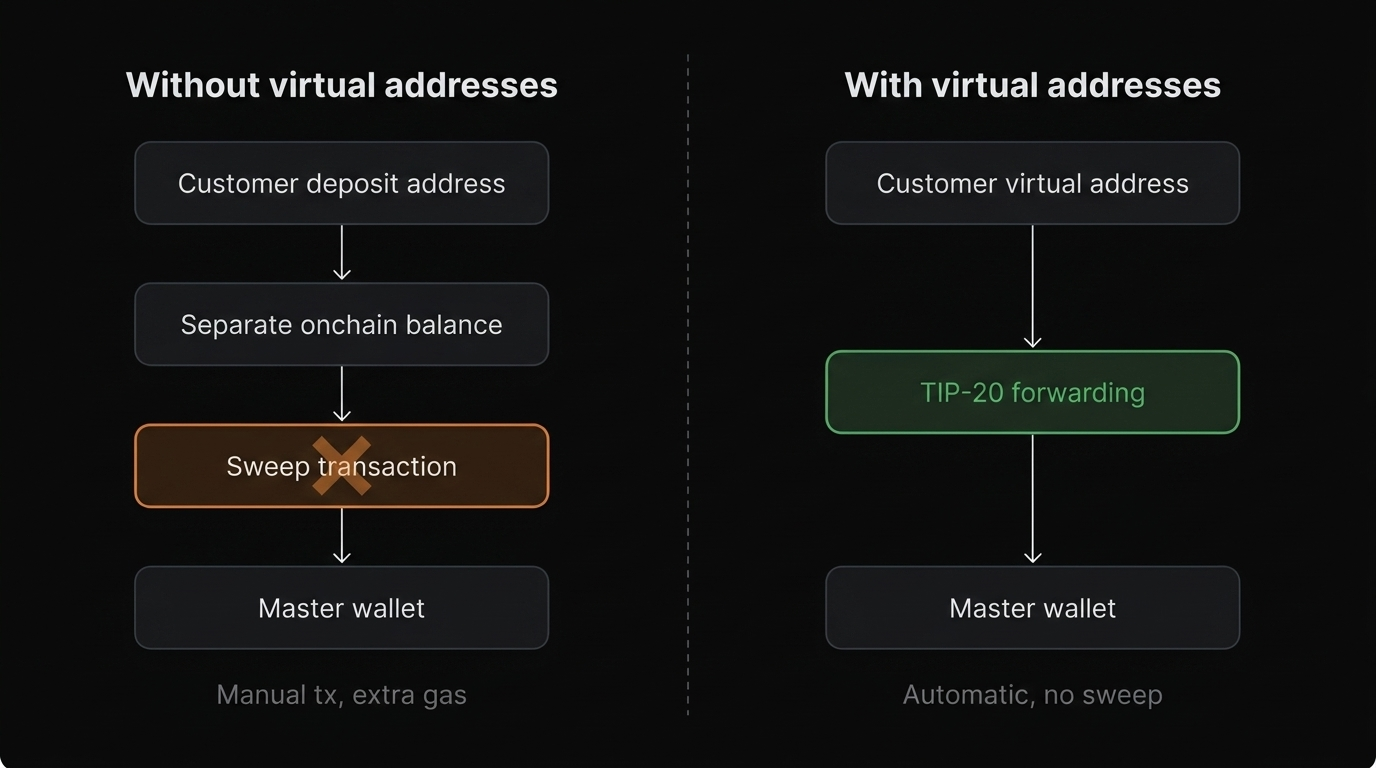
tempo request --dry-run --json '{"input":"hello"}'
tempo request --max-spend 1.00 --json '{"input":"hello"}'
```
## Tempo Wallet operations
```bash
# Wallet readiness and balances
tempo wallet whoami
tempo wallet whoami --credits
# Key and spending-limit state
tempo wallet keys
tempo wallet revoke --dry-run
# Fund wallet
tempo wallet fund
tempo wallet fund --credits
# Transfer tokens
tempo wallet transfer --dry-run
tempo wallet transfer
```
For machine-readable output:
```bash
tempo wallet -t whoami
tempo wallet -t whoami --credits
tempo wallet -t keys
```
Use access-key spending limits and `tempo request --max-spend` for agent workflows. Credits are separate from token balances and only work with eligible one-time MPP charges.
## Tempo Wallet service discovery
```bash
# Search services by keyword
tempo wallet services --search ai
# Inspect one service to see exact endpoints
tempo wallet services
```
Tip: copy endpoint URL, method, and payload shape directly from service details.
Service details also show pricing, payment mode, and whether `supportsCredits: true` is available.
## Tempo Wallet request execution
Preview before paying:
```bash
tempo request --dry-run --json '{"input":"hello"}'
```
Execute paid request:
```bash
tempo request --max-spend 1.00 --json '{"input":"hello"}'
```
Capture headers for a credits flow:
```bash
headers="$(mktemp)"
tempo request -t --dry-run -D "$headers" -X POST --json '{"input":"hello"}'
tempo wallet -t transfer --credits --dry-run --mpp-challenge-file "$headers"
tempo wallet -t transfer --credits --mpp-challenge-file "$headers"
```
## Tempo Wallet session management
```bash
# List sessions
tempo wallet sessions list
# Reconcile local state against on-chain state
tempo wallet sessions sync
# Preview close operations first
tempo wallet sessions close --dry-run --all
# Close orphaned sessions
tempo wallet sessions close --orphaned
# Finalize channels pending close
tempo wallet sessions close --finalize
```
Sessions are MPP payment channels used by pay-as-you-go services. One-time charges may use direct token payment or MPP Credits when the service supports credits.
## Tempo Wallet agent and script mode
Use TOON output (`-t`) when command output is consumed by agents or scripts.
```bash
tempo wallet -t whoami
tempo wallet -t services --search ai
tempo wallet -t services
tempo request -t --dry-run --max-spend 1.00 --json '{"input":"hello"}'
```
## Tempo Wallet failure recovery shortcuts
```bash
# Wallet not ready / auth missing
tempo wallet login
tempo wallet -t whoami
# Suspected key issue
tempo wallet logout --yes
tempo wallet login
tempo wallet keys
tempo wallet refresh
# Request failing due to payload/path mismatch
tempo wallet services
# Insufficient funds
tempo wallet fund
# Credit-eligible one-time MPP charge
tempo wallet -t whoami --credits
tempo wallet fund --credits
```
If issues persist, continue with [Troubleshooting](/docs/cli/wallet).
## Tempo Wallet end-to-end script pattern
```bash
# 1) Ensure wallet is ready
tempo wallet -t whoami
# 2) Discover service details
tempo wallet -t services --search ai
# 3) Preview cost
tempo request --dry-run --json '{"input":"hello"}'
# 4) Execute with a spend cap
tempo request --max-spend 1.00 --json '{"input":"hello"}'
```
## Related Tempo Wallet docs
1. [Reference](/docs/wallet/reference)
2. [Wallet CLI Reference](/docs/cli/wallet)
3. [Use with Agents](/docs/wallet/use-with-agents)
# Tempo Wallet CLI Reference
## `tempo wallet`
Manages your onchain identity and provides service discovery for [MPP](https://mpp.dev) endpoints.
### Wallet auth commands
| Command | Description |
| --- | --- |
| `tempo wallet login` | Connect or create wallet via browser auth |
| `tempo wallet login --no-browser` | Print an auth URL for remote-host login |
| `tempo wallet refresh` | Refresh your access key without logging out |
| `tempo wallet logout` | Disconnect wallet and clear local credentials |
| `tempo wallet whoami` | Print readiness, address, balances, and key state |
| `tempo wallet whoami --credits` | Show MPP Credits balance |
### Wallet key commands
Each wallet can have multiple access keys with independent spending limits. This is how you constrain what an agent or script can spend.
| Command | Description |
| --- | --- |
| `tempo wallet keys` | List keys and their spending limits |
| `tempo wallet revoke --dry-run` | Preview access-key revocation |
| `tempo wallet revoke ` | Revoke an access key |
### Wallet funding commands
| Command | Description |
| --- | --- |
| `tempo wallet fund` | Fund wallet (faucet on testnet, bridge on mainnet) |
| `tempo wallet fund --crypto` | Open direct crypto funding |
| `tempo wallet fund --credits` | Buy credits for eligible one-time MPP charges |
| `tempo wallet transfer ` | Transfer tokens to another address |
| `tempo wallet transfer --dry-run` | Preview a token transfer |
| `tempo wallet transfer --credits --mpp-challenge-file ` | Pay a captured MPP challenge with credits |
### Wallet service commands
The service directory indexes [MPP](https://mpp.dev)-registered providers. Each service entry includes endpoint URLs, HTTP methods, pricing, request schemas, payment mode, and credit support when available.
| Command | Description |
| --- | --- |
| `tempo wallet services` | List all registered services |
| `tempo wallet services --search ` | Filter services by keyword |
| `tempo wallet services ` | Show a service's endpoints, methods, and request schemas |
### Wallet session commands
Sessions are the local state for [pay-as-you-go](/docs/guide/machine-payments/pay-as-you-go) payment channels. Tempo Wallet CLI tracks them locally and can reconcile against onchain state.
| Command | Description |
| --- | --- |
| `tempo wallet sessions list` | List active payment sessions |
| `tempo wallet sessions sync` | Reconcile local sessions with onchain state |
| `tempo wallet sessions close --all` | Close all sessions |
| `tempo wallet sessions close --orphaned` | Close sessions whose counterparty is unreachable |
| `tempo wallet sessions close --finalize` | Finalize channels pending close |
| `tempo wallet sessions close --cooperative ` | Use cooperative close for a target session |
### Agent setup and diagnostics
| Command | Description |
| --- | --- |
| `tempo wallet debug` | Collect debug info for support |
| `tempo wallet completions ` | Generate shell completions |
## `tempo request`
A curl-like HTTP client that handles [MPP](https://mpp.dev) payment negotiation transparently. On a `402 Payment Required` response, it reads the challenge, signs and submits the payment, then retries with the credential.
| Command | Description |
| --- | --- |
| `tempo request ` | Make an HTTP request with automatic payment |
| `tempo request --dry-run ` | Preview cost without executing payment |
| `tempo request --max-spend ` | Cap cumulative payment spend |
| `tempo request --json '{...}'` | Send a JSON body (implies `-X POST`) |
| `tempo request -H 'Header: Value'` | Add a custom header |
| `tempo request -D ` | Write response headers to a file |
## Tempo Wallet global flags
| Flag | Scope | Description |
| --- | --- | --- |
| `-t` / `--toon-output` | `tempo wallet`, `tempo request` | Compact machine-readable output for scripts and agents |
| `--dry-run` | `tempo request`, `tempo wallet transfer`, `tempo wallet sessions close` | Preview the action without executing |
| `--max-spend` | `tempo request` | Hard cap for cumulative payment spend |
| `--help` | all commands | Show command documentation |
| `--describe` | supported commands | Output command schema as JSON for programmatic tooling |
| `--schema` | supported built-in setup commands | Output command schema for programmatic tooling |
## Tempo Wallet source
* Repository: [`tempoxyz/wallet-cli`](https://github.com/tempoxyz/wallet-cli)
* Full help: `tempo wallet --help`, `tempo request --help`
# Use Tempo Wallet CLI with Agents
## Agent wallet quickstart
Paste this into your agent to set up Tempo Wallet CLI:
:::code-group
```bash [Claude Code]
claude -p "Read https://tempo.xyz/SKILL.md and set up tempo"
```
```bash [Amp]
amp --execute "Read https://tempo.xyz/SKILL.md and set up tempo"
```
```bash [Codex CLI]
codex exec "Read https://tempo.xyz/SKILL.md and set up tempo"
```
:::
## Auto-installed Tempo wallet skills
When you run the setup prompt, your agent installs Tempo's built-in skills automatically. No manual skill wiring required.
* `tempo-wallet`: gives your agent wallet-aware capabilities like readiness checks, balances, service discovery, and session/funding actions.
* `tempo-request`: gives your agent paid HTTP request capabilities with payment preview (`--dry-run`) and execution support.
This works in supported skill-enabled agents including **Claude Code**, **Amp**, **Codex**, and similar environments.
## Tempo Wallet is agent-ready by design
1. **TOON output mode (`-t` / `--toon-output`)** gives compact, machine-readable, token-efficient output so agent tooling can parse command responses reliably.
2. **Built-in service discovery** (`tempo wallet services`) lets agents search providers, inspect endpoint details, and use verified method/path metadata instead of guessing URLs or payload shapes.
3. **`--dry-run` payment previews** let agents validate endpoint reachability, request shape, and expected payment cost before committing funds.
4. **`--max-spend` and scoped access keys** let you enforce budgets per request and per key.
5. **MPP Credits support** lets agents pay eligible one-time charges from a separate credits balance after checking `tempo wallet -t whoami --credits`.
## Tempo Wallet agent pattern
```bash
tempo wallet -t whoami
tempo wallet -t services --search
tempo wallet -t services
tempo request -t --dry-run --max-spend 1.00 -X POST --json '{"input":"hello"}' /
tempo request -t --max-spend 1.00 -X POST --json '{"input":"hello"}'