Subscriptions on Tempo: onchain billing made easy
Tempo's access keys now support periodic spending limits, making subscription billing possible onchain without re-prompting users or holding their keys. The same mechanism works for human subscribers and AI agents. If you want to build recurring or scoped billing flows using stablecoins, reach out at partners@tempo.xyz.
Many business models center around recurring billing: a customer pays a set amount every week, month or year for a product or service. This model works fine when the customer wants to pay using a credit card. It works less well for customers without a card or AI agents, who increasingly rely on stablecoins. For usage-based flows, MPP Sessions handles high-frequency payments without charging onchain for every request.
While stablecoins handle one-time global payments cleanly, recurring billing has been harder. One option is to require fresh user approval at each charge. The other is to get approval from the user for significantly more funds than immediately needed, e.g., an approval for a year's worth of payments. This results in very poor UX and heightens the risk for consumers.
Tempo access keys let users delegate signing authority to a service with defined constraints: spend up to a fixed total, on specific tokens, until a given expiry. Access keys now also support periodic spending limits, which enables subscriptions.
How Tempo solves the problem
Access keys are a native primitive on Tempo that enables a wide range of payments use cases. This is how access keys work on Tempo:
- A user authorizes an access key, specifying a maximum amount and an expiry.
- They can hand this access key to a service without handing over control to their entire account.
- A service can use the access key to "pull" funds from the user's account within that limit and until it expires.
- Access keys can also be scoped to specific contracts and function selectors, so a key for one service can't be used elsewhere. The user can always revoke the authorization at any time.
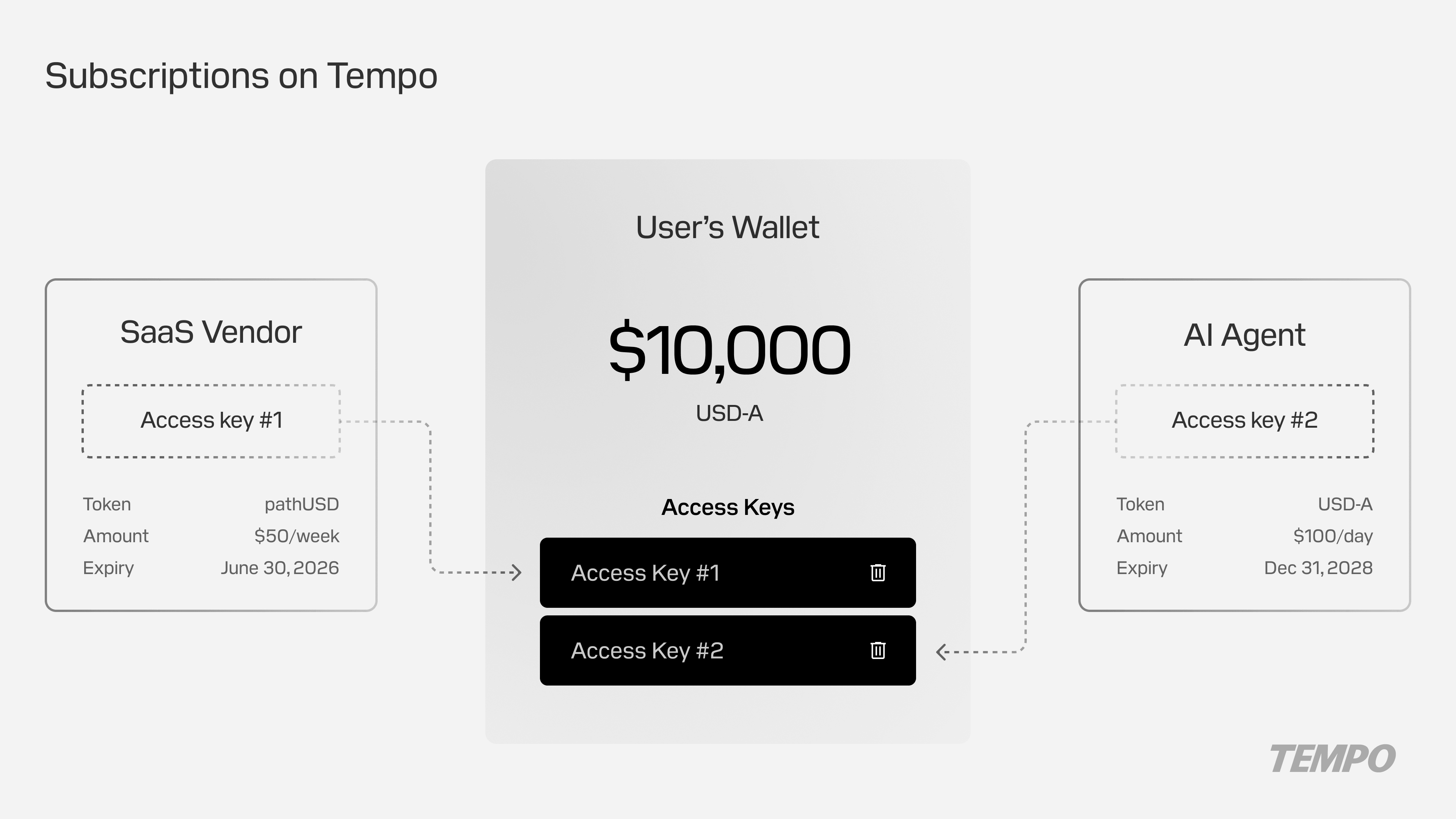
With periodic spending limits, that authorization now includes a per-period cap that resets automatically:
- A service can be granted a right to spend, e.g., "$50 per week for the next 50 weeks" rather than a lump-sum total.1
- The protocol validates each charge against the current week's remaining allowance. If it fits, it succeeds. If it doesn't, it fails.
- When the week ends, the window resets. The user sets terms once, and the service charges on schedule without re-prompting.
What this enables
Access keys make recurring payments with stablecoins practical in a way they weren't before, without repeated approvals or overly permissive authorizations.
A SaaS company billing subscribers across 30 countries no longer needs regional payment integrations for each market. Every subscriber pays in stablecoins with the same flow: one access key authorization, periodic charges, instant settlement.
Similarly, an AI agent that consumes a paid inference API can be granted a key scoped to that API's contract with a $100 monthly limit — complementing the real-time billing enabled by MPP Sessions. The agent calls the service throughout the period using the access key to authorize payment. Each charge is validated against the remaining allowance, and the limit resets automatically. The agent cannot spend the funds elsewhere with that key.
Finally, access keys also enable simple subscription services that charge a fixed periodic amount. For example, a user subscribes to a newsletter or a streaming service by authorizing an access key with a matching limit.
Getting started
If you're building recurring billing, agentic payments or stablecoin cards on Tempo, start with the access keys documentation to understand key scoping and periodic limits, or explore MPP Sessions for usage-based billing patterns.
Recurring billing is one of several new enterprise features live on Tempo today. For the full picture, see new features on Tempo for enterprise payments.
To discuss your use case with the product team, get in touch at tempo.xyz/contact.
Sources
-
Recurring limits currently only support fixed time periods (e.g., 1 day, 1 week). Calendar support (e.g., 1 month) will be available after a future upgrade. ↩